
1. Bubuka
The VEDO VDA216L is a professional 16-channel audio mixer designed for live shows, karaoke, studio recording, and stage performances. It offers comprehensive audio control with features such as 48V phantom power, 3-band equalization, integrated effects, and USB/Bluetooth connectivity for playback and recording. This manual provides detailed instructions for setting up, operating, and maintaining your mixer to ensure optimal performance.

Image 1.1: VEDO VDA216L 16-Channel Audio Mixer. This image displays the full mixer unit, highlighting its 16 input channels and integrated Bluetooth playback feature, shown with a smartphone connected wirelessly.
2. Fitur Produk
- 16 Professional Channels: Each channel features a balanced microphone input, independent 3-band EQ (bass, mid, treble), and integrated effects.
- 48V Phantom Power: Available on microphone inputs for condenser microphones.
- Integrated MP3 Player & Recorder: Supports playback and recording via USB/Bluetooth.
- Pangaruh Reverb: Adjustable reverb effects for enhanced audio.
- Monitoring Outputs: Includes AUX output for returns, high-power K20 headphone output, and RCA output for recording.
- Kasaluyuan lega: Connects to microphones, electronic keyboards, guitars, computers, dynamic microphones, professional amplifiers, and sound boxes.
- Catu daya universal: Compatible with 110V/220V power sources globally.
- Desain mantap: Professional chassis with low noise (EIN -120dB) and efficient heat dissipation.
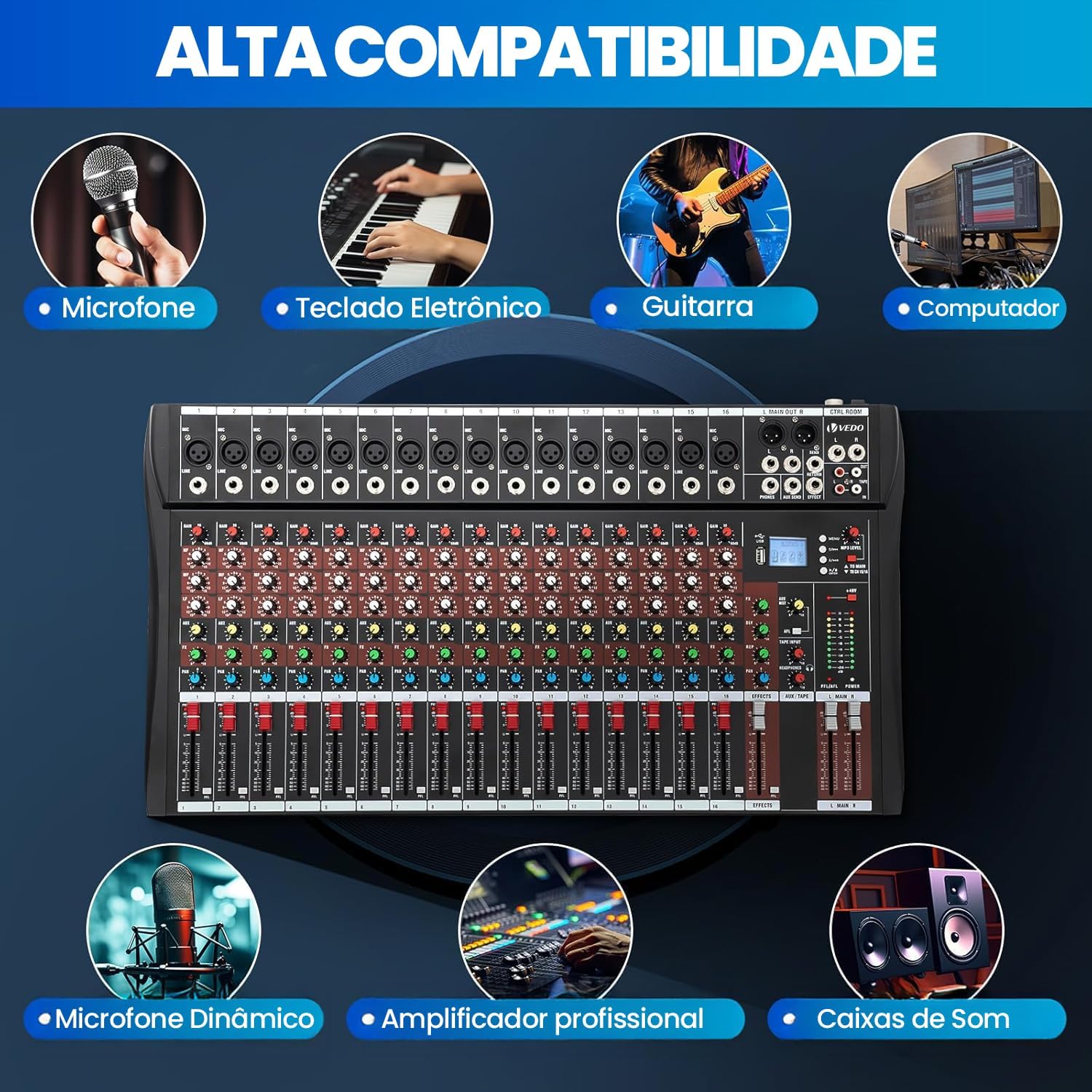
Image 2.1: High Compatibility. This image illustrates the VDA216L mixer's versatility, showing its compatibility with various audio equipment such as microphones, electronic keyboards, guitars, computers, dynamic microphones, professional amplifiers, and sound boxes.

Image 2.2: Enhanced Details. This image highlights key features for an improved user experience, including an efficient heat sink, USB slot with LED screen, stable bottom feet, real-time LED signal indicators, smooth faders, and 48V phantom power for broader compatibility.
3. Control Panel Leuwihview
Familiarize yourself with the various controls and connections on your VDA216L mixer. Refer to the diagram below for a visual guide to each component.

Image 3.1: Control Panel Functions. This diagram labels the various inputs, outputs, and controls of the VDA216L mixer, including microphone inputs, auxiliary sends, gain controls, balanced controls, stereo inputs, effect controls, sound balance, peak indicators, volume controls, effect faders, total volume fader, main power switch, power input, and high-efficiency cooling vents.
- Microphone Input (A): XLR input for microphones.
- Equipment Input (B): Line-level input for instruments or other audio sources.
- Auxiliary Send (C): Output for sending signals to external effects or monitors.
- Gain Control (D): Saluyukeun sensitipitas input pikeun tiap saluran.
- Balanced Control (E): Adjusts the balance of the stereo signal.
- Stereo Auxiliary Input (F): Additional stereo input.
- Effect Control (G): Adjusts the amount of effect applied to the channel.
- Sound Balance Control (H): Adjusts the left/right balance.
- Peak Indicator (I): Lights up when the signal is too high, indicating potential clipping.
- Volume Control (J): Adjusts the output volume for each channel.
- Total Balanced Output Interface (L): Main balanced output.
- Effect Send (M): Output for sending signals to the internal effect processor.
- Line Output (N): Unbalanced line output.
- Recording Input/Output (O): RCA connections for external recording devices.
- Auxiliary Transmission (P): Additional auxiliary send.
- MP3 Player Control (Q): Controls for the integrated MP3 player.
- 48V Phantom Power (R): Switch to activate phantom power for condenser microphones.
- Headphone Volume (S): Nyaluyukeun volume kaluaran headphone.
- Reverb Parameter Adjustment (T): Controls for fine-tuning reverb effects.
- Effect Volume Fader (V): Adjusts the overall volume of the effects.
- Total Volume Fader (U): Main output volume control.
- Main Power Switch (W): Turns the mixer on/off.
- Power Input (X): Connection for the power cable.
- High-Efficiency Cooling Vents (Y): Mastikeun disipasi panas anu leres.
4. Setélan
4.1 Sambungan Daya
- Ensure the mixer's main power switch (W) is in the OFF position.
- Connect the power cable to the Power Input (X) on the mixer.
- Plug the other end of the power cable into a compatible 110V or 220V AC outlet. The mixer automatically adapts to the voltage.
- Turn the Main Power Switch (W) to the ON position. The power indicator will illuminate.
4.2 Nyambungkeun Sumber Audio
The VDA216L offers various input options:
- Mikropon: Connect microphones to the XLR Microphone Inputs (A). For condenser microphones requiring power, activate the 48V Phantom Power switch (R).
- Line-Level Instruments/Devices: Connect instruments (e.g., keyboards, guitars with preamps) or other audio devices to the Equipment Inputs (B) or Stereo Auxiliary Inputs (F) using 1/4-inch TRS or TS cables.
- USB/Bluetooth: For digital audio input, use the USB port or connect via Bluetooth (refer to Section 5.3 for details).
4.3 Nyambungkeun Alat Kaluaran
- Pamicara Utama: Sambungkeun speaker utama Anjeun atawa kakuatan amplifier to the Total Balanced Output Interface (L) using XLR cables.
- Headphone: Plug your headphones into the Headphone Jack (J). Adjust the volume using the Headphone Volume control (S).
- Monitors/External Effects: Use the Auxiliary Send (C) or Effect Send (M) to connect to stage monitors or external effects processors.
- Recording Devices: Connect an external recording device to the Recording Input/Output (O) using RCA cables.
5. Parentah Operasi
5.1 Campuran Dasar
- Set Gain: For each active channel, adjust the Gain Control (D) until the Peak Indicator (I) flashes only occasionally during the loudest parts of the signal. Avoid constant illumination, which indicates clipping.
- Saluyukeun EQ: Use the 3-band EQ controls (Bass, Mid, Treble) on each channel to shape the tone of your audio source. Experiment to find the desired sound.
- Set Channel Volume: Adjust the Volume Control (J) for each channel to balance the levels of all inputs.
- Jilid Master: Use the Total Volume Fader (U) to control the overall output level of the mixer.

Image 5.1: Three-Band Equalizer. This image highlights the 3-band equalizer section of the VDA216L mixer, emphasizing its ability to provide delicate and rich sound quality, segmented music adjustment, and improved integration between vocals and music.
5.2 Ngagunakeun Éfék
- Select Effect: Use the MP3 Player Control (Q) to navigate and select desired built-in effects.
- Apply Effect to Channel: Turn up the Effect Control (G) on the desired channel to send its signal to the effect processor.
- Adjust Effect Parameters: Use the Reverb Parameter Adjustment (T) to fine-tune specific effect settings.
- Control Effect Volume: Adjust the Effect Volume Fader (V) to control the overall level of the applied effects in the mix.
5.3 USB/Bluetooth Playback and Recording
- Puterkeun USB: Selapkeun USB drive jeung MP3 files into the USB slot. Use the MP3 Player Control (Q) to navigate and play tracks.
- Playback Bluetooth: Activate Bluetooth on your device (e.g., smartphone, tablet) and search for the mixer. Pair the devices. Audio played on your device will now be routed through the mixer.
- Ngarékam USB: The integrated MP3 player also supports recording. Insert a USB drive and use the recording function via the MP3 Player Control (Q) to capture your mix.

Image 5.2: Diverse Music Styles. This image illustrates the mixer's capability to handle various music styles through its USB and Bluetooth connectivity, suitable for genres like Nature, Pop, Jazz, Rock, Erudite, and Acoustic.
5.4 Pangimeutan sacara real-time
The mixer provides real-time monitoring capabilities:
- Pangimeutan Headphone: Connect headphones to the Headphone Jack (J) and adjust the Headphone Volume (S) for personal monitoring.
- Auxiliary Monitoring: Use the Auxiliary Send (C) to route specific channels or the main mix to external stage monitors for performers.

Image 5.3: Real-time Monitoring Effect. This image shows the mixer's monitoring section, including headphone input, real-time sound feedback, and precise tuning adjustment, with a visual representation of audio waveforms on a screen.
6. Pangropéa
- beberesih: Regularly wipe the mixer's surface with a soft, dry cloth. Avoid using liquid cleaners or solvents, as they may damage the finish or internal components.
- Perlindungan lebu: When not in use, cover the mixer with a dust cover to prevent dust and debris from entering the controls and faders.
- Panyimpenan: Simpen mixer di tempat anu tiis sareng garing, jauh tina sinar panonpoé langsung, suhu anu ekstrim, sareng kalembaban anu luhur.
- Manajemén Kabel: Ensure all cables are properly coiled and stored to prevent damage. Avoid bending cables sharply.
- Ventilasi: Ensure the cooling vents (Y) are clear and unobstructed to allow for proper heat dissipation.
7. Cara ngungkulan
| Masalah | Mungkin Cukang lantaranana | Solusi |
|---|---|---|
| Taya kaluaran sora |
|
|
| Sora distort |
|
|
| Mikropon teu jalan (condenser mic) |
|
|
| Bluetooth teu nyambung |
|
|
8. Spésifikasi
- merek: VEDO
- model: VDA216L
- Jumlah Saluran: 16
- Sumber Daya: Wired Electric (110V/220V compatible)
- Input Audio: Microphone, Line, Digital (USB/Bluetooth)
- Tanggapan Frékuénsi: 20Hz-25kHz
- Rasio Sinyal-ka-Noise (SNR): 120dB
- Equivalent Input Noise (EIN): -120dB
- Mikropon Gain Control: +40dB
- Tingkat Kaluaran Saimbang: +26dB
- Tingkat Input Maksimum: +24dB
- Sarua: 3-Band Parametric (HF/MF/LF)
- Negara asal: Cina
9. Garansi jeung Rojongan
9.1 Émbaran jaminan
This VEDO VDA216L mixer comes with a 3-garansi sasih ti tanggal beuli. Garansi ieu nyertakeun cacad manufaktur sareng gangguan dina panggunaan normal. Éta henteu nutupan karusakan anu disababkeun ku nyalahgunakeun, kacilakaan, modifikasi anu teu sah, atanapi pamasangan anu teu leres.
Punten tahan bukti pameseran anjeun pikeun klaim garansi.
9.2 Rojongan Palanggan
For technical assistance, troubleshooting beyond this manual, or warranty inquiries, please contact your retailer or the VEDO customer support team. Refer to the product packaging or the retailer's websitus pikeun detil kontak.
When contacting support, please have your product model (VDA216L) and purchase date available.