
Bubuka sarta Émbaran Kasalametan
Thank you for choosing the CREATE WIND CALM SLIM LIGHT Ceiling Fan with Light. This manual provides essential information for the safe installation, operation, and maintenance of your new ceiling fan. Please read these instructions carefully before installation and use, and retain them for future reference.
Pitunjuk Kasalametan Penting:
- Salawasna pegatkeun daya dina pemutus sirkuit utama sateuacan dipasang, diropéa, atanapi dibersihkeun.
- Pamasangan kedah dilakukeun ku tukang listrik anu mumpuni sareng saluyu sareng sadaya kode listrik lokal.
- Ensure the mounting structure can support the fan's weight.
- Ulah nyelapkeun objék kana bilah kipas bari kipas beroperasi.
- Jauhkeun barudak sareng piaraan tina kipas nalika operasi.
- Kipas angin ieu dirarancang pikeun panggunaan jero rohangan wungkul.
- The light intensity is not adjustable.
Setup sareng Instalasi
Carefully unpack all components and ensure all parts are present before beginning installation. Refer to the diagrams below for visual guidance.
Eusi pakét:
- Ceiling Fan Unit (Motor, Blades, Integrated Light)
- Ningkatna Kurung
- Kadali jauh
- Installation Hardware (screws, anchors)
Léngkah-léngkah pamasangan:
- Pegatkeun daya: Turn off power at the main circuit breaker to prevent electrical shock.
- Pamasangan bracket dipasang: Secure the mounting bracket to the ceiling joist or a suitable electrical junction box. Ensure the bracket is firmly attached and can support the fan's weight.
Catetan: Some ceiling installations, particularly those with a DCL box or existing porthole-style light openings, may require additional modifications or drilling new holes in the mounting plate to ensure secure attachment. The provided mounting holes may not align with all existing ceiling setups. Consult a qualified electrician if you encounter difficulties.
- Sambungan Wiring: Sambungkeun kabel listrik kipas kana kabel rumah tangga numutkeun kode listrik lokal. Pastikeun sadaya sambungan aman.
- Majelis kipas: Attach the fan motor assembly to the mounting bracket. Follow the specific instructions provided in the detailed manual (if available) for blade attachment and securing the main unit.
- Pamasangan lampu: The LED light is integrated into the fan's body. Ensure it is properly seated and connected.
- Cék ahir: Verify all connections are secure and the fan is properly mounted before restoring power.
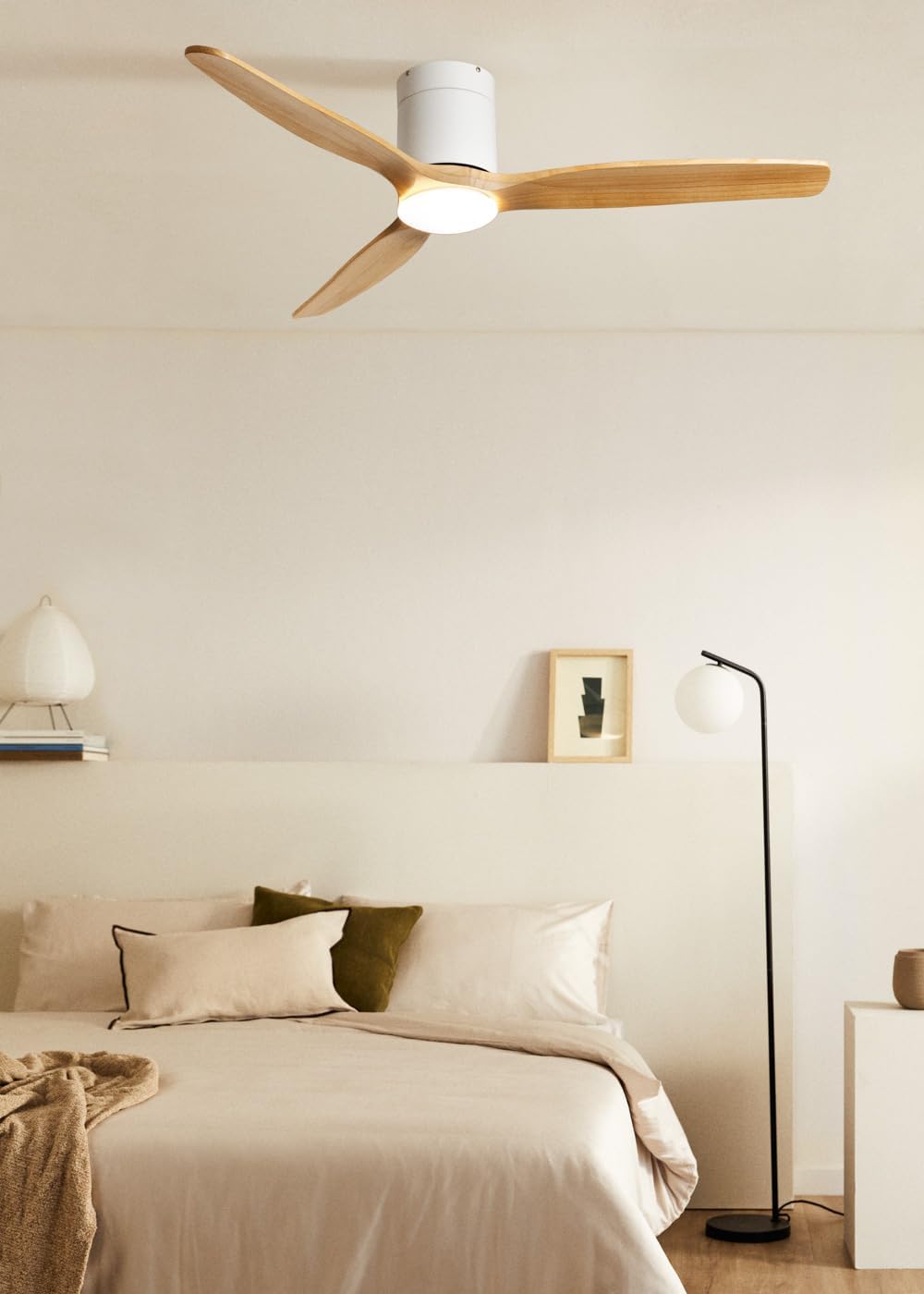
Image: The CREATE WIND CALM SLIM LIGHT ceiling fan with light wood blades and a white body, installed in a modern bedroom setting.

Image: Technical diagram illustrating the top-down dimensions of the fan, showing a total diameter of 132 cm.

Image: Technical diagram illustrating the side dimensions of the fan, showing a height of 27 cm from ceiling to blade tip.
Parentah Operasi
Your CREATE WIND CALM SLIM LIGHT ceiling fan is controlled via the included remote control. Ensure the remote has working batteries.
Fungsi Remote Control:
- Hurungkeun/Pareuman: Ngahurungkeun atawa mareuman kipas jeung lampu.
- Kontrol Laju Kipas: Nyaluyukeun kecepatan kipas ngaliwatan 6 setélan anu sayogi.
- Lampu Hurung/Pareum: Controls the integrated LED light independently.
- Pangaturan Suhu Cahaya: Cycles through 3 color temperatures: warm (2700K), neutral (3300K), and cool (4000K). Note: Light intensity is not adjustable.
- Fungsi Timer: Nyetél kipas supados otomatis pareum saatos 1, 2, 3, atanapi 4 jam.
- Modeu usum panas/usum tiis: Ngarobah arah rotasi sabeulah.
Acara Usum Panas/Usum Tiris:
This feature optimizes air circulation for different seasons:
- Modeu Usum Panas (Rotasi Saarah Jarum Jam): Nyiptakeun aliran hawa ka handap, ngahasilkeun angin ngahiliwir.
- Modeu Usum (Rotasi Searah Jarum Jam): Creates an upward airflow, circulating warm air accumulated near the ceiling throughout the room, improving heating efficiency.

Image: Diagram illustrating the airflow patterns for Winter mode (upward circulation of warm air) and Summer mode (downward cooling breeze).
Fitur Lampu LED:
The integrated LED light offers three distinct color temperatures to suit your preference:
- Bodas haneut (2700K): Pikeun suasana anu nyaman sareng santai.
- Bodas Netral (3300K): Pikeun katerangan umum.
- Bodas Tiis (4000K): For bright, task-oriented lighting.

Gambar: A close-up view of the integrated LED light module at the center of the fan, emitting a bright white light.

Image: Diagram illustrating the three available LED light temperatures: warm (2700K), neutral (3300K), and cool (4000K).
Audible Feedback (Beep):
The fan emits an audible "beep" sound with each command from the remote control or when power is restored. This beep can be muted via the remote control settings. However, if the main power supply to the fan is cut (e.g., by a wall switch), the mute setting may reset, and the beep will return upon power restoration.
Pangropéa
Pangropéa rutin ngajamin kinerja optimal sareng umur panjang kipas siling anjeun.
- beberesih: Pikeun ngabersihkeun kipas, usap bilah sareng wadah motor ku kapas anu lemes,amp lawon. Ulah make cleaners abrasive atawa pangleyur, sabab ieu bisa ngaruksak finish.
- Ngaleungitkeun lebu: Periodically dust the fan blades and light fixture to prevent dust buildup, which can affect performance and light output.
- Kasaimbangan Blade: If the fan wobbles, check that all blade screws are tight. Minor wobbling can sometimes be corrected using a blade balancing kit (not included).
- Pegatkeun daya: Always ensure the power is disconnected at the circuit breaker before performing any cleaning or maintenance.
Pamérésan masalah
| Masalah | Mungkin Cukang lantaranana | Solusi |
|---|---|---|
| Kipas angin teu beroperasi. | No power supply; Remote control batteries are dead; Incorrect wiring. | Check circuit breaker and wall switch. Replace remote control batteries. Verify wiring connections are secure (consult an electrician if unsure). |
| Lampu henteu hurung. | No power supply; Light function not activated on remote; LED module fault. | Check power. Ensure light button on remote is pressed. If problem persists, contact support. |
| Kipas ngageter kaleuleuwihi. | Sekrup pemasanganna leupas; Bilahna teu saimbang; Pemasanganna teu bener. | Ensure mounting bracket and fan screws are tight. Check for bent blades. Use a blade balancing kit if necessary. Re-check installation steps. |
| Kipas nyieun sora anu teu biasa. | Loose screws; Obstruction; Motor issue. | Check all screws. Ensure nothing is touching the blades or motor housing. If noise persists, contact support. |
| Kadali jauh teu ngabales. | Dead batteries; Remote not paired (unlikely for this model but general); Obstruction. | Replace batteries. Ensure clear line of sight to the fan's receiver. |
| Audible "beep" sound persists after muting. | Main power supply was cut. | The mute setting may reset if the fan's main power is disconnected. Re-apply the mute setting using the remote control. |
Spésifikasi teknis
| merek | NYIPTA |
| Ngaran modél | WIND CALM SLIM LIGHT |
| Nomer modél | 198506_515822 |
| Warna | Kayu Cahaya |
| Desain kipas | Kipas Ceuli |
| Sumber Daya | Kabel Listrik |
| Gaya | siling |
| Ukuran (Diaméter x Jangkungna) | 132 cm x 29 cm |
| Fungsi husus | LED Light, Timer, Summer-Winter Function, Remote Control |
| Tipe Pamasangan | Gunung siling |
| Tipe Controller | Kadali jauh |
| Jumlah Speeds | 6 |
| Tingkat Noise | 40 desibel |
| Kakuatan | 40 Watt |
| Jumlah wilah | 3 |
| Kapasitas Aliran Udara | 180 Cubic meters per minute |
| Voltage | 240 volt |
| Lingkungan Pamakéan | jero rohangan |
| Tipe Motor | DC Motor with Brushes |
| Bahan Sabeulah | Kai |
Émbaran jaminan
Specific warranty details for the CREATE WIND CALM SLIM LIGHT Ceiling Fan are not provided in this manual. For information regarding warranty coverage, terms, and conditions, please refer to the documentation included with your purchase or contact CREATE customer support directly.
Rojongan Palanggan
If you have any questions, require technical assistance, or need to report an issue with your CREATE WIND CALM SLIM LIGHT Ceiling Fan, please contact CREATE customer support. Contact information can typically be found on the manufacturer's websitus atanapi dina bungkusan produk.
Manufacturer: CREATE