
1. Bubuka
Thank you for choosing the Ctronics CTIPC-980 4K 8MP PTZ Outdoor WiFi Security Camera. This manual provides detailed instructions for the installation, operation, and maintenance of your new security camera. Please read this manual thoroughly before use to ensure proper functionality and safety.
The CTIPC-980 camera offers advanced surveillance features including 4K Ultra HD resolution, intelligent human, vehicle, and animal detection, dual-band WiFi connectivity, and comprehensive 360° panoramic coverage. Its robust IP66 weatherproof design ensures reliable performance in various outdoor conditions.
2. Eusi Paket
Please check the package contents upon receipt. If any items are missing or damaged, contact Ctronics customer support.
- Ctronics CTIPC-980 4K 8MP PTZ Outdoor WiFi Security Camera
- Adaptor kakuatan
- Pamasangan Sekrup
- Kit waterproof
- Manual pamaké

Image: The Ctronics CTIPC-980 camera with its included accessories, such as the power adapter and mounting kit.
3. Fitur Produk
- Resolusi 4K Ultra HD: Captures clear and detailed images at 3840x2160P (8 Megapixels) with a 3.6mm Starlight lens.
- Canggih Peuting Visi: Offers three modes:
- IR Peuting Visi: Black and white images using infrared LEDs.
- Warna Night Vision: Full-color images in low light conditions using the built-in spotlight.
- Smart Night Vision: Automatically switches from IR to color night vision upon detection of motion.
- Deteksi calakan: Accurately identifies humans, vehicles, and animals, reducing false alarms by up to 95%.
- Pencegahan aktip: Built-in siren and spotlights activate automatically upon detection to deter intruders.
- Konéktivitas WiFi Dual-Band: Supports both 2.4GHz and 5GHz WiFi for stable and faster network connection.
- 360° Panoramic Coverage: Pan 355° horizontally and Tilt 90° vertically for comprehensive area monitoring.
- Audio Dua Arah: Communicate directly through the camera using the integrated microphone and speaker.
- Pilihan Panyimpenan Fleksibel: Supports local storage via a MicroSD card (up to 256GB), Ctronics Cloud storage, and FTP.
- Kasaluyuan lega: Accessible via the Ctronics Pro app on iOS and Android devices, and HiP2P client on Windows and Mac.
- IP66 Tahan Cuaca: Designed to withstand harsh outdoor weather conditions.

Image: The camera's intelligent detection feature identifying a child, a dog, and a car in a driveway, with a notification showing "Human Recognition Warning".

Image: Comparison of IR night vision (black and white), color night vision (full color with spotlight), and smart night vision (activates spotlight on motion) from the Ctronics camera.
4. Setélan
4.1 Instalasi fisik
- Pilih Lokasi: Select a suitable outdoor location with a clear view of the area you wish to monitor. Ensure it is within range of your WiFi network and has access to a power outlet.
- Pamasangan: Use the provided mounting screw kit to securely attach the camera to a wall or ceiling. The camera supports both wall and ceiling installation.
- Sambungan Daya: Connect the camera to the power adapter and plug it into a power outlet. Ensure the power cable is routed safely and protected from the elements using the waterproof kit.
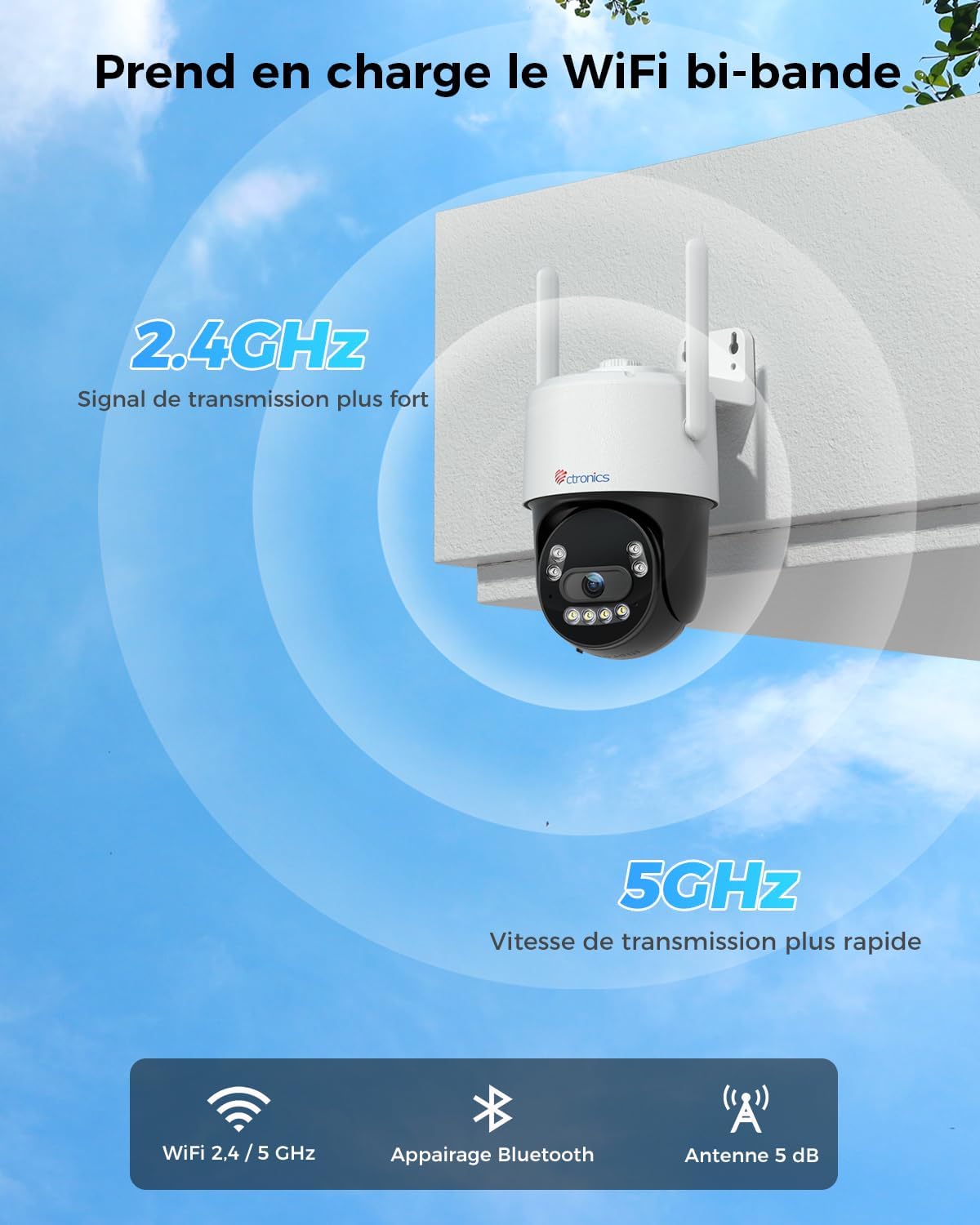
Image: The Ctronics camera securely mounted on an exterior wall of a building, demonstrating a typical installation scenario.
4.2 Pamasangan Aplikasi sareng Konéksi Jaringan
- Unduh Aplikasi: Milarian pikeun "Ctronics Pro" in your mobile device's app store (iOS or Android) and download the application.
- Ngadamel akun: Open the Ctronics Pro app and follow the on-screen instructions to create a new user account.
- Tambahkeun kaméra:
- Hurungkeun kaméra.
- Dina aplikasi, ketok ikon "+" pikeun nambahkeun alat anyar.
- Select your camera model or scan the QR code on the camera.
- Follow the in-app instructions for Bluetooth pairing for quick setup.
- Connect the camera to your WiFi network. The CTIPC-980 supports both 2.4GHz and 5GHz bands. Choose the appropriate network and enter the password.
- Once connected, the camera will appear in your device list.

Image: The Ctronics camera illustrating its dual-band WiFi capability, showing stronger 2.4GHz signal and faster 5GHz speed.
5. Parentah Operasi
5.1 Hirup View
Open the Ctronics Pro app and tap on your camera from the device list to access the live video feed. You can view the feed in real-time from anywhere with an internet connection.
5.2 Kontrol PTZ
Dina live view screen, use the directional controls to pan (rotate horizontally up to 355°) and tilt (rotate vertically up to 90°) the camera lens to adjust your viewsudut ing.
5.3 Audio Dua Arah
Tap the microphone icon in the app to speak through the camera's built-in speaker. Tap the speaker icon to listen to audio from the camera's surroundings. This allows for real-time communication with visitors or to deter unwanted guests.

Image: A person using the Ctronics Pro app on a smartphone to communicate via the camera, showing a live feed of a child and a car with speech bubbles indicating two-way conversation.
5.4 Ngarekam jeung Playback
The camera can record continuously or based on motion detection. Recorded footage can be accessed and played back through the Ctronics Pro app. Navigate to the playback section to view historical recordings.
5.5 Modeu Visi Peuting
You can configure the night vision mode in the camera settings:
- Infrared (IR) Mode: Nyadiakeun gambar hideung bodas anu jelas dina poék mongkleng.
- Modeu Warna pinuh: Utilizes the built-in spotlight to capture color images at night.
- Smart Mode: The camera operates in IR mode and automatically switches to full-color mode with the spotlight activated when motion is detected.
5.6 Deteksi pinter jeung Tanda
Enable intelligent detection for humans, vehicles, or animals in the app settings. When an event is detected, the camera can:
- Send push notifications to your mobile device.
- Activate the built-in siren.
- Turn on the integrated spotlights.

Image: An intruder being deterred by the camera's activated siren and spotlight, with a notification showing "Human Recognition Warning".
5.7 Pilihan Panyimpenan
The CTIPC-980 offers multiple storage solutions for your recordings:
- Kartu MicroSD: Insert a MicroSD card (up to 256GB, not included) into the designated slot for local 24/7 recording. The oldest footage will be overwritten when the card is full.
- Ctronics Cloud Storage: Subscribe to Ctronics Cloud service for secure off-site storage. A free trial may be available.
- FTP: Configure FTP settings in the app to upload recordings to your own FTP server.

Image: The Ctronics camera with a MicroSD card being inserted, illustrating the various storage options including TF card, cloud storage, and FTP support.
6. Pangropéa
- beberesih: Rutin ngabersihan lénsa kaméra jeung perumahan ku lemes, damp cloth to ensure clear image quality. Do not use harsh chemicals.
- Pembaruan firmware: Check the Ctronics Pro app periodically for available firmware updates. Keeping your camera's firmware up-to-date ensures optimal performance and security.
- Siklus kakuatan: If the camera experiences issues, try power cycling it by unplugging and replugging the power adapter.
7. Cara ngungkulan
| Masalah | Mungkin Cukang lantaranana | Solusi |
|---|---|---|
| Kaméra offline | No power, WiFi disconnected, poor signal. | Check power connection. Restart camera and router. Ensure camera is within WiFi range. Reconfigure WiFi in the app. |
| Kualitas gambar henteu saé | Dirty lens, low light, network bandwidth. | Clean the lens. Ensure adequate lighting or proper night vision mode. Check internet speed. |
| Alarm palsu | Sensitivity too high, environmental factors (e.g., moving branches). | Adjust detection sensitivity in the app. Define specific detection zones to exclude irrelevant areas. |
| Cannot connect to 5GHz WiFi | Incorrect WiFi password, router settings, distance. | Verify WiFi password. Ensure your router supports 5GHz and it's enabled. Move camera closer to the router. Try 2.4GHz if 5GHz connection remains unstable. |
| Taya audio | Microphone/speaker disabled, app volume low. | Check audio settings in the app. Ensure your phone's volume is up. |
8. Spésifikasi
| Fitur | Rincian |
|---|---|
| Nomer modél | CTIPC-980 |
| merek | Ctronics |
| Resolusi | 4K Ultra HD (3840x2160P), 8 Megapixels |
| Lensa | 3.6mm Starlight Lens |
| Pan / Dengdekkeun Range | Pan: 355°, Dengdekkeun: 90° |
| Visi Peuting | IR, Color, Smart (with 4 IR LEDs) |
| Konéktipitas WiFi | 2.4GHz / 5GHz Dual-Band |
| Audio | Audio Dua Arah (Mikropon & Speaker Bawaan) |
| Pilihan Panyimpenan | MicroSD Card (up to 256GB), Cloud Storage, FTP |
| Deteksi | Human, Vehicle, Animal Detection |
| Peunteun Weatherproof | IP66 |
| Input kakuatan | 12 Volt, 12 Watt |
| Ukuran (L x W x H) | 10 x 5 x 10 cm (kira-kira) |
| Sistem Operasi | ios, Android, Windows, Mac |

Image: Displays the Ctronics camera's compatibility with iOS, Android, Windows, and Mac operating systems, showing the app interface on a laptop, desktop monitor, tablet, and smartphone.
9. Garansi jeung Rojongan
Ctronics products come with a standard warranty. For detailed warranty information, please refer to the warranty card included in your package or visit the official Ctronics website. If you encounter any issues or have questions regarding your CTIPC-980 camera, please contact Ctronics customer support through their official websitus atanapi inpormasi kontak anu disayogikeun dina aplikasi.
Resmi Websitus: www.ctronics.com