
1. Bubuka
Thank you for choosing the HETP HX45X2 Mini Portable Power Bank. This device is designed to provide convenient and fast charging for your compatible iPhone models, ensuring you stay powered on the go. Its compact size and advanced features make it an ideal companion for daily use and travel.
2. Produk Langkungview
The HETP HX45X2 is a 5000mAh portable power bank featuring an integrated Lightning connector for direct iPhone charging and a Type-C port for recharging the power bank itself. It includes an LCD digital display to show the remaining battery percentage.
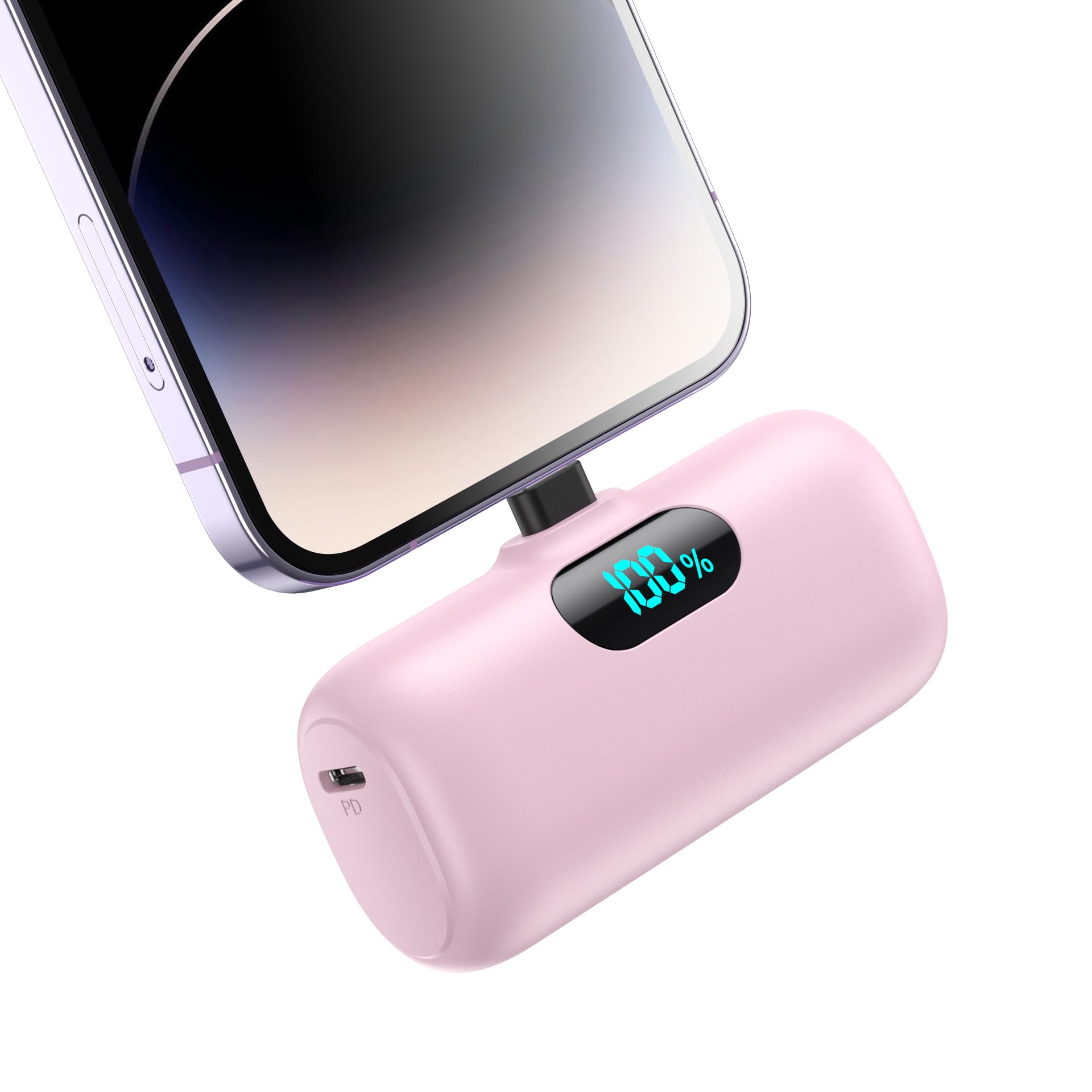
Figure 2.1: HETP HX45X2 Mini Portable Power Bank in Pink.

Figure 2.2: The compact HETP HX45X2 Mini Portable Power Bank easily fits into a small handbag, highlighting its portability.

Figure 2.3: Diagram illustrating the HETP HX45X2 Mini Portable Power Bank with its dimensions and labeled ports (Lightning output, Type-C input/output, power button, LCD display).

Figure 2.4: Close-up of the HETP HX45X2 Mini Portable Power Bank's LCD digital display showing the current battery percentage.
3. Setélan
3.1 Ngecas Awal Bank Daya
- Connect the provided Type-C charging cable to the Type-C input/output port on the power bank.
- Plug the other end of the Type-C cable into a compatible USB power adapter (not included) or a computer's USB port.
- The LCD display will show the charging progress. Ensure the power bank is fully charged before first use for optimal performance.
3.2 Mariksa Level Batré
Press the power button located on the side of the power bank. The LCD digital display will illuminate, showing the current battery percentage.
4. Parentah Operasi
4.1 Ngecas iPhone Anjeun
- Remove the protective cap from the integrated Lightning connector.
- Plug the Lightning connector directly into your compatible iPhone's charging port.
- The power bank will automatically begin charging your iPhone. The LCD display will show the power bank's remaining charge.
- To stop charging, simply unplug the power bank from your iPhone.

Figure 4.1: Illustration of the HETP HX45X2 Mini Portable Power Bank charging a phone via its integrated Lightning connector and being recharged via its Type-C port.
4.2 Ngaliwatan Ngecas
The HETP HX45X2 supports pass-through charging. This allows you to recharge the power bank while it is simultaneously charging your iPhone. Simply connect your iPhone to the power bank, and then connect the power bank to a power source using the Type-C cable.
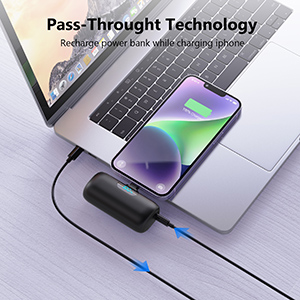
Figure 4.2: HETP HX45X2 Mini Portable Power Bank connected to a laptop for recharging while simultaneously charging an iPhone, demonstrating pass-through technology.
4.3 Kasaluyuan
This portable charger is compatible with various iPhone models, including:
- iPhone 14, iPhone 14 Pro, 14 Pro Max, iPhone 14 Plus
- iPhone 13, iPhone 13 Pro, iPhone 13 Pro Max, iPhone 13 Mini
- iPhone 12, iPhone 12 Pro, iPhone 12 Pro Max, iPhone 12 Mini
- iPhone 11, iPhone 11 Pro, iPhone 11 Pro Max
- iPhone XR, iPhone 8, iPhone 8 Plus, iPhone X, iPhone 7, iPhone 7 Plus, iPhone XS Max, iPhone XS, iPhone SE, iPhone 6s
Note: Not compatible with iPhone 15/15 Plus/15 Pro/15 Pro Max or iPhone 16/16 Plus/16 Pro/16 Pro Max (Type-C models).

Figure 4.3: Image illustrating the HETP HX45X2 Mini Portable Power Bank's compatibility with various iPhone models and explicitly stating incompatibility with Type-C iPhone models.
5. Pangropéa
- Panyimpenan: Simpen bank daya di tempat anu tiis sareng garing jauh tina sinar panonpoé langsung sareng suhu anu ekstrim.
- beberesih: Use a soft, dry cloth to clean the exterior of the power bank. Avoid using harsh chemicals or abrasive materials.
- Perawatan batré: To prolong battery life, fully charge the power bank at least once every three months if not in regular use. Avoid completely draining the battery frequently.
- Perlindungan: The power bank has built-in intelligent chips to protect against over-discharge, over-charge, short-circuit, and overheating.
6. Cara ngungkulan
6.1 Power Bank Teu Ngecas
- Ensure the Type-C charging cable is securely connected to both the power bank and the power source.
- Verify that the power source (USB adapter, computer) is functioning correctly.
- Coba nganggo kabel ngecas Tipe-C anu béda.
6.2 iPhone Not Charging from Power Bank
- Pastikeun power bankna gaduh muatan anu cekap (pariksa layar LCD-na).
- Verify that the Lightning connector is fully inserted into your iPhone's charging port.
- Check for any debris in your iPhone's charging port or on the power bank's Lightning connector.
- Confirm your iPhone model is compatible (refer to Section 4.3).
6.3 Ngecas Lambat
- Ensure you are using a 15W PD (Power Delivery) compatible power adapter for optimal charging speed of the power bank.
- Close unnecessary apps on your iPhone to reduce power consumption during charging.
7. Spésifikasi
| Fitur | Spésifikasi |
|---|---|
| Nomer modél | HX45X2 |
| merek | HETP |
| Kapasitas batré | 5000 Miliamp Jam-jaman |
| Tipe Panyambung | Lightning (for iPhone output), Type-C (for input/output) |
| Fitur husus | Lightweight, Pocket Size, LED Indicator Lights, Short Circuit Protection, Cordless Portable, 15W PD Quick Charge, Airline Approved |
| Voltage | 5 volt |
| Sumber Daya | Kabel Listrik |
| Jumlah Palabuhan | 2 (1x Lightning, 1x Type-C) |
| Tipe sél batré | Litium Polimér |
| Item Dimensions (L x W x Th) | 3.2 x 1.96 x 1 inci |
| Beurat batré | 10 gram |
8. Garansi jeung Rojongan
8.1 Émbaran jaminan
This HETP HX45X2 Mini Portable Power Bank comes with a garansi 2 taun ti tanggal beuli. Garansi ieu nyertakeun cacad manufaktur sareng mastikeun yén produkna nyumponan standar kinerja anu ditangtukeun dina panggunaan normal.
8.2 Rojongan Palanggan
For any questions, technical assistance, or warranty claims, please contact HETP customer service through the platform where you purchased the product. Please have your order number and product model (HX45X2) ready for faster service.