
Bubuka
Thank you for choosing the FLEXISPOT OC8 Ergonomic Office Chair. This manual provides detailed instructions for the assembly, operation, and maintenance of your new chair. Designed for comfort and support during long hours of work or study, the OC8 features advanced ergonomic adjustments to suit individual preferences. Please read this manual carefully before assembly and use to ensure proper function and longevity of your product.

Image: The FLEXISPOT OC8 Ergonomic Office Chair in black, showcasing its mesh back, adjustable headrest, and armrests.
Émbaran Kasalametan
- Pastikeun yén sadaya komponén dipasang sacara aman sateuacan dianggo.
- Ulah nangtung dina korsi atawa make eta salaku stool hambalan.
- Avoid placing heavy objects on the chair that exceed its weight capacity (136 kg / 300 lbs).
- Tetep barudak jeung pets jauh ti korsi salila assembly.
- Paké korsi dina datar, permukaan stabil pikeun nyegah tipping.
- Regularly check for loose screws or damaged parts and tighten or replace as necessary.
Eusi pakét
Please verify that all parts are present before beginning assembly. Refer to the assembly guide included in your product packaging for a detailed list and diagrams. Typically, your package should include:
- Majelis backrest
- Seat cushion assembly
- Headrest
- Sandaran leungeun (2)
- Silinder angkat gas
- Dasar korsi nganggo roda
- Hardware kit (screws, washers, Allen wrench)
Setup sareng Majelis
Assembly of the FLEXISPOT OC8 chair is straightforward. For detailed, step-by-step instructions and diagrams, please consult the dedicated assembly manual provided in the product packaging. Below are general steps and important dimensions:
- Pasangkeun roda-roda kana dasar korsi.
- Selapkeun tabung pengangkat gas kana liang tengah dasar korsi.
- Secure the armrests to the seat cushion using the provided hardware.
- Attach the backrest to the seat cushion assembly.
- Mount the headrest to the top of the backrest.
- Pasangkeun korsi sareng sandaran anu parantos dirakit kana tabung pengangkat gas.

Image: A diagram illustrating the dimensions of the FLEXISPOT OC8 chair, including height, width, and depth measurements for various components.
Operating Instructions: Adjustments
The FLEXISPOT OC8 chair offers multiple adjustment options to customize your seating experience for optimal ergonomic support.
1. Dual-Wing Dynamic Lumbar Support
The dual-wing lumbar support system provides adaptive support that conforms to your spine's natural curvature. It adjusts in multiple directions (forward, backward, up, down) and at different angles to provide continuous comfort, especially during prolonged sitting.

Gambar: A close-up view of the chair's dual-wing dynamic lumbar support, highlighting its flexible design.

Image: An illustrative diagram demonstrating how the adaptive lumbar support can be opened and closed for adjustment.
2. 3D Ergonomic Headrest
The 3D headrest allows for precise adjustments in height, forward/backward tilt, and angle. This personalized support helps alleviate neck and shoulder tension, particularly beneficial during long video calls or intensive work sessions.

Image: A user demonstrating the adjustment of the 3D ergonomic headrest, with diagrams showing various tilt and height options.

Image: A technical diagram illustrating the multi-position adjustment and mechanical components of the headrest.
3. Adjustable Seat Depth
Individually adjustable seat depth provides enhanced thigh support, reduces pressure points, and promotes a healthy posture. This feature is ideal for users requiring comfort during extended periods of concentration.

Image: A diagram illustrating the 3-level height adjustment range and the mechanism for adjusting seat depth.
4. 3D Adjustable Armrests
The 3D armrests can be adjusted in height, depth, and lateral rotation, adapting to various postures. They offer greater freedom of movement and keep your arms relaxed whether typing, using a mouse, or during video calls.

Gambar: A close-up view of the 3D adjustable armrest, with diagrams showing its various movement capabilities.

Image: A diagram illustrating the multidirectional adjustments for both the headrest and the 3D armrests.
5. 3-Level Dynamic Backrest and Recline
The backrest features a 3-level dynamic adjustment for precise lift and support. The chair also offers a recline function for resting, with a tension regulator to adapt to different pressure preferences and a tilt lock lever to secure your desired recline angle.
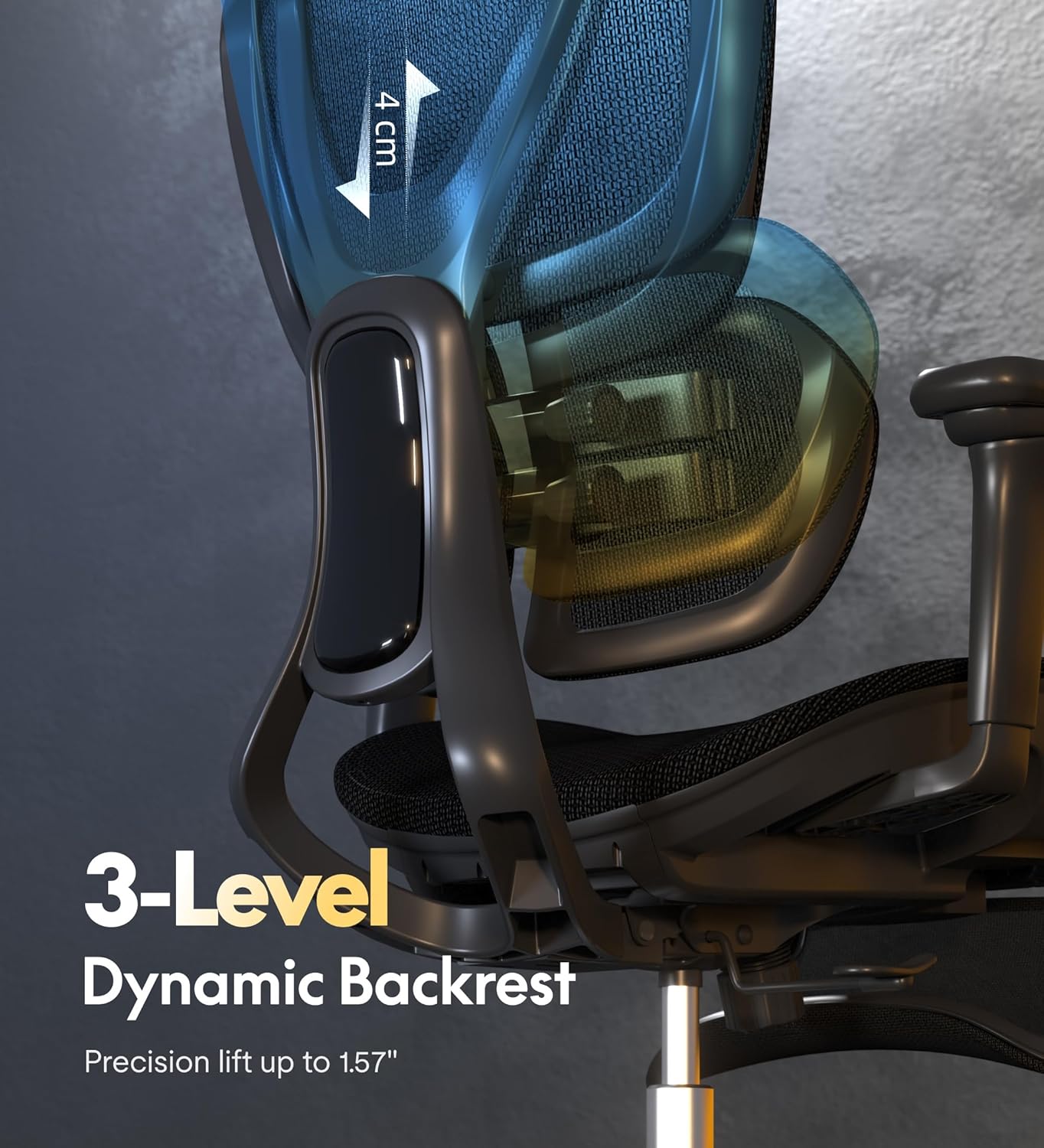
Gambar: Hiji sisi view of the chair highlighting the 3-level dynamic backrest, indicating its precision lift capability.

Image: A diagram illustrating the chair's recline function, showing the adjustable tension button and the tilt lock lever.
Pangropéa
Proper maintenance ensures the longevity and optimal performance of your FLEXISPOT OC8 chair.
- beberesih: Ngagunakeun lemes, damp cloth with mild soap to clean the mesh and leather surfaces. Avoid harsh chemicals or abrasive cleaners. For the mesh, a vacuum cleaner with a brush attachment can remove dust.
- Casters: Periodically check the casters for hair or debris that may hinder smooth movement. Clean them as needed. The chair features smooth, silent, and anti-scratch wheels suitable for various floor types.
- Hardware: Every few months, inspect all screws and bolts to ensure they are tight. Re-tighten any loose hardware to maintain stability and safety.
- Inspeksi umum: Check for any signs of wear and tear, especially on moving parts and upholstery. Contact customer support if you notice any significant damage.

Image: Illustrates the breathable mesh seat for heat dissipation and the smooth, silent, anti-scratch properties of the chair's wheels.
Pamérésan masalah
If you encounter any issues with your FLEXISPOT OC8 chair, refer to the common problems and solutions below:
| Masalah | Mungkin Cukang lantaranana | Solusi |
|---|---|---|
| Korsi teu nyaluyukeun jangkungna | Tabung gas lift teu jalan atawa tuasna teu nyambung. | Pastikeun tuas pangaturan jangkungna parantos dipasang sapinuhna. Upami masalahna teras-terasan, lift gas panginten kedah digentos. |
| Korsi ngahuleng | screws leupas atawa lanté henteu rata. | Pariksa jeung tighten sadaya screws assembly. Pastikeun korsi aya dina tempat anu datar. |
| Kastor teu ngagulung lancar | Uing bray dina casters atanapi casters ruksak. | Cabut bulu atanapi kokotor tina roda kastor. Upami ruksak, gentos rodana. |
| Sandaran teu bisa diuk atawa dikonci | Recline mechanism locked or tension too high. | Ensure the tilt lock lever is disengaged. Adjust the recline tension knob to a lower setting. |
spésifikasi
Key specifications for the FLEXISPOT OC8 Ergonomic Office Chair:
| Fitur | Rincian |
|---|---|
| merek | FLEXISPOT |
| Modél | OC8 |
| Warna | Hideung |
| Bahan | Leather (seat), Mesh (backrest) |
| Ukuran produk (D x W x H) | 74.5 x 72 x 111.5 cm (29.3 x 28.3 x 43.9 inci) |
| Bahan Pigura | Alloy Steel |
| Gaya Sandaran | Sandaran Padet |
| Posisi Reclining | 3 |
| Kapasitas beurat | Nepi ka 136 kg (300 lbs) |
| Majelis Diperlukeun | No (referring to the 'Requiere montaje: No' specification, which might mean minimal assembly or pre-assembled main parts) |
| Age Range Pedaran | Dewasa |
| Jero rohangan / pamakéan outdoor | jero rohangan |
Garansi sareng Rojongan
FLEXISPOT is committed to providing high-quality products designed for durability. The FLEXISPOT OC8 chair comes with an official brand warranty. For specific warranty terms and duration, please refer to the warranty card included with your product or visit the official FLEXISPOT websitus.
Should you require any assistance, our professional and responsive after-sales service team is available to help. Please contact FLEXISPOT customer support for any questions, concerns, or service requests related to your chair.
Kanggo inpo nu leuwih lengkep atawa rojongan, mangga buka dina FLEXISPOT Brand Store.