
AFK B0FDQN2HTM
AFK Wireless Charging Station with Bluetooth Speaker and Alarm Clock User Manual
Model: B0FDQN2HTM
1. Bubuka
The AFK Wireless Charging Station is a versatile device designed to simplify your daily routine. It integrates a wireless phone charger, a Bluetooth speaker for audio playback, a digital alarm clock, and hands-free calling capabilities into a single compact unit. This manual provides detailed instructions for setup, operation, and maintenance to ensure optimal performance.

Image 1.1: The AFK Wireless Charging Station in use, showing a smartphone charging and the time displayed on the clock.
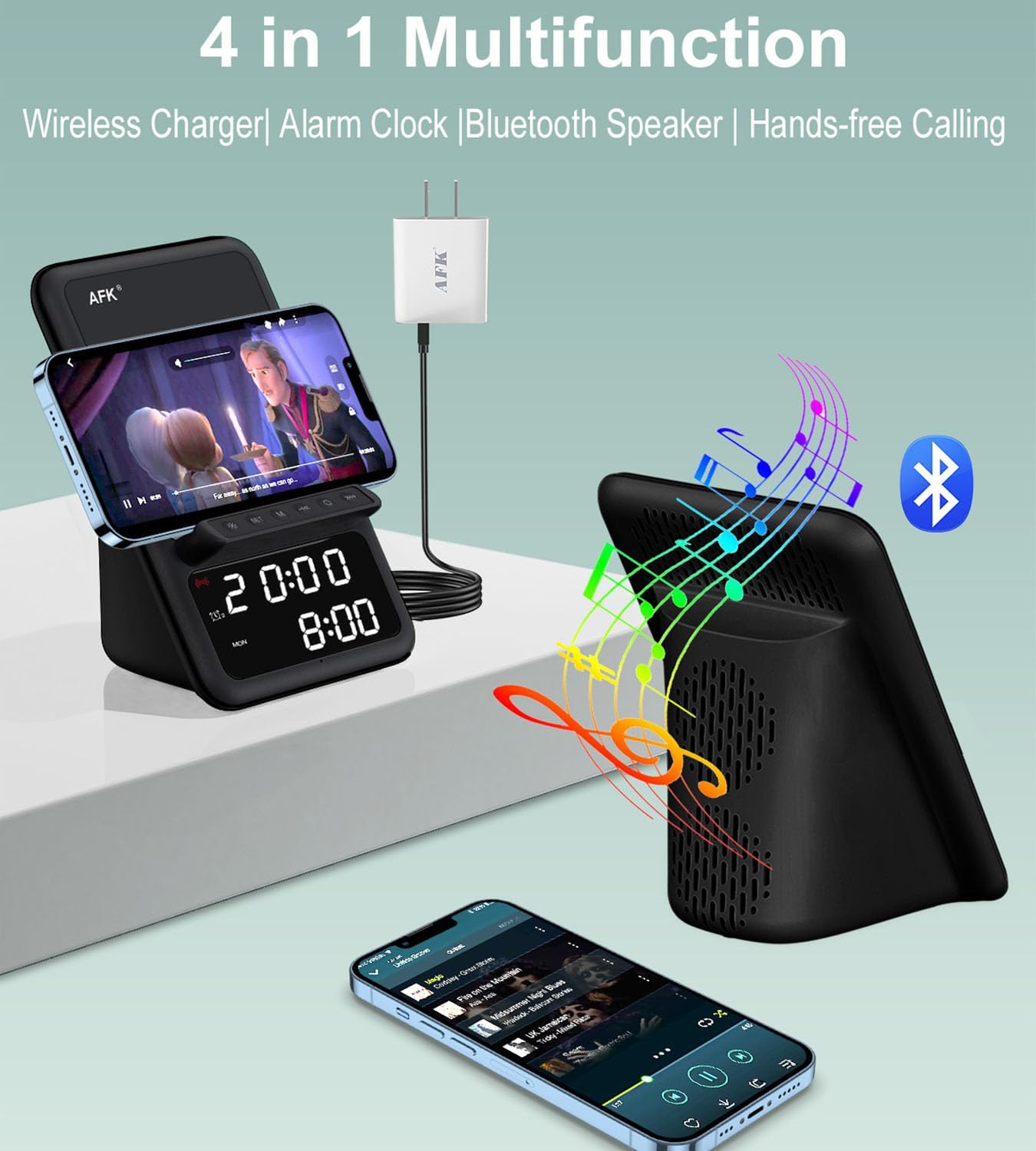
Gambar 1.2: Leuwihview of the product's four main functions: wireless charging, alarm clock, Bluetooth speaker, and hands-free calling.
2. Émbaran Kasalametan
- Entong ngalaan alat ka suhu anu ekstrim, sinar panonpoé langsung, atanapi kalembaban anu luhur.
- Hindarkeun ragrag atanapi ngagentoskeun alat kana tabrakan anu kuat.
- Jauhkeun alat tina cai atawa cairan séjén.
- Ulah nyobian ngabongkar atanapi ngalereskeun alat nyalira. Hubungi petugas servis anu mumpuni.
- Anggo ukur adaptor daya anu disayogikeun atanapi anu sarimbag anu disertipikasi.
- Pastikeun ventilasi ditangtoskeun sabudeureun alat salila operasi.
3. Eusi Paket
Mangga parios pakét kanggo barang-barang ieu:
- AFK Wireless Charging Station
- Adaptor kakuatan
4. Produk Langkungview
Familiarize yourself with the various components of your AFK Wireless Charging Station.
Panel hareup
- Digital tampilan: Shows time, alarm status, and other indicators.
- Tombol kontrol: For setting time, alarms, and controlling speaker functions.
Panel luhur
- Pad ngecas nirkabel: Place your compatible smartphone here for wireless charging.
Panel tukang
- Port Input Daya: Sambungkeun adaptor daya anu disayogikeun.
- Speaker grille: Pikeun kaluaran audio.
5. Setélan
5.1 Sambungan Daya
- Connect the USB Type-C end of the power adapter cable to the Power Input Port on the back of the charging station.
- Colokkeun tungtung adaptor daya anu sanésna kana stop kontak témbok standar.
- The digital display will light up, indicating the device is powered on.
5.2 Setélan Waktu Awal
Upon first power-up, you may need to set the correct time.
- Press and hold the 'Time Set' button (refer to product diagram for exact button location).
- Use the '+' and '-' buttons to adjust the hour. Press 'Time Set' again to confirm.
- Use the '+' and '-' buttons to adjust the minute. Press 'Time Set' again to confirm.
- Waktos ayeuna tos disetel.
6. Parentah Operasi
6.1 Ngecas Nirkabel
The charging station supports wireless charging for compatible smartphones.
- Ensure your smartphone supports wireless charging.
- Place your smartphone directly onto the wireless charging pad on the top of the station.
- The charging indicator on your phone or the station (if available) will confirm charging has begun.
- Catetan: The charging station can charge through phone cases up to 5mm thick. Magnetic, metal accessories, or other foreign objects on the back of your phone may interfere with charging and should be removed.
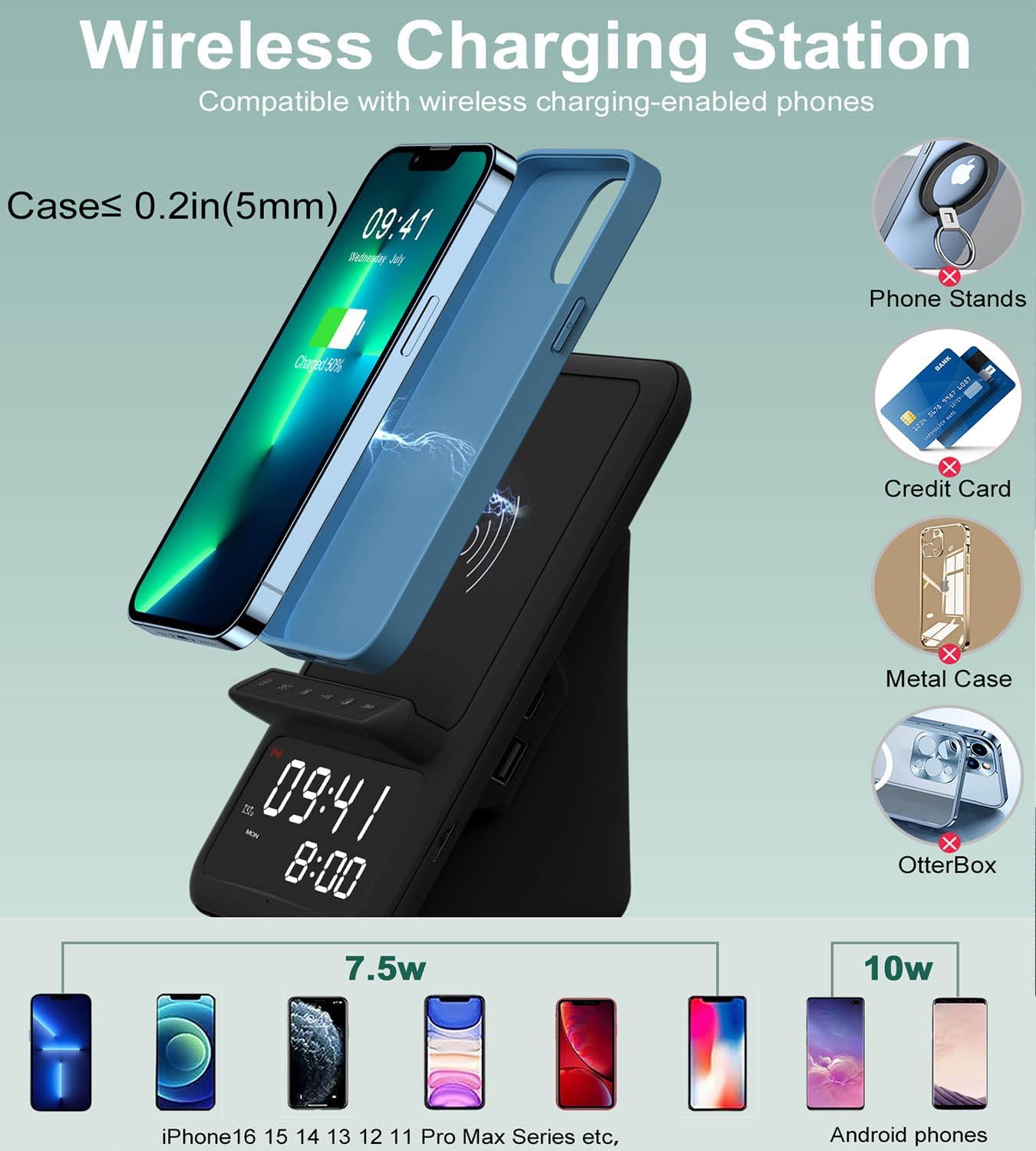
Image 6.1: Illustration of wireless charging, indicating compatibility with various phone models and the maximum case thickness for effective charging.
6.2 Speaker Bluetooth
Connect your device via Bluetooth to play audio through the integrated speaker.
- Press the 'Bluetooth' button on the charging station to enter pairing mode. The Bluetooth indicator will flash.
- Dina telepon pinter, tablet, atanapi laptop anjeun, aktipkeun Bluetooth teras milarian alat anu sayogi.
- Select "AFK Charging Station" (or similar name) from the list of devices to pair.
- Once paired, the Bluetooth indicator will become solid, and you can now play audio through the speaker.
- Use the volume buttons on the charging station or your connected device to adjust the sound level.

Image 6.2: The AFK Charging Station functioning as a Bluetooth speaker, connected to a laptop for audio playback.
6.3 Jam Alarm
Setel dugi ka dua alarm anu mandiri.
- Setélan Alarm 1: Press and hold the 'Alarm 1' button. Use '+' and '-' to set the hour, then press 'Alarm 1' to confirm. Use '+' and '-' to set the minute, then press 'Alarm 1' to confirm.
- Setélan Alarm 2: Repeat the process using the 'Alarm 2' button.
- Ngaktipkeun/Nonaktipkeun Alarm: Briefly press the 'Alarm 1' or 'Alarm 2' button to toggle the respective alarm on or off. An icon on the display will indicate active alarms.
- Fungsi Tungkul When an alarm sounds, press any button (except 'Off') to activate snooze. The alarm will sound again after a set interval (e.g., 9 minutes).
- Ngeureunkeun Alarm: To turn off an alarm completely, press the designated 'Alarm Off' button (refer to product diagram).

Image 6.3: The charging station positioned on a bedside table, illustrating the dual alarm functionality with two distinct alarm times displayed.
6.4 Nelepon Bebas Tangan
Utilize the built-in microphone for hands-free communication when connected via Bluetooth.
- Ensure your phone is paired with the charging station via Bluetooth.
- When a call comes in, the speaker will ring. Press the 'Call Answer' button (refer to product diagram) to answer the call.
- Speak towards the device's microphone for clear communication.
- To end a call, press the 'Call End' button.

Image 6.4: The charging station facilitating a hands-free video conference call, showcasing its integrated microphone and speaker capabilities.
7. Spésifikasi
| Fitur | Katerangan |
|---|---|
| merek | AFK |
| Tipe Panyambung | USB Tipe C |
| Alat nu cocog | Phones that support wireless charging |
| Fitur husus | Wireless Charger, Bluetooth Speaker, Alarm Clock, Hands-Free Calling |
| Warna | Hideung |
| Bahan | Acrylonitrile Butadiena Styrene |
| Sumber Daya | USB |
8. Pangropéa
To ensure the longevity and optimal performance of your AFK Wireless Charging Station, follow these maintenance guidelines:
- beberesih: Use a soft, dry cloth to wipe the surface of the device. Do not use abrasive cleaners, solvents, or chemical sprays.
- Panyimpenan: Lamun teu dipaké pikeun période nambahan, nyimpen alat dina tiis, tempat garing jauh tina sinar panonpoé langsung.
- Ngahindarkeun halangan: Ensure the speaker grille and charging pad are free from dust and debris.
9. Cara ngungkulan
Upami anjeun ngalaman masalah sareng alat anjeun, tingali masalah sareng solusi umum ieu:
| Masalah | Solusi anu mungkin |
|---|---|
| Alat teu hurung. | Pastikeun adaptor daya disambungkeun pageuh kana alat sareng stop kontak anu tiasa dianggo. Cobi stop kontak anu sanés. |
| Ngecas nirkabel teu jalan. | Verify your phone supports wireless charging. Remove any metal objects, magnetic accessories, or overly thick cases (over 5mm) from your phone. Ensure the phone is centered on the charging pad. |
| Bluetooth speaker cannot pair. | Ensure the charging station is in Bluetooth pairing mode (indicator flashing). Make sure Bluetooth is enabled on your device and it's within range. Try restarting both devices. |
| Alarm teu disada. | Check if the alarm is activated (icon visible on display). Ensure the volume is not set to minimum. Verify the time is set correctly. |
| Kualitas sora ti speaker goréng. | Ensure the device is within Bluetooth range. Check for obstructions around the speaker grille. Adjust volume on both the station and your connected device. |
10. Garansi jeung Rojongan
This product comes with a standard manufacturer's warranty. For specific warranty details, please refer to the documentation included with your purchase or contact AFK customer support.
If you require further assistance or have questions not covered in this manual, please contact AFK customer support through the retailer's platform or the official AFK websitus.
Ask a question about this manual
Ask about setup, troubleshooting, compatibility, parts, safety, or missing instructions. Manuals+ will review the question and use this page’s manual context to help answer it.