
Bmax B9 Plus
Buku Panduan Pangguna Bmax B9 Plus Mini PC
Pitunjuk komprehensif pikeun setelan, operasi, sareng pangropéa.
1. Bubuka
This user manual provides detailed instructions for the Bmax B9 Plus Mini PC. It covers initial setup, operational guidelines, maintenance procedures, and troubleshooting tips to ensure optimal performance and longevity of your device. Please read this manual thoroughly before using the product.

Figure 1: Bmax B9 Plus Mini PC, showing front and rear ports.
2. Setélan
2.1. Eusi Paket
- 1 x B9 Plus MINI PC
- Adaptor kakuatan
- Manual pangguna (dokumén ieu)
- VESA Mount (if included)
2.2. Nyambungkeun Mini PC Anjeun
Follow these steps to connect your Bmax B9 Plus Mini PC:
- Sambungkeun tampilan: Connect your monitor(s) to the Mini PC using the HDMI 2.1, DisplayPort 1.4a, or Type-C (full features) ports. The B9 Plus supports triple-display output at 4K@60Hz.
- Sambungkeun Periferal: Connect your keyboard, mouse, and other USB devices to the available USB 3.2 (x2) or USB 2.0 (x2) ports.
- Sambungkeun Jaringan: For wired internet, connect an Ethernet cable to the RJ45 port. For wireless, ensure your Wi-Fi network is available.
- Sambungkeun Kakuatan: Plug the power adapter into the DC 19V/3.42A port on the Mini PC, then plug the adapter into a power outlet.
- Daya Hurung: Pencét tombol daya anu aya di payuneun Mini PC.

Figure 2: Triple display setup with Bmax B9 Plus Mini PC.

Gambar 3: Detil view of Bmax B9 Plus Mini PC ports, including USB, HDMI, DP, Ethernet, and power input.
2.3. Boot Awal sareng Setelan Sistem Operasi
Upon first boot, the Mini PC may guide you through the operating system setup process. Follow the on-screen instructions to configure language, region, network settings, and user accounts. The B9 Plus is compatible with Windows 11 Pro, Linux, and Ubuntu.
3. Ngoperasikeun Mini PC Anjeun
3.1. Performance Leuwihview
The Bmax B9 Plus is equipped with an Intel Core i5-1250P Processor (up to 4.4GHz, 12 Cores/16 Threads, 12MB Smart Cache) and 24GB LPDDR5 memory, providing robust performance for various tasks including gaming, office work, streaming, and web ngotektak.

Figure 4: Intel Core i5-1250P processor details and performance comparison.
3.2. Storage and Expansion
The Mini PC includes an ultrafast 512GB NVMe SSD for quick boot times and application loading. It also features an M.2 2280 SATA or NVMe SSD slot for additional storage expansion (SSD not included).
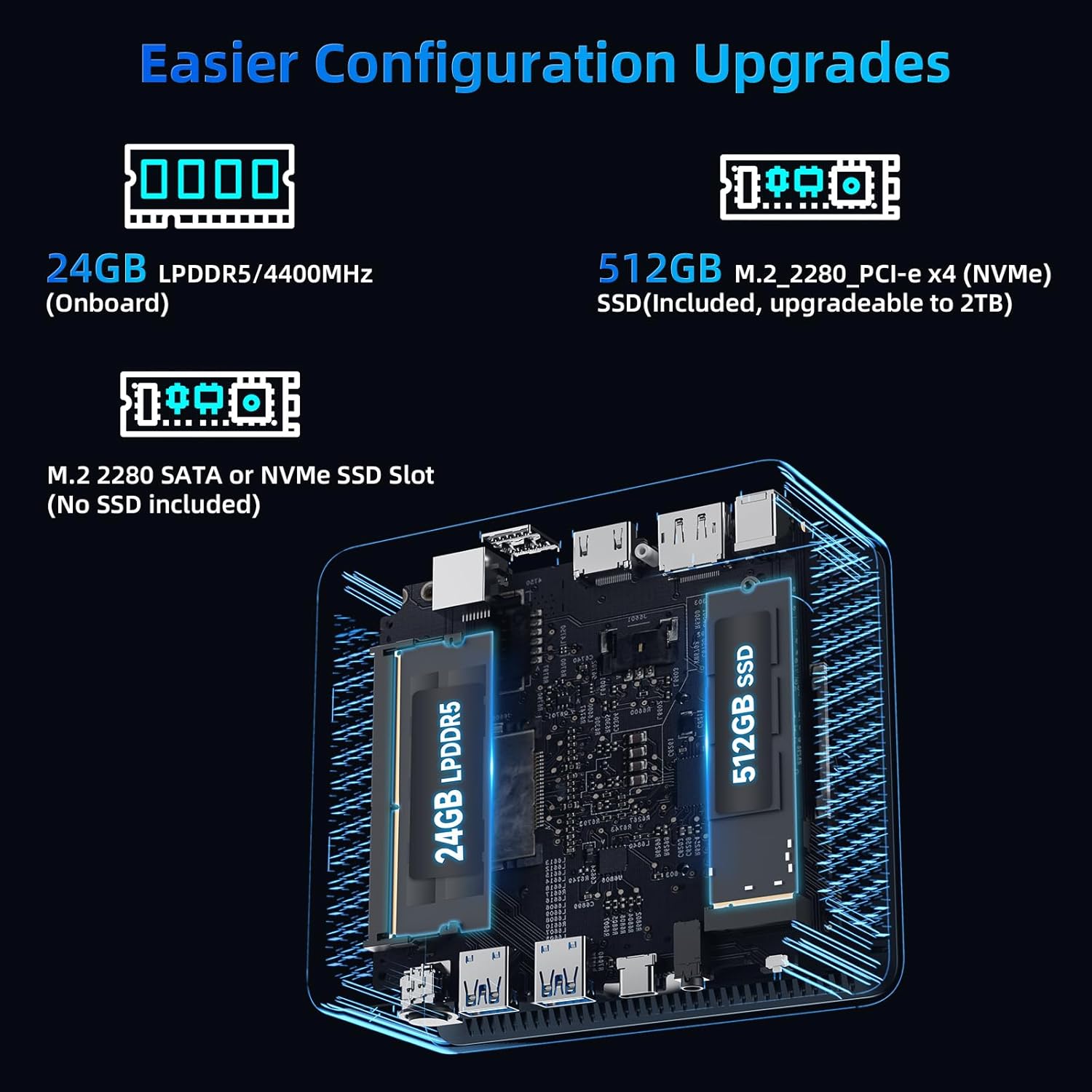
Gambar 5: Internal view highlighting 24GB LPDDR5 memory and 512GB NVMe SSD, with an additional M.2 slot for expansion.
3.3. Konéktipitas Wireless
Benefit from high-speed wireless connectivity with built-in WiFi 6, offering speeds up to 3x faster than Wi-Fi 5. Bluetooth 5.2 allows for quick connection to wireless peripherals like headsets, mice, and keyboards.
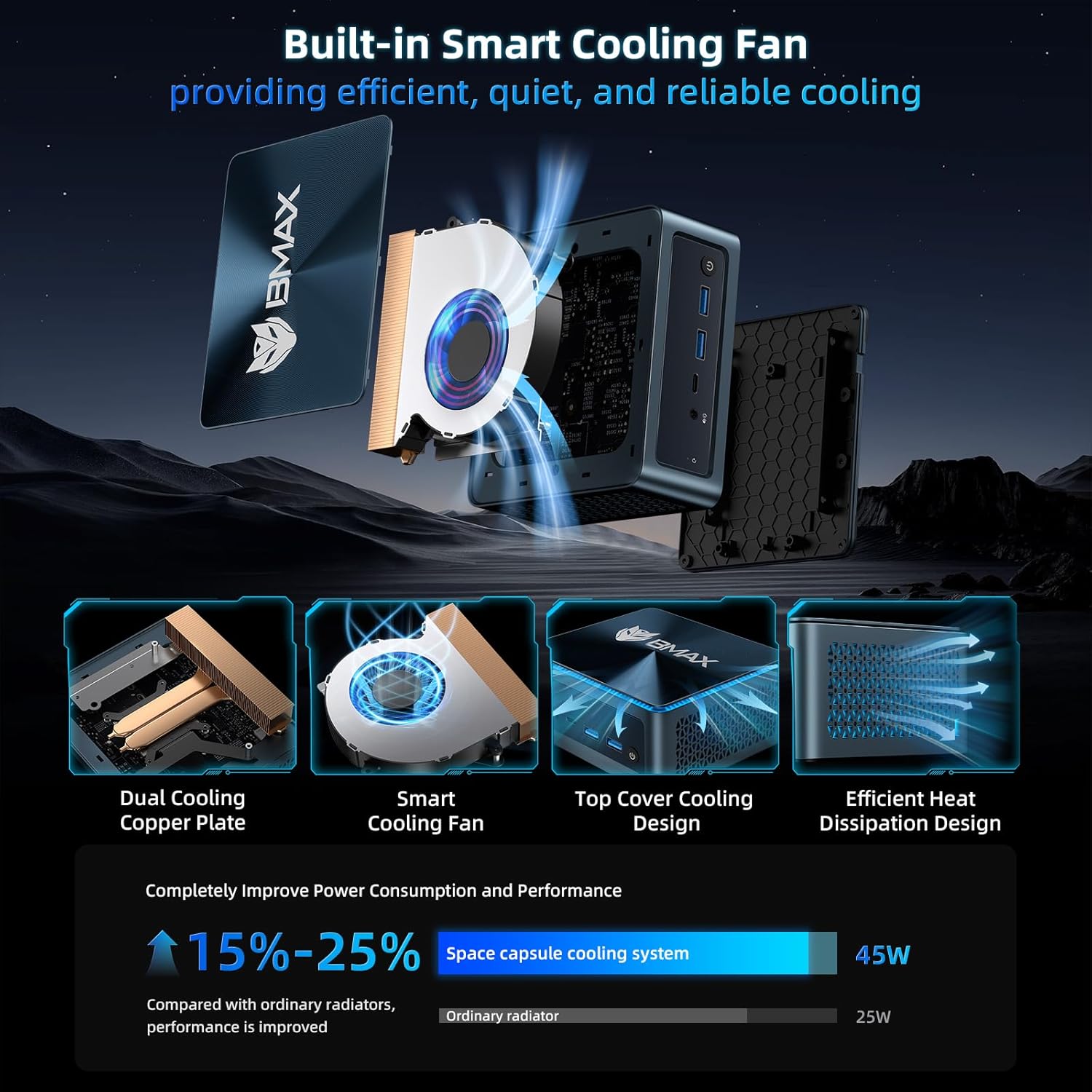
Figure 6: Bmax B9 Plus Mini PC demonstrating WiFi 6 and Bluetooth 5.2 capabilities.
3.4. Video Playback and Usage Scenarios
The Bmax B9 Plus is designed for versatile use, from home entertainment to professional applications. Its powerful processor and ample memory ensure smooth performance across various tasks.
Video 1: Official BMAX MINI PC B9 Plus product overview, nuduhkeuncasing its features and various usage scenarios like office work, home theater, and gaming.
4. Pangropéa
4.1. Sistim cooling
The B9 Plus features a "Space Capsule Cooling System" with an enlarged double copper heat pipe and a giant turbo smart fan. This design ensures efficient heat dissipation, improving performance by 15-25% compared to ordinary radiators.

Angka 7: Ngabeledug view of the Bmax B9 Plus cooling system, showing the dual copper cooling plate and smart fan.
4.2. Apdet parangkat lunak
Regularly update your operating system and drivers to ensure optimal performance, security, and compatibility. Refer to your operating system's documentation for specific update procedures.
4.3. beberesih
Keep the Mini PC clean by gently wiping the exterior with a soft, dry cloth. Ensure ventilation openings are free from dust and obstructions to maintain efficient cooling.
5. Cara ngungkulan
5.1. Isu umum jeung Solusi
| Masalah | Mungkin Cukang lantaranana | Solusi |
|---|---|---|
| Taya kaluaran tampilan | Sambungan kabel salah, monitor pareum, sumber input salah. | Check display cables (HDMI/DP/Type-C), ensure monitor is on and set to correct input. |
| Mini PC not powering on | Adaptor daya teu nyambung, stop kontakna rusak. | Verify power adapter connection to PC and outlet. Try a different outlet. |
| kinerja lalaunan | Too many applications running, insufficient storage, outdated drivers. | Close unnecessary applications, check available storage, update drivers and OS. |
5.2. One-Click Smart Recovery
The Bmax B9 Plus features a unique one-click smart recovery function. If your OS crashes, becomes slow, or encounters issues during upgrades, this function allows you to restore the system to factory settings quickly, replacing the current OS with a fresh configuration.
6. Spésifikasi
| Fitur | Rincian |
|---|---|
| Prosesor | Intel Core i5-1250P (up to 4.4GHz, 12 Cores/16 Threads, 12MB Cache) |
| Ram | 24GB LPDDR5 |
| Panyimpenan | 512GB NVMe SSD (expandable via M.2 2280 SATA/NVMe slot) |
| Grafika | Integrated Intel Iris Xe Grafika |
| Konéktipitas Wireless | WiFi 6, Bluetooth 5.2 |
| Palabuhan | HDMI 2.1, DisplayPort 1.4a, Type-C (full features), 2x USB 3.2, 2x USB 2.0, RJ45 Ethernet, 3.5mm Audio Jack, DC Power In |
| Kaluaran tampilan | Triple-display 4K@60Hz |
| Sistem operasi | OS (Compatible with Windows 11 Pro, Linux, Ubuntu) |
| Diménsi | 4.9 x 4.4 x 1.7 inci |
| Beurat | 1.5 pon |
7. Garansi jeung Rojongan
BMAX MINI PCs provide a one-Year warranty and lifetime professional customer service. For any pre-sale or after-sale support, please do not hesitate to contact Bmax Official Store.
Pikeun pitulung salajengna, buka di Bmax Official Store on Amazon.