
Bubuka
The Generic Rear Paddle Mod is designed to enhance the gaming experience for users of the FlyDigi Vader 3 and 4 Pro controllers. This modification integrates paddle-style triggers on the back of your controller, inspired by the Xbox Elite layout. This design aims to improve ergonomics and enable faster, more intuitive in-game actions without requiring thumbs to leave the analog sticks. It is particularly beneficial for fast-paced games such as FIFA, racing simulations, and first-person shooters, where quick reactions and precise control are crucial.
Fitur konci:
- Kasaluyuan Disesuaikeun: Custom-fit for FlyDigi Vader 3 and 4 Pro controllers.
- Érgonomi ditingkatkeun: Paddle design mimics the Xbox Elite layout for improved comfort and control.
- Boosted Reaction Time: Allows for quick command execution while keeping thumbs on sticks.
- Optimized for Competitive Gaming: Provides greater command precision for action-heavy titles.
Eusi pakét
Punten parios yén sadaya komponén aya sateuacan neraskeun pamasangan.
- 1x Rear Paddle Mod (Red)
- Necessary mounting hardware (e.g., screws)
Setup & Pamasangan
This section outlines the steps required to install the Rear Paddle Mod onto your FlyDigi Vader 3/4 Pro controller. While some product descriptions may suggest a 'snap-in' installation, actual installation typically requires opening the controller's back shell and securing the mod with screws for a stable and functional fit. Users are advised to proceed with caution and refer to visual guides if available.
Parabot anu diperyogikeun (Teu Kalebet):
- Leutik Phillips sirah obeng
- Prying tool (optional, for opening controller shell)
Léngkah-léngkah pamasangan:
- Prepare Controller: Ensure your FlyDigi Vader 3/4 Pro controller is powered off.
- Open Controller Shell: Carefully remove the screws securing the back shell of your controller. Use a prying tool if necessary to gently separate the shell halves.
- Position Paddle Mod: Align the Rear Paddle Mod with the designated areas on the back of the controller's internal structure. The mod features specific holes for screw placement.
- Secure Mod: Using the provided screws and a small Phillips head screwdriver, carefully fasten the paddle mod into place. Ensure it is securely attached without overtightening.
- Pasang deui Kontroler: Carefully reattach the back shell of the controller, ensuring all internal components are correctly seated. Replace and tighten all screws.
- Fungsi Uji: Power on your controller and test the functionality of the newly installed paddles in a game or controller testing utility.
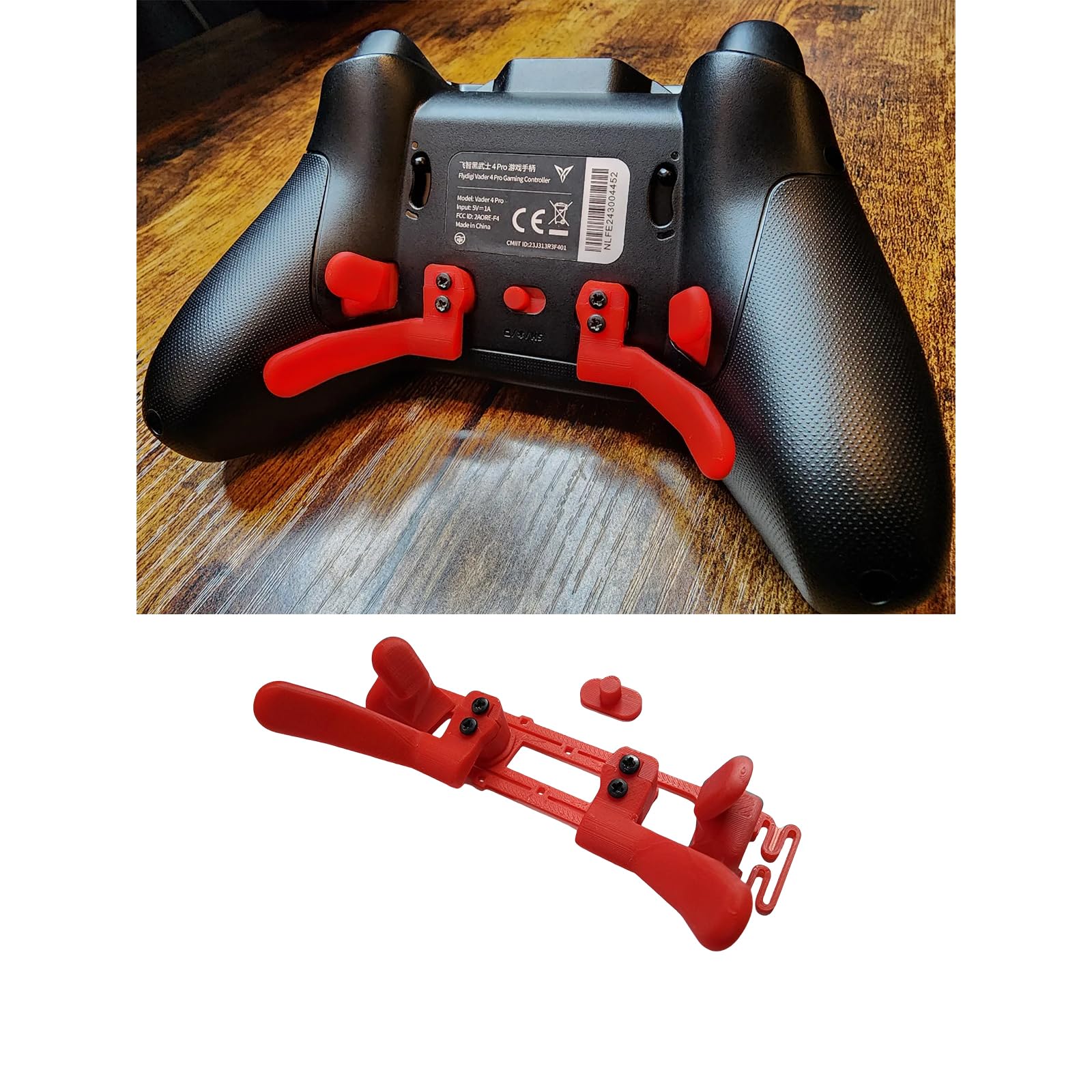
Image: The red Rear Paddle Mod, designed to be installed on the back of a compatible FlyDigi Vader controller. This image shows the mod's structure and color.
Parentah Operasi
Once installed, the Rear Paddle Mod provides additional input options on the back of your controller. These paddles are typically mapped to existing face buttons or other functions via your controller's software or in-game settings, allowing for quicker access to commands without moving your thumbs from the analog sticks.
Mapping Paddles:
- Refer to your FlyDigi Vader 3/4 Pro controller's official software or manual for instructions on how to remap the back paddles to desired functions (e.g., jump, reload, melee).
- Experiment with different button mappings to find the configuration that best suits your playstyle and the specific games you play.
Pangropéa
Proper maintenance ensures the longevity and optimal performance of your Rear Paddle Mod.
- beberesih: Use a soft, dry cloth to wipe down the paddles and surrounding areas. Avoid using harsh chemicals or abrasive materials.
- Panyimpenan: Store your controller in a clean, dry environment away from extreme temperatures and direct sunlight.
- Pamariksaan: Periodically check the paddles for any signs of wear or looseness. If paddles become loose, gently re-tighten the mounting screws if accessible.
Pamérésan masalah
If you encounter issues with your Rear Paddle Mod, refer to the following common troubleshooting steps:
- Paddles Not Registering:
- Ensure the mod is securely installed and all internal connections (if any) are properly made.
- Verify that the paddles are correctly mapped in your controller's software or game settings.
- Test the controller with and without the mod to isolate the issue.
- Loose Paddles:
- If the paddles feel loose, carefully open the controller and ensure the mounting screws are tightened appropriately. Avoid overtightening.
- Ruksakna Fisik:
- Inspect the mod for any visible cracks or damage. If damaged, replacement may be necessary.
spésifikasi
| Fitur | Rincian |
|---|---|
| merek | Generik |
| Ngaran modél | Rear Paddle Mod for FlyDigi Vader 3/4 Pro Controller |
| Nomer modél | Rear Paddle Mod for FlyDigi Vader |
| Alat nu cocog | FlyDigi Vader 3/4 Pro Controller (PC) |
| Tipe Controller | Gamepad Accessory |
| Téhnologi konektipitas | N/A (Physical Mod) |
| Fitur tambahan | Desain ergonomis |
| Warna | Beureum |
Garansi & Rojongan
For warranty information or technical support regarding your Generic Rear Paddle Mod, please refer to the retailer or manufacturer from whom the product was purchased. Specific warranty terms and support channels may vary.
Disarankeun pikeun nahan bukti pameseran anjeun pikeun klaim garansi.