
1. Bubuka jeung Leuwihview
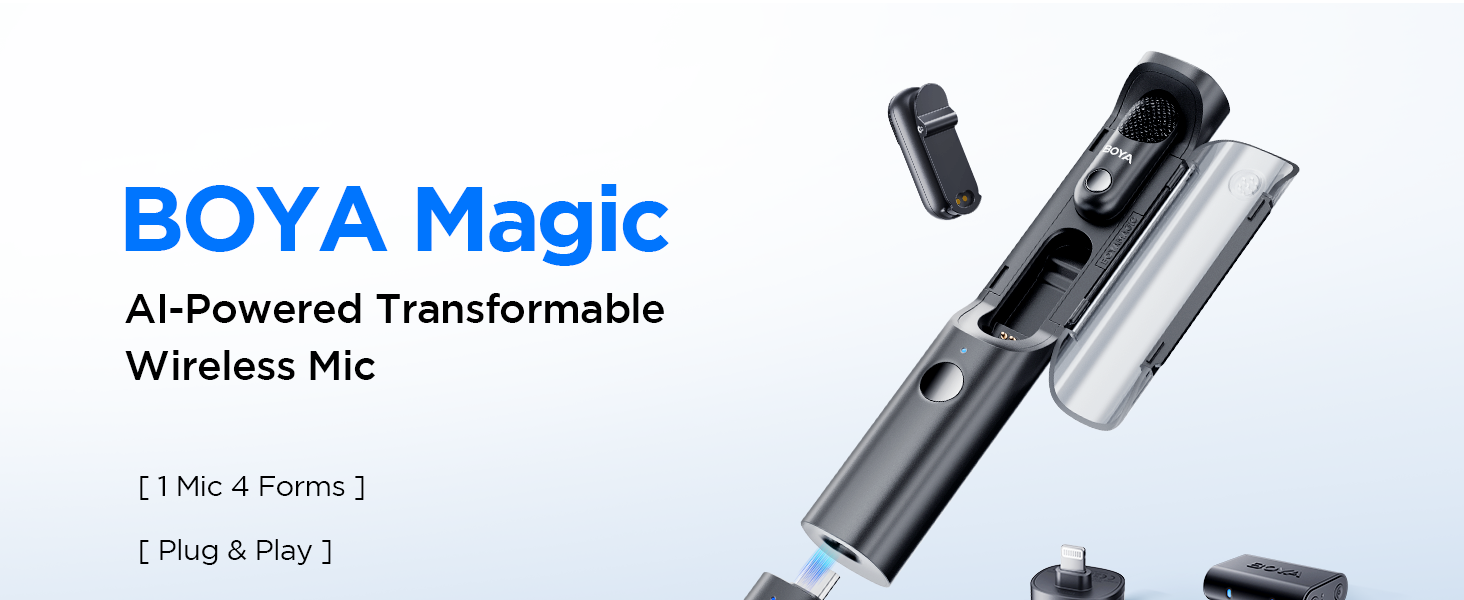
The BOYA Magic-02 is a versatile 4-in-1 wireless lavalier microphone system designed for content creators. It offers multiple usage modes, advanced audio protection features, and broad compatibility across various devices.
Fitur konci:
- Transformable Flexibility: Functions as a clip-on, handheld, desktop, or on-camera microphone.
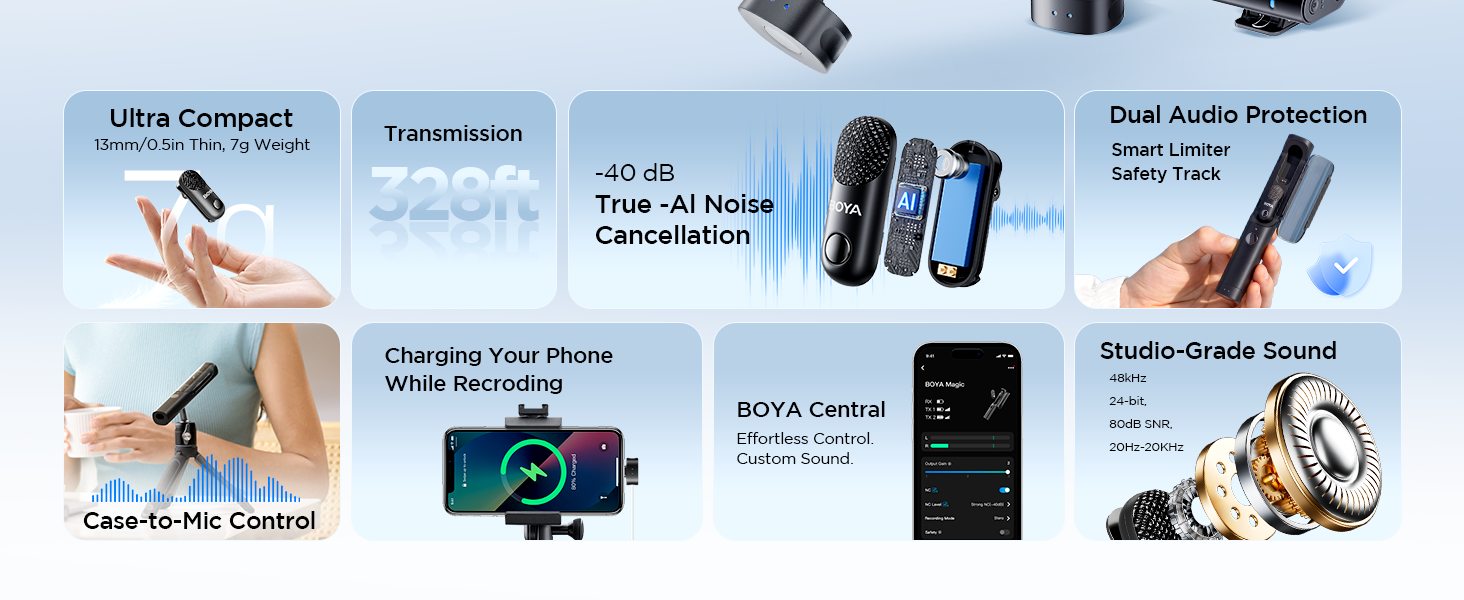
- Pangurangan Noise AI: Equipped with True AI-power noise reduction, suppressing up to 40dB of interference.
- Ultra-Slim & Long Battery Life: Weighs just 7g, 13mm thin. Offers 6 hours per transmitter and 30 hours total with the charging case.
- Professional Audio Protection: Features a limiter and safety track for distortion-free, 48kHz/24-bit studio-grade sound.
- Kasaluyuan lega: Includes USB-C, Lightning, and 3.5mm TRS receivers for instant connection to smartphones, cameras, camcorders, tablets, and computers.
2. Komponén produk
The BOYA Magic-02 system includes the following components:
- 2 x BOYA Magic Transmitters (TX)
- 1 x USB-C Receiver (RX)
- 1 x Lightning Receiver (RX)
- 1 x 3.5mm TRS Receiver (RX)
- 1 x Kasus Ngecas
- 2 x Magnét
- 3 x Fur Windshields (2 for TX, 1 for Charging Case)
- 1 x USB-C to USB-A Data Cable
- 1 x USB-C to USB-C Data Cable
- 1 x All-in-One Storage Bag
3. Setélan
Follow these steps to set up your BOYA Magic-02 Wireless Lavalier Microphone:
- Ngeusi batre Alat: Ensure both transmitters and the charging case are fully charged. The charging case acts as a power bank for the transmitters.
- Select Receiver: Choose the appropriate receiver (USB-C, Lightning, or 3.5mm TRS) for your recording device.
- Sambungkeun panarima: Plug the selected receiver directly into your smartphone, camera, camcorder, tablet, or computer. For Android devices, ensure OTG is enabled in system settings before connecting.
- Pemancar Hurungkeun: Turn on the transmitters by pressing and holding the power button for 5 seconds until their status indicators blink blue quickly to pair.
- papasangan: The transmitters will automatically pair with the receiver. Once paired, the indicator lights will turn solid blue.
- Pasangkeun Mikropon: Clip the transmitter discreetly onto your clothing using the built-in clip or the included magnets for a secure fit.

Video: How to Set Up BOYA Magic on My Phone
This video provides a step-by-step guide on connecting and setting up the BOYA Magic-02 microphone system with a smartphone, demonstrating the ease of use and compatibility.
4. Parentah Operasi
Maximize your audio recording experience with the BOYA Magic-02's versatile operating modes and features.
4-in-1 Usage Modes:
- Clip-On: Attach the lightweight 7g transmitter directly to your clothing for discreet recording.
- Handheld: Insert the transmitter into the charging case to convert it into a handheld microphone for interviews or presentations.
- desktop: Pair with a compatible BOYA stand (sold separately) for professional desktop recording.
- Dina Kaméra: Plug the receiver directly into your camera's hot shoe for integrated audio capture.

Pangurangan Noise AI:
The BOYA Magic-02 features True AI-power noise reduction. Activate this feature with a single button press on the transmitter to effectively suppress up to 40dB of background noise, ensuring pristine vocals even in noisy environments.
Safety Track & Limiter:
For professional audio protection, the microphone includes a limiter to prevent audio peaks and a safety track that records a backup audio track at -12dB to prevent clipping and distortion. This ensures high-quality 48kHz/24-bit sound comparable to studio recordings.

BOYA Central App Control:
Download the BOYA Central app to fine-tune settings such as output gain, noise cancellation level, recording modes (mono/stereo), and custom EQ presets for a personalized audio experience.

Video: How to Use the BOYA Magic App
This video demonstrates how to connect the BOYA Magic-02 to the BOYA Central app and utilize its advanced settings for customized audio recording.
5. Pangropéa
Proper maintenance ensures the longevity and optimal performance of your BOYA Magic-02 system.
- Ngecas: Always return transmitters to the charging case when not in use. The case provides up to 30 hours of total usage. Connect the charging case to a USB-C power source when its indicator lights are low.
- beberesih: Regularly wipe the charging contacts on the transmitters and charging pins in the case with a clean, dry cloth to ensure proper connection and prevent charging issues.
- Panyimpenan: Store the microphone system in the provided all-in-one storage bag to protect it from dust, moisture, and physical damage.
- Perawatan batré: Avoid completely depleting the batteries for extended periods. Charge the devices regularly, especially if they haven't been used for a long time.
6. Cara ngungkulan
If you encounter problems with your BOYA Magic-02, refer to the following checklist. If the issue persists, contact the seller for after-sales service.
- Transmitter(s) cannot pair with the receiver:
- Pareuman pamancar (s) jeung panarima. Pencet jeung tahan tombol dayana salila 5 detik nepi ka indikator statusna kedip-kedip biru gancang pikeun nyapasangkeun deui.
- Charging case cannot pair with the receiver:
- When using the charging case as a handheld or desktop microphone, ensure the microphone is placed in the first slot. If the microphone is already in the first slot but cannot connect to the receiver, remove it and re-pair following the steps above.
- Operating range is limited, sound changes, or noise appears:
- Make sure there is no interference from high-power wireless routers or devices in your recording environment.
- Due to 2.4GHz wireless frequency, signal can be easily attenuated. Try to avoid obstacles such as walls and buildings, and avoid close proximity to devices with 2.4 GHz signals such as high-power Wi-Fi antennas, radios, etc.
- Pastikeun panarima disambungkeun ogé ka alat Anjeun leres.
- Transmitter(s) or the receiver doesn't power on:
- Lamun batréna tos rengse depleted sabab pamancar (s) atawa panarima geus lila teu dipaké, ngeusi batre.
- Charging case can't charge the transmitter(s):
- Upami sesa muatan tina wadah ngecas handap teuing, mangga eusian deui wadahna teras cobian deui.
- Ngusap kontak ngecas dina pamancar (s), jeung ngecas pin dina kasus nu make lawon bersih. Pastikeun teu aya kokotor anu nutupan aranjeunna.
- If the charging contacts and pins are not firmly connected due to insufficient magnetic force, please contact us for after-sales service.
7. Spésifikasi
| Fitur | Rincian |
|---|---|
| Ngaran modél | Magic-02 |
| Faktor Bentuk Mikropon | Lavalier |
| Téhnologi konektipitas | USB |
| Tipe Panyambung | 3.5 mm Jack, USB Type-C, Lightning |
| Fitur husus | Réduksi Noise |
| Alat nu cocog | Kaméra, Smartphone |
| Sumber Daya | Batré Powered |
| Jumlah Batré | Batré 3 C diperyogikeun. |
| Rasio Signal-to-Noise | 80 dB |
| Jumlah Saluran | 2 |
| Item Beurat | 50 Gram (1.76 ons) |
| Ukuran Paket | 8.31 x 3.78 x 3.35 inci |
| Produsén | BOYA |
8. Garansi jeung Rojongan
BOYA is committed to providing quality products and customer satisfaction.
- Official Warranty: The BOYA Magic-02 comes with an official warranty. For specific terms and conditions, please refer to the warranty card included in your package or visit the official BOYA websitus.
- Bantosan Téknis: For any technical assistance, product inquiries, or after-sales service, please contact the seller directly or reach out to BOYA's customer support.
- Verifikasi Transparansi: Unggal barang gaduh kode unik anu diverifikasi sateuacan dikirim, pikeun mastikeun kaaslian produk.