
Bubuka
This manual provides essential information for the safe and efficient use of your Google Pixel 9 Pro 5G smartphone. Please read these instructions carefully before operating your device.

Gambar 1: Hareupeun view of the Google Pixel 9 Pro 5G.
Naon dina Box
Pastikeun yén sadaya barang aya dina bungkusan:
- Smartphone Google Pixel 9 Pro
- Kabel USB-C ka USB-C (1m, USB 2.0)
- Pakakas Pangeluar Baki SIM
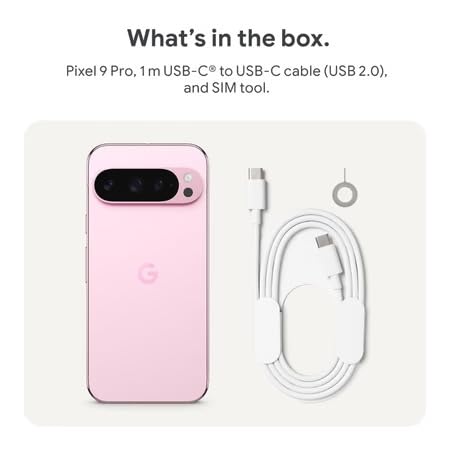
Figure 2: Included items in the Pixel 9 Pro packaging.
Disetél
1. Nyelapkeun Kartu SIM
- Locate the SIM tray on the side of your Pixel 9 Pro.
- Insert the provided SIM ejector tool into the small hole on the SIM tray and press gently until the tray pops out.
- Simpen kartu Nano-SIM anjeun kana baki kalayan kontak emasna malik ka handap. Pastikeun kartu éta dipasang kalayan leres.
- Dorong baki SIM deui kana alat sacara ati-ati dugi ka rata.
2. Ngecas Awal
Sateuacan nganggo heula, disarankeun pikeun ngeusi batre alat anjeun sapinuhna.
- Sambungkeun kabel USB-C ka port ngecas di handapeun telepon Anjeun.
- Connect the other end of the cable to a compatible USB power adapter (sold separately) and plug it into a power outlet.
- Ikon batré dina layar bakal nunjukkeun status ngecas.
3. Powering on / Pareum
- Pikeun Ngahurungkeun: Press and hold the Power button (located on the right side) until the Google logo appears on the screen.
- Pikeun mareuman: Pencét terus tahan tombol Daya, teras ketok 'Pareuman' dina layar.

Figure 3: Power and volume buttons on the side of the device.
4. Wizard Setup Mimiti-waktos
Upon powering on for the first time, follow the on-screen instructions to:
- Pilih basa sareng daérah anjeun.
- Nyambung ka jaringan Wi-Fi.
- Asup jeung akun Google Anjeun atawa jieun nu anyar.
- Set up security features such as fingerprint unlock, face unlock, PIN, pattern, or password.
- Mindahkeun data tina alat anu lami (opsional).
Parentah Operasi
Napigasi Dasar
- Gerak layar rampa: Interact with the device using taps, swipes, pinches (for zoom), and long presses.
- Layar Utama: Access your applications, widgets, and customize your layout.
- Bewara: Gesek ka handap ti luhur layar pikeun view bewara.
- Setélan gancang: Swipe down twice from the top of the screen to access quick settings toggles (Wi-Fi, Bluetooth, etc.).
Operasi kaméra
The Pixel 9 Pro features a powerful triple rear camera system.

Figure 4: Rear camera system of the Pixel 9 Pro.
- Buka kaméra: Tap the Camera app icon on your home screen or lock screen.
- Ngaganti Lénsa: Tap the icons on the viewfinder to switch between wide, ultrawide, and 5x telephoto lenses.
- Modeu shooting: Select from various modes such as Night Sight for low-light conditions, Astrofotografi for capturing stars, Makro for close-up shots, Paparan Panjang for creative effects, and Potrét for depth-of-field effects.
- Super Rés Zoom: Pinch the screen to digitally zoom up to 30x. For video, Super Res Zoom supports up to 20x.
- Pro Controls: Access advanced camera settings like shutter speed and manual focus for greater creative control.
Manajemén batré
- Mariksa Tingkat Batré: View persen batrétage in the status bar or in Settings > Battery.
- Panghemat Batré ekstrim: Enable this mode in Settings > Battery > Extreme Battery Saver to significantly extend battery life.
- Ngecas: Use the provided USB-C cable and a compatible power adapter for optimal charging speed.
Fitur Kaamanan
Your Pixel 9 Pro incorporates multiple hardware security layers to protect your data.
- Buka konci sidik: Register your fingerprints in Settings > Security & privacy > Device unlock.
- Muka konci: Setel pangenal raray pikeun muka konci anu merenah.
- PIN/Pola/Sandi: Always set a strong screen lock method.
- Apdet parangkat lunak: Regularly install system updates to ensure your device has the latest security patches.
Sénsor Suhu
The Pixel 9 Pro includes a thermometer for measuring temperature.
- Open the dedicated Thermometer app.
- Follow the on-screen instructions to measure body temperature or the temperature of objects.
- Temperature data can be saved and tracked within the Fitbit application.
Pangropéa
Ngabersihan Alat Anjeun
- Anggo lawon anu lemes sareng henteu buluan pikeun ngabersihkeun layar sareng awak telepon anjeun.
- Avoid using abrasive materials, harsh chemicals, or aerosol sprays.
- Do not submerge the device in water, despite its water-resistant rating.
Software Apdet
Google regularly releases software updates to improve performance, add features, and enhance security.
- To check for updates, go to Settings > System > System update.
- Ensure your device is connected to Wi-Fi and has sufficient battery charge before installing updates.
Perawatan Fisik
The Pixel 9 Pro is built with Corning Gorilla Glass Victus 2 and is water-resistant, offering durability against everyday drops and spills.
- While durable, avoid excessive impacts or drops to prevent damage.
- Consider using a screen protector and a protective case for additional safeguarding.
Pamérésan masalah
Alat Teu Ngabales
If your phone becomes unresponsive, perform a force restart:
- Pencét terus tahan tombol Daya salila kurang leuwih 10-15 detik nepi ka alat hurung deui.
Aplikasi nabrak atanapi katirisan
- Tutup aplikasi anu bermasalah sareng buka deui.
- Clear the app's cache: Go to Settings > Apps > See all apps > [App Name] > Storage & cache > Clear cache.
- Pastikeun aplikasi parantos diropéa kana vérsi pangénggalna ti Google Play Store.
- Balikan deui telepon anjeun.
Masalah Konektipitas Jaringan (Wi-Fi/Sélular)
- Toggle Wi-Fi or cellular data off and then back on.
- Balikan deui telepon anjeun.
- Pariksa yén kartu SIM anjeun parantos dipasang kalayan leres.
- Reset network settings: Go to Settings > System > Reset options > Reset Wi-Fi, mobile & Bluetooth.
Batré Draining Gancang
- Check battery usage in Settings > Battery to identify power-consuming apps.
- Kurangkeun kacaangan layar sareng durasi timeout layar.
- Disable unnecessary features like GPS, Bluetooth, and Wi-Fi when not in use.
- Enable Extreme Battery Saver mode.
Reset Pabrik (Resor Terakhir)
Warning: A factory reset will erase all data from your phone. Back up all important data before proceeding.
- Buka Setélan > Sistem > Pilihan reset > Hapus sadaya data (reset pabrik).
- Confirm your decision when prompted.
spésifikasi
| Fitur | Rincian |
|---|---|
| merek | |
| Modél | Pixel 9 Pro |
| Sistem operasi | Android 15 |
| Prosesor | Google Tensor G4 (3.1 GHz) |
| Ram | 16 GB |
| Panyimpenan internal | 256 GB |
| tampilan | 6.3 Inches LTPO OLED (Actua), 1280 x 2856 Pixels, 120 Hz Refresh Rate |
| Kaméra tukang | 50 MP wide + 48 MP ultrawide (Macro) + 48 MP 5x telephoto |
| Kaméra hareup | 42 MP |
| Kapasitas batré | 4700 Miliamp Hours (up to 24 hours average life) |
| Konektipitas | 5G, Wi-Fi 7, Bluetooth 5.3, NFC, UWB, USB-C |
| Kartu SIM | Single Nano SIM |
| Tahan cai | Tahan cai |
| Diménsi | 8 x 72 x 153 Milimeter |
| Beurat | 198 gram |
Garansi sareng Rojongan
Émbaran jaminan
Your Google Pixel 9 Pro 5G comes with a 1 Taun Produsén Garansi ti tanggal beuli. Garansi ieu nyertakeun cacad manufaktur dina panggunaan normal. Punten tahan bukti pameseran anjeun pikeun klaim garansi.
Rojongan Palanggan
For technical assistance, warranty claims, or other support inquiries, please contact Google customer service:
- Pabrikan: Google LLC, 1600 Amphitheatre Parkway, Gunung View, CA 94043, AS
- Phone Support (India): +91 7718892303
- Importer Contact (India): Nexora Axis Private Limited (+91 7718892303)
For the most up-to-date support information, please visit the official Google Pixel support websitus.