
Minuteman EN450G
Minuteman EN450G 450VA Standby UPS User Manual
Model: EN450G
1. Bubuka
This manual provides essential instructions for the safe and efficient operation of your Minuteman EN450G 450VA Standby Uninterruptible Power Supply (UPS). The EN450G is designed to provide reliable backup power and surge protection for various electronic devices, including gaming consoles, desktop PCs, home office equipment, and network devices. Please read this manual thoroughly before installation and use, and retain it for future reference.
2. Parentah Kasalametan penting
WARNING: To reduce the risk of electric shock, fire, or injury to persons, read all instructions before using this product.
- UPS ieu ngandung vol picilakaeuntages. Do not attempt to disassemble the unit. Servicing should be performed by qualified service personnel only.
- Entong nyambungkeun barang anu teu aya hubunganana sareng komputer sapertos alat médis, alat pangrojong kahirupan, oven microwave, atanapi pembersih vakum ka UPS.
- Ulah ngahalangan liang ventilasi. Pastikeun aliran hawa di sabudeureun unit cekap.
- Do not install the UPS in direct sunlight, near heat sources, or in areas with excessive dust, moisture, or flammable liquids.
- Connect the UPS to a properly grounded AC power outlet.
- The battery is hot-swappable. Exercise caution when replacing the battery. Refer to the Maintenance section for instructions.
- In case of emergency, press the power button to turn off the UPS and disconnect the power cord from the AC power outlet.
3. Produk Langkungview
The Minuteman EN450G UPS provides comprehensive power protection. Familiarize yourself with its components:
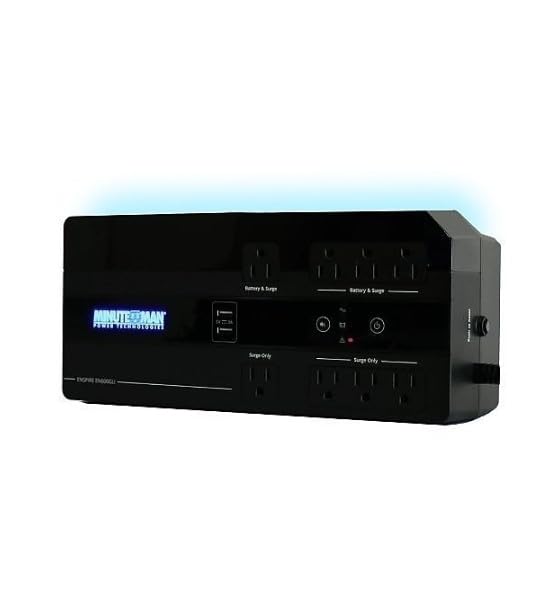
Gambar 1: Minuteman EN450G UPS Unit. This image displays the Minuteman EN450G UPS unit. The front panel features the 'Minuteman Power Technologies' logo, two USB charging ports, and control buttons. The top surface shows four 'Battery & Surge' protected outlets and four 'Surge Only' outlets, clearly labeled. The unit is black and designed for compact placement.
3.1 Fitur Panel hareup
- Tombol Daya: Ngahurungkeun atanapi mareuman UPS.
- Palabuhan Ngecas USB: Two ports for charging mobile devices.
- Indikator Status: LEDs indicating power status, battery status, and fault conditions.
3.2 Fitur Panel Rear
- Battery & Surge Outlets (x4): Provide battery backup power and surge protection for critical devices.
- Surge Only Outlets (x4): Provide surge protection only for non-critical devices.
- Input AC: Connects the UPS to the wall power outlet.
- Pamutus Sirkuit: Protéksi overload anu tiasa direset.
4. Setup jeung Instalasi
4.1 Ngabongkar bungkusan
Carefully unpack the UPS and inspect it for any shipping damage. If damage is found, do not operate the unit and contact your dealer.
4.2 Nempatkeun
The EN450G is designed for versatile placement:
- desktop: Teundeun unit dina permukaan datar anu stabil.
- Lantai: Position on the floor, ensuring ventilation is not obstructed.
- Tembok Gunung: The unit can be mounted on a wall using appropriate hardware (not included). Ensure the mounting surface can support the weight of the UPS.
Ensure the installation area is clean, dry, and has adequate ventilation. Avoid placing the UPS near heat-emitting appliances or in direct sunlight.
4.3 Nyambung kana Kakuatan
- Ensure the UPS is turned off.
- Plug the UPS power cord into a grounded 120V AC wall outlet.
- Allow the UPS to charge for at least 8 hours before initial use to ensure optimal battery runtime.
4.4 Nyambungkeun Alat
- Battery & Surge Protected Outlets: Connect critical devices such as your computer, monitor, router, or other essential electronics that require continuous power during outages.
- Outlet anu ngan naékna: Connect non-critical devices like printers, scanners, or desk lamps that only require surge protection.
CAUTION: Do not connect laser printers or shredders to the battery backup outlets, as their high power draw can overload the UPS.
5. Operasi
5.1 Ngahurungkeun/Pareuman UPS
- Pikeun Ngahurungkeun: Press and hold the power button for approximately 2 seconds until you hear a beep and the power indicator illuminates.
- Pareuman: Press and hold the power button for approximately 2 seconds until you hear a beep and the power indicator turns off.
5.2 Indikator Status
The front panel LEDs provide information about the UPS status:
- LED Héjo (Padet): UPS is operating normally, providing AC power.
- Green LED (Flashing) & Audible Alarm: UPS is operating on battery power during an outage.
- Red LED (Solid) & Audible Alarm: Battery low or fault condition. Refer to Troubleshooting.
5.3 Batré Runtime
The EN450G provides approximately 3 minutes of runtime at full load (450VA/255W) and 11 minutes at half load. Actual runtime may vary based on connected equipment and battery age.
6. Pangropéa
6.1 Ngagantian batré
The EN450G features a hot-swappable Sealed Lead Acid (SLA) battery, allowing replacement without interrupting power to connected devices. Batteries typically last 3-5 years depending on usage and environmental conditions. A flashing red LED or continuous alarm may indicate a need for battery replacement.
- Ensure the UPS is connected to AC power and operating normally.
- Locate the battery access panel (refer to product diagram if available).
- Carefully slide out the old battery pack.
- Insert the new, fully charged replacement battery pack, ensuring correct orientation.
- Secure the battery access panel.
- Allow the new battery to charge for 8-12 hours to reach full capacity.
WARNING: Use only approved replacement batteries. Improper battery replacement can result in fire or explosion. Dispose of old batteries properly at a recycling facility.
6.2 beberesih
Bersihkeun bagian luar UPS sacara berkala nganggo lawon anu lemes sareng garing. Entong nganggo pembersih cair atanapi aerosol. Pastikeun liang ventilasi tetep bébas tina lebu sareng kokotor.
7. Cara ngungkulan
This section addresses common issues you may encounter with the EN450G UPS. If a problem persists after attempting the solutions below, contact technical support.
| Masalah | Mungkin Cukang lantaranana | Solusi |
|---|---|---|
| UPS teu hurung. | Batré teu disambungkeun atawa discharged. Kabel listrik teu nyambung. | Pastikeun batréna disambungkeun sareng dicas kalayan leres. Verify power cord is securely plugged into wall outlet and UPS. |
| UPS beeps continuously or red LED is solid. | Battery low or fault condition. Overload on battery outlets. | Allow battery to charge. If problem persists, battery may need replacement. Disconnect non-essential devices from battery outlets. Check circuit breaker. |
| UPS sering beroperasi nganggo batré. | Unstable incoming AC power. UPS sensitivity setting (if applicable, though not specified for this model). | Check the quality of your incoming AC power. Consider connecting to a different outlet. |
| No power from surge-only outlets. | Pamutus sirkuit kasasar. | Press the circuit breaker reset button on the rear panel. Reduce load if necessary. |
8. Spésifikasi
| Fitur | Rincian |
|---|---|
| Modél | EN450G |
| Kapasitas | 450VA / 255W |
| Input / Kaluaran Voltage | 120V AC |
| Bentuk gelombang kaluaran | Simulasi Gelombang Sinus |
| Outlet | 4 x Battery & Surge Protected, 4 x Surge Only |
| Jenis Batré | Sealed Lead Acid (SLA), Hot-Swappable |
| Typical Runtime (Full Load) | Nepi ka 3 menit |
| Typical Runtime (Half Load) | Nepi ka 11 menit |
| Diménsi (D x W x H) | 12.8 x 5.7 x 4.1 inci (32.5 x 14.5 x 10.4 cm) |
| Beurat | 4.4 pon (2 kg) |
| Pilihan Pamasangan | Desktop, Floor, Wall Mount |
9. Émbaran jaminan
Please refer to the warranty card included with your product or visit the manufacturer's websitus pikeun istilah jeung kaayaan jaminan lengkep. Simpen bukti pameseran anjeun pikeun klaim garansi.
10. Rojongan Téknis
If you require technical assistance or have questions regarding your Minuteman EN450G UPS, please contact your dealer or the manufacturer's customer support. Have your model number (EN450G) and serial number ready when contacting support.
For more information, you may visit the official Minuteman websitus.