
1. Bubuka
Thank you for choosing the Rowenta Force Pro 500 Steam Generator Iron. This manual provides essential information for the safe and efficient use of your appliance. Please read all instructions carefully before first use and keep them for future reference.
2. Parentah Kasalametan penting
- Salawasna mastikeun voltage dituduhkeun dina alat pakait jeung vol mains Anjeuntage.
- Ulah ninggalkeun beusi unattended bari eta dihurungkeun atawa disambungkeun ka mains.
- Jauhkeun alat tina jangkauan barudak sareng jalma anu kakurangan kamampuan fisik, indrawi, atanapi mental.
- Entong neuleumkeun alat, kabel listrik, atanapi nyolok kana cai atanapi cairan sanésna.
- Do not operate the appliance if it has been dropped, if there are visible signs of damage, or if it is leaking.
- Always place the iron on a stable, flat, and heat-resistant surface.
- Cabut colokan alat tina stop kontak utama sateuacan ngeusian tangki cai, beberesih, atanapi ngalaksanakeun pangropéa naon waé.
- Tapak suku sareng uapna panas pisan sareng tiasa nyababkeun kaduruk. Ati-ati upami dianggo.
3. Komponén produk
Familiarize yourself with the main parts of your Rowenta Force Pro 500 steam generator iron:
- Unit beusi: Bagian handheld kalawan soleplate.
- Dasar generator uap: Houses the water tank and control panel.
- Tangki cai: tank removable pikeun ngeusian ku cai.
- Panél kontrol: Buttons for power, Eco mode, Max mode, and Anti-calc.
- Selang uap: Nyambungkeun unit beusi kana dasar generator uap.
- Kolektor Kalkulator: Removable part for collecting limescale.
- Sistem ngonci: Secures the iron unit to the base for transport and storage.
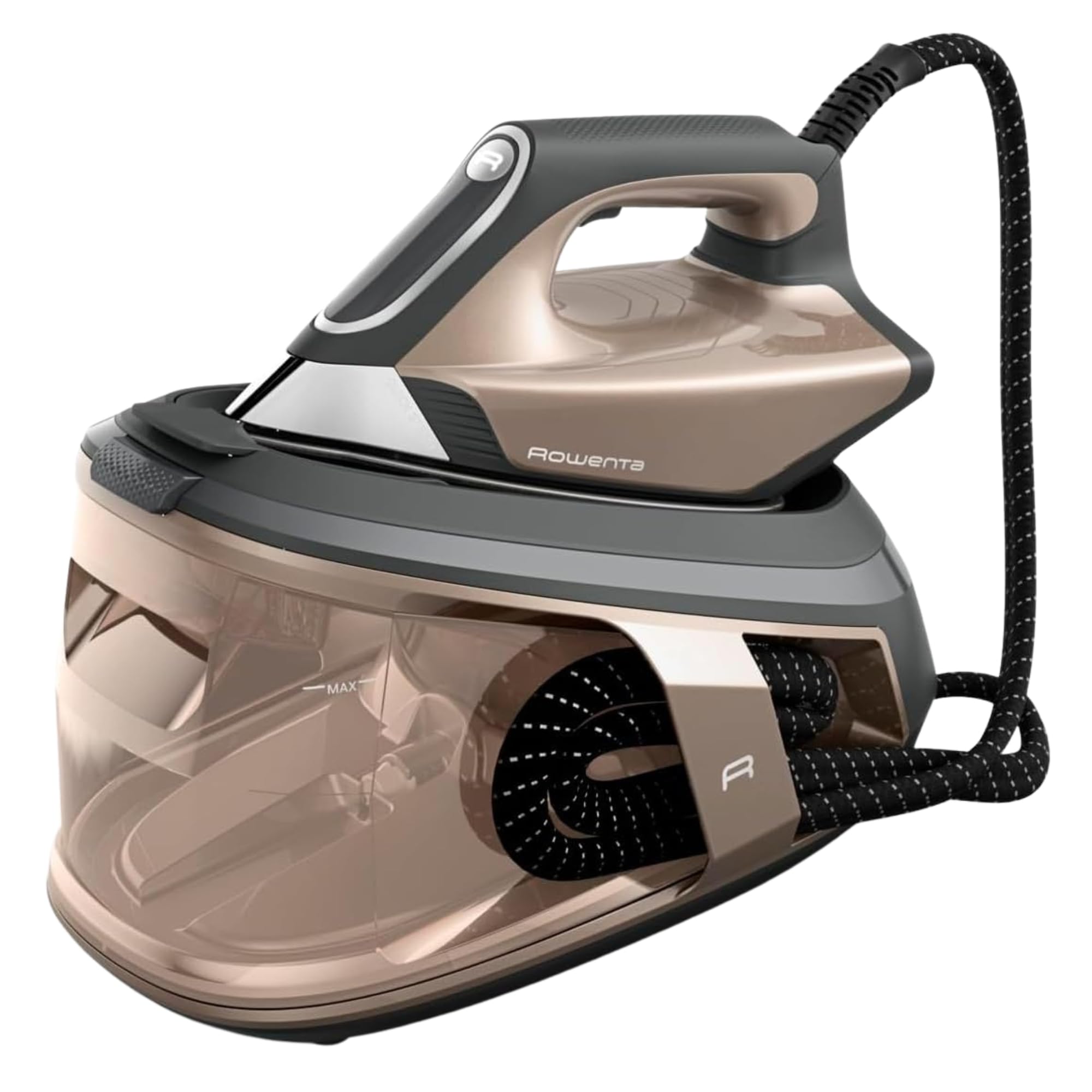
Gambar 1: Leuwihview of the Rowenta Force Pro 500 Steam Generator Iron.

Figure 2: Illustration of the removable water tank.
4. Setup jeung pamakéan munggaran
- Ngabongkar bungkusan: Taliti miceun sadaya bahan bungkusan sareng pastikeun sadaya komponén aya.
- Posisi: Place the steam generator base on a stable, flat, and heat-resistant surface.
- Ngeusian Tangki Cai:
- Cabut bak cai tina dasarna.
- Fill the tank with tap water up to the 'MAX' level indicator. Do not use distilled or demineralized water exclusively, as it can affect steam performance.
- Pasangkeun deui tangki cai pageuh kana dasarna dugi ka ngaklik kana tempatna.
- Nyambungkeun ka Daya: Colokkeun kabel listrik kana stop kontak listrik grounded.
- Persiapan pamakéan munggaran: Before ironing garments, allow the iron to heat up completely. Press the steam trigger a few times to prime the system and release any initial impurities.
5. Parentah Operasi
5.1 Ngahurungkeun sareng Pemanasan
Press the power button on the control panel. The indicator light will flash while the appliance heats up. Once the light becomes steady, the iron is ready for use.
5.2 Selecting Ironing Modes
The Rowenta Force Pro 500 features two primary ironing modes:
- Mode Eco: For energy-efficient ironing of most fabrics. This mode saves up to 50% energy while still providing effective steam.
- Modeu MAX: For stubborn creases and thicker fabrics, providing maximum steam output (550 g/minute steam boost).
Select your desired mode directly from the control panel. The iron automatically adjusts the temperature, eliminating the need for manual temperature settings.

Figure 3: Eco mode for energy saving.

Figure 4: Control panel showing Eco and Max mode selection.
5.3 Steam Generation (Quicksteam Technology)
The Quicksteam technology provides instant steam on demand. Press the steam trigger located under the iron handle to activate continuous steam. For a powerful steam boost, press the trigger firmly.

Figure 5: Iron in use, demonstrating powerful steam output.

Figure 6: Visual representation of instant steam on demand.
5.4 Distribusi Uap Optimal
The soleplate features 400 active micro-holes designed for maximum and even steam distribution, ensuring efficient wrinkle removal.

Figure 7: Close-up of the soleplate demonstrating steam distribution.
5.5 Ngukus nangtung
The powerful steam output allows for vertical steaming of hanging garments, curtains, and delicate fabrics. Hold the iron a few centimeters away from the fabric and press the steam trigger.
5.6 Panyimpenan jeung Angkutan
After use, allow the iron to cool down completely. Secure the iron unit to the base using the locking system. The integrated cable management system allows for easy storage of the power cord and steam hose.
6. Pangropéa jeung beberesih
6.1 Descaling (Calc Collector)
The integrated Calc Collector ensures long-lasting steam performance by capturing limescale. Regularly clean the Calc Collector:
- Pastikeun alatna dicabut sareng tiis lengkep.
- Locate the Calc Collector on the steam generator base.
- Pulas sareng tarik kaluar kolektor.
- Rinse the collector under running water to remove any limescale deposits.
- Reinsert the clean Calc Collector firmly until it locks into place.
Figure 8: Location of the Calc Collector on the control panel.
6.2 Ngabersihkeun Soleplate
To maintain optimal glide and performance, clean the soleplate regularly:
- Pastikeun yén beusi geus unplugged tur tiis.
- Usap soleplate nganggo iklanamp cloth. For stubborn marks, use a specialized soleplate cleaning stick (available separately) according to its instructions.
- Do not use abrasive cleaners or metallic scouring pads, as these can damage the soleplate.

Gambar 9: Kelample of cleaning the iron's soleplate.
6.3 Ngosongkeun Tangki Cai
It is recommended to empty the water tank after each use to prevent limescale buildup and ensure hygiene.
7. Cara ngungkulan
| Masalah | Mungkin Cukang lantaranana | Solusi |
|---|---|---|
| Taya uap dihasilkeun. | Tangki cai kosong. Alat henteu dipanaskeun. Pemicu uap teu dipencet. | Fill the water tank. Wait for the indicator light to become steady. Press the steam trigger. |
| Water droplets or brown stains appear on fabric. | Limescale buildup. Iron not hot enough. | Clean the Calc Collector. Allow the iron to heat up completely before use. |
| Iron is not heating. | Teu acan dicolokkeun. Tombol daya teu acan dipencet. | Check power connection. Press the power button. |
| Reduced steam output. | Limescale buildup. Water tank low. | Clean the Calc Collector. Refill the water tank. |
Lamun masalah persists sanggeus nyobian solusi ieu, mangga ngahubungan rojongan customer.
8. Spésifikasi Téknis
- model: VR9033F0
- Tekanan: 7.5 bar
- Naekeun uap: Nepi ka 550 g / menit
- Kaluaran uap kontinyu: Approx. 120-140 g/minute
- Daya (Wattage): 2800 Watt
- Kapasitas Tangki Cai: Approx. 1.5-1.8 Liters
- Bahan Soleplate: Beusi sténless
- Ukuran produk (L x W x H): 38.5 x 29 x 34 cm
- Beurat produk: 3.4 kg
- Voltage: 220V
- Fitur husus: Quicksteam Technology, Eco Mode, Max Mode, Calc Collector.

Gambar 10: Dimensi produk.
9. Garansi sarta Rojongan Palanggan
Rowenta is committed to product quality and durability. This product is designed for long-term use, with a focus on reparability.
- Reparability: Rowenta offers 15 years of reparability at a fair price, supported by a network of 6200 repair centers worldwide. This commitment aims to extend the product's lifespan and reduce waste.
- Palayanan palanggan: For any questions, technical assistance, or warranty claims, please refer to the official Rowenta websitus atanapi hubungi pusat layanan palanggan lokal anjeun.
- Sumberdaya Online: Nganjang ka resmi Toko Merek Rowenta pikeun émbaran produk tambahan sarta rojongan.