
1. Bubuka
The ATTACK SHARK R85 HE is a high-performance 75% wired gaming keyboard featuring magnetic switches, designed for precision and responsiveness. This manual provides detailed instructions for setting up, operating, and maintaining your keyboard.

Image 1: ATTACK SHARK R85 HE Magnetic Switch Gaming Keyboard.
Fitur konci:
- Ultra-Low Latency & Unrivaled Precision: Equipped with a high-frequency gaming chip, offering an 8000Hz polling rate and 0.005mm trigger accuracy.
- 16.8 Million Color RGB Lighting & Unique Light Bar: South-facing LEDs provide vibrant, uniform lighting. Features 19 built-in light effects and 6 light bar modes.
- ATTACK SHARK Purple Magnetic Switches: High-performance magnetic switches designed for professional e-sports, offering brighter RGB, improved structural stability, faster rebound, and smoother typing.
- 5-Layer Sound DampSistim ening: Advanced design with PE foam, IXPE pads, PET acoustic layers, and silicone bottom coating for pure, clear switch acoustics.
- Comprehensive Professional Software: Fully programmable via dedicated software, including Rapid Trigger (RT), Dynamic Keystroke (DKS), Mod-Tap (MT), and Toggle Key (TGL) functions.
- Compact 75% Layout with Aluminum Plate: Optimizes space while retaining F1-F10 keys. Aluminum positioning plate enhances structure and stability.
- Dual-Level Adjustable Support & Durable PBT Keycaps: Adjustable feet for ergonomic comfort. Double-shot PBT keycaps offer durability and resistance to wear.
- Hot-Swappable Magnetic Switches: Easily change or mix high-performance magnetic switches. Each key can be individually adjusted for a personalized actuation point.
2. Eusi Paket
Punten parios yén sadaya barang aya dina pakét:
- 1 x R85 HE Keyboard
- 1 x Keycap Puller
- 1 x Panutup Lebu
- 1 x C01ULTRA Cable
- 1 x Manual Pamaké
- 2 x "ATTACK SHARK" Stickers
- 1 x Ribbon
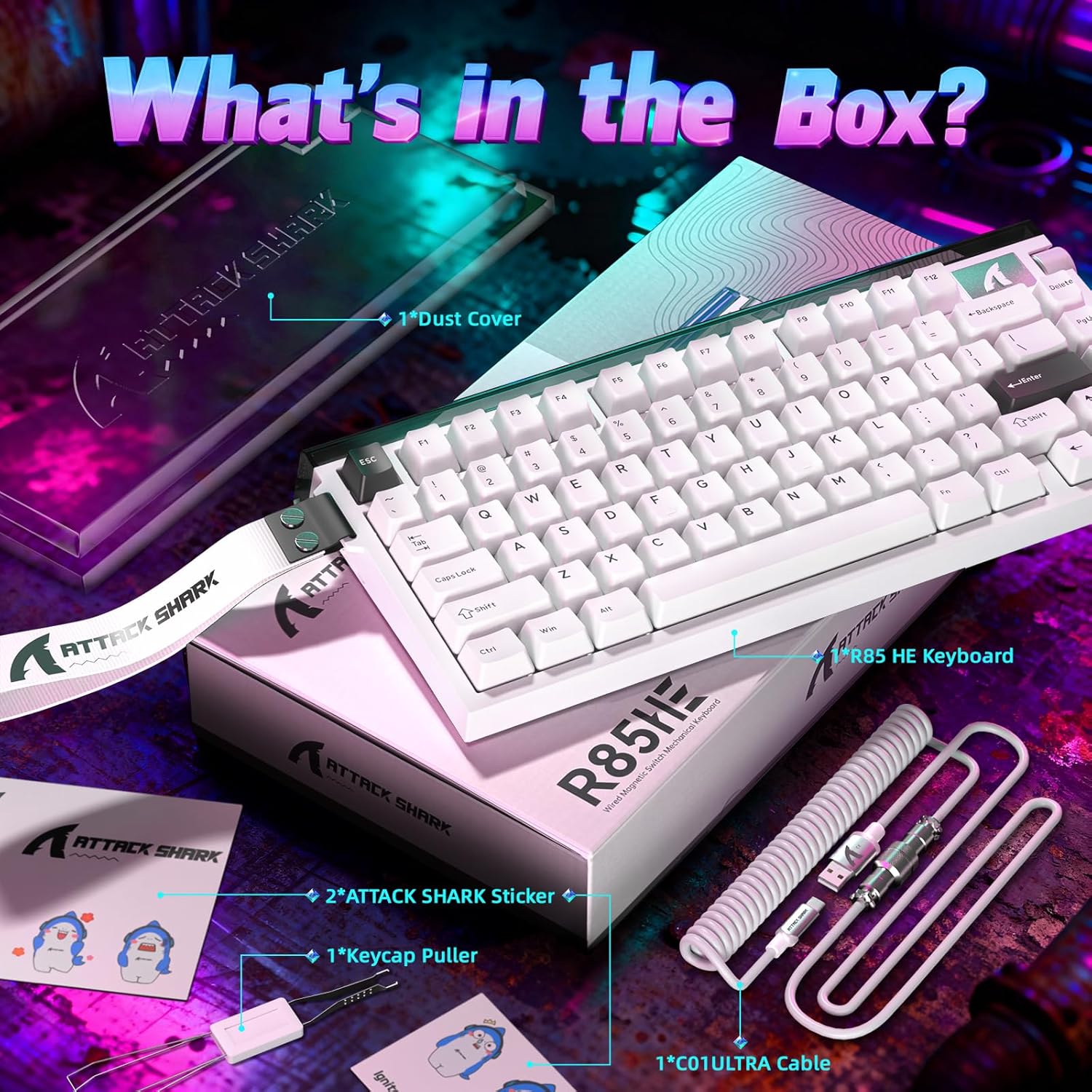
Image 2: All items included in the ATTACK SHARK R85 HE keyboard package.
3. Parentah Setup
Follow these steps to set up your ATTACK SHARK R85 HE keyboard:
- Buka bungkus kibor: Cabut keyboard sareng sadaya asesoris sacara saksama tina bungkusan.
- Sambungkeun kabel: Insert the USB-C end of the provided C01ULTRA cable into the USB-C port on the keyboard. Connect the other end (USB-A or USB-C, depending on your cable variant) to an available USB port on your computer.
- Power-on mimiti: The keyboard will automatically power on and its RGB lighting will illuminate. Your computer should recognize the device without additional drivers for basic functionality.
- Pasang Parangkat Lunak (Opsional tapi Disarankeun): For full customization and advanced features, download the dedicated software from qmk.top.

Image 3: The C01ULTRA cable, featuring 8000 Polling Rate, Colorful LED, and Type-C connectivity.
4. Parentah Operasi
Keyboard Layout and Function Keys:
The R85 HE features a 75% QWERTY layout with 79 keys and a scroll wheel. Many functions are accessible via the FN key combined with other keys.
Potong kompas keyboard:
- FN + \|: Robah mode cahaya
- FN + C: Enable/disable case lighting
- FN + ↑: Ningkatkeun kacaangan
- FN + ↓: Turunkeun kacaangan
- Additional shortcuts can be found in the software.
Kontrol Lampu RGB:
The keyboard offers extensive RGB customization. Use the FN key shortcuts or the dedicated software to adjust lighting effects, colors, and brightness for both the key backlighting and the unique light bar.
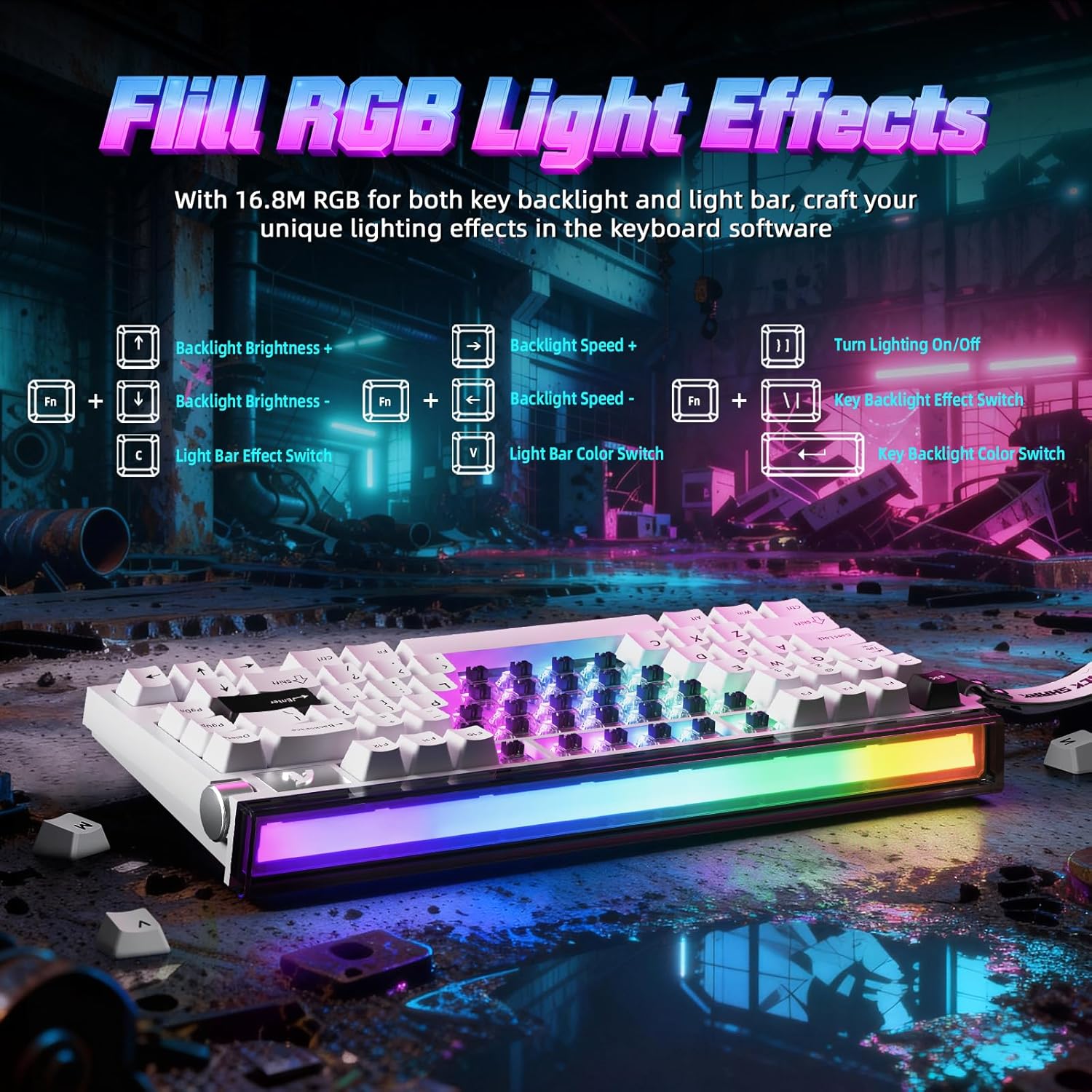
Image 4: FN key combinations for controlling backlight brightness, speed, and color, as well as light bar effects.
Kustomisasi parangkat lunak:
The ATTACK SHARK R85 HE is fully programmable through its dedicated software, available at qmk.top. The software allows you to:
- Customize individual key functions.
- Saluyukeun épék cahaya RGB sareng warna.
- Configure advanced gaming features like Rapid Trigger (RT), Dynamic Keystroke (DKS), Mod-Tap (MT), and Toggle Key (TGL).
- Set personalized actuation points for magnetic switches.

Gambar 5: Leuwihview of the multi-functional software interface for keyboard customization.
Magnetic Switches and Key Customization:
The R85 HE features ATTACK SHARK Purple Magnetic Switches, which are hot-swappable. This allows for easy replacement or mixing of switches. The software enables precise adjustment of the actuation point for each key, ranging from 0.1mm to 3.3mm, with a sensitivity of 0.005mm.

Gambar 6: Detil view of the magnetic switch, showing its components and specifications like start force, end force, sensitivity, and actuation range.
5. Design and Construction
5-Layer Sound DampSistim ening:
The keyboard incorporates a sophisticated 5-layer sound dampening system to optimize acoustics. This system includes PE foam, IXPE pads, PET acoustic layers, and a silicone bottom coating, ensuring a pure and clear sound profile from the magnetic switches.
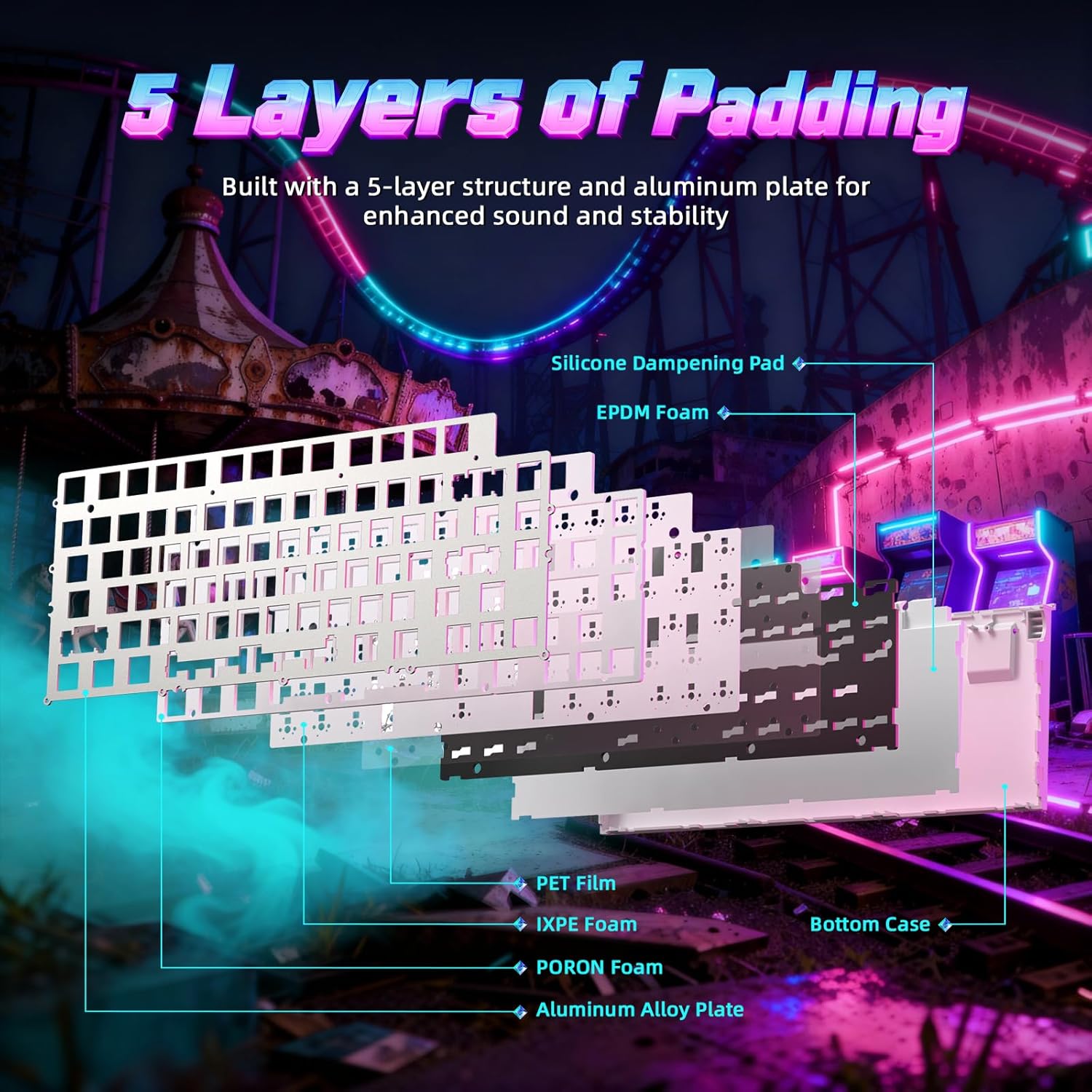
Gambar 7: Ngabeledug view of the keyboard's internal structure, highlighting the 5 layers of padding for sound dampening and stability.
Aluminum Plate and PBT Keycaps:
The R85 HE features an aluminum positioning plate for enhanced structural integrity and stability. The keycaps are made from durable double-shot PBT material, which resists wear and shine over time, providing a consistent typing feel.
Adjustable Support:
The keyboard includes dual-level adjustable feet, allowing you to set the optimal typing or gaming angle for comfort.
6. Pangropéa
To ensure the longevity and optimal performance of your ATTACK SHARK R85 HE keyboard, follow these maintenance guidelines:
- beberesih: Regularly clean the keyboard with a soft, dry cloth. For dust and debris between keycaps, use compressed air. For stubborn dirt, you may carefully remove keycaps using the provided keycap puller and clean the switches and plate.
- Panggantian Keycap sareng Switch: The hot-swappable design allows for easy replacement of keycaps and magnetic switches. Use the provided keycap puller and switch puller (if included) to carefully remove and install components. Ensure proper alignment when reinserting switches.
- Perawatan kabel: Avoid sharp bends or excessive pulling on the C01ULTRA cable to prevent damage.
7. Cara ngungkulan
If you encounter issues with your keyboard, refer to the following common troubleshooting steps:
- Keyboard Teu Ngabales:
- Pastikeun kabel USB-C disambungkeun sacara aman ka kibor sareng komputer Anjeun.
- Coba sambungkeun kibor ka port USB anu béda dina komputer anjeun.
- Nguji keyboard dina komputer sejen pikeun ngaluarkeun masalah husus sistem.
- Lampu RGB Teu Gawé:
- Check if the lighting is turned off using the FN+C shortcut.
- Adjust brightness using FN+↑/↓.
- Ensure the keyboard software is installed and updated, and check lighting settings within the software.
- Konci Henteu Ngadaptar atanapi Ngetik Ganda:
- This can sometimes be resolved by cleaning the switch or replacing the affected magnetic switch.
- Check the actuation point settings in the software; a very low actuation point might cause unintended triggers.
- Parangkat Lunak Henteu Ngadeteksi Kibor:
- Ensure the software is the correct version for your R85 HE model.
- Pareuman terus hurungkeun deui komputer sareng parangkat lunakna.
- Temporarily disable any antivirus or firewall software that might be blocking the connection.
8. Spésifikasi
| Fitur | Rincian |
|---|---|
| merek | SERANG HIU |
| Modél | R85 anjeunna |
| Téhnologi konektipitas | USB-C (Kabel) |
| Katerangan kibor | Kaulinan |
| Fitur husus | Érgonomis |
| Warna | Starlight White (Blanc étoilé) |
| Dukungan Warna Lampu Latar Kibor | RGB |
| Bahan | Plastic (Internal), Aluminum (Plate) |
| Pindah Tipe | Linear Magnetic Switches |
| Tata perenah kibor | QWERTY (79 keys + scroll wheel) |
| Sistem Operasi cocog | Windows, Mac |
| Laju Polling | 8000Hz |
| Akurasi RT | 0.005 mm |
| Rentang Aktuasi | 0.1-3.3mm |
| Bahan Keycap | PBT (Double Injection) |
| GTIN | 752010861071 |
9. Garansi jeung Rojongan
Inpormasi Garansi:
The ATTACK SHARK R85 HE keyboard comes with a one-year warranty against manufacturing defects. Please retain your proof of purchase for warranty claims.
Bantosan Téknis:
For further assistance, software downloads, or advanced configurations, please visit the official software websitus: qmk.top.