
1. Bubuka
Thank you for choosing the JeeBer VB619 1080P No WiFi Video Baby Monitor. This manual provides detailed instructions for the safe and effective use of your new baby monitor. Please read this manual thoroughly before operation and retain it for future reference. This monitor is designed to provide clear video and audio surveillance of your baby, ensuring peace of mind with its secure, non-Wi-Fi connection.
2. Eusi Paket
Ensure all items are present in the package. If any items are missing or damaged, please contact customer support.
- Baby Monitor Unit (Parent Unit)
- Baby Camera Unit (Baby Unit)
- Charging Cable (x2, one for each unit)
- Pitunjuk Pitunjuk (Dokumén ieu)
3. Produk Langkungview
The JeeBer VB619 baby monitor system consists of a parent unit with a 5-inch 1080P IPS display and a baby unit (camera). It features a secure FHSS wireless connection, eliminating the need for Wi-Fi.

Gambar 3.1: Leuwihview of the JeeBer VB619 Baby Monitor system, showing the parent unit (monitor) and the baby unit (camera) with a baby in the background. Key features like 5-inch IPS screen, VOX mode, 1080P HD clarity, FHSS encrypted transmission, no WiFi, 4 camera support, two-way audio, 3x zoom, fixed view with digital pan, 8-meter HD night vision, temperature monitoring, feeding reminder, and lullabies are highlighted.

Gambar 3.2: The JeeBer baby monitor highlighting its "No WiFi Required" feature, emphasizing privacy protection through FHSS technology.
3.1 Parent Unit (Monitor) Features:
- 5-inch 1080P IPS Display: Provides a clear, wide-angle view tina orok anjeun.
- Obrolan Dua Arah: Communicate with your baby remotely.
- Modeu VOX: Voice-activated screen for power saving.
- Pangimeutan Suhu: Displays real-time room temperature.
- Lullabies: Built-in soothing melodies.
- 3X Digital Zoom: Gedékeun view pikeun pamariksaan anu langkung caket.
- Bisa dilegakeun: Supports up to four cameras (sold separately).
- Batré 3050 mAh: Long-lasting power for continuous monitoring.
3.2 Baby Unit (Camera) Features:
- Pidéo HD 1080P: Ngarekam pidéo definisi luhur.
- Visi Peuting Anu Jelas: 10 invisible infrared LEDs for clear images in darkness.
- Sénsor Suhu: Ngadeteksi suhu kamar.
- Mikropon & Spiker: Pikeun komunikasi audio dua arah.
4. Setélan
Follow these steps for initial setup of your baby monitor system.
- Ngecas Unit Induk: Connect the charging cable to the parent unit and a power outlet. Charge fully before first use.
- Hurungkeun Unit Orok: Connect the charging cable to the baby unit and a power outlet. The camera requires continuous power to operate.
- Position the Baby Unit: Place the baby unit (camera) in a secure location in your baby's room, ensuring a clear view of the crib. Keep it at least 3 feet (1 meter) away from the crib to prevent entanglement hazards.
- Daya Hurung: Turn on both the parent unit and the baby unit. The units are pre-paired at the factory and should automatically connect.
- Test Sambungan: Verify that you can see and hear your baby through the parent unit. Adjust the camera angle as needed.

Gambar 4.1: A woman in a kitchen observing her baby on the 5-inch 1080P IPS Eye-Care Display of the JeeBer baby monitor. The image emphasizes the clear view ti sudut mana wae.
5. Parentah Operasi
5.1 Operasi Dasar
- Hurungkeun/Pareuman: Pencét jeung tahan tombol daya dina unit indungna.
- Kontrol volume: Use the dedicated volume buttons on the parent unit to adjust audio levels.
- Kontrol kacaangan: Adjust screen brightness via the menu settings.
5.2 VOX Mode (Voice-Activated Screen)
VOX mode conserves battery life by turning off the screen when no sound is detected from the baby unit. The screen automatically reactivates when sound is detected.
- Activate/Deactivate VOX: Access the menu on the parent unit and select the VOX option to turn it on or off.
- Sensitipitas VOX: Adjust the sensitivity level in the menu to determine how loud a sound needs to be to activate the screen.

Gambar 5.1: A visual comparison demonstrating the enhanced clarity of JeeBer's night vision, powered by 10 infrared LED bulbs, compared to another brand's night vision.

Gambar 5.2: An image depicting a baby sleeping peacefully, with musical notes floating around, symbolizing the 8 soothing lullabies feature designed to aid healthy sleep habits.
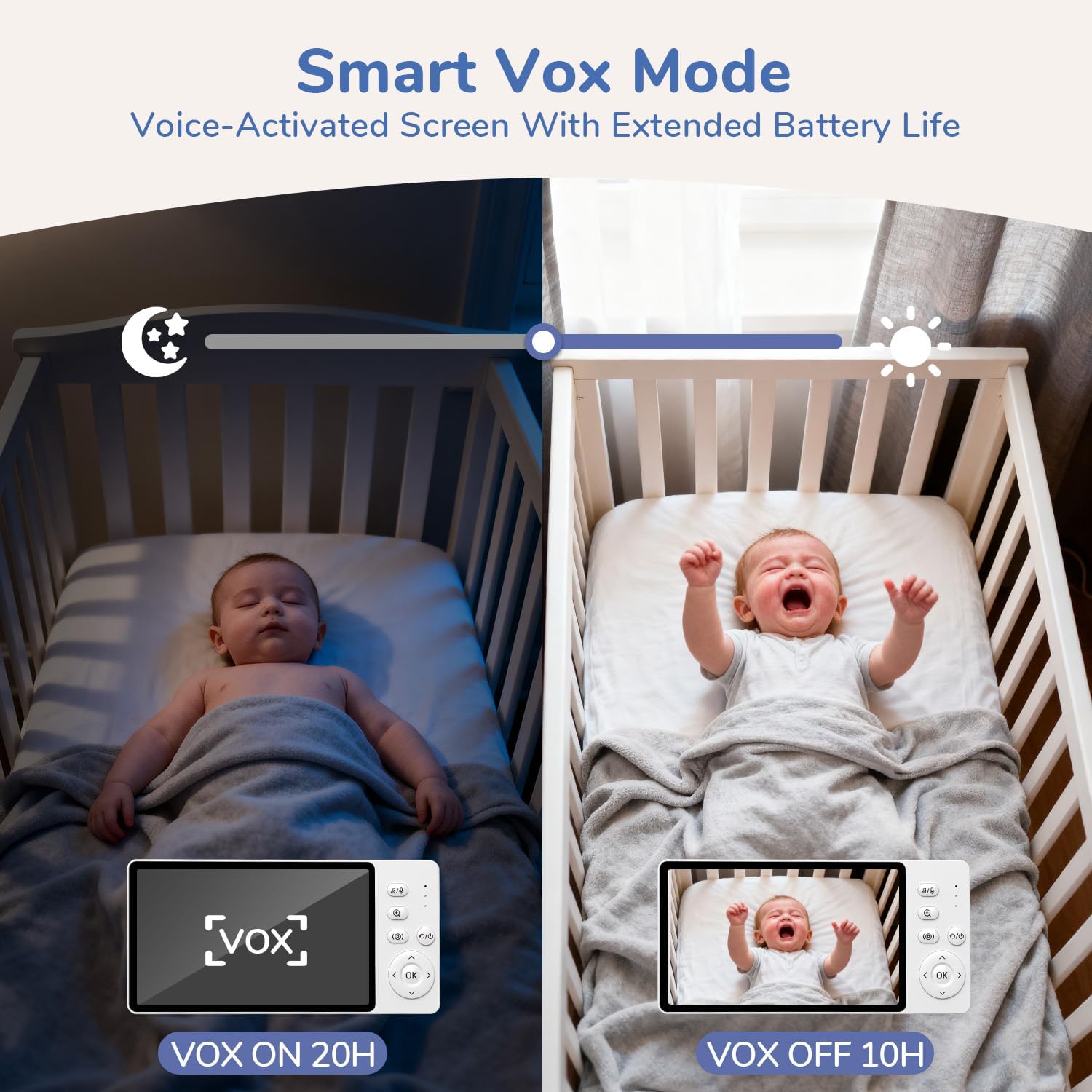
Gambar 5.3: This image illustrates the Smart VOX Mode, showing the monitor screen off when the baby is sleeping (VOX ON, 20H battery life) and the screen on when the baby is crying (VOX OFF, 10H battery life), highlighting its voice-activated screen and extended battery life.
5.3 Obrolan Dua Arah
To speak to your baby, press and hold the "Talk" button on the parent unit. Release the button to hear your baby.

Gambar 5.4: A woman in a kitchen using the two-way noise-canceling call feature of the JeeBer baby monitor to communicate with her baby in the crib, with speech bubbles indicating "I hear you, my love." and "Ah-goo... ba-ba...".
5.4 Pupuh
Access the lullaby menu on the parent unit to select and play soothing melodies for your baby. You can choose from 8 built-in lullabies.
5.5 Digital ngazum
Press the zoom button on the parent unit to digitally zoom in on the video feed (up to 3X). Press again to zoom out.
5.6 Visi Peuting
The baby unit automatically activates its infrared night vision in low-light conditions, providing a clear black and white image of your baby without disturbing red lights.
5.7 Pangimeutan Suhu
The parent unit displays the real-time temperature of your baby's room, detected by the baby unit's sensor.

Gambar 5.5: An image showing the precise temperature monitoring feature of the JeeBer baby monitor, displaying "28.8°C" on the screen while a parent interacts with a baby. This highlights scientific care powered by accurate temperature readings.
5.8 Adding/Managing Cameras (Optional)
Your monitor supports up to four cameras. To add additional cameras, refer to the "Camera Pairing" section in the menu settings on your parent unit.
6. Pangropéa
- beberesih: Use a soft, dry cloth to clean the surfaces of both units. Do not use abrasive cleaners or solvents.
- Perawatan lensa: Gently wipe the camera lens with a lens cleaning cloth if it becomes dirty.
- Panyimpenan: If storing the monitor for an extended period, ensure both units are fully charged and then powered off. Store in a cool, dry place.
7. Cara ngungkulan
| Masalah | Solusi anu mungkin |
|---|---|
| Henteu aya gambar / sora dina unit indungna. |
|
| Kualitas gambar henteu saé. |
|
| hirup batré pondok. |
|
| Interference/Static. |
|
8. Spésifikasi
| Fitur | Rincian |
|---|---|
| Ngaran modél | VB619 |
| Pamakéan jero rohangan / outdoor | jero rohangan |
| Sumber Daya | Didukung ku Batré (Unit Induk), Didukung ku AC (Unit Orok) |
| Téhnologi konektipitas | Wireless (FHSS) |
| Resolusi Capture Video | 1080 p |
| Paparan Unit indungna | 5 inci IPS LCD |
| Fitur husus | 2-Way Audio, Cry Detection (VOX), HD Resolution, Night Vision, Temperature Monitoring, Lullabies, 3X Zoom |
| Ukuran barang (L x W x H) | 2.6 x 4.33 x 5.91 inci |
| Item Beurat | 1.23 pon |
| Batré | 1 C battery required (included for parent unit) |
9. Garansi jeung Rojongan
JeeBer offers a 90 poé bebas kawijakan balik jeung a garansi 2 taun for this product. For any questions, technical assistance, or warranty claims, please contact JeeBer customer service.
Our dedicated customer service team is available to provide one-on-one support. Please refer to the contact information provided with your purchase or visit the official JeeBer websitus pikeun detil rojongan.