
1. Bubuka
Hatur nuhun pikeun meuliasing the DEPSTECH DS620-TL Triple Lens Endoscope Camera. This device is designed for visual inspection in hard-to-reach areas, featuring a 1080P triple-lens camera, a 5-inch IPS monitor, and an IP67 waterproof semi-rigid cable. This manual provides essential information for safe and effective use of your endoscope camera.
2. Produk Langkungview
2.1 Fitur konci
- 1080P Triple Lens Camera: Equipped with three cameras (front, side B, side C) for multi-angle inspection.
- 5-inch IPS Monitor: Provides clear, real-time images with excellent color reproduction.
- IP67 Waterproof Probe: The 7.9mm diameter semi-rigid cable is waterproof, suitable for wet environments.
- Lampu LED anu tiasa diatur: Features 8+1+1 high-brightness LED chips with adjustable intensity for optimal illumination.
- 5M Semi-Rigid Cable: Offers flexibility and durability for navigating various spaces.
- Batré anu tiasa dicas deui: Built-in battery provides approximately 2-3 hours of continuous operation.
2.2 Eusi pakét
Pastikeun sadaya item aya dina bungkusan:
- DEPSTECH DS620-TL Endoscope Camera
- Kabel Ngecas Tipe-C
- Hook and Magnet Attachments
- Storage Drawstring Bag
- Manual pamaké

Angka 2.2: Kaasup asesoris sareng unit utama.
3. Émbaran Kasalametan
- Ulah dianggo alat ieu dina lingkungan anu aya gas anu gampang kaduruk atanapi ngabeledug.
- Jauhkeun alat tina médan éléktromagnétik anu kuat.
- Avoid direct exposure of the camera lens to strong light sources.
- Ulah nyobian ngabongkar atawa ngaropéa alat. Perbaikan ngan kedah dilakukeun ku tanaga anu otorisasi.
- Ensure the device is fully charged before use to avoid interruptions during inspection.
- Clean the probe and lens after each use, especially after contact with liquids or corrosive substances.
4. Setélan
4.1 Ngecas Alat
Connect the provided Type-C charging cable to the device's charging port and a suitable USB power adapter (not included). The charging indicator will show the charging status. A full charge typically takes 2-3 hours.
4.2 Nyelapkeun Kartu Micro SD
To save photos and videos, a Micro SD card (Class 10/Class 10 or higher, 8-32GB) is required (not included). Locate the Micro SD card slot on the side of the monitor unit and insert the card until it clicks into place.
4.3 Ngalampirkeun Asesoris
The endoscope comes with hook and magnet attachments. These can be screwed onto the tip of the camera probe for retrieving small objects or maneuvering in tight spaces.

Figure 4.3: Magnet and hook attachments for the probe.
5. Parentah Operasi
5.1 Powering on / Pareum
Press and hold the power button (usually located on the side or front panel) for a few seconds to turn the device on. The screen will display the DEPSTECH logo. To power off, press and hold the power button again.

Figure 5.1: Monitor button layout and functions.
5.2 Switching Lenses
The DS620-TL features a triple-lens system. Press the lens switch button (often labeled with a camera icon or 'M') to cycle between Front Camera A, Side Camera B, and Side Camera C. This allows for comprehensive viewing without repositioning the probe.

Figure 5.2: Triple lens camera detail.
5.3 Nyaluyukeun Kacaangan LED
Use the up/down arrow buttons on the monitor to adjust the brightness of the LED lights on the camera probe. There are multiple levels of brightness to suit different inspection environments.
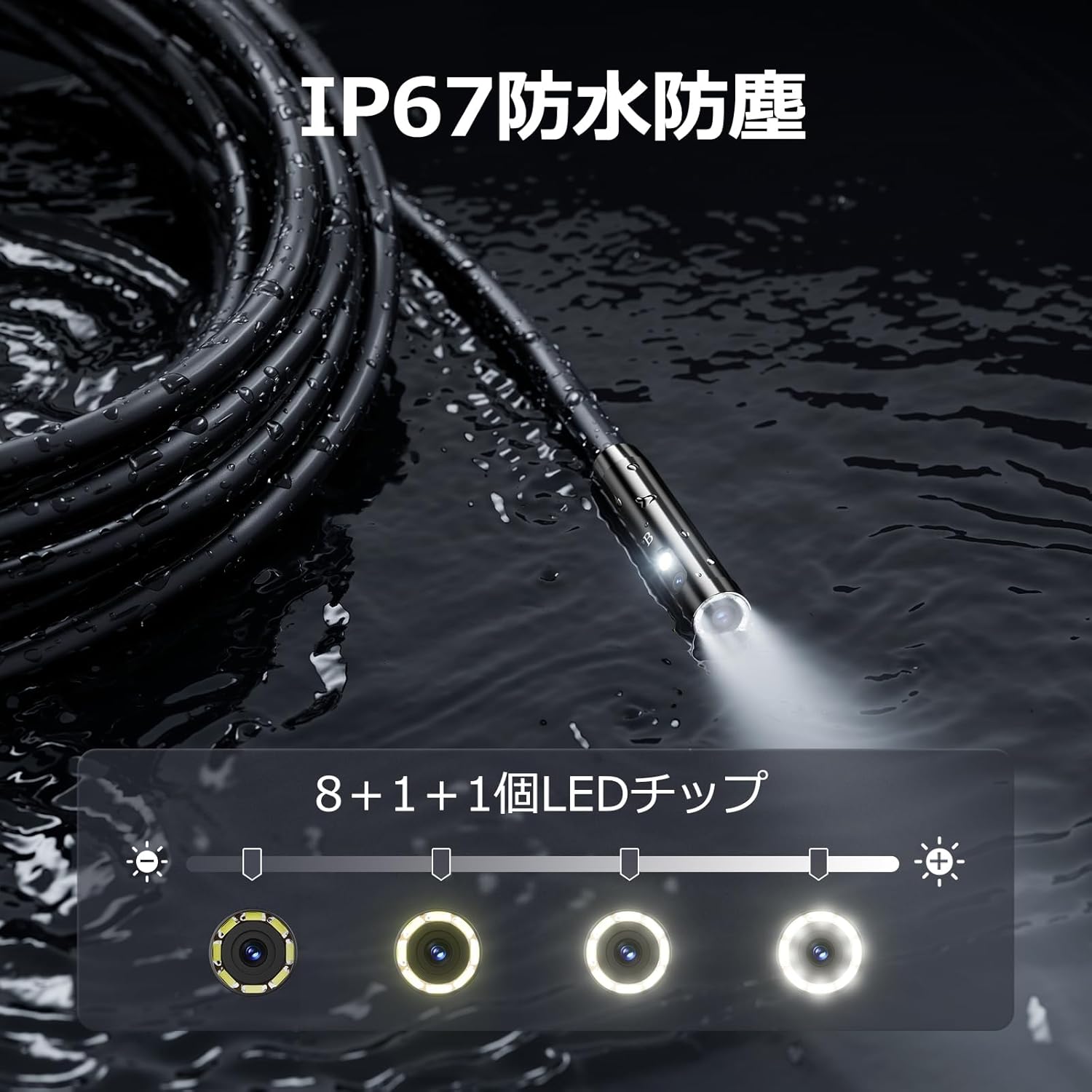
Figure 5.3: IP67 waterproof probe with adjustable LED illumination.
5.4 Taking Photos and Recording Videos
Press the photo/video button (usually a camera icon) to capture a still image. To record video, press and hold the photo/video button; press again to stop recording. Ensure a Micro SD card is inserted to save your media.

Figure 5.4: Monitor interface for photo and video capture.
5.5 Rotasi layar
Press the screen rotation button (often a circular arrow icon) to rotate the image on the monitor by 180 degrees. This is useful when the probe is in an inverted position.
5.6 Practical Applications
The DS620-TL is suitable for various tasks including home appliance maintenance, pipe inspection, wall wiring checks, and automotive repairs.

Figure 5.6: Various inspection scenarios for the endoscope.
5.7 Video Demonstrasi Produk
Video 5.7: A demonstration of the DEPSTECH DS620-TL endoscope camera in use, showcasing fitur sareng aplikasi na.
6. Pangropéa
6.1 Ngabersihkeun Probe sareng Lénsa
After each use, especially in dirty or wet conditions, gently wipe the camera probe and lens with a soft, dry cloth. For stubborn dirt, a slightly damp cloth can be used, followed by drying. Do not use abrasive cleaners or solvents.
6.2 Panyimpenan
Store the endoscope camera in a cool, dry place, away from direct sunlight and extreme temperatures. Use the provided drawstring bag for protection. Ensure the cable is coiled neatly without sharp bends.
6.3 Perawatan Batré
To prolong battery life, avoid fully discharging the device frequently. If storing for an extended period, charge the battery to approximately 50% every three months.
7. Cara ngungkulan
7.1 Taya Gambar dina Layar
- Pastikeun alat dihurungkeun tur dicas pinuh.
- Check if the camera cable is securely connected to the monitor unit.
- Atur kacaangan LED pikeun mastikeun cahaya anu cekap di daérah pamariksaan.
7.2 Cannot Record Photos/Videos
- Verify that a compatible Micro SD card (Class 10/Class 10 or higher, 8-32GB) is inserted correctly.
- Pariksa naha kartu Micro SD gaduh rohangan kosong anu cekap.
- Ensure the Micro SD card is not locked (read-only).
- Try formatting the Micro SD card (this will erase all data).
7.3 Alat Teu Ngecas
- Ensure the Type-C charging cable is properly connected to both the device and the power source.
- Try using a different USB power adapter or charging cable.
- Pariksa port ngecas pikeun sagala lebu atawa karuksakan.
If you encounter issues not listed here or if the problem persists, please contact DEPSTECH customer support.
8. Spésifikasi
| Fitur | Spésifikasi |
|---|---|
| merek | DEPSTECH |
| Ngaran modél | DS620TL-JP |
| Warna | Hideung |
| Tingkat Waterproof | IP67 |
| Jenis Média | SD Memory Card (8-32GB, Class 10/Class 10 or higher recommended) |
| File Formatna | MP4, MOV, AVI, JPEG, RAW |
| Format Capture Video | MP4 |
| ViewPanimu Tipe | IPS |
| Tipe sénsor | CMOS |
| Resolusi Sénsor Poto | 2.1 MP |
| Fungsi Fokus | Fokus Maneuh |
| Pokus Otomatis | No |
| Batré Rata Kahirupan | 2 Jam |
| Komponén Kaasup | Type-C Cable, Attachments, Storage Drawstring Bag |
| Garansi Produsén | 2 Taun |
| Negara asal | Cina |
9. Garansi jeung Rojongan
9.1 Produsén jaminan
The DEPSTECH DS620-TL comes with a 24-month manufacturer warranty. Your order number serves as proof of purchase for warranty claims.
9.2 Rojongan Palanggan
For any inquiries, technical assistance, or warranty claims, please contact our dedicated support team:
- Surélék: support@depstech.com
- Waktu ngaréspon: We aim to respond to all inquiries within 24 hours. For requests submitted on weekends or holidays, a response will be provided on the next business day.

Figure 9.2: DEPSTECH support details.