
BOSGAME P4 Ultra
BOSGAME P4 Ultra Mini PC Ryzen 7 7730U Instruction Manual
Modél: P4 Ultra
1. Bubuka
This manual provides detailed instructions for setting up, operating, and maintaining your BOSGAME P4 Ultra Mini PC. Please read this manual thoroughly before using the device to ensure optimal performance and longevity.
2. Naon dina Box
Upon unboxing your BOSGAME P4 Ultra Mini PC, you should find the following items:
- 1 × P4 Ultra Mini PC
- 1 × Kabel HDMI
- 1 × Adaptor Daya
- 1 × VESA Mount & Screws
- 1 × Manual Pamaké (dokumén ieu)


3. Setup Guide
3.1 Sambungan Awal
- Place the Mini PC on a stable surface or mount it using the provided VESA mount.
- Connect your monitor(s) to the Mini PC using the HDMI, DisplayPort, or USB Type-C ports.
- Sambungkeun keyboard sareng beurit anjeun ka palabuhan USB anu sayogi.
- Plug the power adapter into the Mini PC and then into a power outlet.
- Pencét tombol daya di hareup Mini PC pikeun ngahurungkeun deui.
3.2 Operating System Setup (Windows 11 Pro)
Your BOSGAME P4 Ultra Mini PC comes with Windows 11 Pro pre-installed. Follow the on-screen instructions to complete the initial setup.
- Select your country, region, and language.
- For the fastest and cleanest first-time setup, it is recommended to skip connecting to Wi-Fi during the initial setup. To do this, press Pindah + F10 on your keyboard to open a command window. Type
oobe\bypassnrojeung pencét Lebetkeun. The PC will restart. - Once restarted, you can proceed with the offline setup by selecting "I don't have internet" when prompted.
- Jieun rekening pamaké sarta sandi.
- Adjust privacy settings as desired.
The system is 100% clean, fast, and secure, with no bloatware.
4. Parentah Operasi
4.1 Daya Hurung/Pareuman
- To power on, press the red power button on the front panel.
- To power off, click the Start menu in Windows and select "Power" then "Shut down." Alternatively, press and hold the power button for 5 seconds.
4.2 Setélan Témbongkeun Triple
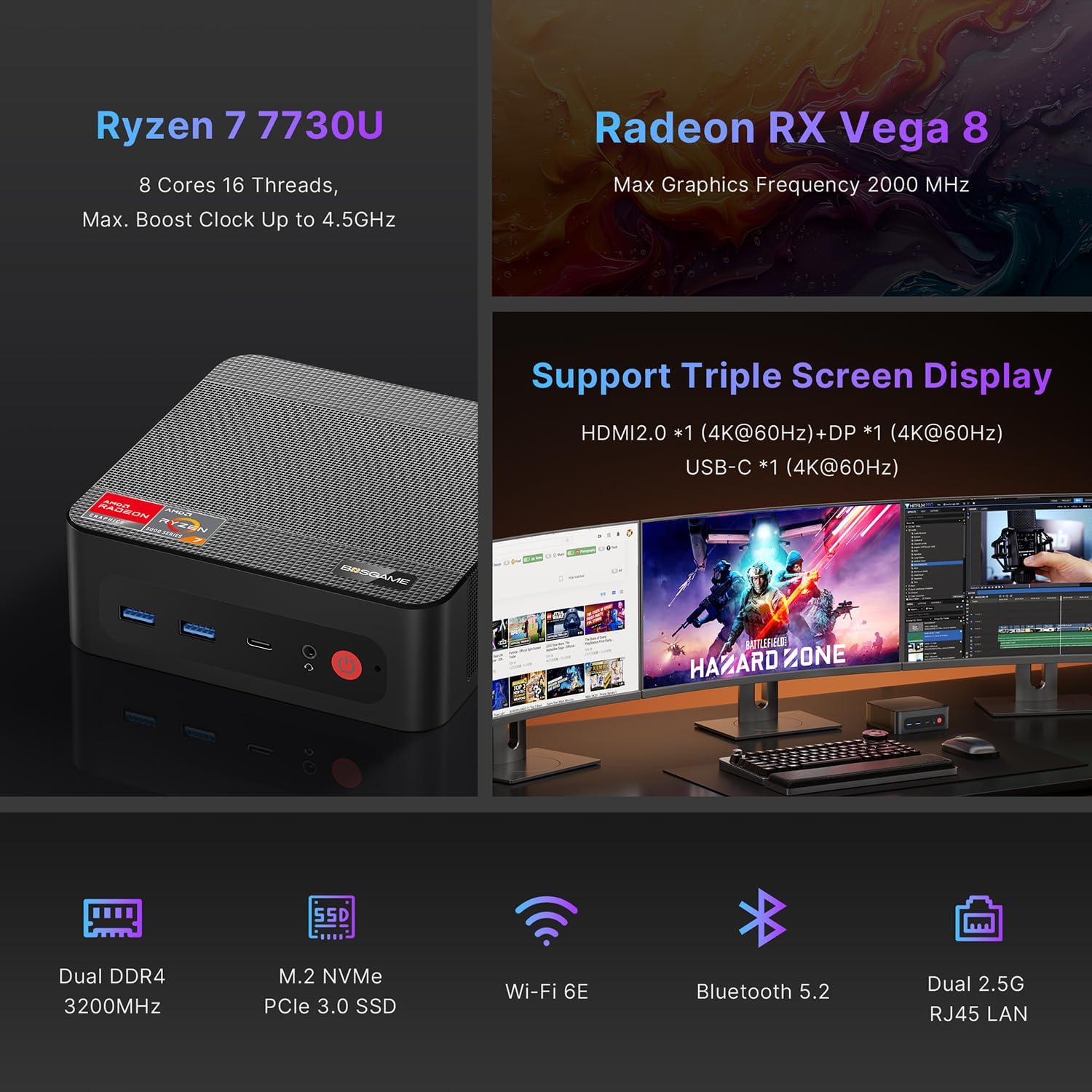
The BOSGAME P4 Ultra supports simultaneous output to three 4K monitors via HDMI 2.0, DisplayPort, and Full-Function USB Type-C.
- Connect the DisplayPort cable to the first monitor.
- Connect the HDMI cable to the second monitor.
- Connect the USB Type-C cable to the third monitor.
- Ensure all monitors are powered on and set to the correct input source.


5. Konektipitas
5.1 Palabuhan Leuwihview
| Panganteur | kuantitas | Katerangan |
|---|---|---|
| USB3.2 Gen2 (4K 60Hz) | 1 | Full-function USB Type-C for data, 4K video, and Power Delivery 3.0 |
| HDMI (2.0 @4K 60Hz) | 1 | output video pikeun ngawas |
| USB3.2 Gen1 | 2 | Mindahkeun data-speed tinggi |
| 5.5*2.5mm DC Jack | 1 | Input kakuatan |
| USB2.0 | 2 | Standard USB ports |
| 3.5mm Combo Jack | 1 | Input / kaluaran audio |
| DP (4K 60Hz) | 1 | kaluaran pidéo DisplayPort |
| 2.5G RJ45 LAN | 2 | Dual 2.5 Gigabit Ethernet ports |

5.2 Konéktipitas Wireless
- Wi-Fi 6E: For high-speed, lag-free wireless internet.
- Bluetooth 5.2: For instant pairing with peripherals like keyboards, mice, and headphones.

6. Performance & Expansion
The BOSGAME P4 Ultra Mini PC is powered by an AMD Ryzen 7 7730U processor, offering robust performance for various tasks.
- Prosesor: AMD Ryzen 7 7730U (8 Cores, 16 Threads, Max. Boost Clock up to 4.5GHz)
- Grafik: Radeon RX Vega 8 (Max Graphics Frequency 2000 MHz)
- Mémori: 16GB DDR4 3200MHz SODIMM (expandable up to 32GB)
- Panyimpenan: 1TB NVMe PCIe 3.0 x4 SSD (expandable up to 4TB via additional M.2 2280 slot)

6.1 Storage and RAM Upgrade
You can upgrade the RAM and SSD to enhance performance or storage capacity.
- Remove the screws from the base plate.
- Carefully open the base plate.
- Move the system fan to access the RAM and SSD slots.
- Replace the RAM and/or SSD as needed.

6.2 Graphics Dock Expansion
The Mini PC supports graphics dock expansion via its full-featured USB Type-C port, allowing for enhanced graphics performance for demanding applications or gaming.
7. Pangropéa
7.1 Sistim cooling
The Mini PC features an advanced thermal design and a low-noise fan system to ensure stable operation and efficient heat dissipation, even under load.


8. Cara ngungkulan
8.1 Setélan mios
To access and modify BIOS settings, press the Hapus key repeatedly during boot-up.
- Daya Otomatis Hurung: Arahkeun ka Maju → Daya Otomatis Hurung. Pencét Lebetkeun, pilih Daya Hurungkeun, teras pencét F4 pikeun nyimpen.
- Wake On LAN: Arahkeun ka Maju → Hudang Dina LAN. Pencét Lebetkeun, pilih Diaktipkeun, teras pencét F4 pikeun nyimpen.
- UMA Frame Buffer Size: Arahkeun ka Maju → Ukuran panyangga pigura UMA. Pencét Lebetkeun, select the desired size (e.g., 8G), teras pencét F4 to save. This allocates system memory to graphics for higher-level tasks.
- S5 RTC Wake Settings: Arahkeun ka Maju → S5 RTC Setélan Wake. Pencét Lebetkeun, pilih Waktos Maneuh or Waktos dinamis, teras pencét F4 to save. This allows the system to wake from S5 (soft off) at a scheduled time.
penting: The BIOS is locked by default, and overclocking is not recommended as it may damage the computer. Please be aware.
9. Spésifikasi
| Fitur | Rincian |
|---|---|
| merek | BOSGAME |
| Ngaran modél | P4 Ultra |
| Sistem operasi | Windows 11 Pro (pre-installed), compatible with Linux |
| Modél CPU | Ryzen 7 7730U |
| Laju CPU | 2 GHz (Base), 4.5 GHz (Max Boost) |
| Inti/Utas CPU | 8 Inti, 16 Utas |
| Ukuran Cache | 16 MB |
| Kartu Grafis | Integrated Radeon Graphics (Radeon RX Vega 8) |
| Graphics Frequency | 2000 MHz (Max) |
| Mémori (RAM) | 16 GB DDR4 3200MHz SODIMM (Max 32 GB) |
| Panyimpenan | 1 TB NVMe PCIe 3.0 x4 SSD (Max 4 TB, 2x M.2 2280 slots) |
| Kaluaran Video | HDMI (4K@60Hz), DisplayPort (4K@60Hz), USB Type-C (4K@60Hz) |
| LAN | Dual 2.5G RJ45 Ethernet |
| Konéktipitas Wireless | Wi-Fi 6E, Bluetooth 5.2 |
| palabuhan USB | 2x USB 3.2 Gen1, 2x USB 2.0, 1x USB 3.2 Gen2 Type-C (Full-function) |
| Audio | 3.5mm Combo Jack |
| Konsumsi Daya | 15 Watts (Default TDP) |
| Diménsi | 5.12 x 4.72 x 1.73 inci (129 x 123 x 44 mm) |
| Beurat | 514 Gram (1.13 lbs) |
| Métode Cooling | Kipas angin |
| Gunung VESA | Kaasup |

10. Jaminan & Dukungan
BOSGAME is committed to quality and customer satisfaction.
- Garansi: The BOSGAME P4 Ultra Mini PC comes with a 12-month warranty for the entire machine and a 3-year warranty for parts.
- Palayanan palanggan: For any questions or support regarding your purchase, please contact BOSGAME customer service.
Kumaha Ngahubungan Rojongan:
- Kontak Kami di Amazon: Log in to your Amazon buyer's account, find your order, click 'Get help'.
- Send E-mail to After-sales Support Team: You can also reach out via email for assistance.


Ask a question about this manual
Ask about setup, troubleshooting, compatibility, parts, safety, or missing instructions. Manuals+ will review the question and use this page’s manual context to help answer it.