
1. Bubuka
This manual provides detailed instructions for the LAUNCH Creader Elite V3.0 OBD2 Scanner, a professional diagnostic tool designed specifically for Land Rover and Jaguar vehicles. It covers device setup, operational procedures for various diagnostic and service functions, software updates, and troubleshooting tips. Please read this manual thoroughly before operating the device to ensure correct usage and optimal performance.
2. Produk Langkungview
2.1. Naon dina Box
- 1 * LAUNCH Creader Elite V3.0 OBD2 Scanner for JLR
- 1 * OBD2 Diagnostic Cable
- 1 * Gancang Mimitian Guide
- 1 * Manual pamaké
2.2. Fitur konci
The LAUNCH Creader Elite V3.0 offers a comprehensive suite of features for vehicle diagnostics and maintenance:
- Hardware ditingkatkeun: Features Android 8.1 operating system, 32GB ROM, 3000mAh battery, and 2.4&5GHz dual-band Wi-Fi for improved performance.
- DoIP Protocol Support: Supports the new DoIP protocol for Land Rover & Jaguar models manufactured after 2017 (requires an adapter).
- Full Systems Diagnostics: Provides in-depth scanning for all available vehicle modules, including engine, transmission, ABS, SRS, and more.
- Kontrol Dua Arah (Tés Aktif): Allows control of vehicle components and systems for active testing, such as windows, mirrors, wipers, and horn.
- Comprehensive Service Functions: Includes Oil Reset, Electronic Parking Brake (EPB) Reset, Battery Management System (BMS) Reset, Steering Angle Sensor (SAS) Calibration, Injector Coding, Throttle Relearn, Height Calibration, Transmission Adaptation, Crankshaft/Camshaft Relearn, Sunroof Calibration, and more.
- Aliran Data Langsung 4-in-1: Displays real-time data from multiple sensors simultaneously in a graphical format, with recording and playback capabilities.
- Smart Diagnostic Functions: Features Auto VIN for automatic vehicle identification, DTC Lookup for code explanations, and the ability to generate and share diagnostic reports.
- Fungsi OBD2 lengkep: Supports all 10 OBD2 test modes for universal vehicle compatibility (post-1996 models).
- Pembaruan Gratis Saumur hirup: Provides lifetime free software updates specifically for Land Rover and Jaguar vehicle brands.
2.3. Device Comparison
The Creader Elite V3.0 offers significant upgrades over previous versions:

Image: Comparison of Creader Elite V3.0, V2.0, and V1.0, highlighting V3.0's superior features like DoIP, Android 8.1, 32GB memory, and 2.4&5GHz WiFi.
2.4. Pedaran Fisik
The device features a durable orange casing with a 4-inch touchscreen display. The back of the device includes product identification details such as the model number, FCC ID, and serial number.
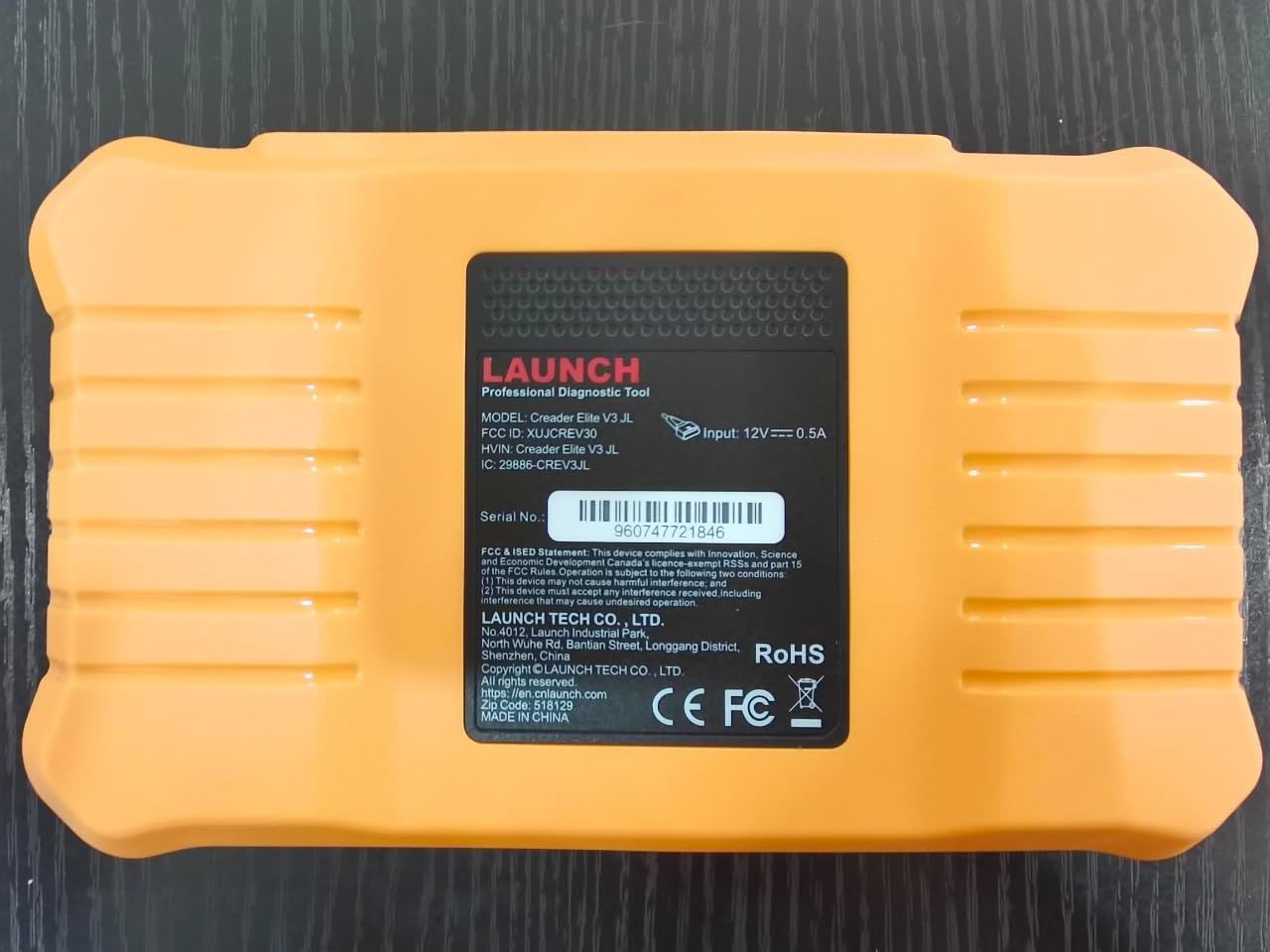
Gambar: Tukangeun view of the LAUNCH Creader Elite V3.0, displaying the model number, FCC ID, and serial number (e.g., 960747721846).
3. Setélan
3.1. Daya Awal Hurung
- Pastikeun alat geus dicas pinuh atawa disambungkeun ka sumber kakuatan.
- Pencét jeung tahan tombol daya nepi ka layar hurung.
- Turutan parentah dina-layar pikeun milih basa jeung wewengkon nu Anjeun pikaresep.
3.2. Sambungan Wi-Fi
- Tina ménu utama, arahkeun ka Setélan.
- Pilih Wifi tur hurungkeun.
- Pilih jaringan Wi-Fi anu dipikahoyong tina daptar sareng lebetkeun kecap akses upami dipenta.
- Confirm the connection. A stable internet connection is required for software updates and online resources.
3.3. Pendaptaran sareng Aktivasina
Upon first use or after a factory reset, you may be prompted to register your device. Follow the on-screen instructions to create an account or log in. This step is crucial for accessing software updates and technical support.
4. Parentah Operasi
4.1. Nyambung ka Kandaraan
- Locate the vehicle's OBD2 diagnostic port, typically under the dashboard on the driver's side.
- Pastikeun konci kontak kendaraan aya dina ON posisi (mesin pareum atawa ngajalankeun, gumantung kana tés).
- Connect the OBD2 diagnostic cable to the vehicle's OBD2 port and to the LAUNCH Creader Elite V3.0 device.
- The device will automatically power on or prompt you to do so.
4.2. Full Systems Diagnostics
This function allows you to scan all available electronic control units (ECUs) in the vehicle.

Image: Display showing OE-level all system diagnostics, including Auto VIN, fault codes, 4-in-1 live data, and MIL reset.
- Tina ménu utama, pilih Diagnosis Lokal.
- Choose the vehicle brand (Land Rover or Jaguar).
- Pilih Pilarian Otomatis or Pamilihan Manual. Auto Search (Auto VIN) will attempt to automatically identify the vehicle.
- Once the vehicle is identified, select Laporan Kaséhatan or Sistem Scan to perform a comprehensive scan of all modules.
- Review the diagnostic trouble codes (DTCs) and ECU information. You can then choose to clear codes if necessary.
4.3. Fungsi Service
The Creader Elite V3.0 provides numerous maintenance and reset services. Access these functions via Diagnose > Brand > System Selection > Special Function.

Gambar: Leuwihview of various service functions including Oil Reset, Brake Reset, SAS Calibration, Start-Stop Reset, TPMS Reset, Injector Coding, Battery Reset, ABS Bleeding, Seat Calibration, and Height Calibration.
Common services include:
- Reset minyak: Ngareset sistem umur oli mesin.
- Reset EPB: Resets the electronic parking brake after replacement.
- Kalibrasi SAS: Calibrates sensor sudut steering.
- Injector Coding: Kode nomer injector anyar kana ECU.
- Throttle Diajar deui: Diajar deui posisi throttle body.
- Kalibrasi jangkungna: Calibrates the vehicle's suspension height.
- Reset batré: Registers a new battery replacement.
- Perdarahan ABS: Ngalaksanakeun prosedur perdarahan rem ABS.
Note: The availability of specific service functions may vary depending on the vehicle model and year. Always check compatibility before performing a service.
4.4. Kontrol Dua Arah (Tés Aktif)
Active tests allow you to send commands to vehicle systems and components to verify their functionality.

Image: Depicts bi-directional active tests, showing the device sending commands to vehicle actuators like wipers, windows, clutch, and injectors to check their status.
- Navigate to the desired vehicle system within the diagnostic menu.
- Pilih Tés Aktif or Kontrol dua arah.
- Choose the specific component or system you wish to test (e.g., 'Wiper Test', 'Window Test', 'Horn Test').
- Follow the on-screen instructions to activate and observe the component's response.
4.5. Fungsi OBD2 pinuh
For universal vehicle diagnostics (all OBD2 compliant vehicles after 1996), use the OBD II pilihan menu.
- Baca Konci: Retrieves generic (P0, P2, P3, U0) and manufacturer specific (P1, P3, U1) codes.
- Hapus Kodeu: Clears diagnostic trouble codes and turns off the Malfunction Indicator Light (MIL).
- Data Langsung: Némbongkeun aliran data real-time ti sénsor kandaraan.
- Kesiapan I / M: Mariksa kesiapan monitor anu aya patalina jeung émisi.
- Frame Frame: Displays a snapshot of operating conditions at the time of an emission-related fault.
- Tés Sénsor O2: Retrieves O2 sensor monitor hasil tés.
- Uji Monitor Dina Papan (Mode 6): Retrieves hasil pikeun komponén powertrain patali émisi jeung sistem.
- Uji Sistem EVAP (Mode 8): Mimitian uji sistem kontrol émisi évaporatif.
- Émbaran Kandaraan: Meunangkeun nomer idéntifikasi kendaraan (VIN), ID kalibrasi (CALID), sareng nomer verifikasi kalibrasi (CVN).
4.6. Real-Time Monitoring and Data Stream
Monitor various vehicle parameters in real-time to diagnose intermittent issues or verify repairs.

Image: Real-time monitoring screen showing battery voltage, transmission oil temperature, coolant temperature, and vehicle speed, with a detailed 4-in-1 data stream graph below.
- From the diagnostic menu, select Data Hirup.
- Pilih parameter anu anjeun hoyong monitor.
- The device can display up to four data streams simultaneously in a graphical format.
- Ngagunakeun éta Rékam jeung Playback functions to capture and review data for later analysis.
4.7. Smart Diagnostic Features
The device includes features to streamline the diagnostic process:
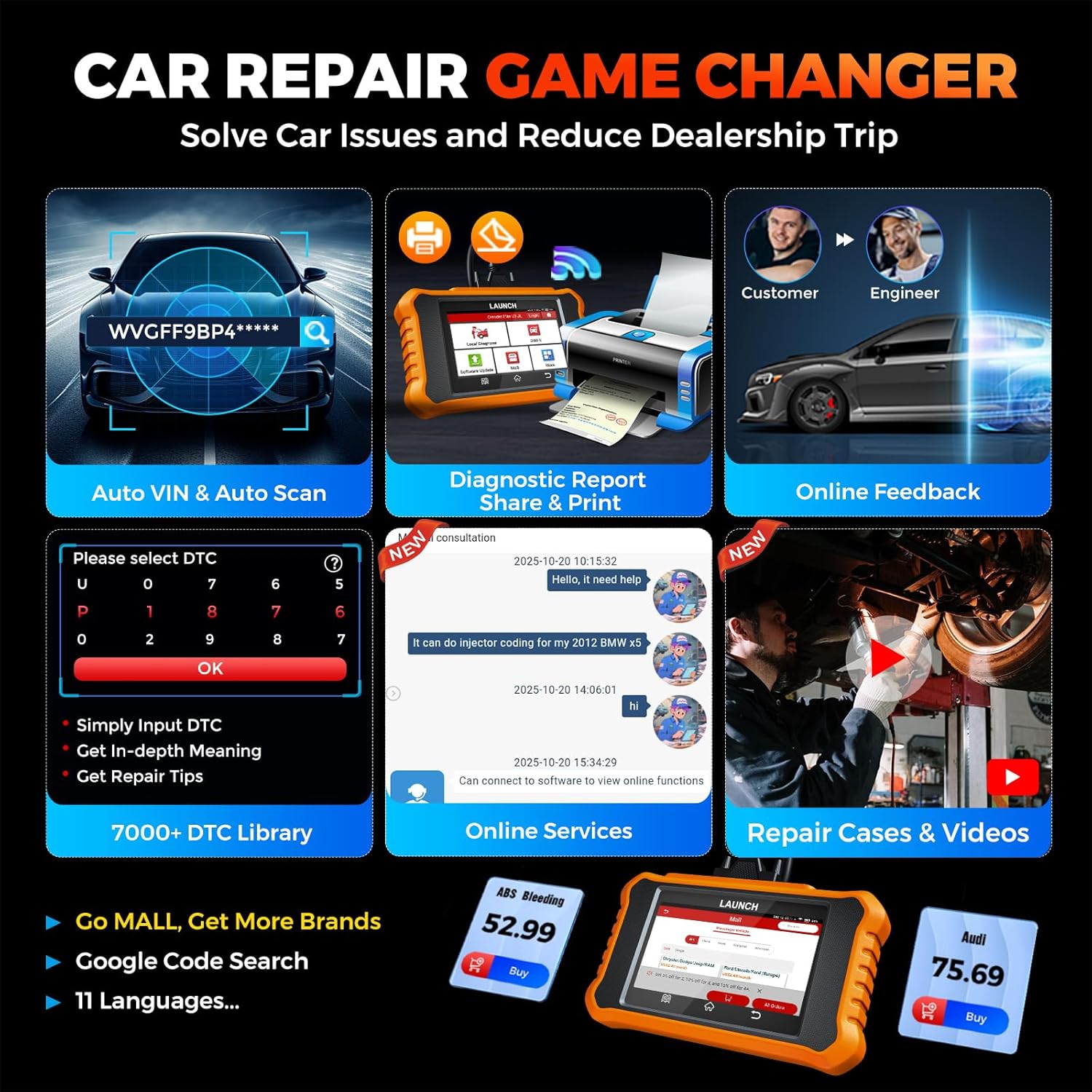
Image: Smart diagnostic features such as Auto VIN, diagnostic report generation and printing, online feedback, 7000+ DTC library, and access to online services.
- VIN Otomatis: Automatically identifies vehicle information (year, make, model) for quicker diagnostics.
- Pilarian DTC: Provides detailed explanations for diagnostic trouble codes.
- Laporan diagnostik: Generates a professional diagnostic report that can be shared or printed.
- Eupan Balik Online: Allows users to submit feedback or issues directly to technical support.
5. Maintenance & Updates
5.1. Apdet parangkat lunak
The LAUNCH Creader Elite V3.0 offers lifetime free software updates for Land Rover and Jaguar brands.
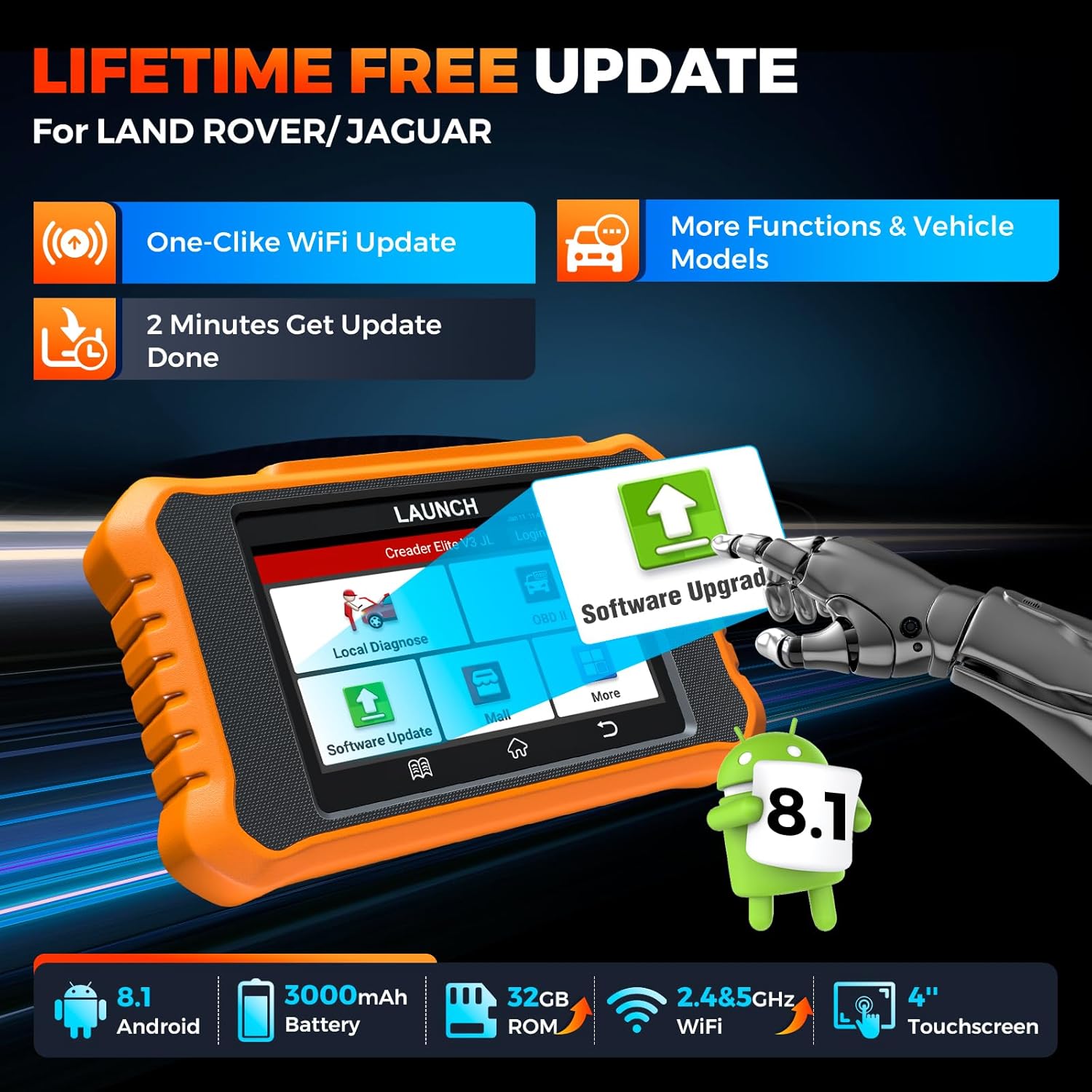
Image: Device screen illustrating the one-click Wi-Fi update process, emphasizing lifetime free updates for Land Rover/Jaguar and the ability to get more functions and vehicle models.
- Pastikeun alat disambungkeun ka jaringan Wi-Fi stabil.
- Tina ménu utama, pilih Software Update.
- The device will check for available updates.
- Select the updates you wish to install and follow the on-screen prompts. Updates typically take a few minutes.
5.2. Expanding Vehicle Coverage (Mall)
If you require diagnostic capabilities for other vehicle brands beyond Land Rover and Jaguar, you can purchase additional software packages from the Mal application on the device. Please note that software purchased from the Mall is typically valid for one year and may require re-purchase after expiry.
5.3. Perawatan Alat
- Jaga alat tetep beresih sareng bebas tina lebu sareng beueus.
- Hindarkeun ngaragragkeun alatna atanapi mangaruhan kana tabrakan anu kuat.
- Simpen alat dina tempat anu tiis sareng garing upami henteu dianggo.
- Paké ngan kabel ngecas disadiakeun jeung asesoris.
6. Kasaluyuan
The LAUNCH Creader Elite V3.0 is primarily designed for:

Image: Device interface showing diagnostic options for Land Rover (Defender, Discovery, Range Rover, Evoque) and Jaguar (E-Pace, F-Pace, F-Type, S-Type, X-Type, XE, XF, XJ, XK) models, with a note on DoIP protocol for models after 2017.
- Landrover: Compatible with models such as Defender, Discovery, Discovery Sport, Range Rover, Range Rover Evoque, etc.
- Jaguar: Compatible with models such as E-Pace, F-Pace, F-Type, S-Type, X-Type, XE, XF, XJ, XK, etc.
- Protokol DoIP: Supports Land Rover & Jaguar models after 2017, requiring a separate DoIP adapter.
- Universal OBD2: Fully compatible with all OBD2 compliant vehicles manufactured after 1996 for basic OBD2 functions.
For specific vehicle compatibility, it is recommended to contact technical support via obdbox21@163.com.
7. Spésifikasi
| Modél | LAUNCH Creader Elite 3.0-JL |
| Sistem operasi | Android 8.1 |
| Ukuran layar | 4 inci |
| Panyimpenan internal (ROM) | 32GB |
| Kapasitas batré | 3000 mah |
| Wifi | 2.4 & 5GHz Dual-band |
| Sumber Daya | Batré Powered |
| Item Beurat | 1.49 pon |
| Ukuran Paket | 8 x 7.5 x 1.5 inci |
| Automotive Fit Tipe | Universal Fit (for OBD2 functions) |
8. Cara ngungkulan
8.1. Alat Teu Dihurungkeun
- Check battery level. Connect the device to a charger and allow it to charge for at least 30 minutes.
- Pastikeun tombol daya dipencet sareng dicekel leres.
- If connected to the vehicle, ensure the vehicle's ignition is on and the OBD2 cable is securely connected.
8.2. Communication Error with Vehicle
- Verify the OBD2 cable is securely connected to both the device and the vehicle's port.
- Pastikeun konci kontak kendaraan aya dina ON posisi.
- Confirm that the vehicle is OBD2 compliant (generally 1996 and newer for US vehicles).
- Try a different OBD2 compliant vehicle to rule out a vehicle-specific issue.
- Ensure the correct vehicle brand software is installed and up to date.
8.3. Software Update Failure
- Check your Wi-Fi connection for stability and signal strength.
- Ensure the device has sufficient battery charge or is connected to power during the update process.
- Verify that there is enough free storage space on the device.
- Pareuman terus hurungkeun deui alat teras cobian apdet deui.
8.4. Inaccurate Readings or Functions Not Working
- Ensure the vehicle's make, model, and year are correctly identified by the device.
- Verify that the specific function is supported for your vehicle model and year. Refer to the compatibility section or contact support.
- Ensure the device software is fully updated.
9. Garansi jeung Rojongan
9.1. Émbaran jaminan
The LAUNCH Creader Elite V3.0 comes with an Extended 60-Day Return & Replacement policy and a 5-Year Quality Backup. Please retain your proof of purchase for warranty claims.
9.2. Rojongan Téknis
For any technical assistance, questions, or compatibility inquiries, please contact our support team:
- Surélék: obdbox21@163.com
- Our support team is available 24/7/365.
Note: Please direct all support inquiries to the provided email address. Do not contact LAUNCH Tech USA for support related to this specific product.