
1. Bubuka
Thank you for choosing the Tyler TM710-14 14-inch Portable LCD HD TV. This device is designed for versatility, serving as a portable television, a monitor for various devices, or a display for security cameras. Its compact size makes it ideal for use in RVs, kitchens, campers, bathrooms, and bedrooms. This manual provides essential information for the safe and efficient operation of your new portable TV.
Fitur konci:
- Desain Sleek & Kompak: 14-inch widescreen LED HDTV, optimized for small spaces.
- Konektipitas serbaguna: HDMI, USB, SD/MMC inputs for external audio/video playback.
- Audio terpadu: Built-in speakers and headphone jack.
- Tuner TV Digital: Full band digital TV tuner (ATSC, NTSC compatible).
- Pilihan Daya: AC/DC power compatibility, includes car charger.
- Convenient Stand: Built-in stand for easy placement.
- Kasaluyuan lega: Connects with streaming sticks (Roku, Fire Stick, Apple TV), gaming consoles, computers, and security cameras.
2. Émbaran Kasalametan
Mangga baca sakabeh parentah kaamanan taliti saméméh ngagunakeun produk ieu. Simpen manual ieu pikeun rujukan ka hareup.
- Ulah ngalaan unit ka hujan atawa Uap pikeun nyegah seuneu atawa shock listrik.
- Ulah muka lomari. Rujuk ngalayanan ka tanaga anu mumpuni wungkul.
- Ulah nempatkeun unit deukeut sumber panas kayaning radiators, registers panas, kompor, atawa alat sejenna (kaasup ampLiifiers) anu ngahasilkeun panas.
- Nangtayungan kabel listrik tina leumpang atawa diciwit, utamana dina colokan, wadah merenah, jeung titik dimana aranjeunna kaluar tina aparat.
- Ngan anggo kantétan/aksésori anu ditunjuk ku produsén.
- Cabut colokan alat ieu nalika badai kilat atanapi nalika henteu dianggo kanggo waktos anu lami.
- Ngabersihan ngan ku kaén garing.
- Mastikeun ventilasi ditangtoskeun; ulah ngahalangan sagala bukaan ventilasi.
3. Naon dina Box
Pastikeun yén sadaya barang aya dina bungkusan:
- Tyler TM710-14 Portable TV
- Kabel Daya (Adaptor AC)
- Kadali jauh
- Diwangun-di Stand
- anteneu
- Car Charger (DC Adapter)
- Adaptor RCA
4. Produk Langkungview
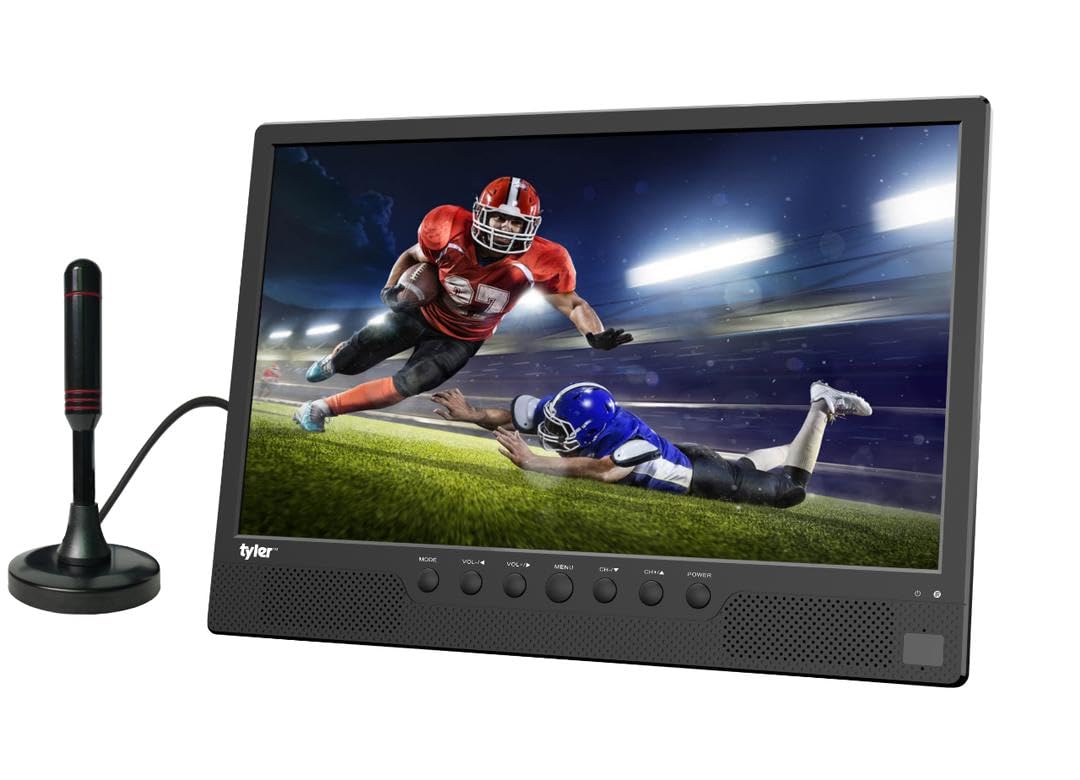
Gambar 4.1: Hareupeun view of the Tyler TM710-14 portable TV, showing the screen, control buttons, and an attached antenna.

Gambar 4.2: Tukangeun view of the TV with the built-in stand extended, showing the DC 12V input, AV-OUT, AV-IN, HDMI input, and ANT input on the right side, and USB, SD/MMC input on the left.

angka 4.3: pungkur lengkep view of the TV, illustrating the location of the DC 12V input, AV-OUT, AV-IN, HDMI input, ANT input, USB port, and SD/MMC card slot.
Control Buttons (Front Panel):
- MODÉ: Switches between input sources (TV, AV, HDMI, USB, SD/MMC).
- VOL-/VOL+: Adjusts volume down/up.
- MENU: Ngaksés menu dina layar.
- CH-/CH+: Changes channels or navigates menu options.
- kakuatan: Hurungkeun/pareuman TV.
5. Setélan
5.1 Ngagantelkeun Stand
The TM710-14 features a built-in stand. Gently pull the stand out from the back of the unit until it locks into position. Ensure the TV is placed on a stable, flat surface.
5.2 Nyambungkeun Daya
- Daya AC: Connect the provided AC power adapter to the "DC 12V" input port on the back of the TV, then plug the adapter into a standard wall outlet.
- DC Power (Car Charger): For portable use, connect the car charger to the "DC 12V" input port and plug the other end into your vehicle's 12V power socket.
5.3 Connecting an Antenna
For receiving over-the-air broadcast channels, connect the included antenna to the "ANT" input port on the back of the TV. Position the antenna for optimal signal reception.
5.4 Daya Awal Hurung
Pencét éta POWER button on the front panel or the remote control to turn on the TV. The first time you power on, the TV may guide you through an initial setup process, including language selection and channel scanning.
6. Parentah Operasi
6.1 Milih Sumber Input
Pencét éta MODÉ button on the TV or the SUMBER button on the remote control to cycle through available input sources: TV (Antenna), AV, HDMI, USB, SD/MMC.
6.2 TV Mode (Antenna)
- Select "TV" as the input source.
- Aksés ka MENU and navigate to "Channel Setup" or "Auto Scan".
- Initiate an auto scan to find available digital (ATSC) and analog (NTSC) channels.
- Paké CH-/CH+ tombol pikeun ngarobah saluran.
6.3 Nyambungkeun Alat éksternal
- HDMI: Connect a streaming stick (Roku, Fire Stick, Apple TV), gaming console, or computer to the Masukan HDMI port. Select "HDMI" as the input source.
- Input AV: Use the RCA adapter to connect older devices like DVD players to the AV-IN port. Select "AV" as the input source.
- USB/SD/MMC: Insert a USB flash drive or SD/MMC card into the respective slots. Select "USB" or "SD/MMC" as the input source to browse and play compatible media files (AVI, MOV, MPEG, MP4, MP3, JPEG, etc.).
6.4 Kaluaran Audio
The TV has built-in speakers. For private listening, connect headphones to the headphone jack (AV-OUT port can also function as audio out with appropriate adapter).
7. Pangropéa
7.1 Ngabersihan Layar
Lembut usap layar nganggo lawon anu lemes sareng teu aya serat. Pikeun tanda nekad, rada dampBilas lawon ku cai atanapi larutan pembersih layar anu khusus dirancang pikeun layar LCD/LED. Ulah nyemprotkeun cairan langsung kana layar.
7.2 Ngabersihan Kabinet
Wipe the exterior of the TV with a soft, dry cloth. Avoid using abrasive cleaners or solvents.
7.3 Panyimpenan
If storing the TV for an extended period, unplug it from the power source and store it in a cool, dry place, away from direct sunlight and extreme temperatures.
8. Cara ngungkulan
| Masalah | Mungkin Cukang lantaranana | Solusi |
|---|---|---|
| Taya kakuatan | Power cable not connected; outlet not working; power adapter faulty. | Ensure power cable is securely connected. Test the outlet with another device. Try a different power adapter if available. |
| Teu aya gambar/Teu aya sinyal | Incorrect input source selected; antenna not connected/positioned correctly; external device not powered on or connected properly. | Pencét MODÉ/SUMBER to select the correct input. Adjust antenna position or rescan channels. Check connections and power for external devices. |
| Taya sora | Volume too low or muted; external device audio settings. | Pencét VOL+ or unmute the TV. Check audio settings on connected external devices. |
| Kadali jauh teu jalan | Batteries depleted or inserted incorrectly; obstruction between remote and TV; remote sensor blocked. | Replace batteries. Ensure correct polarity. Remove any obstructions. Clean the remote sensor on the TV. |
9. Spésifikasi
| Fitur | Rincian |
|---|---|
| Nomer modél | TM710-14 |
| Ukuran layar | 14 inci |
| Téknologi tampilan | LCD |
| Resolusi | 1080 p |
| Refresh Laju | 120 Hz |
| Rasio Aspék | 16:9 |
| Konektipitas | HDMI (1), USB (1), AV, Antenna |
| Média Playback | USB, SD/MMC (AVI, MOV, MPEG 1/2/3/4, XVID, AVC, MP4, H.264, HEVC(H.265), FLV, MKV, MP3, JPEG, WMV, RMVB, MKY, 3GP) |
| Audio | Built-in speakers (2.0 channels), Headphone Jack (AV-OUT) |
| Sasayogian tanaga | AC/DC (12V DC input) |
| Ukuran produk (D x W x H) | 1 "D x 14" W x 11" H |
| Warna | Hideung |
10. Émbaran jaminan
The Tyler TM710-14 Portable LCD HD TV comes with a 1-Taun jaminan kawates from the date of purchase. This warranty covers manufacturing defects in materials and workmanship under normal use. It does not cover damage caused by misuse, accidents, unauthorized modifications, or external causes.
Mangga simpen bukti pameseran anjeun kanggo klaim garansi. Kanggo syarat sareng katangtuan garansi anu lengkep, tingali dokuméntasi anu kalebet dina produk anjeun atanapi hubungi dukungan palanggan.
11. Rojongan Palanggan
If you encounter any issues or have questions regarding your Tyler TM710-14 Portable LCD HD TV that are not addressed in this manual, please contact Tyler customer support.
- Websitus: Visit the official Tyler websitus pikeun FAQs jeung sumber rojongan.
- Surélék: Mangga tingali bungkus produk atanapi kartu garansi anjeun kanggo alamat email dukungan.
- Telepon: Tingali bungkus produk atanapi kartu garansi anjeun pikeun nomer telepon layanan palanggan.
When contacting support, please have your model number (TM710-14) and proof of purchase ready.