
1. Produk Langkungview
The G-Shock Casio GD010 digital watch is engineered for durability and functionality, designed to withstand demanding conditions while providing essential timekeeping features. This timepiece incorporates bio-based resin components and a CORDURA re/cor band, reflecting a commitment to environmental considerations.
This manual provides detailed instructions for setting up, operating, maintaining, and troubleshooting your GD010 watch.
Fitur konci
- Shock Resistant Construction: Designed to endure impacts and vibrations.
- Struktur Pelindung Inti Karbon: Enhances durability and protection for the internal module.
- Tahan Cai 200 Méter: Suitable for swimming, snorkeling, and diving (non-SCUBA).
- Hirup batré anu panjang: Kira-kira 10 taun nganggo batré CR2025.
- Bio-based Resin Components: Case and bezel made with environmentally conscious materials.
- CORDURA re/cor Band: Durable strap made from recycled PET plastic fiber.
- Digital tampilan: Clear and easy-to-read time and function information.
- Sababaraha Fungsi: Includes alarm, chronograph (stopwatch), and timer.

Image 1.1: The G-Shock GD010 watch, showcasing its core features including shock resistance, Carbon Core Guard structure, and a 10-year battery life.
2. Ngamimitian: Setup
Fungsi Tombol
Your GD010 watch features several buttons for navigation and function control. Familiarize yourself with their locations and primary roles.

Gambar 2.1: Sisi view of the G-Shock GD010, illustrating the location of the control buttons.
- Saluyukeun (Kénca luhur): Dianggo pikeun asup sareng kaluar tina modeu setelan, sareng pikeun mastikeun setelan.
- MODE (Kénca handap): Cycles through the watch's various modes (Timekeeping, Stopwatch, Timer, Alarm).
- REVERSE (Top Right): Used to decrease values or move backward through options during setting.
- FORWARD / START (Bottom Right): Used to increase values or move forward through options during setting. Also used to start/stop stopwatch or timer.
- LIGHT (Center Bottom): Activates the backlight for illumination.
Setélan Waktos sareng Tanggal Awal
- Dina Mode Timekeeping, pencét jeung tahan tombol Saluyukeun button until the city code starts to flash, indicating the setting mode.
- Ngagunakeun éta BALIKAN jeung MAJU buttons to select your desired Home City Code. This will automatically set the correct time zone.
- Pencét éta MODÉ button to cycle through the settings: DST (Daylight Saving Time) → 12/24-hour format → Seconds → Hour → Minute → Year → Month → Day.
- Pikeun unggal setélan, anggo BALIKAN jeung MAJU tombol pikeun ngarobah nilai.
- Saatos sadaya setélan parantos dikonfigurasi, pencét Saluyukeun tombol pikeun kaluar tina mode setelan.
3. Ngoperasikeun Watch Anjeun
The GD010 offers various modes for different functions. Press the MODÉ tombol pikeun siklus ngaliwatan aranjeunna.
Modeu Timekeeping
Ieu mangrupikeun mode standar, ningalikeun waktos ayeuna, dinten dina saminggu, sareng kaping.
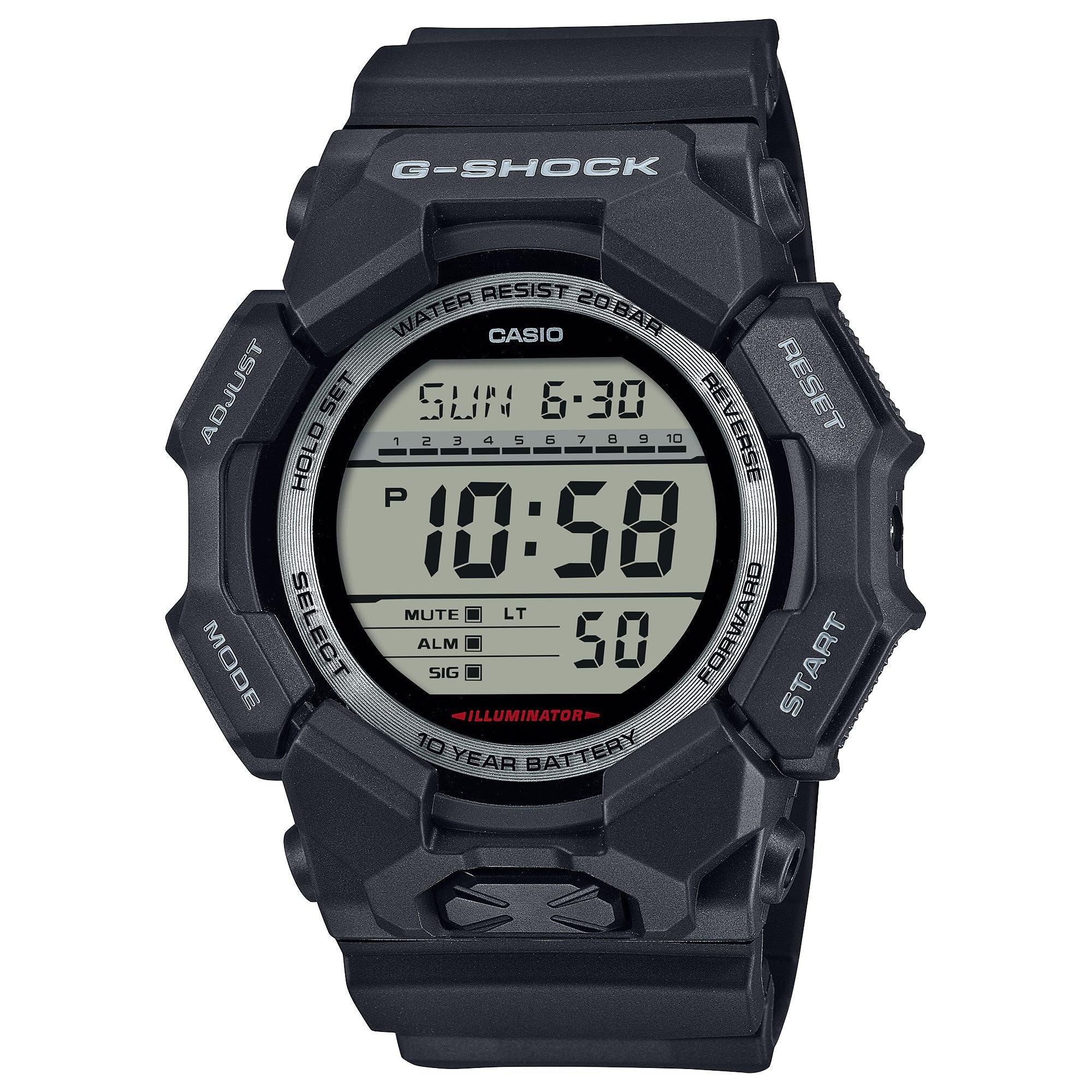
Image 3.1: The G-Shock GD010 watch face in Timekeeping Mode.
Ngagunakeun Stopwatch (Kronograf)
- Tina Modeu Timekeeping, pencét tombol MODÉ button until "STW" or "STOPWATCH" appears on the display.
- Pencét éta FORWARD / START tombol pikeun ngamimitian stopwatch nu.
- Pencét éta FORWARD / START tombol deui pikeun ngeureunkeun stopwatch.
- Pikeun ngareset stopwatch ka nol, pencét tombol BALIKAN tombol bari stopwatch dieureunkeun.
Nyetel Timer Countdown
- Tina Modeu Timekeeping, pencét tombol MODÉ button until "TMR" or "TIMER" appears.
- Pencét jeung tahan tombol Saluyukeun button until the current timer setting starts to flash.
- Ngagunakeun éta MODÉ tombol pikeun milih setélan jam atanapi menit.
- Ngagunakeun éta BALIKAN jeung MAJU tombol pikeun nyetel waktu mundur anu dipikahoyong.
- Pencét éta Saluyukeun tombol pikeun kaluar tina mode setelan.
- Pencét éta FORWARD / START button to start the countdown. An alarm will sound when the timer reaches zero.
Fungsi Alarm
- Tina Modeu Timekeeping, pencét tombol MODÉ tombol nepi ka "ALM" atawa "ALARM" nembongan.
- Pencét jeung tahan tombol Saluyukeun tombol nepi ka waktu alarm mimiti kedip-kedip.
- Ngagunakeun éta MODÉ tombol pikeun milih setélan jam atanapi menit.
- Ngagunakeun éta BALIKAN jeung MAJU tombol pikeun ngeset waktos alarm nu dipikahoyong.
- Pencét éta Saluyukeun tombol pikeun kaluar tina mode setelan.
- Pikeun ngahurungkeun alarm ON/OFF, pencét tombol FORWARD / START button while in Alarm Mode (without holding ADJUST).
Pitunjuk Lalawanan Cai
Your GD010 watch is rated for 200-meter water resistance. This means it is suitable for recreational diving (excluding saturation diving), swimming, snorkeling, and water sports.
- Ulah mencet tombol nalika jam tangan keur tilelep dina cai atawa baseuh.
- Ulah nepi ka jam tangan kakeunaan cai panas, uap, atawa parobahan suhu anu ekstrim, sabab ieu bisa ngaruksak résistansi cai.
- After exposure to saltwater, rinse the watch thoroughly with fresh water and wipe it dry.
4. Perawatan sareng Pangropéa
Perawatan Umum
- Ngusap arloji sacara teratur ku kaén anu garing sareng lemes pikeun ngaleungitkeun kokotor sareng beueus.
- Avoid exposing the watch to strong chemicals, solvents, or detergents, as these can damage the resin materials.
- Simpen arloji dina tempat anu tiis sareng garing jauh tina sinar panonpoé langsung sareng suhu anu ekstrim nalika henteu dianggo.
- The watch's resin components and band are designed for durability, but prolonged exposure to UV light may cause discoloration over time.
Ngagantian batré
The GD010 watch is equipped with a CR2025 battery, providing an approximate battery life of 10 years. When the display becomes dim or functions become erratic, it may be time for a battery replacement.
Battery replacement should ideally be performed by a qualified watch technician to ensure proper sealing and maintain water resistance. Attempting to replace the battery yourself may void the warranty and compromise the watch's water resistance.
beberesih
To clean your watch, use a soft cloth dampened with mild soap and water. Gently wipe the case and band. For stubborn dirt, a soft brush can be used. Rinse thoroughly with fresh water and dry completely with a soft cloth.
5. Guide ngungkulan
If you encounter issues with your GD010 watch, refer to the following common problems and their solutions.
| Masalah | Mungkin Cukang lantaranana | Solusi |
|---|---|---|
| Pintonan kosong atanapi taram. | batré lemah. | Ganti batréna (CR2025). Konsultasikeun ka teknisi jam tangan profésional. |
| Waktu teu bener. | Incorrect time zone or manual setting error. | Saluyukeun deui setelan waktos sareng kaping sakumaha dijelaskeun dina Bagéan 2. |
| Tombol-tombol henteu ngaréspon. | Watch is wet, or internal module error. | Ensure the watch is dry. If the problem persists, a reset may be required (consult support), or professional service. |
| Alarm teu disada. | Alarm is turned off or volume is too low (if adjustable). | Verify the alarm is set to ON in Alarm Mode. Check watch settings for alarm volume if applicable. |
If the problem persists after attempting these solutions, please contact G-Shock customer support for further assistance.
6. Spésifikasi produk
| Ngaran modél | GD010 |
| Nomer modél | GD010-1 |
| Case Size (L× W× H) | 54.9 × 51.9 × 16.1 mm |
| Beurat | 73 g (kira-kira 2.57 oz) |
| Case and Bezel Material | Bio-based Carbon / Bio-based Resin |
| Tipe Bahan Pita | Resin (CORDURA re/cor) |
| Pangwangunan | Shock Resistant, Carbon Core Guard structure |
| Tahan cai | 200-méteran lalawanan cai |
| Sasayogian tanaga | CR2025 (1 Lithium Metal battery, included) |
| Kira-kira Umur Batré | 10 taun |
| Kristal | Kaca Mineral |
| Tipe tampilan | Digital |
| Jinis Gerakan | Kuarsa Jepang |
| Fitur tambahan | Alarm, Chronograph, Timer |
| Jenis jepitan | Gesper |
| Warna Pita | Hideung |
| Dial Warna | Hideung |
7. Garansi sarta Rojongan Palanggan
Émbaran jaminan
Your G-Shock GD010 watch comes with a Garansi kawates. The terms and conditions of this warranty cover manufacturing defects under normal use. Please refer to the warranty card included with your purchase for specific details regarding coverage duration, exclusions, and how to make a claim. Keep your proof of purchase for warranty validation.
Ngahubungan Rojongan Palanggan
For technical assistance, warranty service, or any other inquiries regarding your G-Shock GD010 watch, please contact G-Shock customer support.
- Visit the official G-Shock website for support contact information, FAQs, and service center locations.
- Have your watch model number (GD010-1) and proof of purchase ready when contacting support.