
Bubuka
The Casio G-Shock Move GBA-950 Series watch is designed for urban sports and daily training, combining robust G-Shock durability with smart features. This manual provides essential information for setting up, operating, maintaining, and troubleshooting your GBA950-1A watch.
Key features include smartphone link via Bluetooth for precision timekeeping and step tracking, GPS-assisted distance measurement (via smartphone), Auto Lap functionality, and a durable carbon fiber-reinforced resin case with a bio-based resin band.
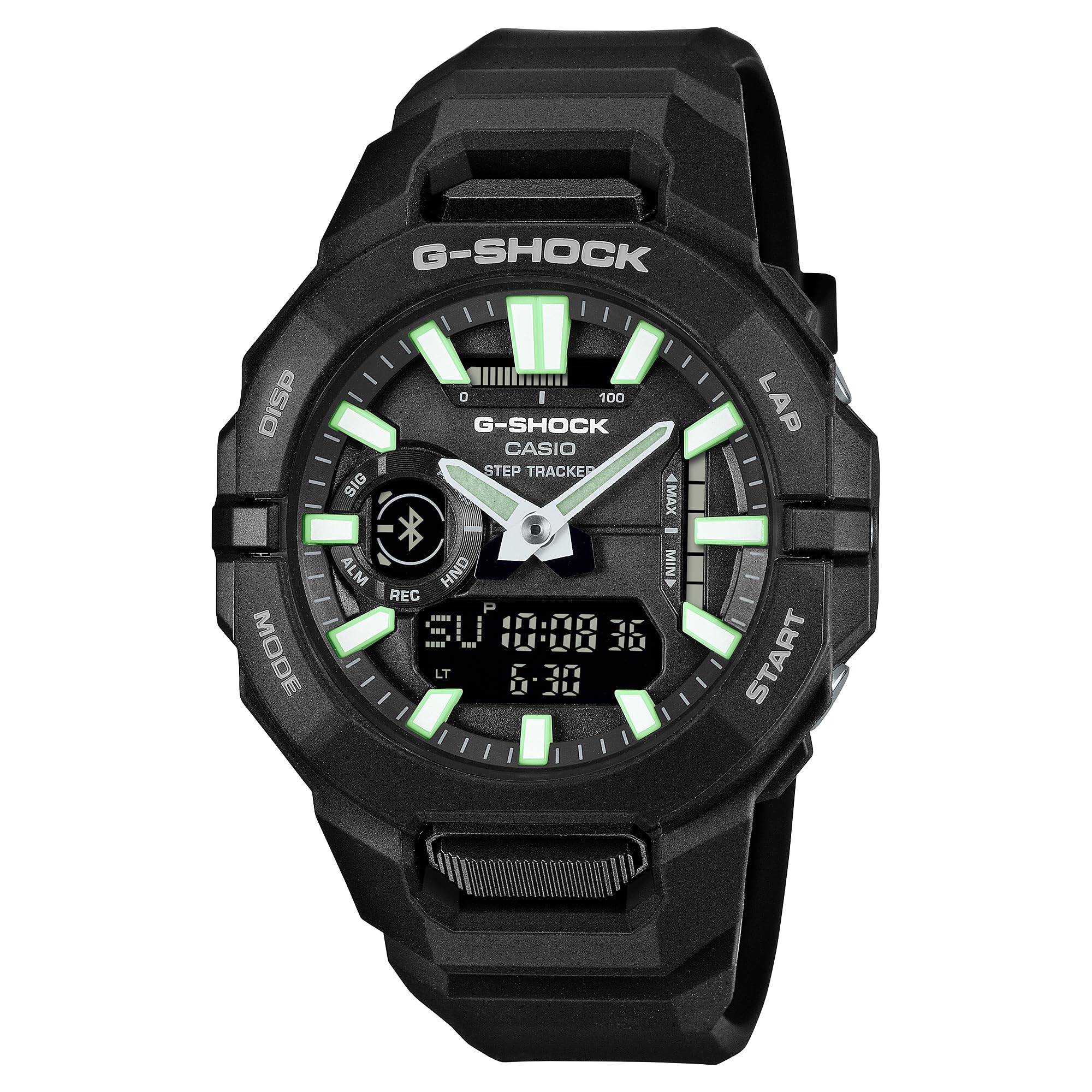
Gambar 1: Hareupeun view of the Casio G-Shock Move GBA950-1A watch.
Disetél
1. Setélan Waktu Awal
Your GBA950-1A watch can synchronize its time with a smartphone via Bluetooth. For initial setup, it is recommended to pair the watch with the dedicated G-SHOCK Connected app.
2. Masangkeun sareng Smartphone
- Unduh G-SHOCK Connected aplikasi ti toko aplikasi smartphone anjeun.
- Aktipkeun Bluetooth dina smartphone Anjeun.
- Dina jam tangan, pencét terus tahan tombol MODÉ button (usually bottom left) until the Bluetooth indicator appears or flashes.
- Open the G-SHOCK Connected app and follow the on-screen instructions to pair your watch. The app will guide you through the pairing process and automatically adjust the watch's time and date.
3. Fungsi Tombol Dasar
- Tombol MODE (Kénca handap): Cycles through different watch modes (Timekeeping, Stopwatch, Timer, Alarm, etc.).
- DISP Button (Top Left): Changes the information displayed on the digital screen.
- Tombol MIMITI (Katuhu Handap): Used to start/stop stopwatch, timer, or other functions.
- LAP Button (Top Right): Used for lap/split times in stopwatch mode or other specific functions.

Gambar 2: Hareupeun view of the GBA950-1A watch, highlighting button locations.
Ngoperasikeun Watch
1. Timekeeping
The watch features both analog hands and a digital display. The analog hands show the current time, while the digital display can show various information depending on the mode, including date, day of the week, and secondary time information.
2. Step Tracker
The GBA950-1A includes a built-in step tracker. For accurate distance measurements, use your smartphone's GPS functionality to calibrate the watch. Once calibrated, the watch can track your pace and distance even without a continuous smartphone connection.
- Ka view step count, cycle through the digital display modes using the DISP kancing.
- For detailed activity history and life log data, refer to the G-SHOCK Connected app.
3. Auto Lap Feature
The Auto Lap feature automatically records lap times over a set distance during your workout. This function is configured and managed through the G-SHOCK Connected app.
4. Tahan cai
This watch is water-resistant to 200 meters (20 BAR), making it suitable for swimming, showering, and snorkeling. Do not operate buttons while the watch is submerged in water.
5. Operasi lampu tukang
Press the top right button (often labeled CAHAYA or Lapang, depending on context) to illuminate the watch face for visibility in low-light conditions. The watch features a bright LED backlight.

Figure 3: Watch face with backlight activated, showing digital display and analog hands.
Pangropéa
1. beberesih
Wipe the watch regularly with a soft, dry cloth to remove dirt and moisture. For stubborn grime, use a soft brush and mild soap solution, then rinse thoroughly with fresh water and dry completely. Avoid using harsh chemicals or solvents.
2. Ngagantian batré
The GBA950-1A is powered by a long-life battery, typically lasting approximately 2 years. When the battery runs low, the watch's functions may become unstable or stop. Battery replacement should be performed by an authorized Casio service center to ensure proper water resistance and function.
3. Resin Material Care
The watch's bezel and band are made from durable resin. Prolonged exposure to direct sunlight, high temperatures, or certain chemicals (e.g., gasoline, alcohol, paint thinner) can cause discoloration or damage. Clean any spills immediately.

Gambar 4: Tukangeun view of the GBA950-1A watch, showing the case back and strap.
Pamérésan masalah
- Lalajo teu nyambung ka smartphone:
Ensure Bluetooth is enabled on your smartphone and the watch. Check if the G-SHOCK Connected app is updated to the latest version. Try restarting both your phone and the watch (by removing and reinserting the battery, if comfortable, or performing a factory reset if available and instructed by support). Ensure the watch is not too far from the phone.
- Inaccurate step counts or distance:
Ensure the watch is worn snugly on your wrist. Calibrate the distance measurement using your smartphone's GPS via the G-SHOCK Connected app. Movement patterns can affect accuracy; ensure your arm swings naturally.
- Tampilan digital kosong atanapi redup:
This may indicate a low battery. Replace the battery at an authorized service center. Extreme temperatures can also temporarily affect display visibility.
- Analog hands are not synchronized with digital time:
Perform a hand alignment correction. This function is usually available through the G-SHOCK Connected app or by following specific button operations detailed in the full Casio manual for your module number.
spésifikasi
| Nomer modél | GBA950-1A |
| merek | G-Shock (Casio) |
| Tahan cai | 200 Méter (20 BAR) |
| Kahirupan batré | Kurang leuwih 2 taun |
| Ukuran Kasus | 48.5 mm (diaméterna) |
| Bahan Casing/Bezel | Carbon fiber-reinforced resin |
| Bahan Pita | Bio-based resin |
| Konektipitas | Bluetooth(R) (Smartphone Link) |
| Fitur konci | Step Tracker, Auto Lap, Smartphone GPS Link, LED Backlight |

Angka 5: Ngabeledug view illustrating the watch's construction and components.
Garansi sareng Rojongan
Your GBA950-1A watch comes with a manufacturer's warranty. Please refer to the "Warranty Information" document included in your product packaging for details regarding coverage, terms, and conditions.
For technical assistance, service, or further inquiries, please contact Casio customer support or visit the official G-Shock website. Contact information can typically be found in your warranty documentation or on the manufacturer's websitus.
When contacting support, please have your watch's model number (GBA950-1A) and purchase details readily available.