
1. Produk Langkungview
The Soundcore Liberty 5 Pro Max are advanced wireless earbuds designed for superior audio experiences, crystal-clear communication, and smart productivity features. They integrate cutting-edge AI technology for noise cancellation, voice recording, and personalized sound.
Fitur konci:
- Guinness World Records Certified Call Quality: The Liberty 5 Pro Max offers exceptional call performance, certified by Guinness World Records for its speech quality.
- AI Voice Recorder & Transcription: The smart charging case features an integrated microphone to record in-person meetings and interviews, providing AI-generated transcriptions and summaries. (Note: Does not record online meetings or calls.)
- Intuitive AMOLED Smart Case: A 1.78" AMOLED display on the charging case allows direct control over AI recording, ANC settings, and earbud configurations, with customizable wallpapers.
- Telepon Crystal-Clear: Equipped with 10 sensors and a Thus AI Chip, ensuring your voice is heard clearly in any environment, even in noisy conditions exceeding 100 dB.
- Instant Absolute Silence (ANC): Features 100% more effective Active Noise Cancellation than previous models, utilizing 8 sensors and a Thus AI Chip to process over 384K noise signals per second for immediate quiet.
- Personalized Audio with HearID 5.0: Tailor your sound experience with custom EQ and an AI audio optimizer, ensuring optimal sound quality.
- Lag-Free Voice Control: Access 20 integrated commands for music playback and volume adjustment with zero delay, thanks to offline processing.
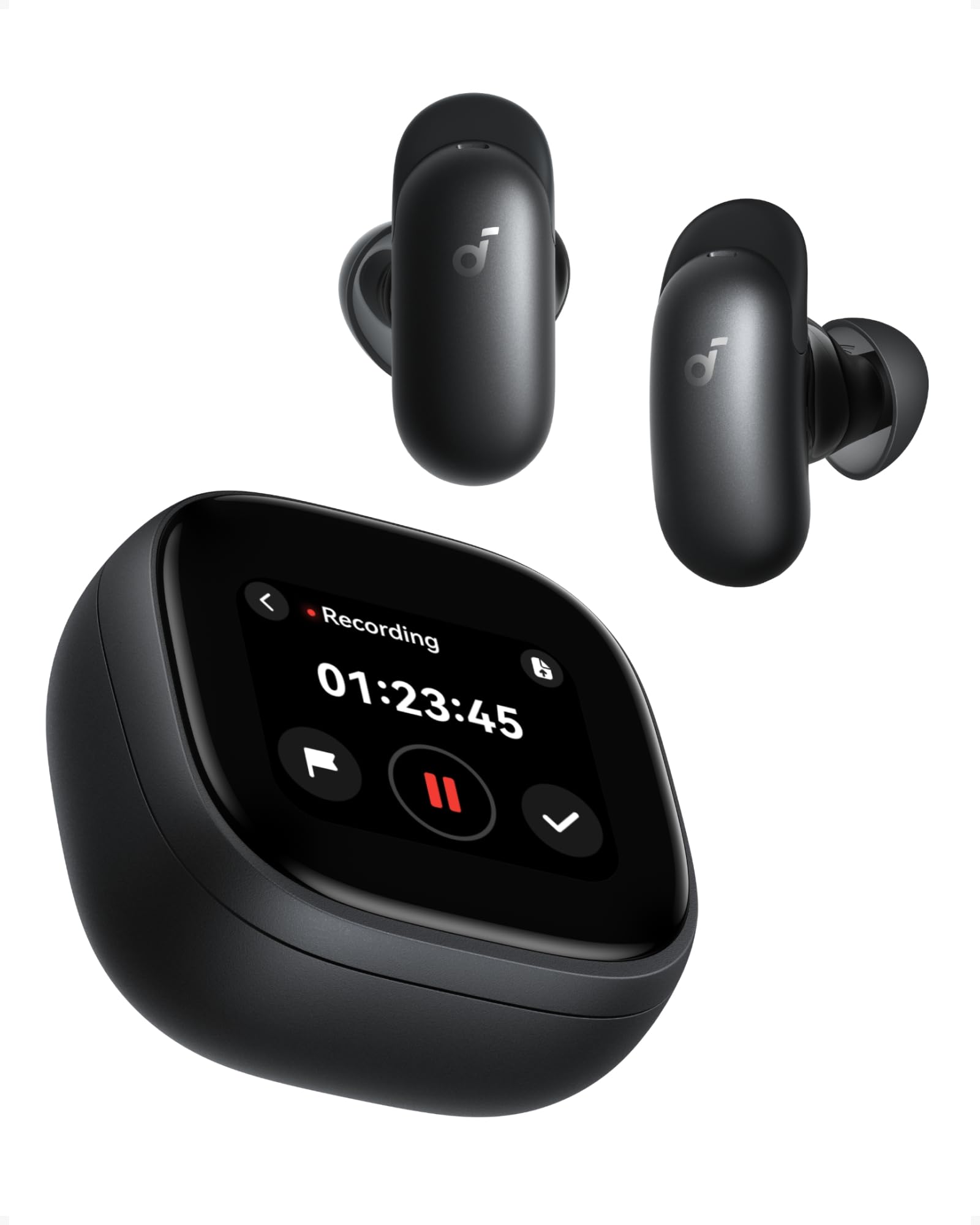
Image: Soundcore Liberty 5 Pro Max earbuds in their smart charging case.
2. Eusi Paket
Pastikeun sadaya item aya dina kotak:
- Soundcore Liberty 5 Pro Max Earbuds
- Smart Ngecas Case
- Ear Tips: XXS, XS, S, M, L (Medium pre-installed)
- Ear Wings: 0, 1, 2 (Size 1 pre-installed)
- Kabel Ngecas USB-C

Image: All components included in the Soundcore Liberty 5 Pro Max package.
3. Setup jeung pamakéan munggaran
3.1 Ngecas Earbuds sareng Case
- Teundeun earbuds kana wadah ngecas.
- Connect the charging case to a power source using the provided USB-C cable. The LED indicators on the case will show charging status.
- Pikeun ngecas nirkabel, simpen wadahna dina bantalan ngecas nirkabel anu cocog.
- A full charge for the earbuds takes approximately 50 minutes. The case provides multiple charges for extended use.
3.2 Nyocogkeun Earbuds
For optimal sound quality and noise cancellation, it is crucial to choose the correct ear tips and ear wings that provide a secure and comfortable seal.
- Experiment with different sizes of ear tips (XXS, XS, S, M, L) and ear wings (0, 1, 2).
- Insert the earbuds into your ears and rotate them until they fit snugly and comfortably.
- Use the Soundcore app's "Tip Fit Test" feature to verify the seal.

Image: Earbud correctly positioned in the ear for a secure fit.
3.3 Nyapasangkeun sareng Alat Anjeun
- Open the charging case. The earbuds will automatically enter Bluetooth pairing mode (LEDs will flash).
- On your device (smartphone, tablet, PC), go to Bluetooth settings and select "Soundcore Liberty 5 Pro Max" from the list of available devices.
- Sakali disambungkeun, earbud bakal otomatis nyambung ka alat anu terakhir dipasangkeun nalika dicabut tina casingna.
- The Liberty 5 Pro Max supports simultaneous connection to up to 3 devices. Manage connections via the Soundcore app or the smart case display.

Image: Illustration of connecting the earbuds to multiple devices simultaneously.
3.4 Soundcore App Installation
Download the Soundcore app from the App Store (iOS) or Google Play Store (Android) to unlock full features, customize settings, and manage your earbuds.
4. Parentah Operasi
4.1 Earbud Controls (Touch/Slide)
The earbuds feature touch and slide controls. Customize these controls via the Soundcore app.
- Puter / Reureuh: Ketok tunggal dina boh earbud.
- Lagu salajengna: Ketok dua kali earbud katuhu.
- Lagu Sateuacanna: Ketok dua kali earbud kénca.
- Volume Up: Slide up on right earbud.
- Volume Turun: Slide down on left earbud.
- Ngajawab / mungkas Telepon: Ketok tunggal dina boh earbud.
- Nolak Telepon: Pencét jeung tahan boh earbud salila 2 detik.
- Ganti Modeu ANC: Press and hold left earbud for 2 seconds (cycles through ANC, Transparency, Normal).
4.2 Smart Charging Case Display
The 1.78" AMOLED display on the charging case provides direct access to various functions:
- AI Voice Recorder: Start, pause, and stop recordings. View waktos ngarekam.
- Kontrol ANC: Adjust Active Noise Cancellation modes (ANC, Transparency, Normal).
- Earbud Settings: Manage equalizer presets, customize controls, and perform firmware updates.
- Status batré: View battery levels for both earbuds and the charging case.
- Custom Wallpapers: Personalize the display background.

Image: Hand interacting with the smart charging case display, showing various control options.
4.3 Modeu Pembatalan Noise Aktif (ANC) sareng Transparansi
The Liberty 5 Pro Max offers advanced noise control:
- Mode ANC: Reduces ambient noise for an immersive listening experience. Ideal for travel or noisy environments.
- Modeu Transparansi: Allows you to hear your surroundings while listening to audio. Useful for awareness in urban areas or conversations.
- Modeu Normal: Standard audio playback without active noise control.

Image: A man on a boat, illustrating the effectiveness of instant absolute silence with ANC.
4.4 AI Voice Recorder
Utilize the AI Voice Recorder for in-person meetings and interviews:
- Access the recorder via the smart case display or the Soundcore app.
- Start recording. The integrated microphone in the case will capture audio.
- After recording, the system will transcribe and generate AI summaries.
- Manage recordings, transcriptions, and summaries through the Soundcore app or the "Ask Anka" web portal.

Image: Individuals in a meeting, demonstrating the use of the AI voice recorder.
4.5 Personalized Audio Settings
The Soundcore app allows you to customize your audio experience:
- IDHear 5.0: Perform a hearing test to create a personalized EQ profile disaluyukeun pikeun pangrungu unik anjeun.
- EQ khusus: Manually adjust equalizer settings to your preference.
- AI Audio Optimizer: Enhances sound quality based on AI analysis.

Image: A woman relaxing, enjoying personalized audio settings.
5. Pangropéa
- beberesih: Regularly clean the earbuds, ear tips, and charging case with a soft, dry, lint-free cloth. Avoid using harsh chemicals.
- Tahan cai: The earbuds have an IPX4 water resistance rating, meaning they are resistant to splashes and sweat. Do not submerge them in water. Ensure earbuds are dry before placing them back in the charging case.
- Panyimpenan: Simpen earbuds dina wadah ngecas nalika henteu dianggo pikeun ngajagi sareng tetep dicas.
6. Cara ngungkulan
| Masalah | Solusi |
|---|---|
| Earbuds teu dipasangkeun |
|
| Teu aya sora atanapi volume handap |
|
| ANC teu efektif |
|
| Masalah ngecas |
|
7. Spésifikasi
| Fitur | Rincian |
|---|---|
| merek | Soundcore |
| Ngaran modél | Liberty 5 Pro Max |
| Nomer modél | D1204 |
| Warna | Hideung |
| Faktor Bentuk | Di-ceuli |
| Kontrol bising | Aktif Noise pembatalan (ANC) |
| Impedansi | 17 ohm |
| Réspon Frékuénsi | 20 KHz |
| Sensitipitas | 123 dB |
| Téhnologi konektipitas | Nirkabel |
| Téhnologi nirkabel | Bluetooth |
| Vérsi Bluetooth | 6.1 |
| Tipe Kontrol | Touch and Slide Control |
| Métode kontrol | Aplikasi, Sora |
| Casing Bahan | palastik |
| Tingkat Résistansi Cai | IPX4 (Tahan cipratan sareng Késang) |
| Umur Batré Rata-rata (Earbud) | 12 Jam |
| Waktu Ngeusi batre | 50 Menit |
| Fitur husus | AI Note-Taker, AI Noise Cancellation, AMOLED Smart Case |
| Alat nu cocog | iPhone, Android, PC, Mac |
| GTIN (UPC) | 194644331047 |
8. Garansi jeung Rojongan
The Soundcore Liberty 5 Pro Max comes with a 24-garansi sasih ti tanggal beuli. Punten tahan bukti pameseran anjeun pikeun klaim garansi.
For technical support, troubleshooting assistance, or warranty inquiries, please visit the official Soundcore support websitus atanapi ngahubungi layanan palangganna. Anjeun tiasa mendakan langkung seueur inpormasi ngeunaan Toko Soundcore di Amazon or the Soundcore app.
9. Émbaran Kasalametan penting
- Ulah kakeunaan suhu ekstrim.
- Hindarkeun ragrag atanapi ngagentoskeun alat kana tabrakan anu kuat.
- Jauhkeun tina jangkauan barudak sareng piaraan.
- Ulah ngabongkar atanapi nyobian ngalereskeun alat sorangan.
- Anggo ngan ukur kabel sareng adaptor ngecas asli atanapi anu disertifikasi.
- Avoid using earbuds at high volume for extended periods to prevent hearing damage.
10. Sumberdaya Video
Teu aya pidéo produk resmi URLs were provided in the product data. Please refer to the official Soundcore website or YouTube channel for video tutorials and demonstrations.