1. Bubuka
The DYMO LabelMANAGER 300 (LM300) is an electronic labelmaker designed for various labeling applications, including industrial and professional use. It features a QWERTY keyboard and a 15-character LCD display for easy label creation and previewing. This device supports printing on multiple D1 tape widths and offers advanced features such as barcode printing and various text formatting options.
Produk Leuwihview
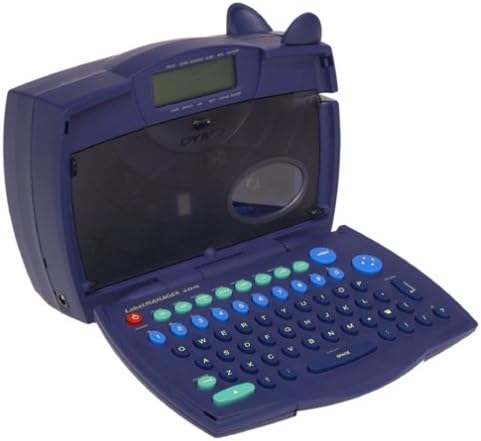
Image 1.1: The DYMO LabelMANAGER 300 in an open position, revealing its QWERTY keyboard and LCD screen. The device is dark blue with light blue and green function keys.
Key features of the LabelMANAGER 300 include:
- Designed for engineering and shop floor applications.
- 15-character LCD display for easy editing and previewing.
- Prints on D1 tape widths: 0.25, 0.325, 0.5, and 0.75 inches.
- Features a QWERTY keyboard with profiled keys for efficient input.
- Capable of printing electrical symbols and various barcode types.
2. Setélan
Ngabongkar Alat
Carefully remove all components from the packaging. Ensure all items are present before proceeding with setup.

Image 2.1: The DYMO LabelMANAGER 300 shown with its standard accessories, including a D1 tape cassette and the product documentation.
Bungkusan kedah ngandung:
- DYMO LabelMANAGER 300 Printer
- D1 Label Tape Cassette (starter roll)
- Manual pangguna (dokumén ieu)
- 2 batré AA (kaasup)
Pamasangan batré
- Locate the battery compartment on the underside of the labelmaker.
- Geser panutup kompartemen batré kabuka.
- Selapkeun 2 batré AA, mastikeun polaritasna bener (+/-) sakumaha dituduhkeun di jero kompartemen.
- Ganti panutup kompartemen batré nepi ka ngaklik aman kana tempatna.
Pamasangan Kaset Pita
- Open the labelmaker cover by gently lifting it from the front.
- Locate the tape cassette compartment.
- Insert a DYMO D1 label tape cassette into the compartment, ensuring the tape feeds correctly into the print head mechanism.
- Close the labelmaker cover until it latches securely.
3. Parentah Operasi
Ngahurungkeun/Pareuman
- Pikeun ngaktipkeun: Pencét Kakuatan button. The LCD display will illuminate.
- Pikeun mareuman: Pencét jeung tahan tombol Kakuatan button until the display turns off. The device also features an automatic shut-off to conserve battery power after a period of inactivity.
Basic Label Creation
- Pastikeun alat diaktipkeun.
- Use the QWERTY keyboard to type your desired text. The text will appear on the 15-character, two-line LCD display.
- Review the text on the display for accuracy. Use the arrow keys to navigate and edit if necessary.
- Pencét éta Nyitak button to print the label.
- Once printed, use the integrated cutter to cut the label.
Pormat téks
The LabelMANAGER 300 offers various text formatting options:
- Print Styles: Select from normal, narrow, bold, vertical, outline, shadow, mirror, and boxed styles. Refer to the device's menu for specific style selection.
- Text Effects: Apply underline, shadow, or box effects to your text.
- Justifikasi: Labels can be printed with left, center, or right justification.
- Multi-garis Printing: Print one, two, three, or four lines on a single label, depending on the tape width.
Fitur canggih
- Incremental Numbering: Automatically print a series of labels with sequential numbers.
- Repeat Printing: Print multiple copies of the same label.
- Barcode Printing: The LM300 supports printing various barcode types, including UPC-A, UPC-E, EAN-8, EAN-13, Code-39, and Code-128. Access this feature through the device's menu.
- Simbol listrik: Embed common electrical symbols into your labels for specialized applications.
- Last-Label Memory: The device retains the last printed label in memory for quick reprinting.
4. Pangropéa
Ngabersihan Alat
- Ensure the labelmaker is powered off before cleaning.
- Ngusap bagian luar alat ku lemes, damp lawon. Ulah make cleaners abrasive atawa pangleyur.
- To clean the print head, open the cover and gently wipe the print head with a cotton swab lightly dampdilebur ku alkohol isopropil. Keun nepi ka garing sagemblengna sateuacan nutup panutupna.
Panyimpenan
When not in use, store the DYMO LabelMANAGER 300 in a cool, dry place away from direct sunlight and extreme temperatures. If storing for an extended period, it is recommended to remove the batteries to prevent leakage.
5. Cara ngungkulan
If you encounter issues with your LabelMANAGER 300, refer to the following common problems and solutions:
- Henteu aya kakuatan:
- Check if batteries are inserted correctly with proper polarity.
- Replace old or depleted batteries with new AA batteries. - Kualitas cetak goréng:
- Ensure the tape cassette is installed correctly.
- Clean the print head as described in the Maintenance section.
- Try a new tape cassette, as old tape may affect print quality. - Tape Jams:
- Open the cover and carefully remove any jammed tape. Ensure no adhesive residue is left in the mechanism.
- Make sure the tape cassette is seated properly. - Tampilan Teu Gawé:
- Check battery power. If the display is dim or blank, replace batteries.
- Power cycle the device (turn off, then on again). - Alat Teu Ngabales:
- Remove and reinsert batteries to perform a soft reset.
- Upami masalahna masih aya, mangga ngahubungi layanan palanggan.
6. Spésifikasi
| Fitur | Rincian |
|---|---|
| Ngaran modél | LM300 |
| merek | DYMO |
| Téhnologi percetakan | Termal |
| tampilan | 15-character, 2-line LCD |
| Tata perenah kibor | QWERTY |
| Lebar Pita anu Dirojong | 0.25, 0.325, 0.5, 0.75 inches (D1 tapes) |
| Print Styles | Normal, Narrow, Bold, Vertical, Outline, Shadow, Mirror, Boxed |
| Pangaruh téks | Underline, Shadow, Box |
| Barcode Support | UPC-A, UPC-E, EAN-8, EAN-13, Code-39, Code-128 |
| Sumber Daya | 2 batré AA (kaasup) |
| Item Beurat | 2.3 pon |
| Ukuran Paket | 11.1 x 8 x 4.4 inci |
| Max Copy Resolution (B&W) | 300 dpi |
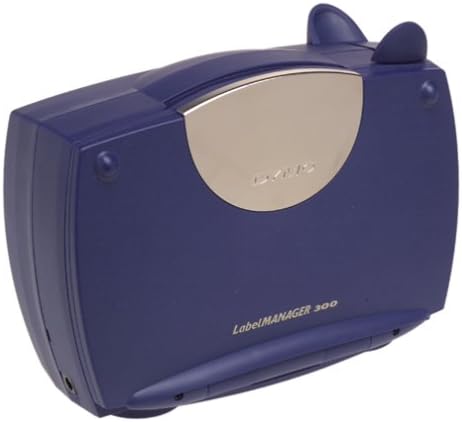
Image 6.1: The DYMO LabelMANAGER 300 in its closed position, showcasing desainna anu ringkes sareng gampang dibawa.
7. Garansi jeung Rojongan
Émbaran jaminan
The DYMO LabelMANAGER 300 comes with a limited warranty. Please refer to the warranty card included with your product for specific terms and conditions, or visit the official DYMO websitus kanggo inpormasi garansi lengkep.
Rojongan Palanggan
For further assistance, technical support, or to purchase accessories and replacement tape, please visit the official DYMO website or contact their customer service department. Contact information can typically be found on the DYMO websitus atanapi dina bungkusan produk.


