Bubuka
Hatur nuhun pikeun meuliasing the GPX C3960 Personal CD/MP3 Player. This manual provides detailed instructions for the proper setup, operation, and maintenance of your device. Please read this manual thoroughly before use and retain it for future reference.
Eusi pakét
Pastikeun sadaya item aya dina bungkusan:
- GPX C3960 Personal CD/MP3 Player
- Earbuds stéroid
- Manual pangguna (dokumén ieu)
Produk Leuwihview
Familiarize yourself with the components and features of your GPX C3960 player.
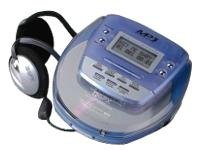
Image: The GPX C3960 Personal CD/MP3 Player, shown in a translucent blue casing, with a pair of silver over-ear headphones connected. The player features a small LCD screen and control buttons on its top surface.
Fitur konci:
- CD-R/RW and MP3 disc playback compatibility
- Anti-skip protection: 45 seconds for audio CDs, 120 seconds for MP3 CDs
- Dynamic Bass Boost (DBB) for enhanced audio output
- 24-track programmable memory
- Low battery alert indicator
- Dioperasikeun dina 2 batré AA
Disetél
1. Pamasangan batré
- Locate the battery compartment on the bottom of the player.
- Geser panutup kompartemen batré kabuka.
- Selapkeun dua (2) accu AA, mastikeun polaritasna bener (+ jeung -) sakumaha dituduhkeun di jero kompartemen.
- Tutup panutup kompartemen batré aman.
- Catetan: Replace batteries when the low battery indicator appears on the display or when playback performance degrades.
2. Nyambungkeun headphone
- Plug the stereo earbuds or your preferred headphones into the TELEPON jack located on the side of the player.
Parentah Operasi
1. Powering on / Pareum
- Pikeun ngaktipkeun, pencét tombol PLAY/PAUSE (►/‖‖) kancing.
- Pikeun mareuman, pencét tombol Seureuh (■) button twice, or wait for the auto-power off feature to activate after a period of inactivity.
2. Loading a CD/MP3 Disc
- Pencét éta BUKA button to open the disc compartment lid.
- Carefully place a CD or MP3 disc onto the center spindle with the label side facing up.
- Gently pencét disc ka handap nepi ka clicks kana tempat.
- Close the disc compartment lid firmly until it latches.
3. Playback dasar
- Puter / Reureuh: Pencét PLAY/PAUSE (►/‖‖) pikeun ngamimitian atawa ngareureuhkeun playback.
- Eureun: Pencét Seureuh (■) pikeun ngeureunkeun playback.
- Langkung Lacak: Pencét SKIP FORWARD (►►) or SKIP BACKWARD (◄◄) to move to the next or previous track.
- Pilarian: Pencét jeung tahan SKIP FORWARD (►►) or SKIP BACKWARD (◄◄) during playback to fast-forward or rewind within a track.
4. Volume Control
- Saluyukeun VOLUME dial located on the side of the player to increase or decrease the audio output level.
5. Dinamis Bass Boost (DBB)
- Pencét éta DBB button to activate or deactivate the dynamic bass boost feature, which enhances low-frequency sounds.
6. Protéksi Anti-Skip
The GPX C3960 features electronic anti-skip protection to prevent audio interruptions during movement. This provides approximately 45 seconds of protection for standard audio CDs and 120 seconds for MP3 CDs.
7. Programming lagu
- With the player stopped, press the PROG button. The program indicator will flash.
- Ngagunakeun éta SKIP FORWARD (►►) or SKIP BACKWARD (◄◄) tombol pikeun milih lagu nu dipikahoyong.
- Pencét PROG deui pikeun nambahkeun trek anu dipilih kana memori program.
- Repeat steps 2 and 3 for up to 24 tracks.
- Pencét PLAY/PAUSE (►/‖‖) to start playback of the programmed sequence.
- To clear the program, open the disc compartment or press Seureuh (■) dua kali.
Pangropéa
Ngabersihkeun Unit
- Wipe the exterior of the player with a soft, slightly damp lawon. Ulah make cleaners abrasive atawa pangleyur.
- Never open the disc compartment while the player is operating.
- Keep the lens clean. If the lens becomes dirty, use a soft camera lens brush to gently remove dust.
Perawatan batré
- Cabut batré upami unit moal dianggo kanggo waktos anu panjang pikeun nyegah bocor.
- Ulah campur batré heubeul jeung anyar, atawa tipena béda accu.
Penanganan Cakram
- Nanganan cakram dina sisina pikeun nyegah sidik sareng goresan.
- Nyimpen cakram dina kasusna nalika henteu dianggo.
- Bersihkeun cakram nganggo kaén anu lembut, teu aya serat, usap ti tengah ka luar.
Pamérésan masalah
| Masalah | Mungkin Cukang lantaranana | Solusi |
|---|---|---|
| Taya kakuatan | Batré pareum atawa salah dipasang. | Ganti batré ku nu anyar, mastikeun polaritasna bener. |
| Disk teu bisa diputer / kasalahan "NO DISC" | Disk kotor, calar, atanapi teu dipasang kalayan leres. | Clean the disc. Reinsert the disc with the label side up. Try a different disc. |
| Sora ngaluncat atanapi distorsi | Disc is dirty, scratched, or player is subjected to excessive vibration. | Clean the disc. Ensure the player is on a stable surface or reduce movement. |
| Teu aya sora tina headphone | Headphones not properly connected or volume too low. | Pastikeun headphone tos dicolokkeun pinuh. Ningkatkeun polumeu. Uji nganggo headphone anu béda. |
spésifikasi
- merek: GPX
- model: C3960
- Média anu Dirojong: CD, CD-R, CD-RW, MP3-CD
- Perlindungan Anti Skip: 45 seconds (CD), 120 seconds (MP3-CD)
- Sumber Daya: 2 x batré AA
- Fitur husus: Portabel
- Beurat barang: Kira-kira 726 g
- ukuran: Kira-kira 40.64 x 38.1 x 30.48 cm (Diménsi Pakét)
Garansi sareng Rojongan
For warranty information or technical support, please refer to the documentation included with your purchase or visit the official GPX websitus. Simpen bukti pameseran anjeun pikeun klaim garansi.


