Bubuka
This manual provides comprehensive instructions for the installation, operation, and maintenance of the HP DL489A Nvidia Quadro FX 1100 128MB DDR II SDRAM AGP 8x Graphics Card. Please read this manual thoroughly before installation and use to ensure proper functionality and to prevent damage.
Émbaran Kasalametan
Salawasna perhatikeun pancegahan kaamanan di handap ieu:
- Ensure your computer is powered off and unplugged from the wall outlet before installing or removing the graphics card.
- Cabut sagala listrik statik tina awak anjeun ku cara noel hiji objek logam grounded saméméh nanganan kartu.
- Nanganan kartu grafik dina sisina pikeun nyegah noel komponén sénsitip.
- Ulah ngantep kartu kakeunaan kalembaban atanapi suhu anu ekstrim.
Setup sareng Instalasi
Follow these steps to install the HP DL489A Nvidia Quadro FX 1100 graphics card into your computer system.
1. Nyiapkeun Sistim anjeun
- Power off your computer and disconnect all cables, including the power cord.
- Open the computer case. Refer to your computer's manual for specific instructions on how to open the case.
- Locate an available AGP 8x slot on your motherboard.
2. Install the Graphics Card
- Carefully align the graphics card with the AGP slot.
- Press down firmly and evenly on both ends of the card until it is securely seated in the slot. You may hear a click if your slot has a locking mechanism.
- Secure the card with a screw to the computer chassis, if applicable.
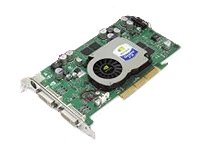
Image: The HP DL489A Nvidia Quadro FX 1100 Graphics Card. This image shows the physical card, highlighting its AGP connector and cooling solution, ready for installation into a compatible motherboard slot.
3. Close and Connect
- Tutup wadah komputer.
- Reconnect all cables, including the power cord, monitor cables (DVI), and any peripherals.
- Daya dina komputer Anjeun.
4. Pamasangan supir
After the operating system loads, it may automatically detect the new hardware. If not, you will need to install the appropriate drivers. Drivers for the Nvidia Quadro FX 1100 can typically be found on the official Nvidia website or HP support websitus. Turutan pitunjuk dina layar anu disayogikeun ku pamasang supir.
Ngoperasikeun Kartu Grafis
Once installed and drivers are configured, the HP DL489A graphics card will manage your system's display output. It supports dual DVI-D monitors.
Konfigurasi tampilan
To configure your display settings, including resolution, refresh rate, and multiple monitor setups:
- Windows: Right-click on the desktop and select "Display settings" or "NVIDIA Control Panel."
- Linux: Use your desktop environment's display settings utility or the NVIDIA X Server Settings application.
The card supports resolutions up to 1920x1200 per DVI output.
Pangropéa
Pangropéa anu leres mastikeun umur panjang sareng kinerja optimal tina kartu grafik anjeun.
- Ngaleungitkeun lebu: Periodically open your computer case and gently clean dust from the graphics card's heatsink and fan using compressed air. Ensure the fan does not spin rapidly during cleaning.
- Pembaruan supir: Keep your graphics drivers updated. Check the official Nvidia or HP websites for the latest compatible drivers.
- Pangimeutan Suhu: Monitor the card's temperature, especially during heavy use, using system monitoring software. Ensure adequate airflow within your computer case.
Pamérésan masalah
Bagian ieu ngabahas masalah umum anu anjeun tingali.
Taya Kaluaran Témbongkeun
- Ensure the monitor cables are securely connected to both the graphics card and the monitor.
- Pastikeun monitor dihurungkeun tur disetel ka sumber input nu bener.
- Check if the graphics card is fully seated in the AGP slot.
- Try connecting the monitor to the motherboard's integrated graphics (if available) to rule out other system issues.
Driver Installation Issues
- Download drivers only from official Nvidia or HP support websitus.
- Ensure you are downloading the correct drivers for your operating system and the Quadro FX 1100.
- Uninstall any previous graphics drivers before attempting a new installation.
Instabilitas Sistim atanapi kacilakaan
- Ensure your power supply unit (PSU) meets the minimum requirements for your system, including the graphics card.
- Check for overheating. Clean dust from the card's fan and heatsink.
- Verify that the graphics drivers are up to date and correctly installed.
spésifikasi
Key technical specifications for the HP DL489A Nvidia Quadro FX 1100 Graphics Card:
| Fitur | Rincian |
|---|---|
| Nomer modél | DL489A |
| Prosesor Grafika | Nvidia Quadro FX 1100 |
| Ukuran mémori | 128 MB |
| Tipe Mémori | DDR II SDRAM |
| Panganteur | AGP 8x |
| Palabuhan Kaluaran | Dual DVI-D |
| Dimensi produk | 12 x 9 x 3 inci |
| Item Beurat | 2 pon |
Garansi sareng Rojongan
For warranty information and technical support, please refer to the documentation provided with your original computer system or contact Hewlett Packard customer support directly. Specific warranty terms may vary based on region and purchase date.
Rojongan HP Websitus: https://www.hp.com/support