Bubuka
This manual provides comprehensive instructions for the setup, operation, and maintenance of your Coby CT-P9040 5.8 GHz Analog Cordless Phone. Please read this manual thoroughly before using your phone to ensure proper functionality and to prevent damage.
Eusi pakét jeung komponén
Sateuacan anjeun ngawitan, pastikeun sadaya komponén aya dina pakét:
- Handset tanpa kabel
- Unit Dasar
- Adaptor Daya AC
- Tali Telepon
- Pack batré Rechargeable
- Manual pangguna (dokumén ieu)
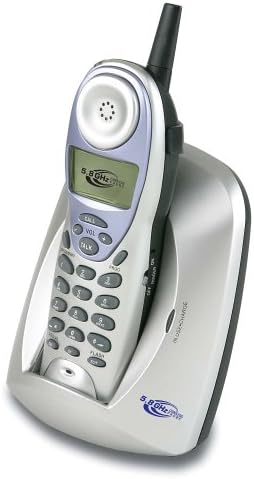
Image: The Coby CT-P9040 cordless phone, showing the handset docked in its silver base unit. The handset features a display screen, numeric keypad, and function buttons. The base unit has a charging cradle for the handset.
Guide Setup
1. Pamasangan batré
- Panggihan kompartemen batré dina tonggong handset.
- Buka panutup kompartemen batré.
- Sambungkeun konektor batré anu tiasa dicas deui kana jack di jero kompartemenna.
- Place the battery pack into the compartment and close the cover securely.
2. Sambungan Unit Base
- Connect one end of the telephone line cord to the "LINE" jack on the back of the base unit.
- Sambungkeun tungtung nu sejen tina kabel saluran telepon ka jack telepon standar.
- Connect the AC power adapter to the "DC IN" jack on the back of the base unit.
- Colokkeun adaptor kakuatan AC kana stop kontak listrik standar.
3. Ngecas Awal
Place the handset in the base unit's charging cradle. Ensure the "IN CHARGE" indicator light on the base unit illuminates, indicating proper charging. For optimal battery performance, charge the handset for at least 12-14 hours before initial use.
Parentah Operasi
Nelepon
- Pick up the handset from the base unit or press the Obrolan kancing.
- Dengekeun nada dial.
- Pencét nomer telepon anu dipikahoyong.
- Pikeun ngeureunkeun telepon, pencét tombol Obrolan button again or place the handset back in the base unit.
Ngajawab Telepon
Sawaktos telepon hurung, angkat héndsét atanapi pencét tombol Obrolan tombol pikeun ngajawab telepon.
Fungsi Redial
Pikeun nelepon deui nomer anu terakhir ditelepon, pencét tombol REDIAL tombol dina handset.
adjustment volume
Nalika nelepon, nganggo VOL+ jeung VOL- buttons on the handset to adjust the earpiece volume.
Fungsi Flash
Pencét éta KECIL button to use call waiting or transfer calls if supported by your telephone service provider.
Storing Phone Numbers (Speed Dial)
Your phone can store up to 10 numbers for frequently called contacts. Refer to the detailed instructions in the full manual for programming speed dial entries.
Pangropéa sareng Perawatan
- Keep the phone away from heat sources, direct sunlight, and moisture.
- Bersihkeun permukaan telepon nganggo kaén anu lemes,amp lawon. Ulah make cleaners abrasive atawa pangleyur.
- Ensure the charging contacts on the handset and base unit are clean to maintain proper charging.
- If the phone will not be used for an extended period, remove the battery from the handset.
Pamérésan masalah
| Masalah | Mungkin Cukang lantaranana | Solusi |
|---|---|---|
| Taya nada dial | Tali saluran telepon dipegatkeun. | Pastikeun kabel saluran telepon disambungkeun sacara aman ka unit dasar sareng jack témbok. |
| Handset teu ngecas | Handset not properly seated in cradle or dirty charging contacts. | Reseat the handset in the base unit. Clean the charging contacts on both the handset and base unit with a dry cloth. |
| Kualitas sora goréng / Statis | Interference from other electronic devices or out of range. | Move the base unit away from other electronic devices (e.g., microwaves, Wi-Fi routers). Move closer to the base unit. |
| Teu bisa nyieun/nampa telepon | Power adapter disconnected or battery low. | Check if the AC power adapter is securely plugged in. Ensure the handset battery is fully charged. |
spésifikasi
- model: CT-P9040 SVR
- Frékuénsi: 5.8 GHz Analog
- Saluran: 40 Channel Auto Scan
- Mémori: 10-number speed dial storage
- fungsi: Flash, Redial, Pause, Tone/Pulse Switch
- Headset Jack: Built-in 2.5mm
- Pamasangan: Desk and Wall Mountable
- Ukuran (L x W x H): 5 x 8 x 4 inci
- beurat: 1.8 pon
- warna: pérak
- ID nu nelepon: Teu Dirojong
- Operasi Multiline: Operasi Single-Line
Garansi sareng Rojongan
For warranty information and technical support, please refer to the warranty card included with your product or visit the official Coby websitus. Simpen resi pameseran anjeun salaku bukti pameseran pikeun klaim garansi.
For further assistance, you may contact Coby customer service. Contact details are typically available on the manufacturer's websitus atanapi dina bungkusan produk.


