1. Bubuka
This manual provides comprehensive instructions for the setup, operation, maintenance, and troubleshooting of your COBY CR-A78 AM/FM Digital Alarm Clock with Time Projector. Please read this manual thoroughly before using the device to ensure proper function and to maximize your user experience. Keep this manual for future reference.
2. Produk Langkungview
The COBY CR-A78 is a versatile digital alarm clock featuring an AM/FM radio tuner and a unique time projection function. It is designed to provide reliable timekeeping, alarm functions, and radio entertainment, with the added convenience of projecting the current time onto a wall or ceiling.
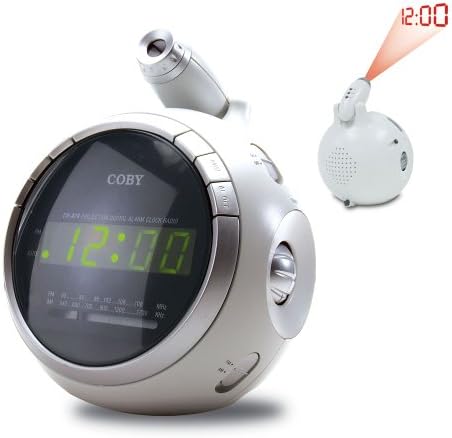
Gambar 2.1: Hareupeun view of the COBY CR-A78 digital alarm clock, showing the green LED display and the adjustable time projector. An inset image illustrates the time '12:00' being projected onto a surface.
3. Fitur
- AM/FM Digital Tuner: For listening to your favorite radio stations.
- Large Green LED Display: Provides clear visibility of the time.
- Integrated Time Projector: Projects the current time onto a wall or ceiling for easy viewing.
- Fungsi Alarm Ganda: Setel dua alarm mandiri pikeun waktos hudang anu béda.
- Fungsi Tungkul Allows for a temporary pause of the alarm.
- Timer Saré: Fall asleep to music with an automatic shut-off feature.
- Cadangan batré: Ngajaga setélan waktos sareng alarm nalika mareuman dayatages (requires 9V battery, not included).
4. Eusi Paket
- COBY CR-A78 AM/FM Digital Alarm Clock
- Adaptor Daya AC
- Manual pangguna (dokumén ieu)
5. Setélan
5.1. Sambungan Daya
- Insert the small end of the AC power adapter into the DC IN jack located on the back of the unit.
- Plug the other end of the AC power adapter into a standard wall outlet (AC 120V, 60Hz).
- The unit will power on, and the display will flash, indicating it is ready for time setting.
5.2. Pamasangan Cadangan Batré
A 9-volt battery (not included) can be installed to provide backup power for the clock and alarm settings during a power interruption.
- Locate the battery compartment cover on the bottom of the unit.
- Remove the cover by sliding it off.
- Connect a 9-volt battery to the battery connector inside the compartment, observing polarity (+ and -).
- Place the battery into the compartment and replace the cover securely.
6. Parentah Operasi
6.1. Netepkeun Waktos
- Pencét jeung tahan tombol WAKTU WAKTU tombol nepi ka digit jam mimiti flash.
- Pencét éta JAM tombol sababaraha kali pikeun nyaluyukeun jam. Titénan indikator PM pikeun setelan AM / PM bener.
- Pencét éta MENIT tombol sababaraha kali pikeun nyaluyukeun menit.
- Pencét éta WAKTU WAKTU tombol deui pikeun ngonfirmasi tur kaluar mode setelan waktos.
6.2. Nyetél Alarm
The CR-A78 features two independent alarms, Alarm 1 and Alarm 2.
- Pencét jeung tahan tombol ALARM 1 SET (atawa ALARM 2 SET) dugi ka angka jam alarm kedip-kedip.
- Pencét éta JAM tombol pikeun ngeset jam alarm nu dipikahoyong.
- Pencét éta MENIT tombol pikeun nyetél menit alarm anu dipikahoyong.
- Pencét éta ALARM 1 SET (atawa ALARM 2 SET) button again to confirm the alarm time.
- Pikeun ngaktipkeun alarm, geser tombol ALARM 1 ON / OFF (atawa ALARM 2 ON / OFF) switch to the 'ON' position. Select 'BUZZER' for a beeping alarm or 'RADIO' to wake to the radio.
6.3. Using the Snooze Function
Nalika alarm disada, pencét éta SNOOZE button. The alarm will temporarily stop and sound again after approximately 9 minutes. To turn off the alarm completely, press the ALARM Hurungkeun / Pareum pindah ka 'PADAM'.
6.4. Operasi Radio (AM/FM)
- Pencét éta RADIO ON/OFF tombol pikeun ngahurungkeun radio.
- Geser ka AM/FM switch to select the desired band.
- Puterkeun TUNING knob to find your desired station.
- Saluyukeun polumeu nganggo VOLUME kenop.
- Pikeun mareuman radio, pencét tombol RADIO ON/OFF tombol deui.
6.5. Using the Time Projector
- Locate the projector lens on top of the unit.
- Pencét éta PROYEKTOR ON/OFF button to activate the time projection.
- Rotate the projector lens to adjust the focus of the projected time.
- Adjust the angle of the projector arm to direct the time onto your desired surface (wall or ceiling).
- Pencét éta PROYEKTOR ON/OFF button again to turn off the projection.
7. Pangropéa
- beberesih: Anggo kaén anu garing sareng lemes pikeun ngabersihan bagian luar unit. Ulah make cleaners abrasive atawa pangleyur.
- Perawatan lensa: Gently wipe the projector lens with a soft, lint-free cloth if it becomes dusty.
- panempatan: Teundeun unit dina tempat anu stabil, datar jauh tina sinar panonpoé langsung, sumber panas, sareng kalembaban anu kaleuleuwihan.
- Ngagantian batré: Replace the 9-volt backup battery annually or if the unit experiences frequent power outages to ensure continuous backup functionality.
8. Cara ngungkulan
| Masalah | Mungkin Cukang lantaranana | Solusi |
|---|---|---|
| Unit teu hurung. | Adaptor AC teu nyambung kalawan bener. | Pastikeun adaptor AC dipasang pageuh kana unit sareng kana stop kontak témbok anu tiasa dianggo. |
| Alarm teu disada. | Alarm teu diaktipkeun atanapi teu leres disetel. | Verify the alarm time is set correctly and the ALARM ON/OFF switch is in the 'ON' position (BUZZER or RADIO). |
| panarimaan radio goréng. | Antenna not extended or unit too close to interference. | Extend the FM wire antenna fully. For AM, rotate the unit for best reception. Move away from other electronic devices. |
| Projected time is blurry. | Projector focus not adjusted. | Rotate the projector lens to adjust the focus until the time is clear. |
| Waktos / setélan leungit sanggeus kakuatan outage. | Batré cadangan paéh atanapi teu acan dipasang. | Install a fresh 9-volt battery or replace the existing one. |
9. Spésifikasi
| Fitur | Spésifikasi |
|---|---|
| merek | Coby |
| Modél | CR-A78 |
| Tipe tampilan | LED Digital (Héjo) |
| Radio Tuner | Analog AM/FM |
| Sumber Daya | AC 120V, 60Hz |
| Nyadangkeun batré | Batré 1 x 9V (teu kalebet) |
| Ukuran produk (L x W x H) | 12.7 x 10.16 x 15.24 cm (5 x 4 x 6 inci) |
| Beurat produk | 567 g (1.25 lbs) |
| Warna | pérak |
10. Garansi jeung Rojongan
For warranty information or technical support, please refer to the documentation provided at the time of purchase or contact Coby customer service. Keep your purchase receipt as proof of purchase for any warranty claims.


