1. Bubuka
Thank you for choosing the Mac Audio MPX 4000 4-channel amppangagung. Ieu amplifier is designed to provide high-quality audio performance for your car hi-fi system. To ensure safe operation and optimal performance, please read this manual thoroughly before installation and use. Keep this manual for future reference.
2. Parentah Kasalametan
- Sasayogian tanaga: Nyambungkeun amplifier only to a 12 Volt DC car electrical system with a negative ground. Ensure proper fusing of the power cable.
- Pamasangan: Pasang éta amplifier in a dry, well-ventilated location, away from direct sunlight, heat sources, and moisture. Ensure it is securely mounted to prevent movement during driving.
- Wiring: All wiring should be done with the vehicle's battery disconnected. Use appropriate gauge wires for power, ground, and speaker connections. Avoid routing cables near sharp edges or moving parts.
- Ventilasi: Do not block the ventilation openings of the amplifier. Adequate airflow is crucial for preventing overheating.
- Pamasangan profésional: Upami anjeun teu yakin kana aspék pamasangan naon waé, konsultasi ka ahli audio mobil anu mumpuni.
- Perlindungan dédéngéan: Paparan anu berkepanjangan ka tingkat volume anu luhur tiasa nyababkeun karusakan dédéngéan. Saluyukeun polumeu ka tingkat anu nyaman.
3. Eusi Paket
Mangga parios eusi bungkusan kanggo mastikeun sadaya barang aya:
- Mac Audio MPX 4000 4-Kanal Amppangagung
- Pamasangan screws
- Manual pangguna (dokumén ieu)
- Kartu Garansi (upami aya)
4. Produk Langkungview
The Mac Audio MPX 4000 is a robust 4-channel amplifier designed for versatile car audio setups. It features a durable casing and clearly labeled connections for easy installation.

Gambar 4.1: Angled view of the Mac Audio MPX 4000 amplifier, highlighting the brushed metal finish and input/output connections on the side.
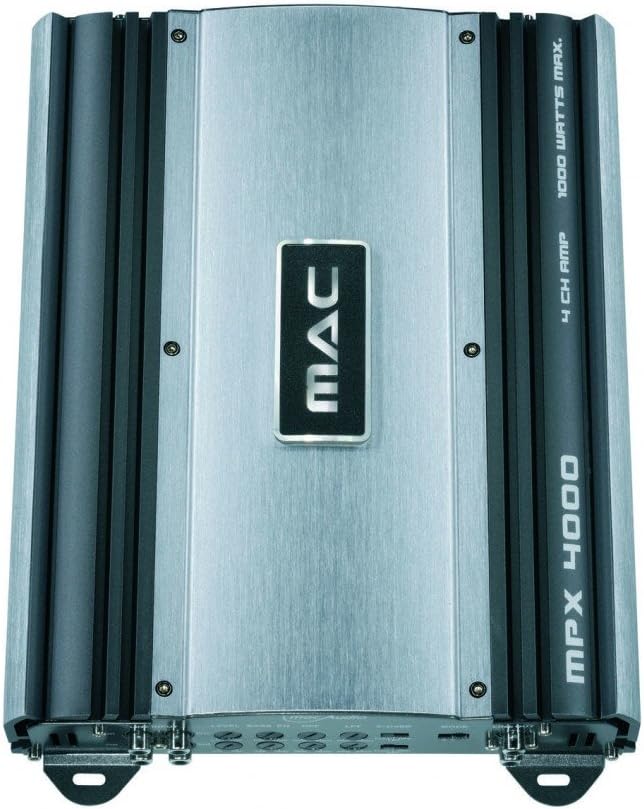
Gambar 4.2: Top-handap view of the Mac Audio MPX 4000 amplirén, nuduhkeuncasing the central MAC logo and the model designation on the heatsink fins.
5. Setup jeung Instalasi
Pamasangan anu leres penting pisan pikeun pagelaran sareng umur panjang anjeun amppanguat. Turutan léngkah-léngkah ieu kalawan saksama:
- Pegatkeun sambungan batré: Sateuacan ngamimitian kabel naon waé, pegatkeun sambungan terminal négatip batré kendaraan anjeun pikeun nyegah sirkuit pondok.
- Lokasi Pasang: Pilih tempat anu aman, garing, sareng ventilasina saé kanggo amplifier. Ensure there is enough space around the unit for proper heat dissipation. Avoid mounting on carpet or directly on metal surfaces without insulation.
- Kabel kakuatan:
- Run a heavy-gauge power cable (e.g., 8 AWG or thicker) directly from the positive terminal of the car battery to the ampterminal +12V liifier. Pasangkeun wadah sekering in-line dina jarak 18 inci (45 cm) ti batré.
- Sambungkeun kabel ground anu pondok sareng kandel tina amplifier's GND terminal to a clean, unpainted metal point on the vehicle's chassis. Ensure a solid electrical connection.
- Sambungkeun kawat péngkolan jauh tina kaluaran jauh unit sirah anjeun ka ampterminal REM lifier urang. Kawat ieu ngahurungkeun amplifier sareng mareuman sareng unit sirah anjeun.
- Sambungan Input Audio: Sambungkeun kabel RCA tina unit sirah anjeunamp outputs kana amplifier's RCA input jacks (FRONT, REAR).
- Sambungan Speaker: Sambungkeun speaker anjeun ka amplifier's speaker output terminals. Ensure correct polarity (+ to + and - to -). This amplifier is stable at 2 ohms, allowing for flexible speaker configurations.
- Gain and Crossover Settings: Initially set all gain controls to minimum and crossover settings to flat or full range. Adjust these after the system is powered on and playing music.
- Sambungkeun deui Batré: Sakali sadaya sambungan parantos aman sareng diverifikasi, sambungkeun deui terminal négatif batré kendaraan anjeun.
6. Operasi anu Amppangagung
After successful installation, follow these steps for initial operation:
- Daya Hurung: Turn on your car's ignition and head unit. The amplifier should power on automatically via the remote turn-on wire, indicated by a power LED.
- Volume awal: Start with the head unit's volume at a low level.
- Ngaronjatkeun gain: Play a familiar piece of music. Slowly increase the amplifier's gain control until you hear distortion, then back it off slightly. The gain control is not a volume knob; it matches the ampsensitipitas input lifier kana kaluaran unit sirah.
- Setélan Crossover: Adjust the high-pass (HPF) or low-pass (LPF) filters as needed for your speaker setup. For full-range speakers, you might use HPF to protect them from low frequencies. For subwoofers, use LPF.
- Setélan lemes: Listen to various types of music and make small adjustments to the gain and crossover settings for optimal sound quality.
7. Pangropéa
The Mac Audio MPX 4000 ampliifier merlukeun pangropéa minimal:
- beberesih: Ngusap périodik ampexterior lifier urang ku lemes, lawon garing. Ulah make bahan kimia kasar atawa cleaners abrasive.
- Ventilasi: Ensure that the ventilation fins remain free of dust and debris to maintain proper cooling. Use compressed air if necessary to clear dust.
- Sambungan: Occasionally check all power, ground, remote, and speaker connections to ensure they are secure and free from corrosion.
8. Cara ngungkulan
Upami anjeun ngalaman masalah sareng anjeun ampLifier, tingal masalah sareng solusi umum ieu:
| Masalah | Mungkin Cukang lantaranana | Solusi |
|---|---|---|
| Amplifier does not turn on (no power LED) | No power, ground, or remote signal; Blown fuse; Loose connections. | Check battery connections, in-line fuse, ground connection, and remote wire connection. Ensure head unit is on. |
| Teu aya sora ti panyatur | RCA cables disconnected; Speaker wires disconnected or shorted; Amplifier in protect mode; Gain too low. | Check RCA and speaker connections. Verify speaker polarity. Check for shorted speaker wires. Increase gain. If in protect mode, turn off system, check wiring, and restart. |
| Sora distort | Gain set too high; Improper crossover settings; Poor ground connection; Speaker impedance mismatch. | Reduce gain. Adjust crossover settings. Ensure solid ground connection. Verify speaker impedance is within amplifier's limits (2 ohm stable). |
| Amplifier overheats (protect LED on) | Insufficient ventilation; Speaker impedance too low; Prolonged high volume. | Mastikeun aliran hawa ditangtoskeun sabudeureun amplifier. Check speaker impedance. Reduce volume. Allow amplifier pikeun niiskeun. |
If the problem persists after trying these solutions, contact Mac Audio customer support or a qualified service technician.
9. Spésifikasi
Key technical specifications for the Mac Audio MPX 4000 amppanguat:
- Jumlah modél: MPX4000
- Saluran: 4-saluran
- Kaluaran Daya Maksimum: 4 x 180 Watts (Total 1000 Watts Max)
- Stabilitas Impedansi: Stable at 2 Ohm
- Operasi Voltage: 12 volt DC
- Beurat barang: 3 kg
- Ukuran produk (L x W x H): 22.6 x 31.9 x 5.9 cm (8.9 x 12.6 x 2.3 inci)
- Tipe Pamasangan: Jalanan
- ASIN: B000Q9MRME
- GTIN: 04023037041408
10. Garansi jeung Rojongan
Mac Audio products are designed for quality and reliability. For information regarding warranty coverage, please refer to the warranty card included with your product or visit the official Mac Audio website. For technical support, troubleshooting assistance beyond this manual, or service inquiries, please contact your authorized Mac Audio dealer or customer service department.
Punten tahan bukti pameseran anjeun pikeun klaim garansi.


