1. Bubuka
This instruction manual provides essential information for the proper installation and maintenance of your Leviton 84026 2-Gang Standard Size Magnetic Stainless Steel Wallplate. Please read these instructions thoroughly before beginning installation to ensure safe and correct usage.
The Leviton 84026 wallplate is designed for 2-gang flush mount applications, featuring a 2.15-inch diameter device receptacle opening. It is constructed from magnetic stainless steel, offering durability and a smooth finish.
2. Émbaran Kasalametan
WARNING: Risk of Electric Shock. Turn off power at the circuit breaker or fuse box before installation.
- Always ensure power is disconnected before handling electrical components.
- Upami anjeun henteu yakin ngeunaan bagian mana waé tina prosés pamasangan, konsultasi ka tukang listrik anu mumpuni.
- produk ieu dimaksudkeun pikeun pamakéan indoor wungkul.
- Ulah dipasang dina baseuh atawa damp lokasi.
- Pastikeun sadaya sambungan aman sareng saluyu sareng kode listrik lokal.
3. Eusi Paket
Pariksa yén sadaya komponén aya sateuacan ngamimitian pamasangan:
- 1 x Leviton 84026 2-Gang Standard Size Magnetic Stainless Steel Wallplate
- Sekrup pemasangan logam anu cocog warnana
4. Parentah instalasi
- Pareuman Daya: Locate the circuit breaker or fuse that controls the power to the outlet or switch where the wallplate will be installed. Turn off the power completely. Verify power is off using a voltage panguji.
- Remove Old Wallplate (if applicable): Carefully unscrew and remove the existing wallplate.
- Prepare New Wallplate: The Leviton 84026 wallplate ships with a protective film (blue or clear) to prevent scratches during shipping and handling. This film must be removed prior to installation for optimal appearance.
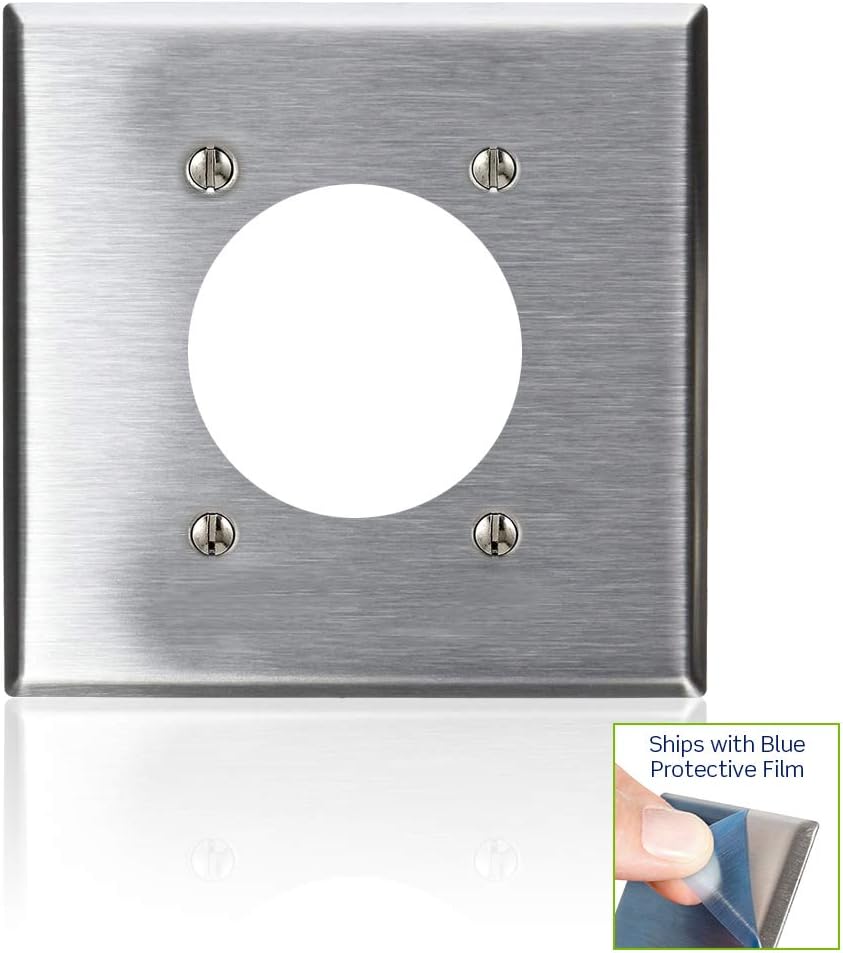
Image: A Leviton 2-Gang Stainless Steel Wallplate with a corner of the blue protective film being peeled off, revealing the brushed stainless steel underneath. This demonstrates the protective film removal process.

Gambar: A close-up view of a finger carefully peeling the blue protective film from the edge of a stainless steel wallplate, highlighting the smooth finish beneath.
- Posisi Wallplate: Align the new Leviton 84026 wallplate over the electrical device(s) and the wall box. Ensure the openings on the wallplate match the device configuration.
- Pelat Dinding anu Aman: Use the provided color-matched metal mounting screws to attach the wallplate to the electrical device(s) and/or wall box. Do not overtighten the screws, as this can damage the wallplate or the device.
- Mulangkeun Daya: Once the wallplate is securely installed, restore power at the circuit breaker or fuse box.
5. Pangropéa
To maintain the appearance and functionality of your Leviton stainless steel wallplate:
- beberesih: Lap pelat témbok ku kaén nu lemes,amp cloth. For stubborn marks, a mild, non-abrasive cleaner suitable for stainless steel can be used. Avoid harsh chemicals, abrasive pads, or scouring powders, as these can scratch the finish.
- Pamariksaan: Periodically check the wallplate for any signs of damage or loose screws. Tighten screws as needed, but do not overtighten.
6. Cara ngungkulan
- Wallplate does not fit over device:
- Ensure you have the correct wallplate configuration (e.g., 2-gang, 2.15-inch diameter receptacle opening) for your electrical device. Verify the device is properly seated in the wall box.
- Scratches or dull appearance:
- Confirm that the protective film has been completely removed from the wallplate. If the film was removed, scratches may indicate improper handling or cleaning with abrasive materials. Stainless steel can be polished with appropriate stainless steel cleaners if needed.
- Sekrup teu kenceng:
- Ensure you are using the provided screws and that the screw holes on the electrical device are not stripped. If stripped, the device itself may need replacement.
7. Spésifikasi
| Fitur | Rincian |
|---|---|
| Nomer modél | 84026 |
| Bahan | Magnét Stainless Steel |
| Konfigurasi | 2-Gang, 2.15-inch Diameter Device Receptacle |
| Ukuran | Standar |
| Ukuran produk (W x H) | 0.07" x 0.14" (Note: These dimensions appear to be for thickness/depth, not width/height of the plate itself. Refer to product packaging for full plate dimensions.) |
| Item Beurat | 2.81 ons |
| Tipe Pamasangan | Screw-In |
| Tipe rengse | Lemes |
| Sertifikasi | Didaptarkeun UL, Disertifikasi CSA |
8. Jaminan & Dukungan
Émbaran jaminan
This Leviton product is covered by a manufacturer's warranty. For specific details regarding the warranty period and terms, please refer to the documentation included with your purchase or visit the official Leviton websitus.
Rojongan Palanggan
For technical assistance, installation questions, or to report any issues with your Leviton product, please contact Leviton Customer Support:
- Websitus: www.leviton.com
- Tingali kana Leviton website for contact phone numbers and email support options specific to your region.


