Bubuka
This manual provides detailed instructions for the setup, programming, and operation of your RCA 6-Device Universal Remote Control, model RCR6473Z. This remote is designed to consolidate control of up to six different audio/video devices, simplifying your home entertainment experience. Please read these instructions carefully before use to ensure proper functionality and to maximize the remote's capabilities.
Eusi pakét
- RCA 6-Device Universal Remote Control (RCR6473Z)
Note: Two AAA batteries are required and are not included in the package.
Fitur konci
- Controls up to 6 devices: TV, Satellite/Cable, Digital-to-Analog Converter (DTC), DVD, DVR, AUX, Audio, or VCR.
- Expanded DVD and DVR capabilities.
- Desain ergonomis pikeun penanganan nyaman.
- Multiple programming methods: Automatic, Direct Code Entry, Brand Code Search, and Manual Code Search.
- Device mode indicators for easy identification of the active device.
- Glow keys for improved visibility in low-light conditions.
- Dedicated buttons for Menu, Guide, Info, and Clear functions.
- Full playback controls including Play, Stop, Pause, Record, Reverse, Forward, Skip Back, and Skip Forward.
Disetél
1. Pamasangan batré
Pikeun ngaktifkeun remote control anjeun, turutan léngkah-léngkah ieu:
- Teangan tempat panutup kompartemen batré dina tonggong kadali jauh.
- Pencét tab sareng geser panutupna kaluar.
- Insert two new AAA alkaline batteries, ensuring the positive (+) and negative (-) terminals align with the markings inside the compartment.
- Geser panutup batré deui kana tempatna nepi ka ngaklik aman.
Note: Replace batteries when the remote's performance diminishes or when the indicator light does not illuminate during button presses.
2. Ngaprogram Jauh Anjeun
The RCA universal remote can be programmed using several methods. It is recommended to try the Automatic Code Search first, then Direct Code Entry, followed by Brand Code Search, and finally Manual Code Search if other methods are unsuccessful. You will need the original remote control for the device you wish to program, or the device itself, to test functionality.
Pilarian Kode Otomatis
This method scans through codes until it finds one that operates your device.
- Turn on the device you want to control (e.g., TV, DVD player).
- Press and hold the desired device button (e.g., TV, DVD) on the universal remote until the indicator light illuminates.
- While holding the device button, press and hold the POWER button. Release both buttons. The indicator light should blink once and then stay lit.
- Arahkeun remot ka alat teras pencét tombolna sababaraha kali ulin tombol (atawa POWER button for some devices) until the device turns off. Pause briefly between presses to allow the device to respond.
- Sakali alat pareum, pencét tombol EUREUN tombol pikeun nyimpen kodeu. Lampu indikator bakal pareum.
- Test the remote's functions (e.g., volume, channel, power) to ensure proper operation. If not all functions work, repeat the process to find a better code.
Éntri Kode Langsung
This method requires you to enter a specific code for your device's brand, usually found in a code list provided with the full manual.
- Hurungkeun alat anu anjeun hoyong ngendalikeun.
- Locate the code list for your device's brand and type (e.g., TV, DVD).
- Press and hold the desired device button (e.g., TV, DVD) on the universal remote until the indicator light illuminates.
- Enter the 4-digit code using the number buttons. As you enter each digit, the indicator light should blink.
- If the code is valid, the indicator light will turn off. If the code is invalid, the light will flash rapidly and remain lit, indicating you should try another code.
- Test the remote's functions. If the device does not respond or not all functions work, try another code from the list.
Milarian Kode Merk
This method searches through codes for a specific brand.
- Hurungkeun alat anu anjeun hoyong ngendalikeun.
- Press and hold the desired device button (e.g., TV, DVD) on the universal remote until the indicator light illuminates.
- Pencét jeung tahan tombol Merk tombol (upami sayogi, atanapi kombinasi sapertos PISAN KODE). Release both buttons. The indicator light should blink once and then stay lit.
- Arahkeun remot ka alat teras pencét tombolna sababaraha kali POWER button until the device turns off. Pause briefly between presses.
- Sakali alat pareum, pencét tombol EUREUN tombol pikeun nyimpen kodeu. Lampu indikator bakal pareum.
- Test the remote's functions.
Milarian Kodeu Manual
This method allows you to manually cycle through all available codes.
- Hurungkeun alat anu anjeun hoyong ngendalikeun.
- Press and hold the desired device button (e.g., TV, DVD) on the universal remote until the indicator light illuminates.
- Pencét jeung tahan tombol PISAN KODE button (or a similar button combination). Release both buttons. The indicator light should blink once and then stay lit.
- Arahkeun remot ka alat teras pencét tombolna sababaraha kali POWER button. Each press sends a new code. Pause briefly between presses.
- Sakali alat pareum, pencét tombol EUREUN tombol pikeun nyimpen kodeu. Lampu indikator bakal pareum.
- Test the remote's functions. If not all functions work, repeat the process to find a better code.
Ngoperasikeun Jauh Anjeun
The RCA 6-Device Universal Remote Control features a logical button layout for intuitive operation. Refer to the image below for a visual guide to the remote's buttons.
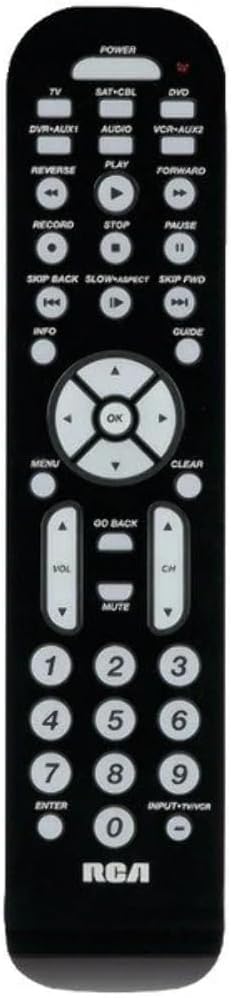
Gambar: Hareupeun view of the RCA 6-Device Universal Remote Control (RCR6473Z). The remote is black with white buttons. At the top are device selection buttons: TV, SAT-CBL, DVD, DVR-AUX1, AUDIO, VCR-AUX2, and a large POWER button. Below these are playback controls: REVERSE, PLAY, FORWARD, RECORD, STOP, PAUSE, SKIP BACK, SLOW/ASPECT, SKIP FWD. A central navigation pad with OK button is surrounded by arrow keys. Other buttons include MENU, CLEAR, INFO, GUIDE, GO BACK, VOL (volume up/down), CH (channel up/down), MUTE, and a numeric keypad (0-9) with ENTER and INPUT-TV/VCR buttons. The RCA logo is at the bottom.
Pamilihan alat
To control a specific device, press the corresponding device button at the top of the remote. The indicator light will illuminate to confirm the selected device mode.
- TV: For your television.
- SAT-CBL: For satellite receiver or cable box.
- DVD: For DVD players.
- DVR-AUX1: For Digital Video Recorders or an auxiliary device.
- AUDIO: For audio receivers or sound systems.
- VCR-AUX2: For VCRs or a second auxiliary device.
Fungsi Dasar
- kakuatan: Ngahurungkeun atawa mareuman alat nu dipilih.
- VOL ▲/▼: Ngaronjatkeun atawa ngurangan polumeu.
- CH ▲/▼: Ngarobah saluran kaluhur atanapi kahandap.
- Bisu: Ngajempékeun kaluaran audio.
- Papan tombol angka (0-9): Used for direct channel entry or code input during programming.
- Asupkeun: Confirms channel selection or other inputs.
- INPUT-TV/VCR: Switches between video inputs on the selected device.
Kadali Playback
- ULIN: Mimitian muter média.
- EUREUN: Ngeureunkeun playback.
- REUREUH SAKEUDEUNG: Ngareureuhkeun playback.
- Rékaman: Ngamimitian ngarékam (upami dirojong ku alat).
- BALIKAN: Rewinds media.
- MAJU: Fast forwards media.
- SKIP BACK: Ngaluncat ka lagu/bab saméméhna.
- SKIP FWD: Luncat ka lagu/bab salajengna.
- SLOW/ASPECT: Activates slow motion playback or changes aspect ratio (functionality varies by device).
Napigasi sareng Fungsi Menu
- MENU: Accesses the on-screen menu of the selected device.
- OKÉ: Ngonfirmasi pilihan dina ménu.
- Arrow Buttons (▲/▼/◀/▶): Navigates through on-screen menus and options.
- JELAS: Clears entries or exits certain menus.
- INFO: Nampilkeun inpormasi ngeunaan program atanapi média ayeuna.
- pituduh: Accesses the electronic program guide (EPG).
- UIH DEUI: Mulih ka ménu atawa layar saméméhna.
Pangropéa
Ngagantian batré
When the remote's range decreases or buttons become unresponsive, it's time to replace the batteries. Always replace both AAA batteries at the same time with new ones. Do not mix old and new batteries, or different types of batteries.
beberesih
To clean your remote control, use a soft, dry cloth. Do not use liquid cleaners or abrasive materials, as these can damage the remote's surface or internal components.
Pamérésan masalah
- Remote does not operate your device:
- Ensure the remote is in the correct device mode (e.g., TV button pressed for TV).
- Verify that the batteries are fresh and inserted correctly.
- Reprogram the remote using a different code from the code list or try another programming method.
- Ensure there are no obstructions between the remote and the device's infrared sensor.
- Sababaraha tombol teu tiasa dianggo:
- Not all functions of your original remote may be supported by the universal remote.
- Try reprogramming the remote with a different code for your device, as some codes may offer better functionality.
- Indicator light does not illuminate:
- Pariksa pamasangan batré jeung ngaganti accu lamun perlu.
spésifikasi
| Nomer modél | RCR6473E (also known as RCR6473Z) |
| merek | RCA |
| Jumlah Max Alat Dirojong | 6 |
| Dimensi produk | 2.5 x 6 x 1 inci (kira-kira) |
| Item Beurat | 12.8 ons |
| Batré Diperlukeun | 2 batré AAA (teu kaasup) |
| Produsén | Audiovox Asesoris Corporation |
Garansi sareng Rojongan
Bantahan Hukum
Garansi henteu ngawengku penyalahgunaan produk.
Émbaran Produsén
For further assistance or specific product inquiries, please refer to the contact information provided by Audiovox Accessories Corporation, the manufacturer of this RCA product. Additional support resources may be available on the official RCA websitus.


