1. Bubuka
Thank you for choosing the Aurora Optima Auroloide Blue Fountain Pen. This exquisite writing instrument combines traditional craftsmanship with modern design, offering a superior writing experience. This manual provides essential information for the proper setup, operation, maintenance, and care of your new fountain pen to ensure its longevity and performance.
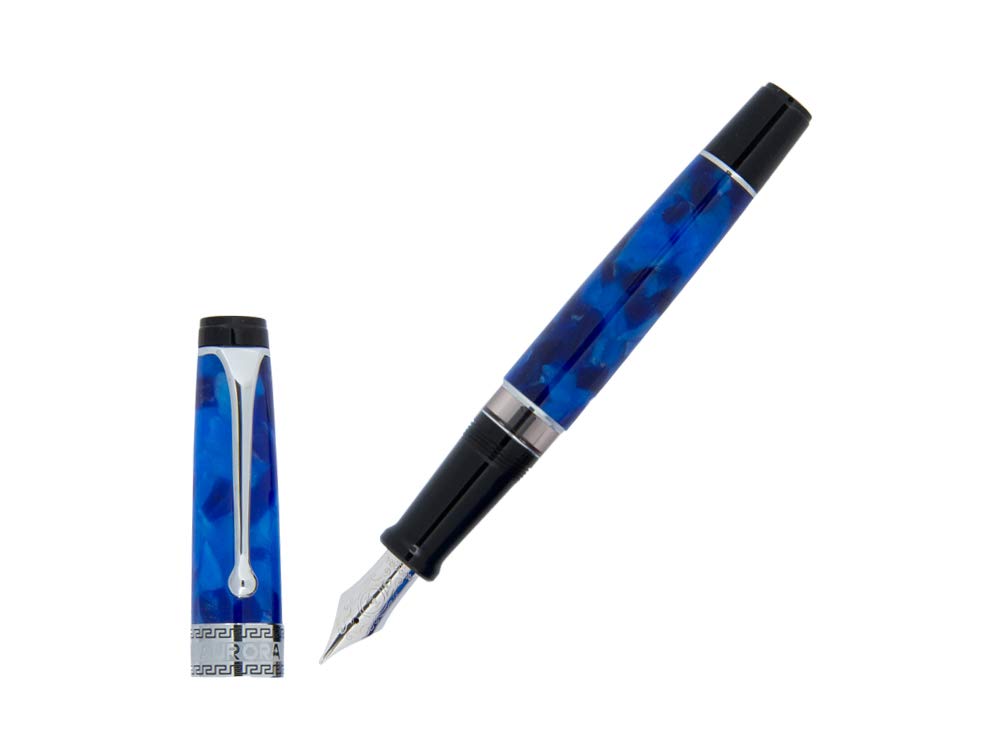
Image 1.1: The Aurora Optima Auroloide Blue Fountain Pen, showcasing its vibrant blue marbled barrel and polished chrome cap band and clip.
2. Setélan
2.1 Ngabongkar bungkusan
Carefully remove your Aurora Optima fountain pen from its packaging. Inspect the pen for any visible damage. The package should contain the pen body, cap, and potentially an ink converter or starter ink cartridges.
2.2 Filling Your Pen
Your Aurora Optima fountain pen can be filled using either an ink converter (for bottled ink) or ink cartridges.
2.2.1 Using an Ink Converter (Recommended for Bottled Ink)
- Cabut larasna tina bagian cekelan pulpen.
- If an empty cartridge is present, remove it. Insert the converter firmly into the grip section, ensuring a secure fit.
- Submerge the nib and part of the grip section into a bottle of high-quality fountain pen ink.
- Twist or slide the converter's piston mechanism to draw ink into the converter. Repeat this process a few times to ensure the converter is full and any air bubbles are expelled.
- Remove the nib from the ink bottle and gently wipe any excess ink from the nib and grip section with a soft, lint-free cloth.
- Reattach the barrel to the grip section.
2.2.2 Using Ink Cartridges
- Unscrew the barrel from the grip section.
- Insert a new Aurora ink cartridge firmly into the grip section until you feel it puncture.
- Allow a few moments for the ink to flow down to the nib. Gently shake the pen or tap the nib lightly on a paper towel to encourage ink flow if necessary.
- Reattach the barrel to the grip section.
3. Operating Your Pen
3.1 Writing Posture and Grip
Hold the pen comfortably between your thumb and forefinger, resting it on your middle finger. Avoid applying excessive pressure, as a fountain pen is designed to write smoothly with minimal effort. Let the ink flow naturally.
3.2 Nutup jeung Muka Tutup
To uncap, gently pull the cap straight off. To cap, align the cap and push it gently until it seats securely. Avoid twisting the cap forcefully, as this can cause wear over time. Always cap your pen when not in use to prevent the nib from drying out.
3.3 Ink Flow
If the ink flow is inconsistent, ensure the pen is adequately inked. If using a converter, a slight twist of the piston can push ink to the feed. For cartridges, ensure it is fully seated. If the issue persists, a gentle cleaning may be required (see Section 4.1).
4. Pangropéa
4.1 Cleaning Your Pen
Regular cleaning is crucial for maintaining optimal performance and preventing ink clogs, especially when changing ink colors or if the pen has been unused for an extended period.
- Empty any remaining ink from the converter or remove the ink cartridge.
- Flush the nib and feed section with cool, clean water. Use the converter to draw and expel water repeatedly until the water runs clear.
- For a more thorough cleaning, you can soak the nib and feed section in cool water for a few hours or overnight.
- Allow the pen to air dry completely before reassembling and refilling with ink.
4.2 Panyimpenan
Store your Aurora Optima pen horizontally or nib-up when not in use. Avoid extreme temperatures and direct sunlight. For long-term storage, clean the pen thoroughly and ensure it is completely dry before storing it without ink.
4.3 Recommended Ink
Always use high-quality fountain pen ink from reputable brands. Avoid India ink, drawing ink, or any ink not specifically formulated for fountain pens, as these can clog the delicate feed system.
5. Cara ngungkulan
- Hard Starts or Skipping: Ensure the pen is properly inked. The nib might be dry; try gently moistening it with a drop of water or by drawing a small amount of ink through the feed. A thorough cleaning (Section 4.1) can often resolve this.
- No Ink Flow: Check if the cartridge is fully punctured or the converter is securely seated and filled. The nib might be clogged; clean the pen as described in Section 4.1.
- Excessive Ink Flow or Leaking: Ensure all parts are securely tightened. Using a different ink might help if the current ink is too thin. If the problem persists, contact customer support.
- Scratchy Nib: Ensure you are writing with the correct side of the nib facing up. Avoid applying excessive pressure. If the nib feels rough, it might require professional adjustment.
6. Spésifikasi
| Fitur | Rincian |
|---|---|
| merek | Aurora |
| Modél | Optima Auroloide Blue (AU-996CB-B) |
| Warna Tinta | Blue (Pen body color) |
| Bahan | Auroloide resin, Chrome accents |
| Tipe Titik | Kandel |
| Rentang Umur (Deskripsi) | Dewasa |
| Produsén | Aurora |
7. Garansi jeung Rojongan
Your Aurora Optima fountain pen is a precision instrument crafted with care. For warranty information, please refer to the documentation included with your purchase or visit the official Aurora website. For technical support, repairs, or any inquiries not covered in this manual, please contact Aurora customer service or your authorized retailer.
Aurora Customer Service: Visit Aurora's Contact Page


