Bubuka
This manual provides detailed instructions for the proper use and maintenance of your Royal DM2070 Electronic Organizer. Please read this manual thoroughly before operating the device to ensure safe and efficient use. Keep this manual for future reference.
Émbaran Kasalametan
- Entong ngalaan alat ka suhu anu ekstrim, sinar panonpoé langsung, atanapi kalembaban anu luhur.
- Hindarkeun ngaragragkeun alatna atanapi mangaruhan kana tabrakan anu kuat.
- Ulah nyobian ngabongkar atawa ngalereskeun alat sorangan. Rujuk sadayana jasa ka tanaga anu mumpuni.
- Jauhkeun alat tina cai sareng cairan sanés.
- Use only the specified battery type for replacement.
Eusi pakét
Pastikeun yén sadaya item aya dina pakét anjeun:
- Royal DM2070 Electronic Organizer
- Stylus (if applicable)
- Gancang Mimitian Guide
- Kartu Garansi
Disetél
1. Pamasangan batré
The Royal DM2070 requires batteries for operation. Follow these steps to install them:
- Teang tempat panutup kompartemen batre dina tonggong alat.
- Geser atanapi angkat panutupna pikeun muka kompartemenna.
- Insert the required batteries, ensuring correct polarity (+ and -) as indicated inside the compartment.
- Ganti panutup kompartemen batré aman.
2. Ngahurungkeun sareng Setélan Mimiti
After installing batteries, power on your device and configure basic settings:
- Pencét jeung tahan tombol POWER tombol nepi ka layar illuminates.
- The device may prompt you to set the date and time. Use the navigation buttons or stylus to enter the correct information.
- Konfirmasi setelan Anjeun pikeun ngalengkepan setelan awal.
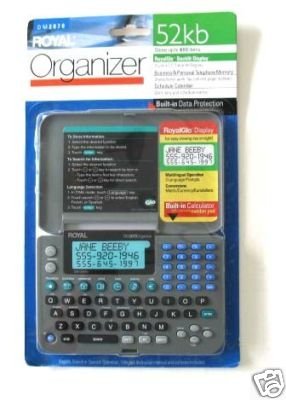
Image: Royal DM2070 Electronic Organizer. This image displays the device's front view, highlighting its screen and keypad, essential for navigation and data entry.
Parentah Operasi
1. Napigasi
The DM2070 features a keypad and potentially a stylus for navigation. Use the arrow keys to move between menu options and press Asupkeun or a designated selection button to confirm.
2. Entering Data
To enter information such as contacts, appointments, or notes:
- Navigate to the desired application (e.g., 'Contacts', 'Calendar', 'Notes').
- Select 'New Entry' or a similar option.
- Use the alphanumeric keypad to input text. Some models may offer an on-screen keyboard via stylus.
- Save your entry before exiting the application.
3. Ngagunakeun Aplikasi
The DM2070 includes various applications:
- Kalénder: View daily, weekly, or monthly schedules. Add and edit appointments.
- Kontak: Store names, phone numbers, addresses, and email information.
- Catetan: Create and manage text notes or memos.
- Kalkulator: Ngalakukeun itungan aritmatika dasar.
- Parabot Parobah Mata Artos: Convert between different currencies (requires manual update of exchange rates on some models).
Pangropéa
1. Ngabersihan Alat
To keep your DM2070 in optimal condition:
- Ngusap layar jeung casing with a soft, dry, lint-free cloth.
- Pikeun tanda nekad, rada dampen lawon jeung cai; ngahindarkeun bahan kimia kasar atawa cleaners abrasive.
- Ensure no moisture enters openings.
2. Kaperawatan batré
- Ganti batréna gancang-gancang nalika indikator batré lemah némbongan.
- Cabut batré upami alat moal dianggo kanggo waktos anu panjang pikeun nyegah bocor.
Pamérésan masalah
If you encounter issues with your Royal DM2070, refer to the following common solutions:
| Masalah | Mungkin Cukang lantaranana | Solusi |
|---|---|---|
| Alat teu hurung. | Batré paéh atawa salah dipasang. | Ganti batré ku nu anyar, mastikeun polaritasna bener. |
| Layar kosong atawa beku. | Software glitch atanapi batré low. | Try a soft reset (refer to Quick Start Guide for specific button combination) or replace batteries. |
| Data loss. | Battery depletion or improper shutdown. | Ensure batteries are fresh. Always save data before powering off. |
| Keypad teu ngaréspon. | Dust/debris under keys or internal issue. | Clean keypad gently. If problem persists, contact support. |
spésifikasi
Key technical specifications for the Royal DM2070 Electronic Organizer:
| Fitur | Rincian |
|---|---|
| merek | ROYAL |
| Nomer modél | DM2070 |
| Bahan Panutup | Kulit |
| Formatna | Pangatur |
| Item Beurat | 181 g |
| Item Ukuran (L x W x H) | 24.4 x 14.5 x 1 cm |
| Sasaran Audiens | Dewasa |
Garansi sareng Rojongan
The Royal DM2070 Electronic Organizer comes with a standard manufacturer's warranty. Please refer to the warranty card included in your package for specific terms and conditions. For technical support, service, or inquiries, please contact Royal customer service through the contact information provided on the warranty card or the official Royal websitus.


