1. Bubuka
This manual provides essential information for the safe and effective use of your Leica D-Lux 4 Safari Special Edition Digital Camera. Please read it thoroughly before using your camera and keep it for future reference. The Leica D-Lux 4 Safari is a limited edition digital camera featuring a distinctive Safari Green color and a special case, designed for high-quality digital photography.
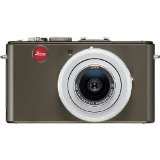
Figure 1: Leica D-Lux 4 Safari Special Edition Digital Camera. This image displays the compact digital camera with its distinctive green finish and lens.
2. Setélan
2.1. Pamasangan batré
- Pastikeun kaméra dipareuman.
- Teangan tempat panutup kompartemen batré dina handapeun kaméra.
- Geser kancing pikeun muka panutup.
- Insert the provided battery, ensuring the correct orientation as indicated inside the compartment.
- Tutup panutup kompartemen batré aman nepi ka klik kana tempatna.
2.2. Selapkeun Card Mémori
The camera supports SD and SDXC memory cards for storing photos and videos.
- With the camera powered off, open the battery/memory card compartment cover.
- Insert the memory card into the designated slot with the label facing the correct direction (usually towards the front of the camera). Push until it clicks into place.
- Tutup panutup kompartemen.
2.3. Daya Awal Hurung
Press the power button to turn on the camera. Follow any on-screen prompts to set the date, time, and language.
3. Parentah Operasi
3.1. Basic Photography (Point & Shoot)
- Daya Hurung: Pencét tombol daya.
- Pilih Mode: Use the mode dial to select "Automatic" for general use.
- fokus: Point the camera at your subject. The camera will automatically focus using contrast detection.
- Capture: Pencét tombol rana satengahna pikeun fokus, teras pencét pinuh pikeun nyandak gambar.
3.2. Ngarekam Pidéo
- Pilih Mode: Turn the mode dial to "Movie" mode.
- Mimitian / Eureun Rekaman: Press the dedicated video record button to start and stop recording. The camera records in 1080p at 30 frames per second.
- Stabilisasi Gambar Digital: The camera features digital image stabilization to reduce blur during video recording.
3.3. Fungsi zum
The camera features 2.5x optical zoom. Use the zoom lever (typically around the shutter button) to zoom in or out. Digital zoom is also available up to 16x.
3.4. Modeu Pamotretan Lanjutan
Explore various modes via the mode dial:
- Modeu Lansekap: Optimized for wide scenic shots.
- Kontrol Paparan Manual: For experienced users to manually adjust aperture and shutter speed.
- Setélan Kasaimbangan Bodas: Customize white balance for accurate color reproduction under different lighting conditions.
3.5. Konektipitas
- Wifi: Connect your camera to a Wi-Fi network for wireless transfer of images and remote control via a compatible smartphone app. Refer to the camera's on-screen menu for Wi-Fi setup.
4. Pangropéa
4.1. Ngabersihan Kaméra
- Awak kaméra: Anggo kaén anu lembut sareng garing pikeun ngusap awak kaméra. Keur kokotor bandel, rada dampbilas lawon ku cai. Hindarkeun bahan kimia anu keras.
- Lensa: Anggo sikat lénsa pikeun miceun lebu, teras usap lalaunan nganggo lawon lénsa microfiber. Pikeun kokotor, anggo larutan beberesih lénsa khusus.
- layar: Wipe the LCD screen with a soft, dry microfiber cloth.
4.2. Kaperawatan batré
- Always use the original Leica charger and battery.
- Ulah ngalaan batré ka suhu ekstrim.
- Simpen batréna di tempat anu tiis sareng garing upami henteu dianggo.
5. Cara ngungkulan
5.1. Kaméra Teu Bisa Dihurungkeun
- Pastikeun batre tos dicas pinuh sareng diselapkeun leres.
- Coba nganggo batré anu béda, anu dicas pinuh upami sayogi.
5.2. Kualitas Gambar Miskin
- Pariksa naha lénsa bersih sareng bébas tina noda atanapi lebu.
- Ensure adequate lighting for your shot.
- Adjust shooting modes or exposure settings if necessary.
5.3. Masalah Konéktivitas Wi-Fi
- Verify that Wi-Fi is enabled on the camera and your smartphone.
- Ensure the camera is within range of the Wi-Fi network.
- Balikan deui kaméra sareng smartphone anjeun.
6. Spésifikasi
| Fitur | Rincian |
|---|---|
| merek | Leica |
| Ngaran modél | D Lux4 Safari |
| Total Leungit Resolusi | 12 MP |
| Téhnologi Sénsor Poto | CMOS |
| Zoom optik | 2.5x |
| Zum Digital | 16x |
| Aperture maksimum | 2.8 milimeter |
| Stabilisasi Gambar | Digital |
| Dirojong File Formatna | JPEG, RAW |
| Resolusi Video | 1080 p |
| Laju pigura | 30 FPS |
| Ukuran layar | 3 inci |
| Téhnologi nirkabel | Wifi |
| Bahan Kandang | logam |
| Warna | Héjo |
| Batré Kaasup | Sumuhun |
7. Jaminan & Dukungan
7.1. Émbaran jaminan
The Leica D-Lux 4 Safari Special Edition Digital Camera comes with a 3-taun jaminan produsén urang. Garansi ieu nyertakeun cacad dina bahan sareng pagawean dina panggunaan normal. Punten tahan bukti pameseran anjeun pikeun klaim garansi.
7.2. Rojongan Palanggan
For technical assistance, troubleshooting, or service inquiries, please visit the official Leica website or contact their customer support. You can find detailed contact information on the Leica website or in the documentation included with your camera.


