1. Bubuka
Thank you for choosing the One Touch KC32 Automatic Multi-Grater. This device is designed to safely and effortlessly grate various food items such as cheese, chocolate, nuts, hazelnuts, and cookies. Its hands-free operation makes it ideal for all users, including those with limited dexterity. This manual provides essential information for the proper setup, operation, and maintenance of your new grater.
2. Parentah Kasalametan
- Baca sagala parentah taliti saméméh pamakéan munggaran.
- Jauhkeun alat tina jangkauan barudak.
- Do not immerse the motor unit (top part) in water or any other liquid.
- Always ensure the device is switched off before assembling, disassembling, or cleaning.
- Handle grater blades with care as they are sharp.
- Anggo alat ieu ngan ukur pikeun tujuan anu dimaksud sakumaha anu dijelaskeun dina manual ieu.
- Do not attempt to grate frozen foods or extremely hard items, as this may damage the blades or motor.
- Pastikeun batréna dipasang kalayan leres numutkeun tanda polaritas.
- Cabut batré upami alat moal dianggo kanggo waktos anu panjang.
3. Eusi Paket
Your One Touch KC32 Automatic Multi-Grater package includes:
- 1x One Touch KC32 Automatic Multi-Grater unit (motor housing, grating chamber)
- 1x Airtight collection container
- 1x Coarse grater disc
- 1x Fine grater disc
- 1x Lid for collection container

Image: The One Touch KC32 Automatic Multi-Grater shown with its airtight collection container and lid.
4. Setélan
4.1. Pamasangan batré
- Ensure the grater is switched off.
- Locate the battery compartment on the top part of the motor unit.
- Buka panutup kompartemen batré.
- Selapkeun 4 batré AA, mastikeun polaritasna bener (+/-) sakumaha dituduhkeun di jero kompartemen.
- Tutup panutup kompartemen batré aman.
4.2. Majelis
- Select the desired grater disc (coarse or fine).
- Carefully place the chosen grater disc into the grating chamber, ensuring it sits securely on the central spindle.
- Attach the grating chamber to the motor unit by twisting until it locks into place.
- Place the airtight collection container underneath the grating chamber.

Image: The two interchangeable grater discs (coarse and fine) included with the KC32.
5. Parentah Operasi
- Ensure the grater is fully assembled with the desired disc and collection container in place.
- Open the top lid of the grating chamber.
- Place the food item (e.g., cheese, chocolate, nuts) into the grating chamber. Do not overfill.
- Tutupkeun tutup luhurna pageuh-pageuh.
- Press and hold the "One Touch" button located on the top of the unit to begin grating. The device will operate hands-free.
- Release the button to stop grating.
- Once grating is complete, remove the collection container. You can use the included lid to store grated items.

Image: The One Touch KC32 grater actively grating cheese into fine strands.
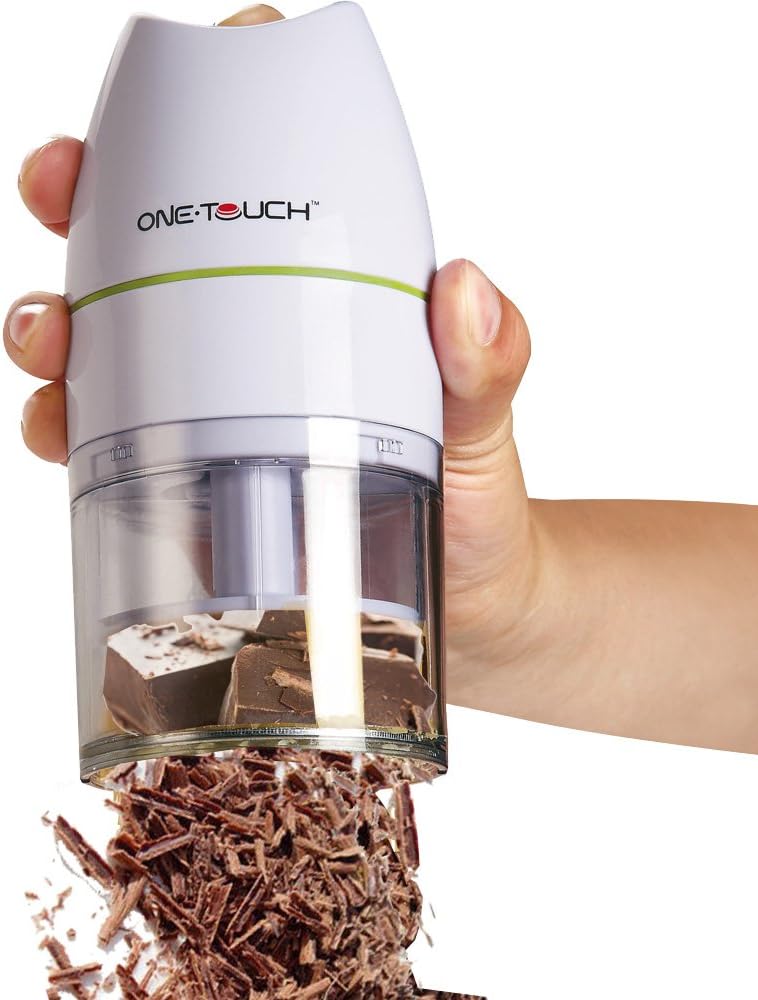
Image: The One Touch KC32 grater actively grating chocolate into fine shavings.
6. beberesih sarta Pangropéa
Regular cleaning ensures optimal performance and hygiene of your grater.
- Before cleaning, ensure the device is switched off and remove the batteries if performing a deep clean.
- Disassemble the grating chamber, grater disc, and collection container from the motor unit.
- The grating chamber, grater discs, and collection container are dishwasher safe. Alternatively, wash them by hand with warm, soapy water and rinse thoroughly.
- Wipe the motor unit (top part) with a damp lawon. Ulah neuleumkeun unit motor dina cai.
- Pastikeun sadaya bagian tos rengse garing sateuacan reassembling atanapi nyimpen.
7. Cara ngungkulan
| Masalah | Mungkin Cukang lantaranana | Solusi |
|---|---|---|
| Grater does not turn on. | Batré pareum atawa salah dipasang. | Pariksa polaritasna batré atawa ngaganti ku batré AA anyar. |
| Grating performance is poor. | Food item is too hard or too large; grater disc is dull or clogged. | Ensure food items are suitable for grating. Clean the grater disc. |
| Device stops during operation. | Overload protection activated; batteries are low. | Reduce the amount of food. Replace batteries. Allow motor to cool if it feels warm. |
8. Spésifikasi
- model: One Touch KC32
- warna: Bodas
- ukuran: 18 x 18 x 18 cm
- beurat: 392 gram
- Sumber Daya: 4 x Batré AA (teu kalebet)
- Bahan: Durable plastic body, stainless steel grater discs.
- Bagian Aman Mesin Pencuci Piring: Grating chamber, grater discs, collection container.
- UPC: 771948514941
9. Émbaran jaminan
One Touch products are manufactured to high-quality standards. For specific warranty details, please refer to the warranty card included with your purchase or contact your retailer. Keep your proof of purchase for any warranty claims.
10. Rojongan
If you encounter any issues or have questions not covered in this manual, please contact the retailer where you purchased the One Touch KC32 Automatic Multi-Grater. For further assistance, you may also visit the official One Touch website (if available) for product support and FAQs.


