1. Produk Langkungview
The Aluratek AUV200F USB 2.0 to VGA Adapter is designed to extend your desktop by adding an additional display via a USB port. This adapter enables dual monitor support, enhancing multitasking capabilities for various applications.
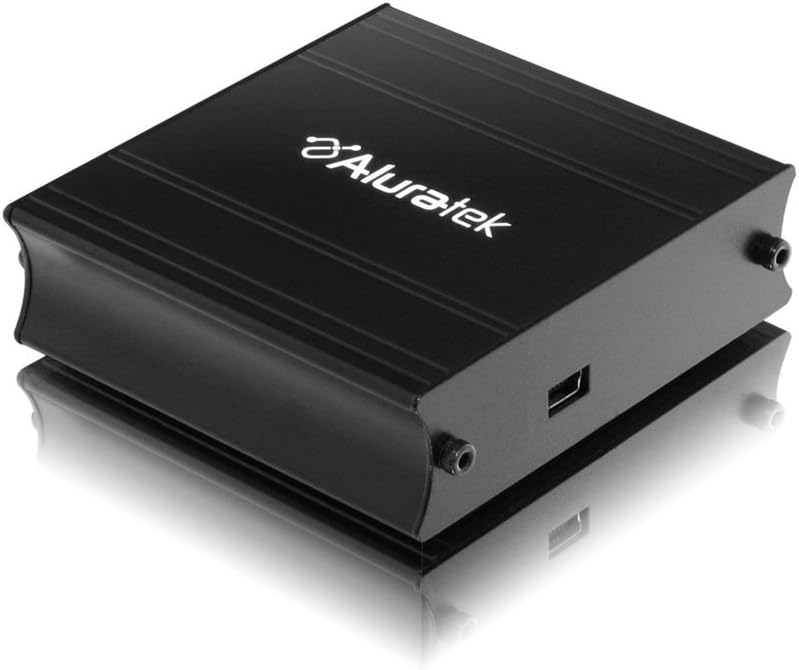
This image shows the Aluratek AUV200F USB to VGA Adapter. It is a compact, black rectangular device designed to connect a computer's USB port to a VGA monitor. The top surface displays the Aluratek logo, and one side features a USB input port, while the opposite side has screw holes for securing a VGA cable.
Fitur konci:
- Supports Primary, Extended, and Mirror display modes.
- Supports widescreen monitor resolutions up to 1680 x 1050.
- Supports standard monitor resolutions up to 1600 x 1200.
- Aktipkeun viewing data across multiple screens or with display continuity.
- Facilitates more effective multitasking by reducing overlapping windows.
2. Eusi Paket
Sateuacan neraskeun pamasangan, mangga pariksa heula naha pakét anjeun ngandung barang-barang ieu:
- Aluratek AUV200F USB to VGA Adapter
- Driver Installation CD (or download instructions)
- Gancang Mimitian Guide
3. Sarat Sistim
Pikeun mastikeun fungsionalitas anu leres, sistem komputer anjeun kedah nyumponan sarat minimum ieu:
- Sistem operasi: Windows XP-SP2/3, Vista, Windows 7, or Mac OS 10.4.11 or later (Intel-based only).
- palabuhan sadia: One available USB port and one available VGA port on the monitor.
- Prosesor: Recommended 1.2 GHz or higher.
- RAM: Recommended 512 MB or higher.
4. Setup jeung Instalasi
4.1 Pamasangan Supir
- Lebetkeun CD Supir: Place the provided driver installation CD into your computer's optical drive. If your computer does not have an optical drive, download the latest drivers from the official Aluratek websitus.
- Jalankeun Installer: Follow the on-screen instructions to install the necessary drivers. It is recommended to restart your computer after the driver installation is complete.
4.2 Panyambung Hardware
- Connect VGA Cable: Connect one end of a VGA cable (not included) to the VGA port on your external monitor and the other end to the VGA port on the Aluratek AUV200F adapter. Secure the screws on the VGA connector for a stable connection.
- Sambungkeun kabel USB: Plug the USB connector of the Aluratek AUV200F adapter into an available USB 2.0 port on your computer.
- Daya Hurung: Ensure your external monitor is powered on.
5. Parentah Operasi
Once the adapter is connected and drivers are installed, your operating system should detect the new display. You can configure the display settings through your computer's display control panel.
5.1 Configuring Display Modes (Windows)
- Access Display Settings: Right-click on an empty area of your desktop and select "Screen resolution" (Windows 7/Vista) or "Display settings" (Windows 10).
- Identify Displays: Click "Identify" to see which number corresponds to each monitor.
- Pilih Mode Tampilan: In the "Multiple displays" dropdown menu, select one of the following options:
- Manjangkeun tampilan ieu: This creates an extended desktop, allowing you to drag windows between monitors.
- Duplikasi tampilan ieu: This mirrors your primary display onto the second monitor.
- Show desktop only on 1/2: This disables one of the displays.
- Adjust Resolution: Select the desired resolution for each monitor. The Aluratek AUV200F supports up to 1680x1050 for widescreen and 1600x1200 for standard monitors.
- Larapkeun Setélan: Click "Apply" and then "OK" to save your changes.
5.2 Configuring Display Modes (Mac OS)
- Access Display Preferences: Go to "System Preferences" > "Displays".
- Arrangement Tab: In the "Arrangement" tab, you can drag the monitor icons to arrange them as desired for an extended desktop. To mirror displays, check the "Mirror Displays" box.
- Resolution Tab: In the "Display" tab for each monitor, select the desired resolution.
6. Cara ngungkulan
If you encounter issues with your Aluratek AUV200F adapter, please refer to the following common solutions:
- No Display on Second Monitor:
- Ensure all cables (USB and VGA) are securely connected.
- Verify that the external monitor is powered on and set to the correct input source (VGA).
- Check your computer's display settings to ensure the second monitor is detected and configured for "Extend" or "Duplicate" mode.
- Reinstall the device drivers from the Aluratek websitus.
- Poor Display Quality or Lag:
- Ensure your computer meets the recommended system requirements.
- Adjust the display resolution to a lower setting to see if performance improves.
- Note that USB-to-VGA adapters are generally not recommended for high-motion video playback or demanding graphic applications like gaming due to potential latency.
- Masalah Instalasi Supir:
- Download the latest drivers directly from the official Aluratek support websitus.
- Pareuman heula perangkat lunak antivirus samentawis nalika pamasangan upami ngaganggu.
- Try installing the drivers in Safe Mode if standard installation fails.
- Adaptor Teu Kawanoh:
- Coba sambungkeun adaptor ka port USB anu béda dina komputer anjeun.
- Ensure the USB port is functional by testing it with another USB device.
7. Spésifikasi
| Modél | AUV200F |
| merek | Aluratek |
| Tipe Panyambung | USB 2.0 pikeun VGA |
| Supported Resolutions (Widescreen) | Nepi ka 1680 x 1050 |
| Supported Resolutions (Standard) | Nepi ka 1600 x 1200 |
| Sistem Operasi cocog | Windows XP-SP2/3, Vista, Windows 7, Mac OS 10.4.11 or later (Intel-based) |
| Alat nu cocog | Laptop, Komputer Desktop |
| Dimensi produk | 23.62 x 14.73 x 6.35 cm |
| Item Beurat | 181.44 g |
8. Pangropéa
To ensure the longevity and optimal performance of your Aluratek AUV200F adapter, follow these maintenance guidelines:
- beberesih: Anggo lawon anu lemes sareng garing pikeun ngabersihkeun adaptor. Ulah nganggo pembersih cair atanapi pelarut.
- Panyimpenan: Simpen adaptor di tempat anu tiis sareng garing jauh tina sinar panonpoé langsung sareng suhu anu ekstrim.
- Penanganan: Handle the adapter with care. Avoid dropping it or subjecting it to strong impacts. Do not force connectors.
9. Garansi jeung Rojongan
The Aluratek AUV200F USB to VGA Adapter comes with a 1-taun jaminan kawates ti tanggal beuli. Garansi ieu nyertakeun cacad dina bahan sareng pagawean dina panggunaan normal.
For technical support, warranty claims, or further assistance, please visit the official Aluratek websitus atanapi ngahubungan departemén layanan palanggan maranéhna. Simpen bukti pameseran anjeun pikeun validasi jaminan.
Aluratek Official Websitus: www.aluratek.com


