1. Bubuka
The ASUS P6X58D-E is an ATX form factor motherboard designed for Intel LGA 1366 processors, including the Intel Core i7 series and future 32nm 6-core processors. It features the Intel X58 chipset and supports DDR3 triple-channel memory. This motherboard incorporates advanced technologies such as USB 3.0 and SATA 6 Gb/s for high-speed data transfer, and ASUS exclusive innovations like Xtreme Phase power design and Stack Cool 3+ for enhanced performance and stability. This manual provides essential information for setting up, operating, and maintaining your motherboard.
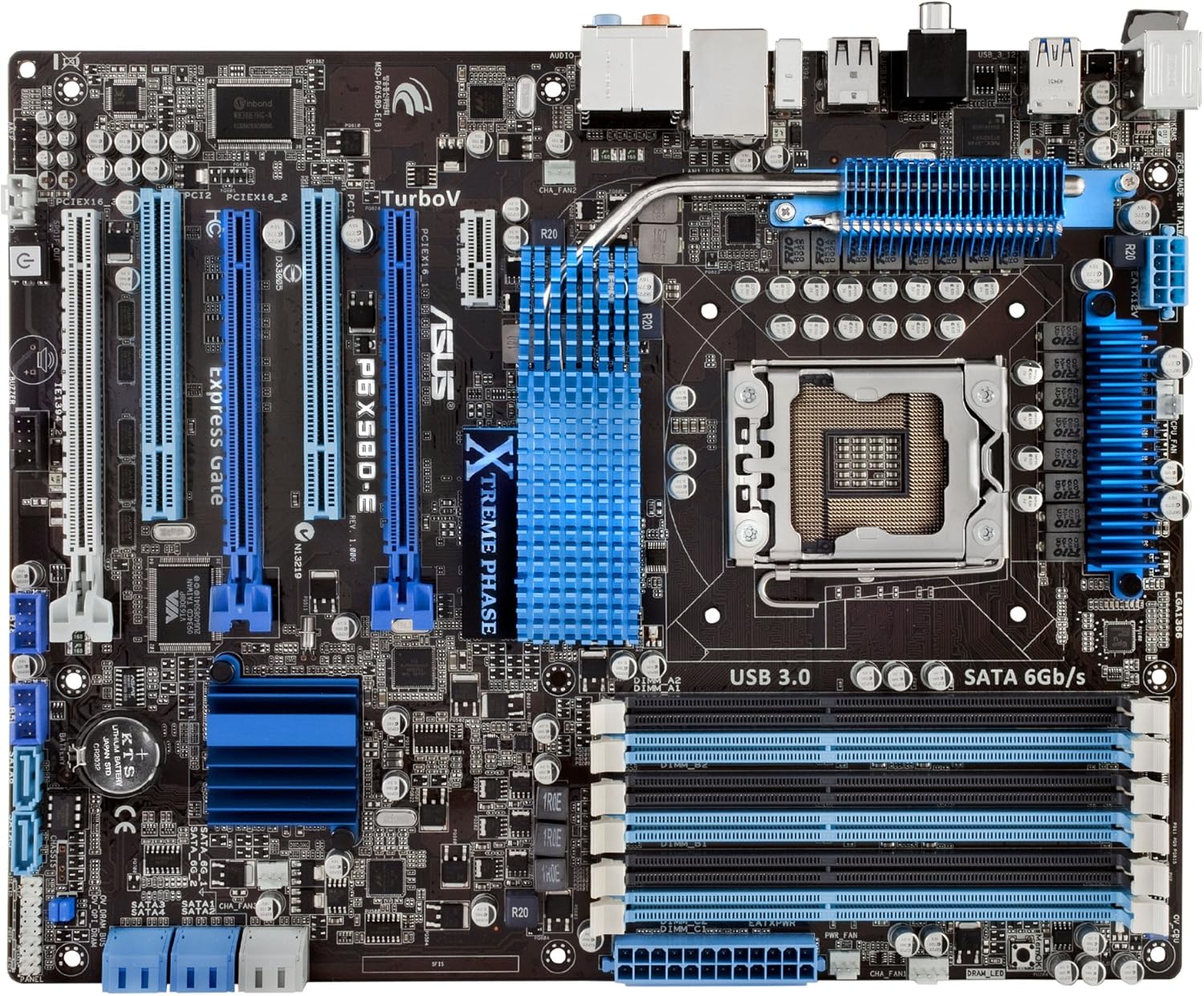
Gambar 1.1: Ti luhur ka handap view of the ASUS P6X58D-E motherboard, highlighting key components like the CPU socket, RAM slots, and PCIe slots.
2. Fitur konci
- Socket Intel LGA 1366: Supports Intel Core i7 series processors and is ready for next-generation 32nm 6-core Intel LGA 1366 processors.
- Intel X58 Chipset: Provides robust performance and compatibility.
- Triple Channel DDR3 Memory: Six DIMM slots support up to 24GB of DDR3 2000 (O.C.)/1600/1333/1066 MHz non-ECC, un-buffered memory.
- TRUE USB 3.0 Support: Offers data transfer rates up to 4.8Gbps, 10 times faster than USB 2.0, and is backward compatible.
- TRUE SATA 6 Gb/s Support: Delivers data transfer rates up to 6.0Gb/s, doubling the bandwidth of previous SATA standards.
- Dukungan Multi-GPU: Features three PCIe 2.0 x16 slots for NVIDIA 3-Way SLI or ATI Quad-GPU CrossFireX configurations.
- ASUS Xtreme Phase Power Design (16+2 Phase): Provides efficient power delivery to the CPU and memory controller, enhancing overclocking capability and component longevity.
- Stack Cool 3+: A fanless cooling solution with embedded copper layers in the PCB to effectively dissipate heat, reducing temperatures by up to 20°C (36°F).
- TurboV Tool: Allows real-time, precise voltage and frequency adjustments for optimized overclocking with micro-interval (0.02v) tuning.
- Express Gate SSD: Provides a quick-booting operating system for instant internet access and basic tasks.
3. Eusi Paket
Verify that all items are present in your ASUS P6X58D-E motherboard package:
- ASUS P6X58D-E Motherboard
- Manual pamaké
- 4 x Serial ATA 3.0Gb/s Cables
- 2 x Serial ATA 6.0Gb/s Cables
- ASUS Q-Shield (I/O backplate)
- 2-in-1 Q-Connector (for front panel headers)
- 1 x ASUS 3-Way SLI Bridge Connector
- 1 x ASUS SLI Bridge Connector
- Support Disc (Drivers, Anti-virus software, ASUS Update, ASUS Utilities)
4. Setup jeung Instalasi
Sateuacan ngamimitian pamasangan, pastikeun sistem anjeun dipareuman sareng dicabut tina stop kontak témbok. Anggo tali pigeulang anti statik pikeun nyegah karusakan éléktrostatik (ESD) kana komponén.
4.1. Persiapan Motherboard
- Pasang CPU: Carefully open the CPU socket lever. Align the triangular mark on the Intel LGA 1366 processor with the mark on the socket. Gently place the CPU into the socket without forcing it. Close the lever to secure the CPU.
- Pasang CPU Cooler: Apply thermal paste to the CPU if not pre-applied on the cooler. Mount the CPU cooler according to its manufacturer's instructions, ensuring it is securely fastened and makes proper contact with the CPU.
- Pasang Mémori (RAM): Open the clips on the DDR3 DIMM slots. Align the memory module's notch with the key in the slot. Press down firmly on both ends of the module until the clips snap into place. For triple-channel operation, refer to your manual for recommended slot population (typically slots A1, B1, C1 or similar).
- Pasang I/O Shield: Install the ASUS Q-Shield into the rear opening of your computer case.

Gambar 4.1: Angled view of the motherboard, showing the CPU socket (LGA 1366) and six DDR3 memory slots.
4.2. Instalasi Motherboard kana Case
- Gunung Motherboard: Carefully place the motherboard into the computer case, aligning the screw holes with the standoffs. Secure the motherboard with screws.
- Nyambungkeun Power Supply: Sambungkeun konektor daya utama ATX 24-pin sareng konektor daya CPU 8-pin tina catu daya anjeun ka port anu saluyu dina motherboard.
- Pasang kartu ékspansi: Insert graphics cards into the PCIe 2.0 x16 slots. Ensure they are seated firmly and secured with the case's retention mechanism. Install any other expansion cards (e.g., sound cards, network cards) into available PCIe x1 or PCI slots.
- Sambungkeun Alat Panyimpenan: Connect SATA data cables from your hard drives, solid-state drives, and optical drives to the SATA 6 Gb/s (Marvell) or SATA 3 Gb/s (Intel ICH10R) ports on the motherboard. Connect SATA power cables from your power supply to these devices.
- Sambungkeun kabel Panel hareup: Use the 2-in-1 Q-Connector to simplify connecting the front panel headers (power button, reset button, HDD LED, power LED) to the motherboard. Connect front panel USB and audio cables.
- Connect Case Fans: Sambungkeun kipas wadah kana header kipas anu sayogi dina motherboard.
4.3. Rear I/O Panel Overview

Gambar 4.2: Rear I/O panel connections. From left to right: PS/2 keyboard/mouse, USB 2.0, USB 3.0, Coaxial S/PDIF Out, Optical S/PDIF Out, LAN (RJ45), and 8-channel audio jacks.
- PS/2 Port: Pikeun nyambungkeun kibor sareng beurit lawas.
- Port USB 2.0: Pikeun nyambungkeun alat USB 2.0.
- Port USB 3.0: Pikeun nyambungkeun alat USB 3.0 anu gancang.
- Palabuhan LAN (RJ45): Pikeun sambungan jaringan.
- Jacks audio: 8-channel audio output and input.
- S/PDIF Out (Coaxial & Optical): Pikeun kaluaran audio digital.
5. Parentah Operasi
5.1. Mimiti boot jeung BIOS Setup
- Saatos assembling sistem anjeun, sambungkeun monitor, keyboard, jeung mouse.
- Power on your system. During the Power-On Self-Test (POST), press the DEL key repeatedly to enter the BIOS Setup Utility.
- Dina BIOS, pariksa yén sadaya komponén anu dipasang (CPU, RAM, drive panyimpenan) parantos dideteksi kalayan leres.
- Configure boot order to install your operating system from a USB drive or optical disc.
- Simpen parobihan teras kaluar ti BIOS. Sistem bakal di-restart.
5.2. Pamasangan supir
After installing your operating system, install the necessary drivers from the provided support disc or download the latest versions from the ASUS official websitus. drivers konci ngawengku:
- Supir Chipset
- Supir Audio
- Supir LAN
- Supir USB 3.0
- SATA 6 Gb/s Drivers
- Graphics Card Drivers (from GPU manufacturer)
5.3. Overclocking with TurboV
The ASUS P6X58D-E features the TurboV tool for real-time system performance tuning. This utility allows for precise adjustments of CPU PPL, NB, NB-PCIe, and DRAM voltages in 0.02v intervals. Refer to the software manual on the support disc or ASUS website for detailed instructions on using TurboV for overclocking.
6. Pangropéa
- Tetep Bersih: Regularly clean dust from inside your computer case using compressed air. Dust accumulation can lead to overheating and component failure.
- Pastikeun aliran hawa: Ensure proper airflow within your case by managing cables and ensuring fans are unobstructed.
- Pembaruan BIOS: Pariksa dukungan ASUS sacara berkala website for BIOS updates. BIOS updates can improve stability, compatibility, and performance. Follow update instructions carefully.
- Pembaruan supir: Tetep supir anjeun diropéa pikeun mastikeun kinerja optimal sarta kasaluyuan jeung software anyar jeung hardware.
7. Cara ngungkulan
Bagian ieu nyayogikeun solusi pikeun masalah umum anu anjeun tiasa patepang.
- Sistem Teu Hurung:
- Check all power connections: 24-pin ATX, 8-pin CPU, and power cables to components.
- Pastikeun saklar catu daya aya dina posisi ON.
- Pariksa sambungan tombol daya panel hareup kana motherboard.
- Henteu aya kaluaran tampilan:
- Ensure the monitor is connected to the graphics card (not the motherboard I/O if a dedicated GPU is installed).
- Pasang deui kartu grafik sareng modul mémori.
- Test with a different monitor or graphics card if available.
- Sistem Pareum atanapi Rusak:
- Pariksa suhu CPU sareng GPU. Overheating bisa ngabalukarkeun instability.
- Jalankeun alat diagnostik mémori pikeun mariksa kasalahan RAM.
- Pastikeun sadaya supir dipasang leres sareng diropéa.
- Pariksa sambungan anu leupas atanapi komponén anu dipasangna teu leres.
- Storage Devices Not Detected:
- Verify SATA data and power cable connections.
- Check BIOS settings to ensure SATA ports are enabled and configured correctly (e.g., AHCI mode).
- Ensure drivers for SATA 6Gb/s controller are installed.
8. Spésifikasi
| komponén | Spésifikasi |
|---|---|
| CPU Socket | LGA 1366 for Intel Core i7 Processor Extreme Edition/Core i7 Processor |
| Chipset | Intel X58 / ICH10R |
| Mémori | 6 x DIMM, Max. 24GB, DDR3 2000 (O.C.)/1600/1333/1066 MHz Non-ECC, Un-buffered Memory, Triple channel memory architecture |
| Power Phase | 16+2 Xtreme Phase |
| PCIe 2.0 x16 Slots | 3 (at x16/x8/x8 or x16/x16/x1 mode) |
| Rojongan Multi-GPU | ATI Quad-GPU CrossFireX / NVIDIA 3-Way SLI |
| LAN | Marvell 88E8056 Gigabit LAN controller featuring AI NET2 |
| Audio | Realtek ALC889 8-Channel High Definition Audio CODEC, DTS support |
| Panyimpenan | 2x SATA 6 Gb/s (Marvell), 6x SATA 3Gb/s (Intel ICH10R, RAID 0,1,5,10 Support), 1x eSATA |
| palabuhan USB | 8x USB 2.0 (4 rear, 4 by headers), 2x USB 3.0 (rear) |
| Firewire (1394a) | 2 ports (1 rear, 1 at mid-board) |
| Faktor Bentuk | ATX (12 inci x 9.6 inci / 30.5 cm x 24.4 cm) |
| Diménsi | 13.5 x 11 x 3.1 inci |
| Item Beurat | 3.8 pon |
9. Émbaran jaminan
The ASUS P6X58D-E motherboard carries a Garansi produk terbatas 3 taun. The warranty is based on the serial number printed on the product box. For detailed terms and conditions, please refer to the warranty card included in your package or visit the official ASUS support websitus.
10. Rojongan
For further assistance, technical support, driver downloads, or BIOS updates, please visit the official ASUS support websitus:
You can also refer to the comprehensive user manual provided on the support disc for more in-depth information.


