Bubuka
The NOVA Medical Products Zoom Rollator Walker is designed to provide optimum stability and comfort for users. This manual provides essential information for the safe and effective use of your rollator, including setup, operation, and maintenance instructions. The Zoom Rollator is available in various seat heights, with this specific model featuring a 22-inch seat height, suitable for users approximately 5'5" - 6'1" tall, and supports a weight capacity of 300 lbs.
Key features include 8-inch wheels for versatile terrain use, patented Feather Touch hand brakes for easy control, a padded seat, an under-seat storage pouch, and the Lock n' Load folding mechanism for convenient transport and storage.
Parentah Setup
Your NOVA Zoom Rollator Walker comes mostly pre-assembled. Follow these steps to complete the setup:
- Ngabongkar bungkusan: Carefully remove the rollator from its packaging. It will be in a folded state.
- Unfolding Rollator:
- Place the folded rollator on a flat surface.
- Gently push the sides of the frame outwards until the rollator is partially open.
- Push down on the middle bar (located under the seat) until the frame fully expands and locks into place.
- Installing Handles:
- Remove any rubber stoppers from the handle inserts on the frame.
- Insert the handgrips into the frame's designated holes.
- Adjust the handle height to your preference. A good starting point is when your wrist aligns with the handgrip, allowing for a slight 30-degree bend in your elbow when holding the grips.
- Secure the handles by inserting and tightening the height adjustment screws through the frame and handle tubes. Ensure they are tight and secure.
- Attaching Backrest:
- Locate the backrest.
- Align the push-buttons on the backrest with the corresponding holes on the rollator frame.
- Push the buttons and insert the backrest into the holders until it clicks securely into place. Pull on the backrest to confirm it is firmly attached.
Video: NOVA Zoom Rollator - Demonstrates features and setup process.
Video: How to Set Up the NOVA Zoom Rollator - Visual guide for initial assembly.
Parentah Operasi
Familiarize yourself with the operational aspects of your Zoom Rollator for safe and effective use.
- Ngagunakeun rem:
- To control speed while walking, gently pull up on the Feather Touch hand brakes. Minimal effort is required.
- To engage the parking brake (lock the wheels), push the brake levers downwards until they click into the locked position. Always ensure brakes are locked before sitting.
- To release the parking brake, pull the levers upwards.
- Sitting on the Rollator:
- Pastikeun rollator aya dina permukaan anu datar sareng stabil.
- Aktipkeun kadua rem parkir ku cara mencét tuas ka handap. Pastikeun rodana geus dikonci.
- Carefully turn around and sit on the padded seat, using the backrest for support. Do not scoot or attempt to move the rollator while seated.
- To stand up, push off the handgrips and then release the parking brakes.
- Folding and Transporting (Lock n' Load):
- Lift the padded seat to access the folding mechanism.
- Pull up on the middle bar located under the seat. The rollator will begin to fold inwards.
- Locate the red Lock n' Load clip on the front bar. Insert this clip into the hinge to secure the rollator in its folded position.
- This locked folded position makes it easier to lift and load the rollator into a vehicle or for storage.
- To unfold, release the Lock n' Load clip, gently push the handgrips outwards, and then push down on the middle bar until the frame locks open.
- Kantong Panyimpen: The under-seat pouch provides convenient storage for personal items. It includes a smaller internal pocket for keys or a phone.

Image: The NOVA Zoom Rollator Walker in its open, ready-to-use configuration, highlighting the seat and storage pouch.
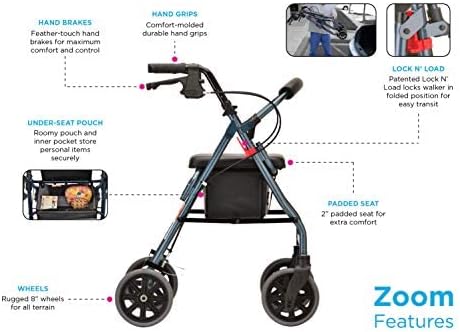
Image: Detailed diagram illustrating the key features of the Zoom Rollator, such as the Feather Touch hand brakes, padded seat, and Lock n' Load system.
Pangropéa
Pangropéa rutin mastikeun umur panjang sareng operasi rollator anjeun anu aman.
- beberesih: Clean the frame and seat regularly with a damp lawon jeung sabun hampang. Ngahindarkeun cleaners abrasive.
- Inspeksi roda: Periodically check the 8-inch wheels for wear and tear. Ensure they rotate freely and are free of debris.
- Pariksa marake: Regularly test the Feather Touch hand brakes to ensure they engage and disengage properly. Adjust if necessary according to the detailed instructions in the included user manual.
- Pengikat: Ensure all screws and fasteners, especially the height adjustment knobs, are securely tightened.
Pamérésan masalah
If you encounter any issues with your Zoom Rollator, please refer to the following common solutions or contact customer support.
- Kasesahan Lipatan / Unfolding: Ensure the middle bar under the seat is fully pulled up or pushed down until it locks. Check for any obstructions.
- Brakes Not Engaging/Disengaging: Inspect the brake cables for any kinks or damage. Ensure the brake levers are properly adjusted. Refer to the full user manual for detailed brake adjustment instructions.
- Unstable Feel: Verify that all height adjustment screws are securely tightened and that the backrest is properly inserted and locked. Ensure both handle heights are set equally.
spésifikasi
| Nomer modél | 4222BK |
| Approximate User Height | 5'5" - 6'1" |
| Jangkungna korsi | 22 inci |
| Kapasitas beurat | 300 pon |
| Rollator Weight | 16.25 pon |
| Nanganan Jangkungna Pangaluyuan | 31.75" - 36" |
| Width Between Handles | 18" |
| Gemblengna Diménsi (Unfolded) | 24.5" W x 26.25" D x 36" H |
| Ukuran Sakabéhna (Dilipat) | 24.5"W x 12.5"D x 37" - 42"H |
| Dimensi korsi | 13.75"L x 12.75"D |
| Pouch Dimensions | 15.5" W x 9.25" D x 6.25" H |
| Ukuran kabayang | 8 inci |
| Warna | Hideung |

Image: Dimensional specifications for the Zoom 22 Rollator, illustrating handle height, seat height, and overall dimensions.
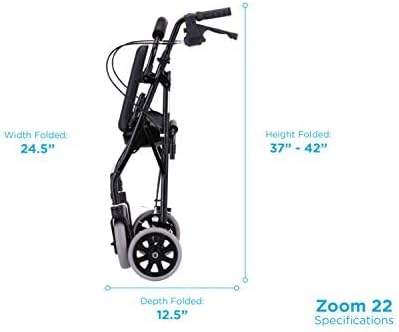
Image: Folded dimensions of the Zoom 22 Rollator, showing its compact size for storage and transport.

Image: Comparison of different Zoom Rollator sizes (18", 20", 22", 24" seat heights) to help users choose the correct fit.
Garansi sareng Rojongan
NOVA Medical Products offers comprehensive support for your rollator.
- Garansi: The NOVA Zoom Rollator comes with a Lifetime Limited Warranty on the frame and a 5-year warranty on the brakes.
- Rojongan Palanggan: For detailed assembly instructions, safety guidelines, or any other inquiries, please refer to the user manual included with your product or contact NOVA Medical Products directly.
Émbaran Kasalametan penting
Always follow safety guidelines when using your rollator to maintain stability and prevent falls or injuries. Ensure the walker's height and width are adjusted to fit your body size for a comfortable grip on the hand brakes. Always engage the parking brakes before sitting or standing.
Bantahan Hukum: Statements regarding dietary supplements have not been evaluated by the FDA and are not intended to diagnose, treat, cure, or prevent any disease or health condition. (This disclaimer was included in the original product information and is provided here as per instructions.)


