Bubuka
This manual provides comprehensive instructions for the setup, operation, maintenance, and troubleshooting of your Logitech M510 Wireless Mouse. Designed for comfort and efficiency, the M510 offers precise control and convenient features for your computing needs.
The Logitech M510 is a comfortable wireless computer mouse featuring a USB Unifying Receiver, back/forward buttons, and side-to-side scrolling. It operates on 2 AA batteries and is compatible with Personal Computers and Macbooks running operating systems like Windows 10.
Eusi pakét
- Mouse Wireless Logitech M510
- Panarima Logitech Unifying
- 2 AA Batteries (pre-installed or included)
Disetél
1. Pamasangan batré
The Logitech M510 mouse requires two AA batteries for operation. These are typically included with your purchase. If not already installed, follow these steps:
- Teangan tempat panutup kompartemen batré dina underside beurit.
- Geser atanapi angkat panutupna pikeun muka kompartemenna.
- Pasangkeun dua batré AA, pastikeun terminal positif (+) sareng négatif (-) saluyu sareng indikator di jero kompartemen.
- Tutup panutup kompartemen batré aman.
2. Connecting the Unifying Receiver
The Logitech M510 uses a Logitech Unifying Receiver for wireless connectivity. This small USB receiver allows you to connect multiple compatible Logitech devices to your computer using a single USB port.
- Locate the Logitech Unifying Receiver. It is often stored inside the battery compartment of the mouse for safekeeping during transport.
- Plug the Unifying Receiver into an available USB port on your computer (desktop, laptop, or Macbook).
- Your computer should automatically detect the receiver and install the necessary drivers. This may take a few moments.
- Once the drivers are installed, the mouse should be ready for use. If not, ensure the mouse's power switch (if present) is in the 'ON' position.

Gambar: luhur-handap view of the Logitech M510 Wireless Mouse alongside its compact USB Unifying Receiver.
Ngoperasikeun Mouse
The Logitech M510 Wireless Mouse is designed for intuitive use with several programmable buttons and comfortable ergonomics.
Fungsi Dasar
- Tombol Klik-Kenca: Tombol primér pikeun milih barang, muka files, sarta interacting jeung software.
- Tombol Klik Katuhu: Secondary button for accessing context menus and additional options.
- Gulung kabayang: Gulung ka luhur atanapi ka handap dina dokumén sareng web kaca. Roda gulung ogé fungsina salaku tombol klik tengah.
- Side-to-Side Scrolling: Tilt the scroll wheel left or right to scroll horizontally in applications that support this feature.
Advanced Features (Programmable Buttons)
The M510 features two thumb buttons (back/forward) on the left side, which can be customized using Logitech Options software (available for download from the Logitech website). By default, these buttons perform browser navigation functions.
- Tombol Balik: Navigasi deui ka jero web browser atawa file penjelajah.
- Tombol Maju: Navigates ka hareup web browser atawa file penjelajah.
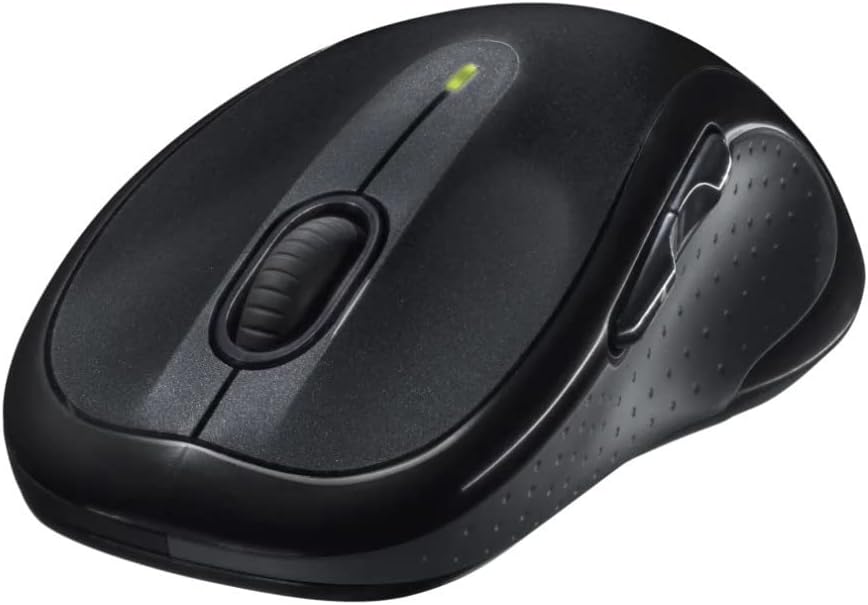
Gambar: Angled view of the Logitech M510 Wireless Mouse, highlighting its ergonomic shape and side buttons.
Pangropéa
Ngabersihan Beurit anjeun
To ensure optimal performance and hygiene, regularly clean your Logitech M510 mouse:
- Disconnect the mouse from your computer by removing the Unifying Receiver.
- Anggo kaén anu lemes sareng teu aya serat anu hampang dampened with water or a mild cleaning solution (e.g., isopropyl alcohol) to wipe down the surface of the mouse.
- For crevices and around buttons, use a cotton swab or a soft brush.
- Avoid getting liquid into the internal components or the optical sensor.
- Allow the mouse to dry completely before re-connecting.
Ngagantian batré
The Logitech M510 has an average battery life of 18 months. When the battery indicator light (if present) flashes or mouse performance degrades, it's time to replace the batteries.
- Pareuman beurit nganggo saklar daya di handapeun.
- Buka panutup kompartemen batré.
- Leupaskeun batré AA heubeul.
- Pasangkeun dua batré AA anyar, bari tetep merhatikeun polaritasna (+/-) anu bener.
- Tutup panutup kompartemen batré.
- Turn the mouse back on.
Pamérésan masalah
| Masalah | Mungkin Cukang lantaranana | Solusi |
|---|---|---|
| Beurit teu ngabales | Low or dead batteries; Unifying Receiver not connected; Mouse power off; Driver issue. | Replace batteries; Ensure Unifying Receiver is securely plugged into a USB port; Turn mouse power switch to 'ON'; Reinstall Logitech Options software or check device manager for driver issues. |
| Gerakan kursor anu laun atanapi teu teratur | Interference; Dirty optical sensor; Mouse used on unsuitable surface; Low battery. | Move mouse closer to receiver; Clear obstructions; Clean optical sensor; Use a mouse pad or suitable surface; Replace batteries. |
| Tombol samping teu jalan | Software not installed or configured; Application does not support custom buttons. | Download and install Logitech Options software from the official Logitech website to customize button functions. Ensure the application you are using supports these functions. |
| Unifying Receiver not recognized | Faulty USB port; Driver issue. | Try a different USB port; Restart your computer; Download and install the Logitech Unifying Software to re-pair the mouse with the receiver. |
spésifikasi
| Fitur | Rincian |
|---|---|
| merek | Logitech |
| Nomer modél | 910-001822 |
| Runtuyan | M510 |
| Téhnologi konektipitas | Radio Frequency, USB (via Unifying Receiver) |
| Téhnologi Deteksi Gerakan | Laser |
| Warna | kulawu poék |
| Item Beurat | 4.6 ons (kira-kira 130 gram) |
| Ukuran produk (L x W x H) | 4.38 x 2.5 x 1.75 inci (kira-kira 11.13 x 6.35 x 4.45 cm) |
| Sumber Daya | Batré Powered |
| Batré Diperlukeun | 2 batré AA (kaasup) |
| Rata Kahirupan Batré | 18 bulan |
| Platform hardware | Personal Computer, Macbook |
| Kasaluyuan System Operasi | Windows 10 (and likely earlier versions, macOS) |
| Fitur husus | Battery Life Indicator, Power Saving Mode, Programmable Buttons, Wireless |
| Tanggal Kahiji Sadia | 7 Juni 2010 |

Gambar: luhur-handap view of the Logitech M510 Wireless Mouse showing its approximate dimensions (4.4" length, 2.5" width).
Garansi sareng Rojongan
Émbaran jaminan
Logitech products typically come with a limited hardware warranty. For specific warranty terms and conditions applicable to your Logitech M510 Wireless Mouse, please refer to the warranty card included with your product or visit the official Logitech websitus.
Rojongan Palanggan
For further assistance, technical support, or to download the latest software (such as Logitech Options or Unifying Software), please visit the official Logitech support websitus:
You may also find helpful resources, FAQs, and community forums on their websitus.


