Bubuka
Welcome to the Greenlee DM-810A True RMS Digital Multimeter user manual. This document provides essential information for the safe and effective operation, maintenance, and troubleshooting of your device. The DM-810A is designed for accurate measurement of AC/DC voltage, AC/DC current, resistance, capacitance, frequency, and continuity, making it a versatile tool for electrical professionals.
Émbaran Kasalametan
Pikeun mastikeun operasi anu aman sareng jasa méterna, turutan pitunjuk ieu. Gagal pikeun niténan peringatan ieu tiasa nyababkeun tatu parah atanapi maot.
- Always read and understand the entire instruction manual before using the meter.
- Ulah ngaleuwihan wates input maksimum pikeun fungsi nanaon.
- Paké caution nalika gawé bareng voltagnyaeta luhur 30V AC RMS, 42V puncak, atawa 60V DC. Ieu voltagÉta nyababkeun bahaya shock.
- Always use the proper terminals, function, and range for your measurements. The DM-810A features a Beep-Jack audible and visible warning to guard against improper A and mA terminal plug-in.
- Inspect test leads for damaged insulation or exposed metal before each use. Replace if damaged.
- Ulah dianggo méteran upami katingalina ruksak atanapi upami wadahna dibuka.
- Pastikeun panutup batré ditutup pageuh sateuacan dioperasikeun.
- Adhere to local and national safety codes. Use personal protective equipment (PPE) such as approved safety glasses and electrically insulated gloves when necessary.
Produk Leuwihview
This section identifies the key parts and controls of your Greenlee DM-810A multimeter.

Gambar 1: Hareupeun view of the Greenlee DM-810A Digital Multimeter, showing the display, function selector dial, and input jacks.
- tampilan: Large LCD for clear readings, often with dual display capability.
- Tombol Pamilih Fungsi: Used to select the desired measurement function (e.g., V~, V-, A~, A-, Ω, CAP, Hz, Continuity).
- Input Jacks:
- COM: Input umum (négatip) pikeun sadaya pangukuran.
- VΩHz: Input positif pikeun voltage, pangukuran résistansi, frékuénsi, sareng kapasitansi.
- mAμA: Input positif pikeun miliampere sareng mikroamppangukuran ayeuna.
- A: Positive input for amppangukuran ayeuna.
- Tombol:
- PILIH: Toggles between functions on a single dial position (e.g., AC/DC voltage, dioda/kontinuitas).
- RANGEUT: Manually selects measurement range or returns to auto-ranging.
- △: Delta function for relative measurements.
- Tahan: Ngabekukeun bacaan tampilan ayeuna.
Disetél
Pamasangan batré
The Greenlee DM-810A requires batteries for operation. Refer to the back of the meter for the battery compartment. Use a screwdriver to open the compartment, insert the specified batteries (typically AA or 9V, check the compartment label), observing correct polarity, and then securely close the cover.
Nyambungkeun Tes Ngarah
Always ensure test leads are properly connected before taking measurements.
- Selapkeun lead test hideung kana COM colokan input (umum).
- Insert the red test lead into the appropriate positive input jack based on the measurement you intend to make:
- Pikeun voltage, resistance, capacitance, or frequency, use the VΩHz jack.
- Pikeun miliampere or microampere current, use the mAμA jack.
- Pikeun ampere current, use the A jack.
- The meter's Beep-Jack feature will provide an audible and visible alert if the function selector is set to a current measurement (A or mA) but the test lead is incorrectly plugged into a voltage/resistance jack, or vice-versa. This helps prevent damage to the meter and ensures correct setup.
Parentah Operasi
This section details how to perform various measurements with your DM-810A multimeter.
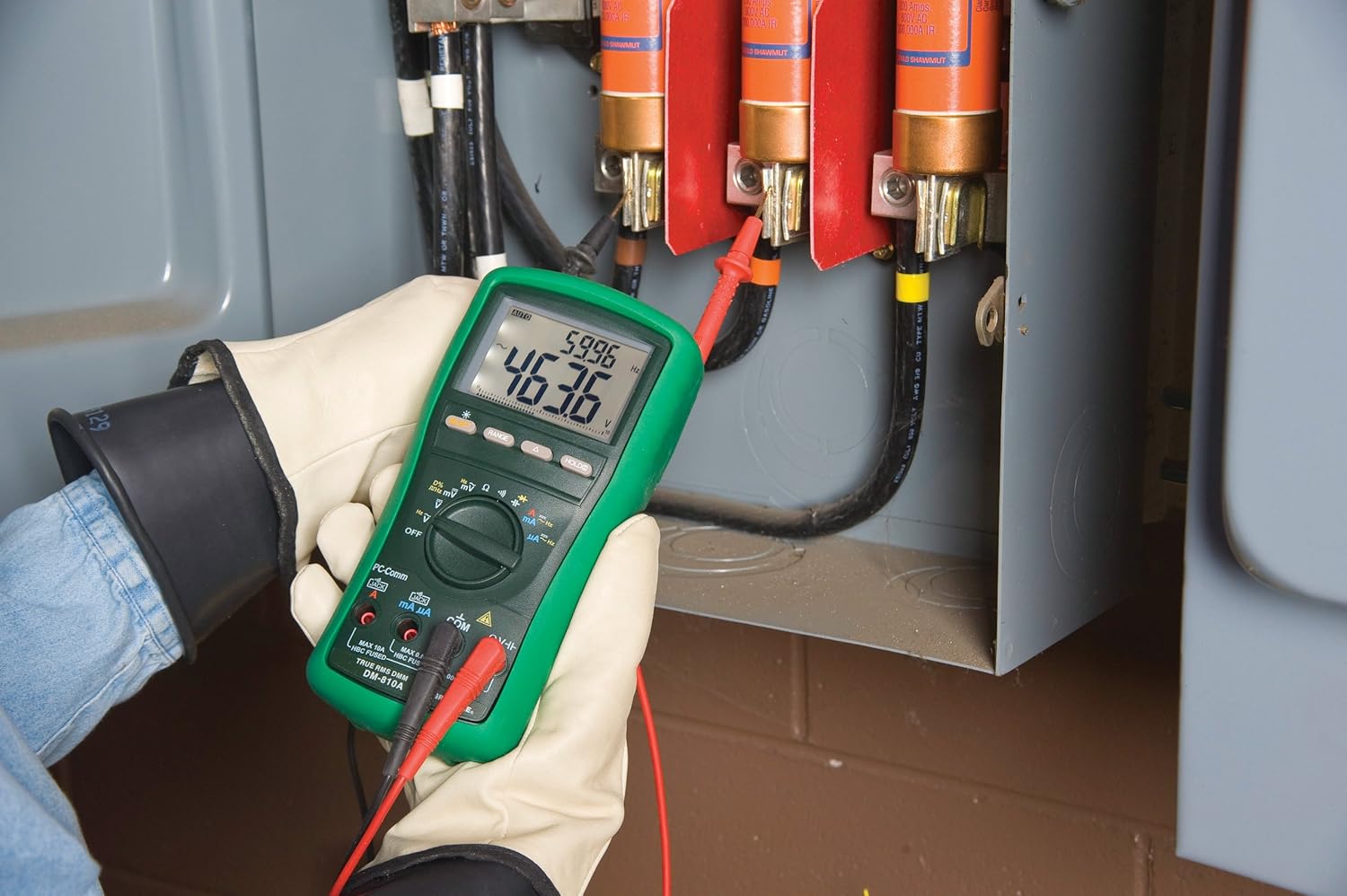
Gambar 2: The Greenlee DM-810A Digital Multimeter being used to take measurements within an electrical panel, demonstrating practical application.
Ukur AC/DC Voltage
- Set the function selector to V~ (AC Voltage) atanapi V- (DC Voltage). Use the SELECT button to toggle if both are on one position.
- Sambungkeun kalungguhan tés hideung COM and the red test lead to VΩHz.
- Sambungkeun probe tés sacara paralel di sakuliah sirkuit atanapi komponén anu badé diukur.
- Baca voltage nilai dina tampilan.
Ngukur Arus AC/DC
penting: Current measurements require the meter to be connected in series with the circuit. Ensure the circuit is de-energized before connecting the meter.
- De-énergize sirkuit.
- Set the function selector to A~ (AC Current) or A- (DC Current), or mA~ / mA-.
- Sambungkeun kalungguhan tés hideung COM. Connect the red test lead to mAμA for small currents or A for larger currents (up to 10A). The Beep-Jack warning will activate if leads are in the wrong jacks for the selected function.
- Open the circuit where the current is to be measured and connect the meter in series.
- Re-energize the circuit and read the current value.
- De-energize the circuit before disconnecting the meter.
Measuring Resistance (Ω)
- De-energize the circuit or component.
- Set the function selector to Ω.
- Sambungkeun kalungguhan tés hideung COM and the red test lead to VΩHz.
- Sambungkeun panyilidikan tés sakuliah komponén.
- Baca nilai résistansi.
Measuring Capacitance (CAP)
- Pastikeun kapasitor geus kosong sapinuhna sateuacan diukur.
- Set the function selector to CAP.
- Sambungkeun kalungguhan tés hideung COM and the red test lead to VΩHz.
- Sambungkeun probe tés kana terminal kapasitor.
- Baca nilai kapasitansi.
Measuring Frequency (Hz)
- Set the function selector to Hz.
- Sambungkeun kalungguhan tés hideung COM and the red test lead to VΩHz.
- Sambungkeun probe tés kana sumber sinyal.
- Baca nilai frékuénsina.
Uji Kontinuitas
- De-energize the circuit or component.
- Set the function selector to the continuity symbol (often shared with diode test, use SELECT to toggle).
- Sambungkeun kalungguhan tés hideung COM and the red test lead to VΩHz.
- Connect the test probes across the circuit path or component.
- An audible beep indicates continuity (low resistance). The display will show the resistance value.
Pangropéa
beberesih
Ngusap méter kalayan iklanamp lawon sareng deterjen hampang. Entong nganggo bahan abrasif atanapi pangleyur. Pastikeun méterna garing pisan sateuacan dianggo.
Ngagantian batré
When the battery indicator appears on the display, replace the batteries immediately to ensure accurate readings. Follow the battery installation steps outlined in the Setup section.
Ngagantian sekering
If the current measurement functions cease to work, the internal fuses may need replacement. Refer to the meter's internal diagram (usually accessible by opening the battery compartment or back casing) for fuse specifications and replacement instructions. Always replace fuses with those of the specified type and rating to maintain safety and performance.
Pamérésan masalah
This section provides solutions for common issues encountered during the operation of your DM-810A multimeter.
| Masalah | Mungkin Cukang lantaranana | Solusi |
|---|---|---|
| Taya tampilan atawa taram tampilan | Batré maot atanapi lemah | Ganti batré. |
| Bacaan anu salah | Incorrect function/range selected; Damaged test leads; External interference | Verify function and range; Inspect and replace test leads; Move away from strong electromagnetic fields. |
| Pangukuran ayeuna teu jalan | Blown fuse; Incorrect lead connection | Check and replace fuses; Ensure leads are in the correct A or mA jacks. |
| Beep-Jack warning active | Test leads connected to incorrect input jacks for the selected function | Adjust test lead connections to match the selected function on the dial. |
| Tes kontinuitas teu nyaring | Open circuit; High resistance | Ensure the circuit is closed; Check for breaks in the circuit or component. |
Spésifikasi teknis
The following table outlines the key technical specifications for the Greenlee DM-810A Digital Multimeter.
| Fitur | Nilai |
|---|---|
| merek | Greenlee |
| Modél | DM-810A |
| Tipe Pangukuran | Leres RMS Digital Multimeter |
| Sumber Daya | Batré Powered |
| Gaya | Digital |
| Item Beurat | 16 ons (1 pon) |
| Ukuran produk (L x W x H) | 10 x 10 x 12 inci |
| Sertifikasi | CE, CSA, UL |
| UPC | 783310087434 |
Garansi sareng Rojongan
Émbaran jaminan
The Greenlee DM-810A Digital Multimeter comes with a 1-taun jaminan produsén urang. Garansi ieu nyertakeun cacad dina bahan sareng pagawean dina panggunaan normal. Punten tahan bukti pameseran anjeun pikeun klaim garansi.
Rojongan Palanggan
For technical assistance, warranty service, or to inquire about replacement parts, please contact Greenlee customer support. Refer to the official Greenlee websitus atawa bungkusan produk pikeun inpo kontak panganyarna.


