1. Bubuka
This manual provides essential information for the proper setup, operation, and maintenance of your Thorens TD-235 Semi-automatic Turntable. Please read these instructions carefully before using your turntable to ensure optimal performance and longevity of the unit.
2. Parentah Kasalametan
- Ulah ngalaan unit ka hujan atawa Uap.
- Ulah muka lomari. Serahkan sadaya jasa ka tanaga anu mumpuni.
- Ensure the turntable is placed on a stable, level surface away from direct sunlight, heat sources, and excessive vibration.
- Cabut kabel daya tina stop kontak upami unit ieu moal dianggo salami lami.
- Handle the stylus with care to prevent damage and ensure proper playback.
3. Eusi Paket
Pariksa yén sadaya barang anu didaptarkeun di handap ieu aya dina bungkusan:
- Thorens TD-235 Turntable Unit
- Panutup lebu
- Plat
- Ngajalankeun Sabuk
- Dirasakeun Mat
- counterweight
- Anti skating Beurat
- Adaptor kakuatan
- Audio Cable (RCA)
- AT-95E Cartridge (pre-installed or separate)
- Manual pangguna (dokumén ieu)
4. Setélan
4.1 Ngabongkar sareng Nempatkeun
Carefully remove all components from the packaging. Place the turntable on a flat, stable surface. Ensure adequate ventilation around the unit.
4.2 Platter jeung Beubeur Instalasi
- Teundeun platter kana spindle tengah.
- Panggihan sabuk panggerakna. Taliti tarik sabuk di sabudeureun sisi jero platter teras di sabudeureun katrol motor. Pastikeun sabukna henteu bengkong.
- Teundeun mat felt dina luhureun platter nu.

Gambar: luhur-handap view of the Thorens TD-235 turntable with the dust cover closed, illustrating the assembled unit.
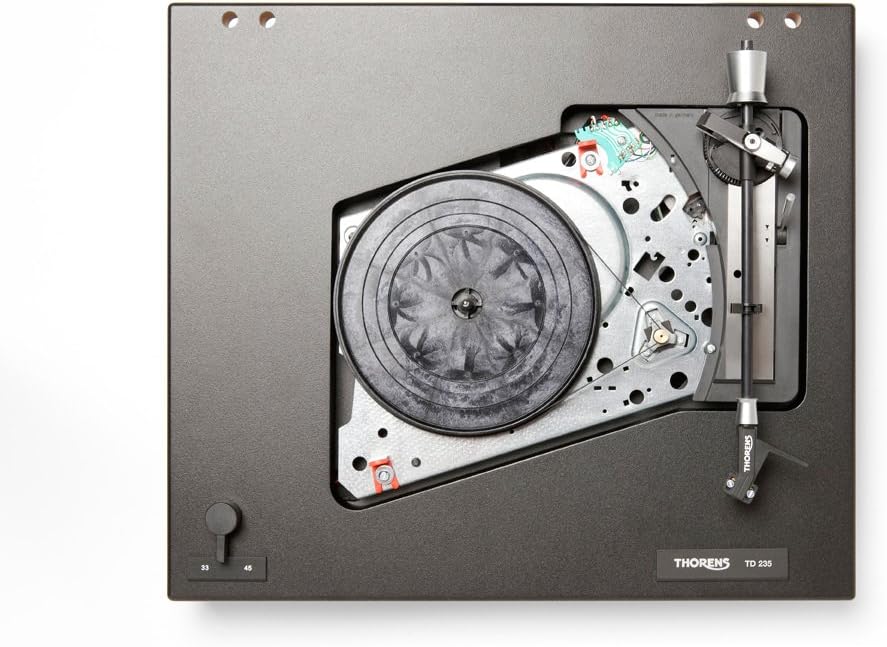
Gambar: internal view of the Thorens TD-235 turntable with the platter removed, showing the motor and belt drive system for installation reference.
4.3 Cartridge and Tonearm Setup
The TD-235 typically comes with an AT-95E cartridge pre-installed. If not, carefully mount the cartridge to the headshell following the cartridge manufacturer's instructions.
- Adjustment counterweight: Slide the counterweight onto the rear of the tonearm. Adjust it until the tonearm is balanced and floats horizontally. Lock the counterweight in place.
- Tracking Force Setting: Refer to the cartridge specifications (e.g., 2.0 grams for AT-95E). Rotate the numbered ring on the counterweight to the desired tracking force without moving the counterweight itself.
- Pangaluyuan Anti-skating: Attach the anti-skating weight to the small fishing line and loop it over the anti-skating rod. Set the anti-skating force to match the tracking force.

Gambar: Detil view of the tonearm assembly, highlighting the cartridge, counterweight, and anti-skating system for precise adjustment.
4.4 Pamasangan Panutup Kekebul
Insert the hinges of the dust cover into the receptacles at the rear of the turntable plinth.
4.5 Sambungan Audio sareng Daya
- Connect the integrated RCA audio cables from the turntable to the PHONO input of your amplifier or receiver. Ensure the ground wire is connected to the ground terminal on your amppangagung.
- Sambungkeun adaptor daya kana input DC dina turntable teras colokkeun kana stop kontak témbok.
5. Parentah Operasi
5.1 Powering on / Pareum
The turntable powers on automatically when the tonearm is moved over the platter and powers off when the tonearm returns to its rest or after the record finishes playing.
5.2 Pamilihan Speed
Use the speed selector switch, typically located on the front left of the plinth, to choose between 33 1/3 RPM for LPs and 45 RPM for singles. Ensure the correct speed is selected for the record you are playing.
5.3 Maén Rékor
- Place a record on the felt mat on the platter.
- Buka konci tonearm tina sésana.
- Gently angkat tonearm ngagunakeun uas cueing.
- Move the tonearm over the desired starting groove of the record. The platter should begin to spin automatically.
- Lower the cueing lever slowly to allow the stylus to descend onto the record.

Image: The Thorens TD-235 turntable with its dust cover open, ready for operation, displaying the main components.
5.4 Ngeureunkeun Putereun
When the record reaches the end of the last track, the tonearm will automatically lift and return to its rest, and the platter will stop spinning. To stop playback manually:
- Angkat tonearm ngagunakeun uas cueing.
- Gently guide the tonearm back to its rest.
- Turunkeun tuas isyarat.
- Lock the tonearm in its rest position. The platter should stop spinning shortly after.
6. Pangropéa
6.1 Ngabersihkeun Stylus
Bersihkeun stylus sacara rutin nganggo sikat lemes anu dirancang pikeun ngabersihkeun stylus, sikat lalaunan ti tukang ka hareup. Stylus anu kotor tiasa ngirangan kualitas sora sareng ngaruksak rékaman.
6.2 Rékaman beberesih
Keep your records clean to prevent dust and debris from accumulating on the stylus. Use a carbon fiber brush or a record cleaning solution and cloth before each play.
6.3 Ngabersihan Turntable
Wipe the plinth and dust cover with a soft, dry, lint-free cloth. For stubborn marks, a slightly damp cloth can be used, followed by a dry cloth. Avoid harsh chemicals or abrasive cleaners.
6.4 Drive Belt Replacement
The drive belt may stretch or degrade over time, affecting speed stability. Replace the belt if you notice inconsistent speed or if it appears worn. Refer to section 4.2 for installation.
7. Cara ngungkulan
| Masalah | Mungkin Cukang lantaranana | Solusi |
|---|---|---|
| Teu aya sora atanapi volume handap | Lepat amplifier input, loose connections, damaged stylus/cartridge. | Ensure RCA cables are securely connected to the PHONO input. Check ground wire. Inspect stylus for damage. |
| Sora distort | Dirty stylus, incorrect tracking force/anti-skating, damaged record. | Clean stylus. Re-adjust tracking force and anti-skating. Try a different record. |
| Kacepetan puter anu salah | Wrong speed selected, worn drive belt. | Verify speed selector switch. Inspect and replace drive belt if necessary. |
| Platter does not spin automatically | Tonearm not moved far enough over platter, power issue. | Ensure tonearm is moved fully over the record area. Check power connection. |
| Automatic stop/return not working | Mechanism obstruction, internal issue. | Ensure no physical obstructions. If problem persists, contact Thorens support. |
8. Spésifikasi
- model: Thorens TD-235
- Tipe: Semi-automatic Turntable
- Tipe Motor: Motor DC
- Laju: 33 1/3, 45 RPM
- Cartridge: AT-95E (included)
- Format Sinyal: Analog
- Rasio Signal-to-Noise: 72 dB
- Sumber Daya: Kabel Listrik
- Ukuran produk: 16.14 x 13.39 x 5.12 inci (410 x 340 x 130 mm)
- Beurat barang: 14.77 pon (6.7 kg)
- Pabrikan: Thorens
9. Garansi jeung Rojongan
Thorens products are covered by a manufacturer's warranty. Please refer to the warranty card included with your product or visit the official Thorens website for detailed warranty terms and conditions. For technical support or service inquiries, please contact your authorized Thorens dealer or the Thorens customer service department.
For further assistance, you may visit the official Thorens websitus: www.thorens.com


