1. Bubuka
Thank you for choosing the SECURAM BSL-0601 Biometric Safe Lock. This manual provides essential information for the proper installation, operation, and maintenance of your new biometric safe lock. The BSL-0601 features patented OneTouch™ Auto Fingerprint Verification, ensuring secure and convenient access to your safe. Its unique self-learning function enhances ease of operation by reducing the False Rejection Rate over time. Designed for efficiency, it operates on a single 9V battery and includes a low battery alert system. The lock is equipped with a UL approved heavy-duty EL-0601 Electronic Swing Bolt Actuator and offers programmable time delay and time window features for enhanced security management.
2. Émbaran Kasalametan
- Always ensure the safe door is open during initial setup and programming to prevent accidental lockout.
- Use only high-quality 9V alkaline batteries. Do not mix old and new batteries, or different types of batteries.
- Keep your fingerprints and access codes confidential.
- Ulah ngalaan konci ka suhu ekstrim atawa Uap.
- The EL-0601 Electronic Swing Bolt Actuator is UL approved, indicating compliance with specific safety and performance standards.
3. Produk Langkungview
3.1 Fitur konci
- Biometric Locking: Keyless access with fingerprint recognition for enhanced security.
- OneTouch™ Auto Fingerprint Verification: Fast 1-second fingerprint access.
- Fungsi Diajar Mandiri: Unique feature that reduces False Rejection Rate over time.
- Mechanical Knob Control: Hand-operated knob for easy access and control.
- Battery Saving Design: Operates on one 9V battery with a low battery alert.
- UL Approved Actuator: Heavy-duty EL-0601 Electronic Swing Bolt Actuator.
- Programmable Security: Features 0-99 minutes time delay and 0-20 minutes time window.
- Wrong Entry Lock-out: Penalty for incorrect password entries.
- Konstruksi awét: Metal construction with a chrome finish for a modern style.
3.2 Komponén
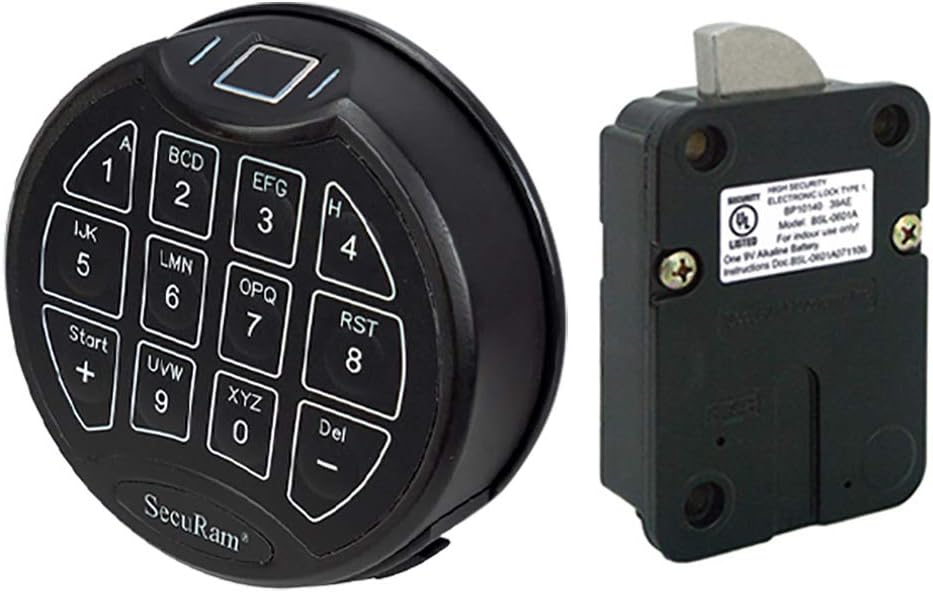
Image 3.2.1: BSL-0601 Keypad and EL-0601 Lock Body
This image displays the SECURAM BSL-0601 biometric keypad on the left and the EL-0601 electronic swing bolt lock body on the right. The keypad features a numerical layout with a fingerprint scanner at the top, while the lock body shows its mounting points and the swing bolt mechanism.
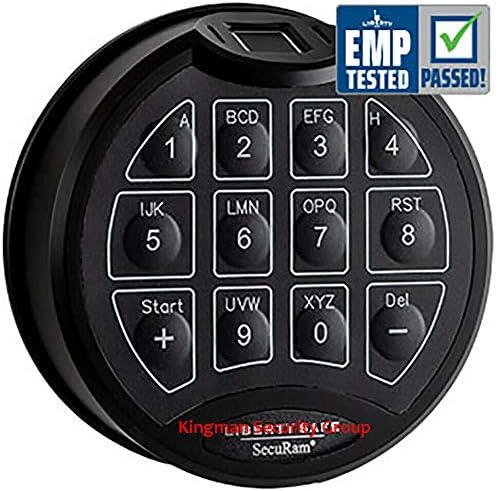
Image 3.2.2: BSL-0601 Biometric Keypad
A nutup-up view of the SECURAM BSL-0601 biometric keypad, highlighting the numerical buttons and the fingerprint sensor. The image also includes a label indicating 'EMP TESTED PASSED!', signifying its resistance to electromagnetic pulses.
- Biometric Keypad (FPC-1808 Entypad): The primary interface for fingerprint and code entry.
- Electronic Swing Bolt Lock Body (EL-0601): The mechanical component that secures the safe door.
- Batré: One 9V alkaline battery (not included).
- Hardware dipasang: Screws and other components for installation (typically included with the safe or lock kit).
4. Setélan
4.1 Pamasangan batré
- Locate the battery compartment, typically on the underside or rear of the keypad.
- Release the lever or slide the cover to open the compartment.
- Pasangkeun batré alkali 9V anyar, pastikeun polaritasna bener.
- Tutup kompartemen batré anu aman.
- The lock will typically emit a beep or light up to indicate successful battery installation.
4.2 Initial Programming and User Enrollment
The SECURAM BSL-0601 supports up to 3 user codes, with each code allowing for 5 associated fingerprints, totaling 15 fingerprints. It is crucial to perform initial programming with the safe door open.
- Change the Default Reset Code: The very first step is to change the factory default reset code to a personal administrator code. Refer to the detailed programming instructions provided with your lock for the specific sequence.
- Enroll Administrator Fingerprint: Using the newly set administrator code, enroll the primary user's fingerprint(s). The system will guide you through placing your finger on the sensor multiple times for accurate registration.
- Add User Codes and Fingerprints: Follow the programming instructions to add additional user codes and their associated fingerprints. An administrator fingerprint or code is required to add new users.
- Set Time Delay (Optional): If desired, program a time delay (0-99 minutes) and a time window (0-20 minutes) for added security. This feature prevents immediate access after entering a code or scanning a fingerprint.
- Operasi tés: After programming, test all enrolled fingerprints and codes multiple times with the safe door open to ensure they function correctly before closing the safe.

Image 4.2.1: ScanLogic Basic Overview
This document provides a summary of the ScanLogic Basic Biometric Safe Lock, which includes the BSL-0601 keypad. It details features such as fast 1-second fingerprint access, support for up to 15 fingerprints, 3 codes, battery operation, UL approval, and compatibility with various lock bodies (SwingBolt, DeadBolt, SpringBolt, StrikeBolt).
5. Parentah Operasi
5.1 Opening with Fingerprint
- Place an enrolled finger flat on the fingerprint sensor located at the top of the keypad.
- Hold your finger steadily for approximately 1 second.
- The lock will emit a beep and/or a green light will illuminate, indicating successful verification.
- Rotate the safe handle to open the door.
5.2 Opening with Code
- Enter your 6-digit access code using the numerical keypad.
- The lock will emit a beep and/or a green light will illuminate upon successful code entry.
- Rotate the safe handle to open the door.
5.3 Ngonci Brankas
To lock the safe, simply close the safe door and rotate the handle to the locked position. The BSL-0601 automatically engages the locking mechanism when the handle is rotated, eliminating the need for additional button presses.
5.4 Time Delay and Time Window
If programmed, the time delay feature will prevent the safe from opening immediately after a successful code or fingerprint entry. During the delay period, the lock will remain engaged. Once the delay period expires, a time window will activate, during which the safe can be opened. If the safe is not opened within the time window, the lock will re-engage, and the access process must be repeated.
6. Pangropéa
6.1 Ngagantian batré
The BSL-0601 features a low battery alert. When the battery is low, the lock will indicate this through specific beeps or light patterns (refer to your lock's specific signals). Replace the battery promptly to avoid lockout. Follow the steps outlined in Section 4.1 for battery installation.
6.2 beberesih
To clean the keypad and fingerprint sensor, use a soft, dry cloth. Avoid using abrasive cleaners, solvents, or excessive moisture, as these can damage the electronic components and finish.
7. Cara ngungkulan
- Konci teu ngaréspon: Check battery level. Replace with a new 9V alkaline battery if necessary. Ensure battery is installed with correct polarity.
- Sidik henteu dikenal: Ensure your finger is clean and dry. Place your entire finger pad flat on the sensor. Try re-enrolling your fingerprint if issues persist. The self-learning function improves recognition over time.
- Kodeu teu ditampi: Ensure you are entering the correct 6-digit code. If multiple incorrect entries occur, the lock may enter a penalty lockout period. Wait for the lockout period to expire before trying again.
- Safe will not open after successful entry: Check if a time delay or time window is active. Ensure the safe handle is fully rotated to engage the bolt. If the mechanical bolt mechanism feels stiff, it might require adjustment or lubrication by a qualified technician.
- Lock mechanism failure: In rare cases, the electronic locking mechanism may fail. If the lock becomes unresponsive even after battery replacement and troubleshooting, contact SECURAM customer support or a certified safe technician. Avoid attempting to force the safe open, as this can cause further damage.
8. Spésifikasi
| Fitur | Spésifikasi |
|---|---|
| merek | SECURAM |
| Nomer modél | BSL-0601 (FPC-0608-CH) |
| Tipe Konci | Biometric, Keyless |
| Fitur husus | Fingerprint Recognition, Time Delay, Time Window, Low Battery Alert |
| Aktuator | UL Approved EL-0601 Electronic Swing Bolt Actuator |
| Sumber Daya | One 9V Alkaline Battery (not included) |
| Kamampuh sidik | Up to 15 (5 per code, 3 codes total) |
| Panjang Kode | 6 Angka |
| Waktos Reureuh | 0-99 Minutes (Programmable) |
| Jandéla Waktos | 0-20 Minutes (Programmable) |
| Ukuran (L x W x H) | 4 x 6 x 3 inci (Produk) |
| Item Beurat | 2 pon |
| Bérés | Chrome Parantos |
| Dianjurkeun Mangpaat | Home, Office, Cabinet or Furniture Security |
9. Garansi jeung Rojongan
For detailed warranty information, please refer to the documentation included with your purchase or visit the official SECURAM websitus. Sarat jaminan biasana nutupan cacad manufaktur pikeun période anu ditangtukeun.
If you encounter any issues that cannot be resolved using the troubleshooting guide, or require technical assistance, please contact SECURAM customer support. Contact information can usually be found on the SECURAM websitus atanapi dina bungkusan produk Anjeun.


