Produk Leuwihview
The Technics ST-K55 is a Stereo Synthesizer Digital AM/FM Tuner designed for integration with digital amplifier systems. It offers precise radio reception and a range of features for convenient listening.

Gambar 1: Hareupeun view of the Technics ST-K55 tuner, showing the display and control buttons.

Gambar 2: Top-down perspective of the Technics ST-K55 tuner, highlighting its compact design.
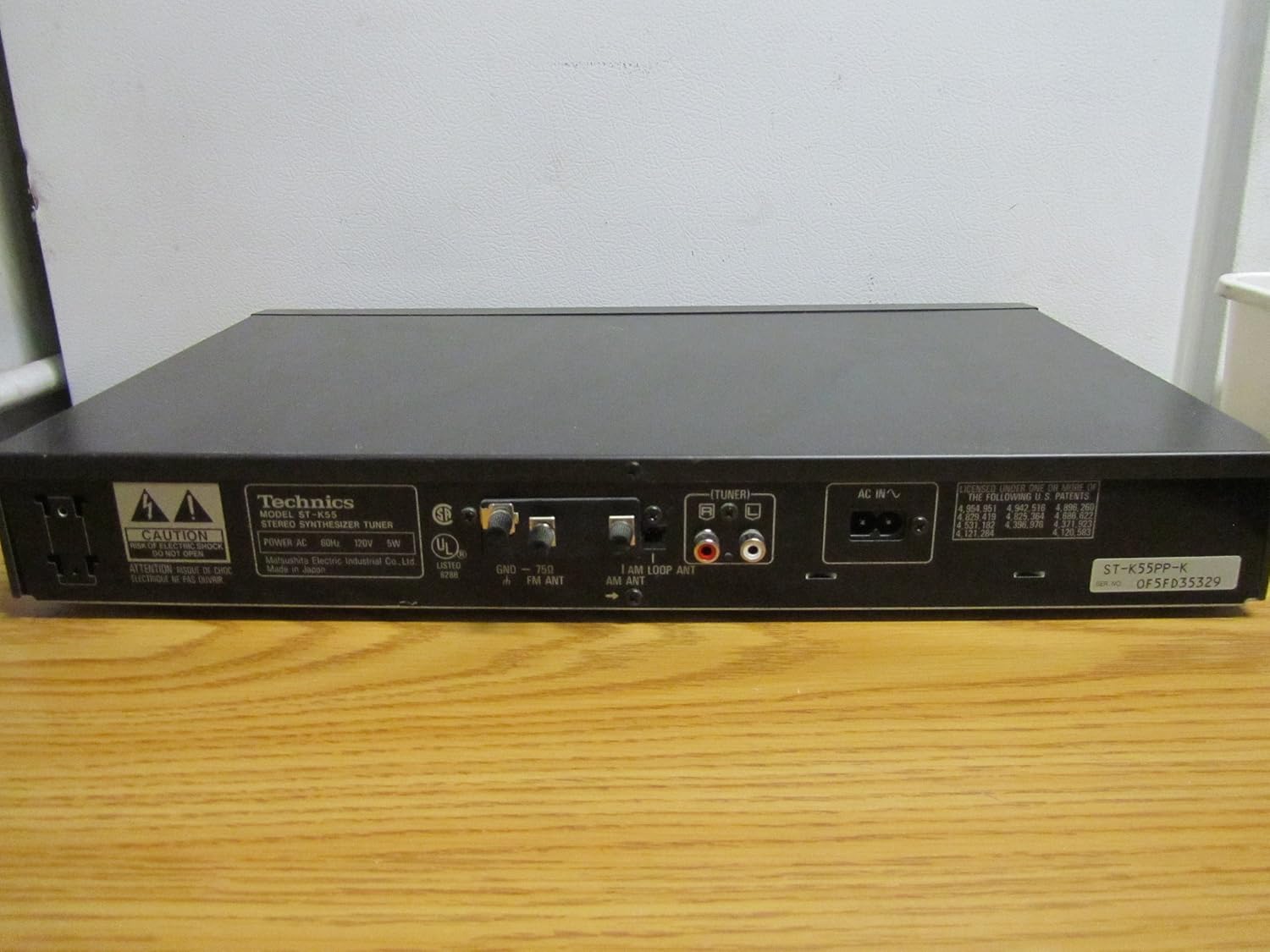
Gambar 3: Rear panel of the Technics ST-K55 tuner, displaying audio output jacks and antenna connections.
Fitur konci
- 30 Programmable AM-FM Stereo Stations: Allows for quick access to your favorite radio frequencies.
- Automatic Radio Station Search and Programming: Simplifies the process of finding and storing available stations.
- Manual Radio Station Search and Programming: Provides precise control for tuning into specific frequencies.
Disetél
1. Ngabongkar bungkusan
Carefully remove the ST-K55 tuner from its packaging. Ensure all components are present, including the main unit and any supplied accessories (e.g., AM loop antenna, FM wire antenna).
2. Panempatan
Place the tuner on a stable, flat surface, away from direct sunlight, heat sources, and excessive dust. Ensure adequate ventilation around the unit.
3. Panyambungan
ngarujuk kana Gambar 3 for a visual guide to the rear panel connections.
- Kaluaran Audio: Connect the audio output jacks (RCA L/R) of the ST-K55 to an available audio input on your amplifier or receiver using appropriate RCA cables.
- Antena AM: Connect the supplied AM loop antenna to the AM antenna terminals. Position the loop antenna for optimal reception.
- Anteneu FM: Connect the supplied FM wire antenna to the FM antenna terminal. Extend the wire antenna fully and position it for best FM reception. For improved FM reception, a 75-ohm coaxial cable can be connected to the FM 75Ω coaxial terminal.
- kakuatan: Colokkeun kabel listrik AC kana stop kontak témbok standar.
Parentah Operasi
1. Daya Hurung / Pareum
Pencét éta POWER button on the front panel to turn the tuner on or off.
2. Selecting Band (AM/FM)
Pencét éta MODE FM or AM MODE button to switch between FM and AM bands.
3. Tuning Modes
- Tuning otomatis: Pencét éta OTOMATIS TUNE button. The tuner will automatically scan and stop at the next available strong station.
- Tuning Manual: Ngagunakeun éta TÉNING NAIK/HANDAP buttons to manually adjust the frequency. Press briefly for step-by-step tuning, or hold down for continuous scanning.
4. Programming Stations (Presets)
The ST-K55 allows you to store up to 30 AM/FM stations as presets.
- Tune to the desired station using automatic or manual tuning.
- Pencét éta ENGÉLING button. The preset number display will flash.
- Within a few seconds, use the PRESET UP/DOWN tombol pikeun milih nomer anu tos ditangtukeun (1-30).
- Pencét éta ENGÉLING button again to confirm and store the station.
5. Ngelingan Stasion Prasetél
Pencét éta PRESET UP/DOWN buttons to cycle through your stored stations.
Pangropéa
1. beberesih
To clean the exterior of the tuner, use a soft, dry cloth. For stubborn marks, slightly dampen lawon jeung cai sarta detergent hampang, teras usap garing langsung. Do not use abrasive cleaners, solvents, or alcohol, as these can damage the finish.
2. Panyimpenan
If storing the unit for an extended period, disconnect it from the power outlet and store it in a cool, dry place, away from direct sunlight and extreme temperatures.
Pamérésan masalah
If you experience issues with your Technics ST-K55 tuner, consult the table below before seeking professional service.
| Masalah | Mungkin Cukang lantaranana | Solusi |
|---|---|---|
| Taya kakuatan | Kabel listrik henteu dicolokkeun sacara aman. | Pariksa sambungan kabel kakuatan ka unit jeung stop kontak témbok. |
| Taya sora atawa sora lemah | Sambungan kabel audio salah. Amplifier input not selected correctly. Antena teu nyambung atanapi diposisikeun kalayan leres. | Ensure audio cables are securely connected to the correct input on your amppangagung. Pilih sumber input anu leres dina anjeun amppangagung. Check antenna connections and adjust position for better reception. |
| Panarimaan goréng (statis, sinyal lemah) | Antenna issues. Gangguan ti alat éléktronik lianna. Lokasi unit. | Adjust antenna position. Consider an external antenna for improved reception. Move the tuner away from other electronic devices. Relocate the unit to an area with better signal strength. |
| Cannot program stations | Léngkah-léngkah pamrograman anu salah. | Review the "Programming Stations" section in this manual and follow the steps carefully. |
spésifikasi
| Fitur | Rincian |
|---|---|
| merek | Téhnik |
| Modél | ST-K55 |
| Tipe Tuner | Stereo Synthesizer Digital AM/FM Tuner |
| Programmable Stations | 30 (AM/FM) |
| Téhnologi konektipitas | Auxiliary, USB (Note: USB connectivity typically refers to modern devices. For this vintage tuner, it likely refers to compatibility with systems that might use USB for other components, not direct USB audio from the tuner itself. The primary audio output is RCA.) |
| Sumber Daya | Kabel Listrik |
| Item Beurat | 5 pon (kira-kira 2.27 kg) |
| Ukuran Paket | 18 x 11 x 2 inci (kira-kira 45.7 x 27.9 x 5.1 cm) |
Catetan: Spésifikasi tiasa robih tanpa aya bewara.
Garansi sareng Rojongan
For information regarding warranty coverage and technical support for your Technics ST-K55 tuner, please refer to the original purchase documentation or contact Technics customer service directly.
Anjeun oge bisa nganjang ka resmi Technics Store on Amazon pikeun émbaran produk tambahan jeung sumber.


