1. Bubuka
This manual provides comprehensive instructions for the safe and effective use of the PeakTech True RMS P 3131 Clamp Meter with Multimeter. This device is designed for measuring AC/DC currents without circuit interruption, as well as AC/DC voltage and resistance, with continuity testing capabilities. It features a 3 3/4 digit LCD display with True RMS measurement for accurate readings.
Punten baca manual ieu sacara saksama sateuacan ngoperasikeun alat sareng tahan pikeun rujukan ka hareup.
2. Émbaran Kasalametan
WARNING: Improper use of this meter can cause damage, shock, injury, or death. Always follow all safety precautions.
- Salawasna taat kana kode kaamanan lokal jeung nasional.
- Do not use the meter if it appears damaged or if the insulation on test leads is compromised.
- Pastikeun méteran disetel ka pungsi sareng rentang anu leres sateuacan ngadamel pangukuran.
- Avoid contact with live circuits. Use appropriate personal protective equipment (PPE).
- The device is rated for CAT II 600V. Do not exceed these limits.
- Ganti batréna gancang-gancang nalika indikator batré lemah némbongan.
- Do not operate the meter in explosive atmospheres.
3. Produk Langkungview jeung Komponén
The PeakTech P 3131 is a robust and reliable clamp meter. Familiarize yourself with its main components:

Gambar 1: Hareupeun view of the PeakTech P 3131 Clamp Méter, nu némbongkeun clamp jaw, function selector, LCD display, and input terminals.
- Clamp rahang: Pikeun pangukuran arus AC/DC non-kontak.
- Tombol Pamilih Fungsi: To select measurement modes (A~, A=, V~, V=, Ω/Continuity, OFF).
- Layar LCD: Némbongkeun bacaan pangukuran, unit, sareng indikator.
- Tombol: AC/DC, ZERO, H/MAX (Data Hold/Max Hold).
- Terminal Input: COM (common) and VΩ (voltage/resistance) for test leads.
- Hansip leungeun: Provides protection against accidental contact.
4. Setélan
4.1 Pamasangan batré
The PeakTech P 3131 requires two 1.5V AAA batteries (included). To install or replace batteries:
- Pastikeun alat dipareuman.
- Panggihan panutup kompartemen batré di tukang méteran.
- Paké obeng pikeun muka kompartemen.
- Insert the two AAA batteries, observing correct polarity (+ and -).
- Ganti panutup kompartemen batré jeung amankeun ku screw nu.
When the low battery indicator appears on the display, replace the batteries immediately to ensure accurate measurements.
4.2 Nyambungkeun Test Leads
Pikeun voltage, resistance, and continuity measurements, connect the supplied test leads:
- Selapkeun lead test hideung kana COM terminal input (umum).
- Selapkeun lead test beureum kana VΩ terminal input.

Figure 2: PeakTech P 3131 Clamp Meter shown with its carrying case, test leads, batteries, and user manual.
5. Parentah Operasi
5.1 Daya Hurung/Pareuman
Rotate the function selector dial from the "OFF" position to any desired measurement function to power on the meter. To power off, rotate the dial back to "OFF". The meter features an automatic power-off function (can be deactivated) to conserve battery life.
5.2 Pangukuran Arus AC/DC (Clamp)
To measure current without breaking the circuit:
- Hurungkeun kenop pamilih fungsi ka A~ (Arus AC) atanapi A= posisi (Arus DC).
- Pencét éta AC/DC button if you need to switch between AC and DC current modes (if the dial position combines them).
- Pencét éta NOL button to zero the display before measuring DC current, especially for small currents, to compensate for residual magnetism.
- Buka clamp rahang ku mencét picuna.
- Lebetkeun hungkul hiji conductor with the clamp rahang. Pastikeun rahangna katutup sapinuhna.
- Baca nilai ayeuna dina tampilan LCD.
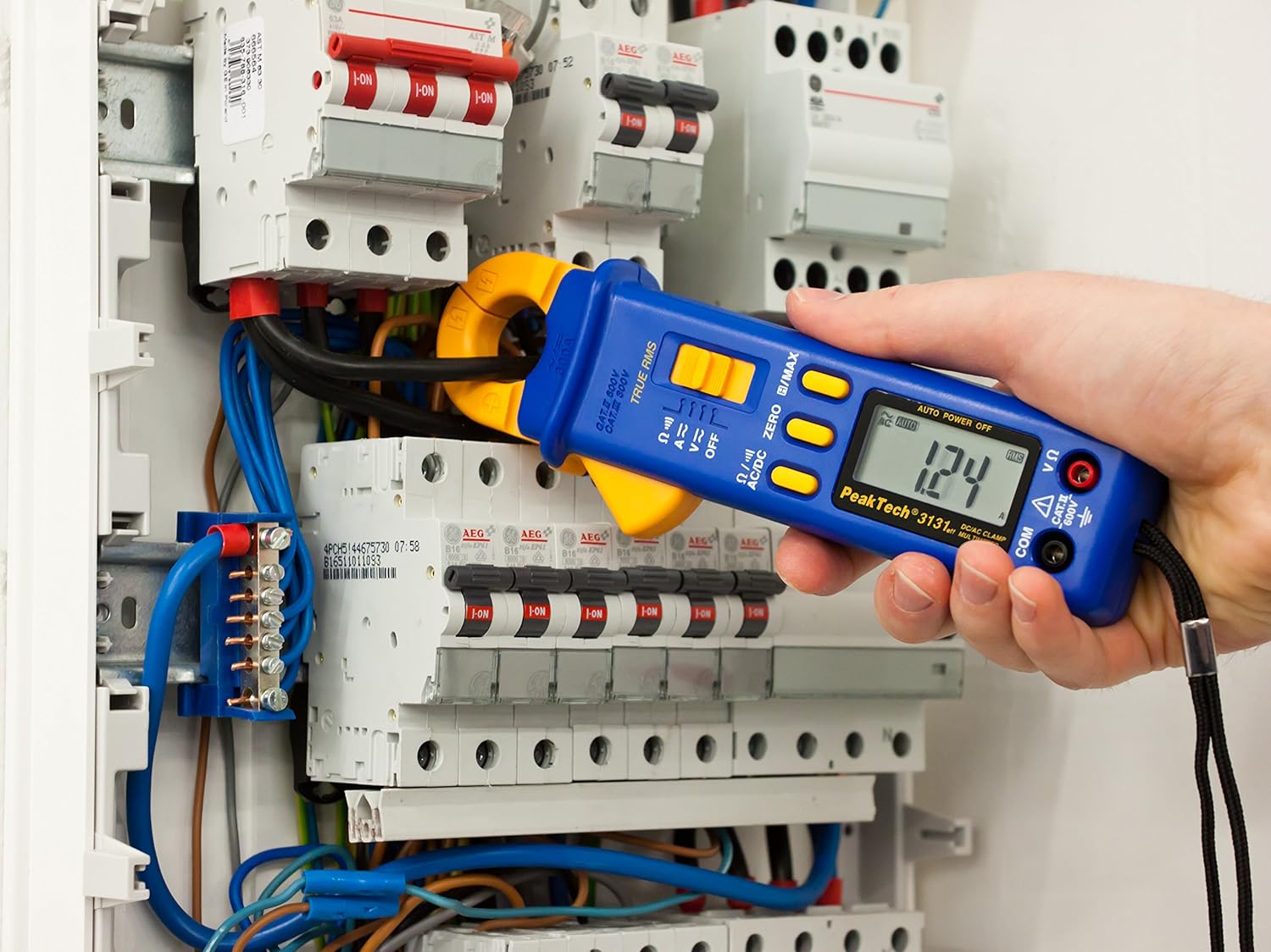
Figure 3: The PeakTech P 3131 Clamp Meter in use, measuring current on a single conductor within an electrical panel.
5.3 AC/DC Voltage Pangukuran
Pikeun ngukur voltage:
- Sambungkeun kabel tés sakumaha anu dijelaskeun dina Bagian 4.2.
- Hurungkeun kenop pamilih fungsi ka V~ (Vol. ACtage) atawa V= (DC Voltage) posisi.
- Sambungkeun probe tés sacara sajajar jeung sirkuit atawa komponén anu rék diukur.
- Baca voltage nilai dina tampilan LCD.
5.4 Pangukuran Résistansi sareng Kontinuitas
To measure resistance or check for continuity:
- Sambungkeun kabel tés sakumaha anu dijelaskeun dina Bagian 4.2.
- Hurungkeun kenop pamilih fungsi ka Ω/))) (Resistance/Continuity) position.
- For resistance: Connect the test probes across the component. Ensure the circuit is de-energized.
- For continuity: Touch the test probes to the two points you want to check. A continuous beep indicates a low-resistance path (continuity).
- Baca nilai lalawanan dina tampilan LCD.
5.5 Fungsi Husus
- RMS leres: The meter measures True Root Mean Square values for AC voltage and current, providing accurate readings for non-sinusoidal waveforms.
- Data Hold (H): Pencét éta H/MAX pencét sakeudeung pikeun ngabekukeun bacaan ayeuna dina tampilan. Pencét deui pikeun ngaleupaskeun.
- Maximum Value Hold (MAX): Pencét jeung tahan tombol H/MAX button to capture and display the maximum measured value. Press again to exit.
- ZERO Function: Used to zero the display for DC current measurements to eliminate offset errors.
- Otomatis Ngalangkungan: The meter automatically selects the appropriate measurement range.
- Otomatis Pareum: The meter automatically turns off after a period of inactivity to save battery. This feature can typically be disabled by holding a specific button during power-on (refer to the device's on-screen indicators or a more detailed manual if available).
6. Pangropéa
6.1 beberesih
Lap wadah méteran ku iklanamp lawon sareng deterjen anu hampang. Entong nganggo bahan abrasif atanapi pangleyur. Pastikeun méterna garing pisan sateuacan dianggo.
6.2 Ngagantian batré
Refer to Section 4.1 for instructions on battery replacement. Always use two fresh 1.5V AAA batteries. Remove batteries if the meter is not used for an extended period to prevent leakage.
6.3 Panyimpenan
Store the meter in a cool, dry place, away from direct sunlight and extreme temperatures. Use the provided carrying case for protection.
7. Cara ngungkulan
| Masalah | Mungkin Cukang lantaranana | Solusi |
|---|---|---|
| Méter teu hurung. | Batré paéh atawa salah dipasang. | Pariksa polaritasna batré; ngaganti accu. |
| "OL" atanapi "OVER" ditampilkeun. | Pangukuran ngaleuwihan rentang dipilih atawa kapasitas maksimum méter urang. | Select a higher range (if manual ranging) or ensure measurement is within meter's limits. |
| Inaccurate DC current reading. | Residual magnetism in clamp rahang. | Pencét éta NOL button before measurement. |
| Taya bip continuity. | Sirkuit kabuka atanapi résistansi anu luhur. | Check connections; ensure circuit is complete. |
If problems persist, contact PeakTech customer support or a qualified service technician.
8. Spésifikasi Téknis
| Parameter | Spésifikasi |
|---|---|
| tampilan | 3 3/4 digit LCD, max. 3999 counts |
| DC Voltage (DCV) | 0.1 mV to 600 V (Accuracy: 0.5% + 2 digits) |
| AC Voltage (ACV) | 1 mV to 600 V (Accuracy: 1.5% + 5 digits) |
| Arus DC (DCA) | 10 mA to 300 A (Accuracy: 1% + 2 digits) |
| Arus AC (ACA) | 10 mA to 300 A (Accuracy: 1% + 3 digits) |
| Lalawanan (Ω) | 0.1 Ω to 40 MΩ (Accuracy: 0.9% + 2 digits) |
| Uji Kontinuitas | Fungsi buzzer |
| RMS leres | Yes, for AC measurements |
| Bukaan rahang | 22 mm max. conductor diameter |
| Peunteun Kasalametan | EN 61010-1, CAT II 600 V |
| Sasayogian tanaga | 2 x 1.5V AAA accu |
| Ukuran (L x W x H) | 192 x 66 x 27 mm (kira-kira 7.56 x 2.6 x 1.06 inci) |
| Beurat | 205 g (kira-kira 0.45 lbs) |
9. Garansi jeung Rojongan
PeakTech products are manufactured under strict quality control. This product is covered by a standard manufacturer's warranty against defects in materials and workmanship. Please refer to the warranty card included with your product or visit the official PeakTech websitus pikeun istilah jeung kaayaan jaminan lengkep.
For technical support, service, or calibration inquiries, please contact your local PeakTech distributor or the PeakTech customer service department. Contact information can typically be found on the PeakTech websitus atanapi dina bungkusan produk.