Bubuka
This manual provides essential information for the safe and effective use of your Sony Cyber-shot DSC-WX50 digital camera. Please read it thoroughly before operating the camera and retain it for future reference. The DSC-WX50 is a compact digital camera featuring a 16.2 MP Exmor R CMOS sensor, 5x optical zoom, and Full HD 1080/60i video recording capabilities.
Naon dina Box
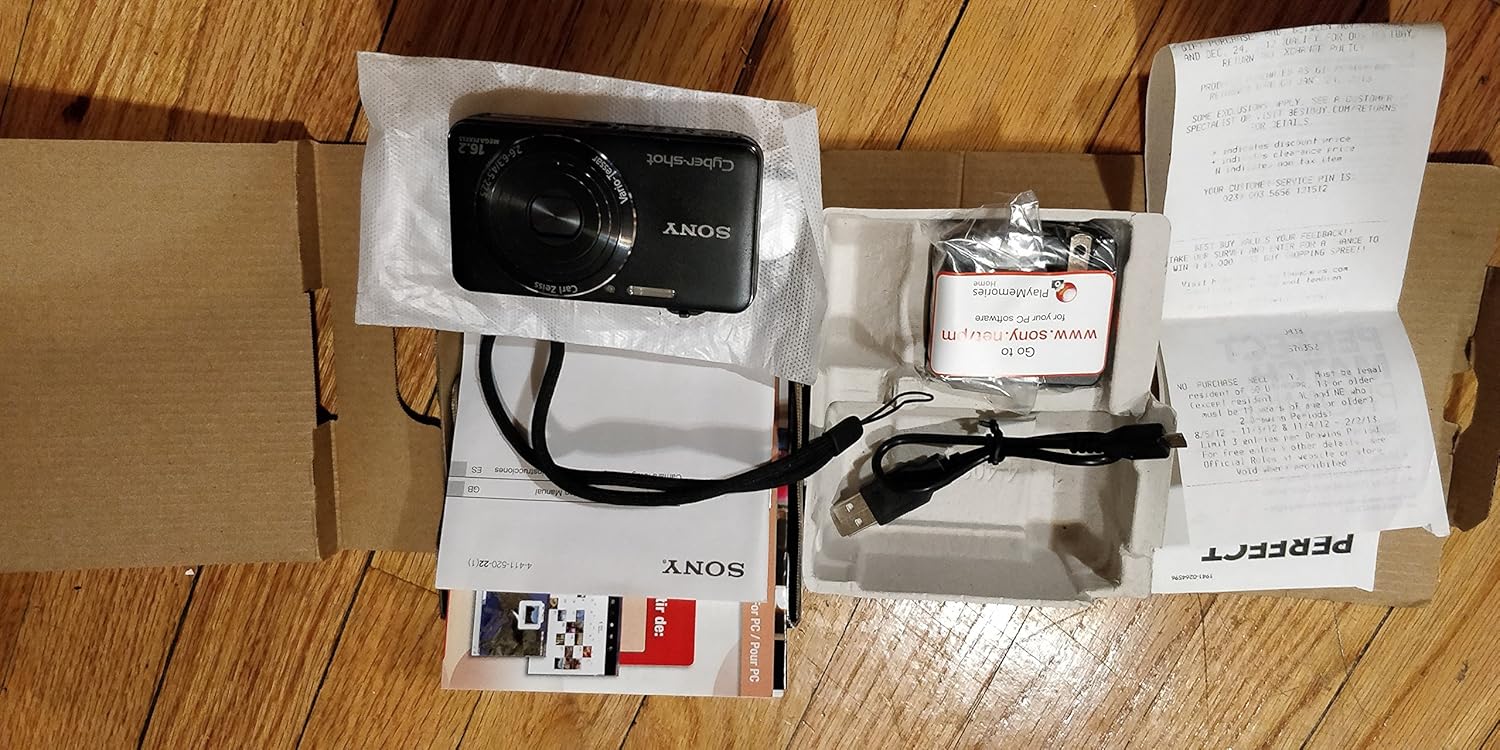
Carefully unpack your camera and ensure all items are present. The standard package contents include:
- Sony Cyber-shot DSC-WX50 Digital Camera
- Pack batré Rechargeable
- Adaptor AC
- Kabel Sambungan USB
- Tali pigeulang
- Instruction Manuals and Documentation
- HDMI Cable (Built-in Media)

Image: All contents of the Sony Cyber-shot DSC-WX50 package, including the camera, cables, and documentation, laid out.

Gambar: Pangdeukeutna view of the included accessories, such as the charger and USB cable, within their packaging.
Disetél
1. Ngecas Batré
Before first use, fully charge the supplied battery pack. Connect the camera to the AC adaptor using the USB cable, then plug the AC adaptor into a wall outlet. The charge lamp bakal hurung nalika ngecas sareng pareum nalika parantos réngsé.
2. Nyelapkeun Batré sareng Kartu Mémori
Open the battery/memory card cover on the bottom of the camera. Insert the charged battery pack firmly until it locks into place. Insert a compatible memory card (SD/SDHC/SDXC or Memory Stick Duo/Pro Duo/Pro-HG Duo) into the memory card slot until it clicks. Close the cover securely.

Gambar: Hareupeun view of the Sony Cyber-shot DSC-WX50 camera, showing the lens and flash.
3. Setélan Awal
When you turn on the camera for the first time, you will be prompted to set the date, time, and time zone. Follow the on-screen instructions to complete these settings.
Ngoperasikeun kaméra
Daya Hurung/Pareuman
Pencét éta POWER tombol pikeun ngahurungkeun atanapi mareuman kaméra. Lénsa bakal manjang nalika dihurungkeun.
Basic Still Image Shooting (Intelligent Auto Mode)
- Hurungkeun kaméra.
- Setel mode dial ka Otomatis calakan (ikon kaméra héjo).
- Frame your subject on the 2.7-inch LCD screen.
- Pencét tombol jepret satengahna ka handap pikeun fokus. Indikator fokus bakal héjo nalika fokus kahontal.
- Pencét tombol jepret sapinuhna ka handap pikeun nyandak gambar.
Gambar: Tukangeun view of the Sony Cyber-shot DSC-WX50, highlighting the 2.7-inch LCD screen and control buttons.
Fungsi Zum
Use the zoom lever around the shutter button to adjust the focal length. The camera features 5x optical zoom and Clear Image Zoom for enhanced magnification without significant quality loss.
Video Recording (Full HD 1080/60i)
To record movies, press the dedicated Pilem button. Press it again to stop recording. The camera supports Full HD 1080/60i video in AVCHD format, allowing for high-quality video capture with Optical SteadyShot Active Mode for reduced blur.
Special Shooting Modes and Features
- Modeu Otomatis Unggul: Automatically detects 33 scenes and optimizes settings for dynamic pictures with reduced noise and improved clarity.
- Intelligent Sweep Panorama HR: Capture wide panoramic images by sweeping the camera. The camera stitches multiple frames automatically.
- Gambar Diam 3D & Panorama Sapuan 3D: Create 3D images for viewdina tampilan 3D anu cocog.
- Éfék Gambar: Apply creative filters to your photos, such as Toy Camera, Pop Color, Partial Color, and more.
- Defokus Latar: Blurs the background to emphasize your subject, similar to DSLR effects.
- Modeu Kulit Lemes: Enhances portraits by reducing the appearance of blemishes and wrinkles.
- Face Detection & Smile Shutter: Automatically detects faces and can trigger the shutter when a smile is detected.
- Fungsi Anti-kedip: Helps prevent photos with subjects blinking by capturing multiple shots.
- Kilat Alami: Corrects colors for more lifelike images when using flash.
- Deteksi gerak: Adjusts ISO and shutter speed to reduce blur in moving subjects.
- Sweep Multi Angle Mode: Captures 15 images at different angles to create a 3D-like view on the camera's LCD when tilted.
Pangropéa
Ngabersihan Kaméra
- Awak kaméra: Ngusap ku lawon lemes, garing. Pikeun kokotor bandel, make kaen hampang dampdikumbah ku cai atawa deterjen hampang, tuluy usap nepi ka garing.
- Lensa: Paké sikat lénsa pikeun miceun lebu, teras usap gently kalawan lawon beberesih lénsa. Hindarkeun noel permukaan lensa ku ramo anjeun.
- Layar LCD: Gently ngusap ku lawon lemes, garing. Ulah pencét teuas dina layar.
Perawatan batré
Pikeun manjangkeun umur batré, ulah kakeunaan suhu anu ekstrim. Simpen batréna di tempat anu tiis sareng garing nalika henteu dianggo. Upami kaméra moal dianggo kanggo waktos anu lami, cabut batréna.
Memory Card Care
Always format new memory cards in the camera before first use. Avoid removing the memory card while the camera is writing data (indicated by a flashing access lamp) to prevent data corruption.
Pamérésan masalah
Upami anjeun mendakan masalah sareng kaméra anjeun, tingal solusi umum ieu:
| Masalah | Solusi |
|---|---|
| Kaméra teu hurung. |
|
| "Writing to Memory card was incomplete" error. |
|
| Gambar blur. |
|
| Flash teu seuneu. |
|
For further assistance, please contact Sony customer support.
spésifikasi
| Fitur | Rincian |
|---|---|
| Resolusi Masih Éféktif | 16.2 MP |
| Téhnologi Sénsor Poto | BSI CMOS |
| Zoom optik | 5x |
| Zum Digital | 20x |
| Ukuran layar | 2.7 inci |
| Tipe tampilan | LCD |
| Stabilisasi Gambar | Optik SteadyShot |
| Resolusi Video | Full HD 1080p (1080/60i AVCHD) |
| Dirojong File Formatna | JPEG (Exif 2.3), 3D: MPF, Video: MPEG-4, AVCHD |
| Kasaluyuan Card Mémori | SD/SDHC/SDXC, Memory Stick Duo/Pro Duo/Pro-HG Duo |
| Konektipitas | HDMI, USB |
| Panjang Fokus Minimum | 25 milimeter |
| Panjang Fokus Maksimum | 125 milimeter |
| Aperture maksimum | f/6.3 |
| Minimum Shutter Speed | 4 detik |
| Maksimum Shutter Speed | 1/1600 detik |
| Item Beurat | 0.26 pon |
Garansi sareng Rojongan
For warranty information and customer support, please refer to the documentation included with your product or visit the official Sony support websitus. Simpen bukti pameseran anjeun pikeun klaim garansi.
Rojongan resmi Sony: www.sony.com/electronics/support


