1. Produk Langkungview
The Maxell LR41 (also known as 192 or AG3) is a mercury-free alkaline button cell battery designed for various small electronic devices. This manual provides essential information for the safe and effective use of these batteries.
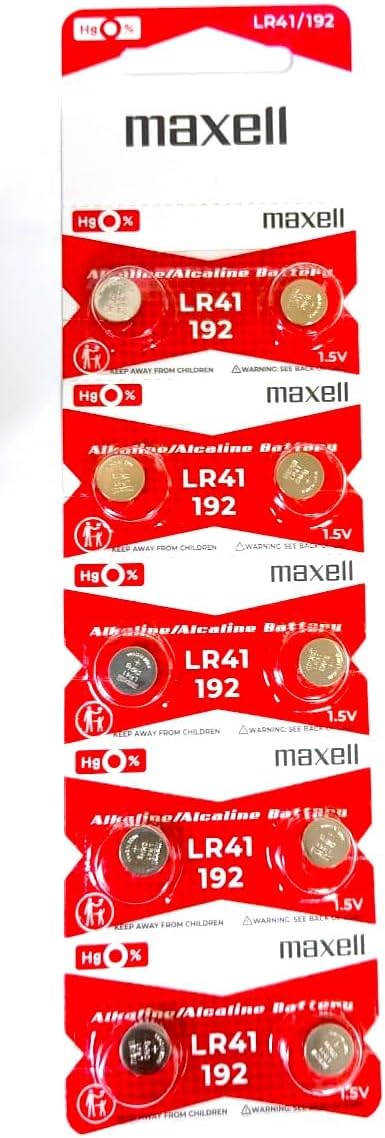
Image: A pack containing 10 Maxell LR41 alkaline button cell batteries, clearly showing the branding and battery type.
2. Émbaran Kasalametan jeung Warnings
WARNING: KEEP OUT OF REACH OF CHILDREN. SWALLOWING MAY LEAD TO SERIOUS INJURY OR DEATH.
- Bahaya Tercekik: These batteries are small and can be swallowed. Keep new and used batteries away from children.
- Bahaya kaduruk kimiawi: If swallowed, button cell batteries can cause severe internal chemical burns in as little as 2 hours, leading to death.
- Seek Medical Attention: If you suspect a battery has been swallowed, seek immediate medical attention.
- Pembuangan anu leres: Ulah buang batré dina seuneu. Éta bisa ngabeledug.
- Ulah ngecas deui: These batteries are not rechargeable. Attempting to recharge them may cause leakage or explosion.
- Ulah ngabongkar: Do not disassemble, crush, or heat batteries above recommended temperatures.
- Panyimpenan: Store batteries in their original packaging until ready to use, and in a cool, dry place.

Image: The reverse side of the battery packaging, displaying important safety warnings, disposal instructions, and the product barcode (UPC: 4902580132682). For explanations of icons, refer to Maxell's official site.
3. Setup jeung Instalasi
Maxell LR41 batteries are commonly used in small electronic devices such as watches, calculators, small toys, and medical devices like thermometers.
- Identipikasi Kompartemen Batré: Locate the battery compartment on your device. Refer to your device's user manual for specific instructions.
- Kompartemen Buka: Buka wadah batréna kalawan ati-ati. Ieu tiasa meryogikeun obeng leutik atanapi koin, gumantung kana alatna.
- Cabut Batré Heubeul (upami aya): If replacing an old battery, remove it carefully. Note its orientation.
- Selapkeun Batré Anyar: Insert the new Maxell LR41 battery with the positive (+) side facing up or as indicated by the device's battery compartment markings. The positive side is typically the flat side with the battery's markings.
- Tutup Kompartemen: Tutup kompartemen batré anu aman.

Gambar: A lengkep view of a single Maxell LR41 button cell battery, showing its size and markings.
4. Parentah Operasi
Once installed correctly, the Maxell LR41 battery will power your compatible device. There are no specific operating instructions for the battery itself, as its function is to provide power to the device it is installed in.
- Ensure the device is turned off before battery installation or removal.
- Always use the correct battery type and size as specified by your device manufacturer.
- If the device does not power on after battery installation, check the battery orientation and ensure the contacts are clean.
5. Pangropéa sareng Panyimpenan
- beberesih: If battery contacts become dirty, wipe them with a clean, dry cloth. Do not use abrasive materials or liquids.
- Panyimpenan: Store unused batteries in their original packaging at room temperature, in a dry environment, away from direct sunlight and extreme temperatures.
- Hindarkeun sirkuit pondok: Ulah nyimpen batréna sacara leupas dina saku atawa dompét nu aya barang logam kawas koin, klip kertas, atawa konci, sabab ieu bisa nyababkeun korsleting.
- pembuangan: Dispose of used batteries according to local regulations. Many communities have recycling programs for button cell batteries.
6. Cara ngungkulan
| Masalah | Mungkin Cukang lantaranana | Solusi |
|---|---|---|
| Device not powering on after battery installation. | Incorrect battery orientation, dirty contacts, or depleted battery. | Check battery polarity (+/-). Clean battery and device contacts with a dry cloth. Replace with a new battery if necessary. |
| Device powers on but quickly shuts off or performs erratically. | Battery is low on power or nearing end of life. | Ganti batréna ku nu anyar. |
| Battery appears corroded or leaking. | Battery damage, improper storage, or extended use beyond its lifespan. | Immediately remove the battery using gloves. Clean the compartment carefully. Dispose of the battery properly. Do not touch leaked material. |
7. Spésifikasi
- Jumlah modél: LR41 (192, AG3)
- Jenis Batré: Alkaline Button Cell
- Voltage: 1.5V
- Merkuri bébas: Sumuhun
- Ukuran produk: 0.04 x 0.04 x 0.04 inches (approximate, for single battery)
- Beurat barang: 0.317 ons (pikeun sabungkusna)
- Komposisi sél batré: Alkali
- Kapasitas batré: 50 Miliamp Jam-jaman
- Pamakéan anu disarankeun: Watch, calculators, small electronics
- Pabrikan: Maxell
- Titimangsa munggaran sadia: 15 Juni 2011
8. Garansi jeung Rojongan
Specific warranty information for Maxell LR41 batteries is typically provided on the product packaging or through the point of purchase. For detailed warranty terms or technical support, please refer to the official Maxell websitus atanapi ngahubungan layanan palanggan maranéhanana langsung.
Kanggo inpo nu leuwih lengkep, anjeun tiasa nganjang ka Toko Maxell di Amazon.