1. Bubuka
This manual provides comprehensive instructions for the proper setup, operation, and maintenance of your 3nStar SC505 Omni-Directional 2D Barcode Scanner. The SC505 is designed to provide efficient and reliable barcode scanning for various applications, featuring omnidirectional scanning capabilities and an adjustable scan head.
2. Émbaran Kasalametan
Please read and understand all safety instructions before operating the device. Retain this manual for future reference.
- Ulah ngantepkeun scanner ka cai atanapi kalembaban anu kaleuleuwihi.
- Hindarkeun ngaragragkeun alat panyeken atanapi mangaruhan kana dampak anu parah.
- Ulah nyobian ngabongkar atawa ngaropéa scanner teh. Ieu bakal ngabatalkeun jaminan.
- Paké ngan kabel USB disadiakeun pikeun sambungan.
- Jaga jandela scan tetep bersih pikeun mastikeun kinerja anu optimal.
3. Eusi Paket
Pastikeun yén sadaya item aya dina bungkusan:
- 3nStar SC505 Omni-Directional 2D Barcode Scanner
- Kabel Sambungan USB
- Manual pangguna (dokumén ieu)
4. Produk Langkungview
The 3nStar SC505 is an omnidirectional 2D barcode scanner designed for efficient data capture. Its key features include:
- Nyeken Omnidirectional: Allows for quick and easy scanning from various angles without precise alignment.
- Adjustable Scan Head: The scanning head can be tilted within a 40-degree range to accommodate different item sizes and scanning preferences.
- Automatic Scanning Operation: The unit automatically scans a barcode when presented, simplifying the scanning process.

Gambar 4.1: Hareupeun view of the 3nStar SC505 scanner, showing the scanning window and base.
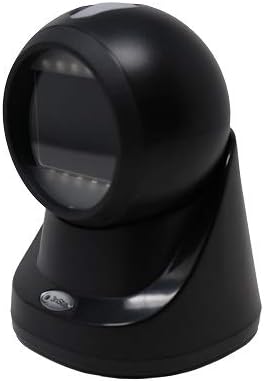
Figure 4.2: Angled front-right view of the scanner, highlighting its compact design.

Figure 4.3: Angled front-left view of the scanner, demonstrating its ergonomic shape.

Gambar 4.4: Sisi profile view of the scanner, illustrating the adjustable head mechanism.
5. Setélan
Follow these steps to set up your 3nStar SC505 barcode scanner:
- Buka bungkus scanner: Carefully remove the scanner and USB cable from the packaging.
- Sambungkeun kabel USB: Insert the smaller end of the USB cable into the USB port located at the back of the scanner's base.
- Nyambung ka Alat Host: Plug the larger end of the USB cable into an available USB Type-A port on your computer, laptop, or compatible POS system.
- Pamasangan supir (upami perlu): In most cases, the scanner is plug-and-play and will be recognized automatically by your operating system. If prompted, allow the system to install necessary drivers.
- Posisi Scanner: Place the scanner on a stable, flat surface. Adjust the scanning head to your preferred angle for comfortable operation.
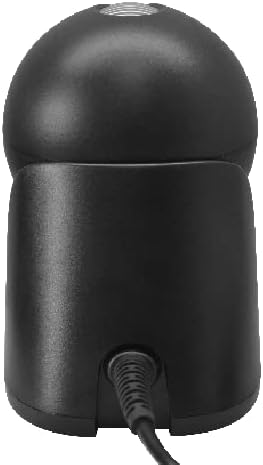
Gambar 5.1: Tukangeun view of the scanner, showing the USB cable connected to the port.
6. Parentah Operasi
The 3nStar SC505 scanner is designed for ease of use with automatic scanning.
- Nyeken Barcode: Simply present the barcode to the scanning window. The scanner will automatically detect and read the barcode.
- Omnidirectional Capability: Due to its omnidirectional design, precise alignment of the barcode is not required. You can present the barcode from various angles.
- Adjusting the Scan Head: If you are scanning items of different sizes or need a specific angle, gently tilt the scanning head up or down within its 40-degree range to optimize scanning position.
- Indikasi Scan anu suksés: A successful scan is typically indicated by an audible beep and/or a visual indicator (e.g., LED light flash).
7. Pangropéa
Pangropéa anu leres mastikeun umur panjang sareng kinerja optimal scanner anjeun.
- Ngabersihkeun Jandela Scanning: Regularly clean the scanning window with a soft, lint-free cloth. For stubborn dirt, dampen the cloth slightly with water or a mild, non-abrasive cleaner. Do not spray cleaning solutions directly onto the scanner.
- beberesih umum: Lap bagian luar scanner ku lawon anu lemes sareng garing.
- Panyimpenan: Nalika henteu dianggo, simpen alat panyeken di tempat anu bersih sareng garing, jauh tina sinar panonpoé langsung sareng suhu anu ekstrim.
8. Cara ngungkulan
Upami anjeun mendakan masalah sareng panyeken anjeun, tingal masalah sareng solusi umum ieu:
- Scanner is not powering on:
- Ensure the USB cable is securely connected to both the scanner and the host device.
- Try connecting the scanner to a different USB port on your host device.
- Verify that the host device is powered on and functioning correctly.
- Scanner is not reading barcodes:
- Pariksa lamun barkod ruksak atawa kirang dicitak.
- Ensure the scanning window is clean and free of obstructions.
- Confirm that the scanner is properly connected and recognized by the host device.
- Coba nyeken barcode anu béda, anu dikenal-alus.
- Teu aya data anu dikirimkeun ka alat host:
- Verify that the application on your host device is ready to receive input (e.g., a text field is active).
- Pariksa sambungan USB.
9. Spésifikasi
| Fitur | Spésifikasi |
|---|---|
| Nomer modél | SC505 |
| Dimensi produk | 3.94 x 4.33 x 5.83 inci |
| Item Beurat | 12.3 ons |
| merek | 3nBéntang |
| Téhnologi konektipitas | Kabel USB |
| Sumber Daya | USB Type A 5V |
| Alat nu cocog | Desktop, Laptop, Smartphone (with USB host capability), Tablet (with USB host capability) |
| Laju Scan | 60 pigura per detik |
10. Garansi jeung Rojongan
For warranty information or technical support, please refer to the documentation provided with your purchase or contact 3nStar customer service. Keep your proof of purchase for warranty claims.


