1. Bubuka
The Optex CX-702 is a high-performance Multi-Focus Passive Infrared (PIR) motion detector designed for reliable security applications. It utilizes advanced multi-focus optics to provide precise detection capabilities, minimizing false alarms while ensuring accurate intruder detection. This manual provides essential information for the proper installation, operation, and maintenance of your CX-702 detector.
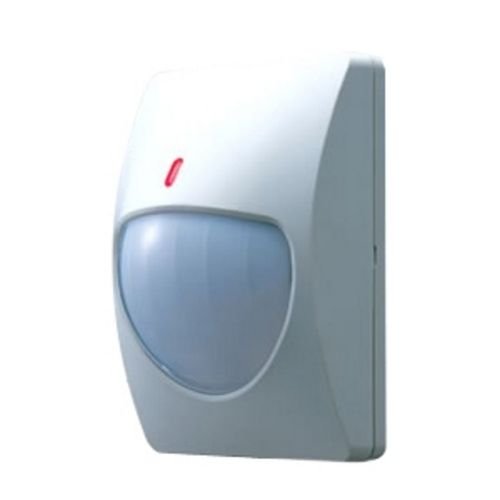
Figure 1: Optex CX-702 Multi-Focus PIR Motion Detector. This image shows the compact, white casing of the motion detector, typically mounted on a wall.
2. Émbaran Kasalametan
Please read and understand all safety instructions before installing or operating the CX-702 detector. Failure to follow these instructions may result in injury, damage to the device, or improper operation.
- Kasalametan listrik: Ensure all power is disconnected before performing any wiring or maintenance. Installation should be performed by qualified personnel in accordance with local electrical codes.
- Pamasangan: Mount the detector securely to a stable surface to prevent it from falling.
- Kaayaan Lingkungan: Do not expose the detector to extreme temperatures, high humidity, or direct water spray.
- gangguan: Avoid installing the detector near sources of strong electromagnetic interference, heating/cooling vents, or direct sunlight, which can cause false alarms.
3. Eusi Paket
Pariksa yén sadaya barang aya dina bungkusan sateuacan neraskeun pamasangan:
- Optex CX-702 Multi-Focus PIR Motion Detector unit
- Mounting bracket (if applicable)
- Pamasangan screws na jangkar
- Manual Pitunjuk (dokumén ieu)
4. Setup jeung Instalasi
Proper installation is crucial for optimal performance of the CX-702 detector.
4.1 Lokasi Pamasangan
- The CX-702 is designed for Tembok Gunung pamasangan.
- Choose a location where the detector has an unobstructed view wewengkon nu bakal ditangtayungan.
- Avoid aiming the detector directly at windows, heat sources, or areas with significant air currents.
- Recommended mounting height is typically between 2.1 to 2.7 meters (7 to 9 feet) for optimal coverage.
4.2 Kabel
The CX-702 operates on Kabel Listrik power. Refer to the wiring diagram inside the detector casing for specific terminal connections. Typically, connections include:
- Input kakuatan: Connect to a stable DC power source (e.g., 9-16V DC). Observe polarity.
- Kaluaran Alarm: Connect to the alarm control panel's zone input. This is usually a normally closed (NC) relay output.
- Tamper Kaluaran: (If available) Connect to a tamper zone on the control panel. This activates if the detector cover is removed.
4.3 adjustment sensitipitas
The detector may feature internal jumpers or potentiometers for adjusting sensitivity. Consult the internal diagram for specific settings. Adjust sensitivity to suit the environment, balancing detection reliability with false alarm immunity.
5. Parentah Operasi
Once installed and powered, the Optex CX-702 detector will begin its warm-up period, typically lasting a few minutes. During this time, the detector may not be fully operational.
5.1 Prinsip Deteksi
The CX-702 uses Passive Infrared (PIR) technology to detect changes in infrared energy (heat) within its detection pattern. When a person moves through the detection zones, the detector senses the change in infrared energy and triggers an alarm.
5.2 Rentang deteksi
The detector offers a Rentang maksimum nepi ka 70 suku (approximately 21 meters). The actual coverage area depends on mounting height, sensitivity settings, and environmental factors.
5.3 Indikator LED
Most PIR detectors include an LED indicator. This LED typically illuminates when motion is detected. During normal operation, the LED may be disabled to prevent drawing attention to the detector. Refer to the internal settings for LED control.
6. Pangropéa
Regular maintenance ensures the long-term reliability and performance of your CX-702 detector.
- beberesih: Periodically clean the detector lens with a soft, dry, lint-free cloth. Do not use abrasive cleaners or solvents, as these can damage the lens and affect detection.
- Pariksa halangan: Ensure that no objects are obstructing the detector's field of view.
- Uji fungsionalitas: Test the detector's functionality regularly (e.g., monthly) by walking through its detection pattern to confirm it triggers an alarm.
7. Cara ngungkulan
If you experience issues with your CX-702 detector, refer to the following common problems and solutions:
- Detector not triggering:
- Pariksa sambungan catu daya.
- Verify wiring to the alarm panel.
- Pastikeun daérah deteksi bébas tina halangan.
- Increase sensitivity settings if necessary.
- Alarm palsu:
- Check for heat sources (heaters, direct sunlight) or air currents (vents) in the detection area.
- Ensure the detector is not aimed at windows where temperature changes or moving objects outside could cause detection.
- Reduce sensitivity settings.
- Clean the detector lens.
- Tamper alarem:
- Ensure the detector cover is securely closed.
- Pariksa tamper sambungan switch.
8. Spésifikasi
| Fitur | Spésifikasi |
|---|---|
| merek | Optex |
| Nomer modél | AL-OPT-CX702 (CX-702) |
| Sumber Daya | Kabel Listrik |
| Item Beurat | 0.22 Kilogram (7.7 ons) |
| Rentang maksimum | 70 suku |
| Tipe Pamasangan | Tembok Gunung |
| ASIN | B007HKI93G |
| Tanggal Kahiji Sadia | 4 Séptémber 2010 |
9. Émbaran jaminan
Optex products are manufactured to high-quality standards. For specific warranty terms and conditions, please refer to the warranty card included with your product or visit the official Optex websitus. Simpen bukti pameseran anjeun pikeun klaim garansi.
10. Rojongan Téknis
If you require further assistance with installation, operation, or troubleshooting that is not covered in this manual, please contact Optex customer support or your authorized dealer. Contact information can typically be found on the official Optex websitus: www.optexamerica.com


