Bubuka
This manual provides essential instructions for the setup, operation, maintenance, and troubleshooting of your RCA RE20QP29 Remote Control. This remote is designed as a direct replacement for specific RCA television models.
Produk Leuwihview
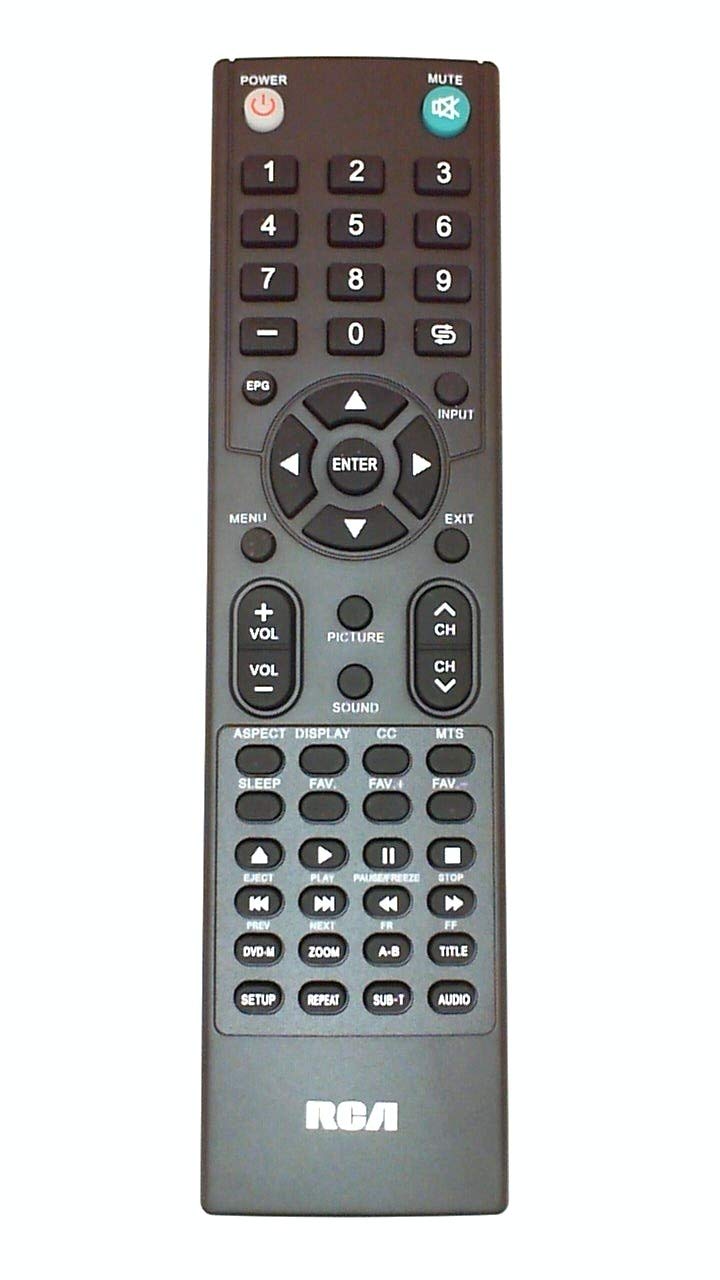
Image of the RCA RE20QP29 remote control, showing its general layout and buttons.
The RCA RE20QP29 is an infrared remote control featuring a button control interface. It is designed to be an ergonomic replacement or spare for compatible RCA television models.
Kasaluyuan
The RE20QP29 remote control is compatible with the following RCA television models:
- RCA 19LA30RQ
- RCA 22LA30RQ
- RCA 22LA45RQ
- RCA 22LA45RQD
- RCA RXV6774
This remote may also be a substitute for part number OARC04G. To ensure compatibility, always verify the part number RE20QP29 matches your original remote or the required part for your television model.
Disetél
1. Pamasangan batré
- Panggihan kompartemen batré dina tonggong kadali jauh.
- Geser panutup kompartemen batré ka handap atawa dina arah nu dituduhkeun ku panah pikeun mukakeunana.
- Selapkeun dua accu AAA anyar (teu kaasup), mastikeun positif (+) jeung négatip (-) terminal align bener jeung markings jero kompartemen nu.
- Ganti panutup kompartemen batré, geser deui kana tempatna nepi ka klik aman.
2. Pamakéan awal
The RCA RE20QP29 remote control is designed for immediate use with compatible RCA television models. No programming or pairing is typically required. Once batteries are installed, point the remote at your television and press the Power button to test functionality.
Parentah Operasi
The remote control features standard television control buttons. While the exact layout may vary slightly, common functions include:
- kakuatan: Ngahurungkeun atawa mareuman televisi.
- Saluran luhur/handap: Ngarobah saluran televisi.
- Volume Kaluhur/Turun: Saluyukeun polumeu audio.
- Jempé: Ngaheningkeun sora televisi.
- Input/Sumber: Selects different video input sources (e.g., HDMI, AV).
- Menu: Accesses the television's on-screen menu.
- Navigation Buttons (Arrow Keys, OK/Enter): Dipaké pikeun nganapigasi ngaliwatan ménu jeung mastikeun selections.
- Pad Nomer: Langsung ngasupkeun nomer saluran.
For specific button functions and their corresponding actions, refer to your television's user manual.
Pangropéa
beberesih
Pikeun ngabersihkeun remot kontrol, anggo lawon anu lemes sareng garing. Pikeun kokotor anu bandel, usap sakedikampen lawon ku cai atawa hampang, cleaner non-abrasive. Hindarkeun ngagunakeun bahan kimia kasar, pangleyur, atawa bahan abrasive, sabab ieu bisa ngaruksak beungeut jauh atawa komponén internal.
Ngagantian batré
Replace batteries when the remote's response becomes sluggish or stops working. Always replace both batteries at the same time with new ones of the same type (AAA). Do not mix old and new batteries, or different types of batteries, as this can lead to leakage or damage.
Panyimpenan
If the remote control will not be used for an extended period, remove the batteries to prevent potential leakage and damage. Store the remote in a cool, dry place away from direct sunlight and extreme temperatures.
Pamérésan masalah
- Jauh teu ngabales:
- Pariksa naha batréna diselapkeun leres kalayan polaritasna anu leres.
- Ganti batré heubeul ku nu anyar.
- Ensure there is a clear line of sight between the remote's infrared emitter and the television's IR receiver. Obstructions can block the signal.
- Ngadeukeutan ka tipi.
- Sababaraha tombol teu jalan:
- Ieu tiasa nunjukkeun gangguan tombol khusus atanapi masalah kompatibilitas sareng fungsi khusus éta dina TV anjeun.
- Ensure the remote is clean and there is no debris under the buttons.
- Jauh dianggo intermittently:
- Weak batteries are a common cause. Replace them.
- Pastikeun teu aya sumber cahaya anu kuat (sapertos sinar panonpoé langsung atanapi lampu fluoresensi) anu ngaganggu sinyal IR.
Upami léngkah-léngkah ngungkulan masalah henteu ngabéréskeun masalah, hubungi dukungan palanggan kanggo bantosan salajengna.
spésifikasi
| Fitur | Rincian |
|---|---|
| Nomer modél | RE20QP29 |
| merek | RCA |
| Téhnologi konektipitas | Infrabeureum |
| Tipe Controller | Tombol Control |
| Fitur husus | Érgonomis |
| Item Beurat | Kira-kira 1.5 pon (0.68 kg) |
| Sumber Daya | 2 x Batré AAA (teu kalebet) |
Émbaran jaminan
This RCA RE20QP29 Remote Control comes with a 180-day warranty from the date of purchase. This warranty covers defects in materials and workmanship under normal use. Please retain your proof of purchase for warranty claims. The warranty does not cover damage caused by misuse, accidents, unauthorized repairs, or normal wear and tear.
Rojongan Palanggan
For further assistance, technical support, or warranty inquiries, please contact the seller or RCA customer service. Provide your product model number (RE20QP29) and details of your issue for efficient support.


