Bubuka
The Taylor Splash 'N' Drop Digital Timer is a durable and rugged kitchen timer designed to withstand the demands of a busy kitchen environment. It features an IP65 rating for dust and water resistance, and can endure impacts from up to 4 feet. This versatile timer offers both count-up and count-down functions, four adjustable volume settings, a bright blue backlight LCD display, and memory recall for previous settings. It also conveniently switches between timer and clock functions.
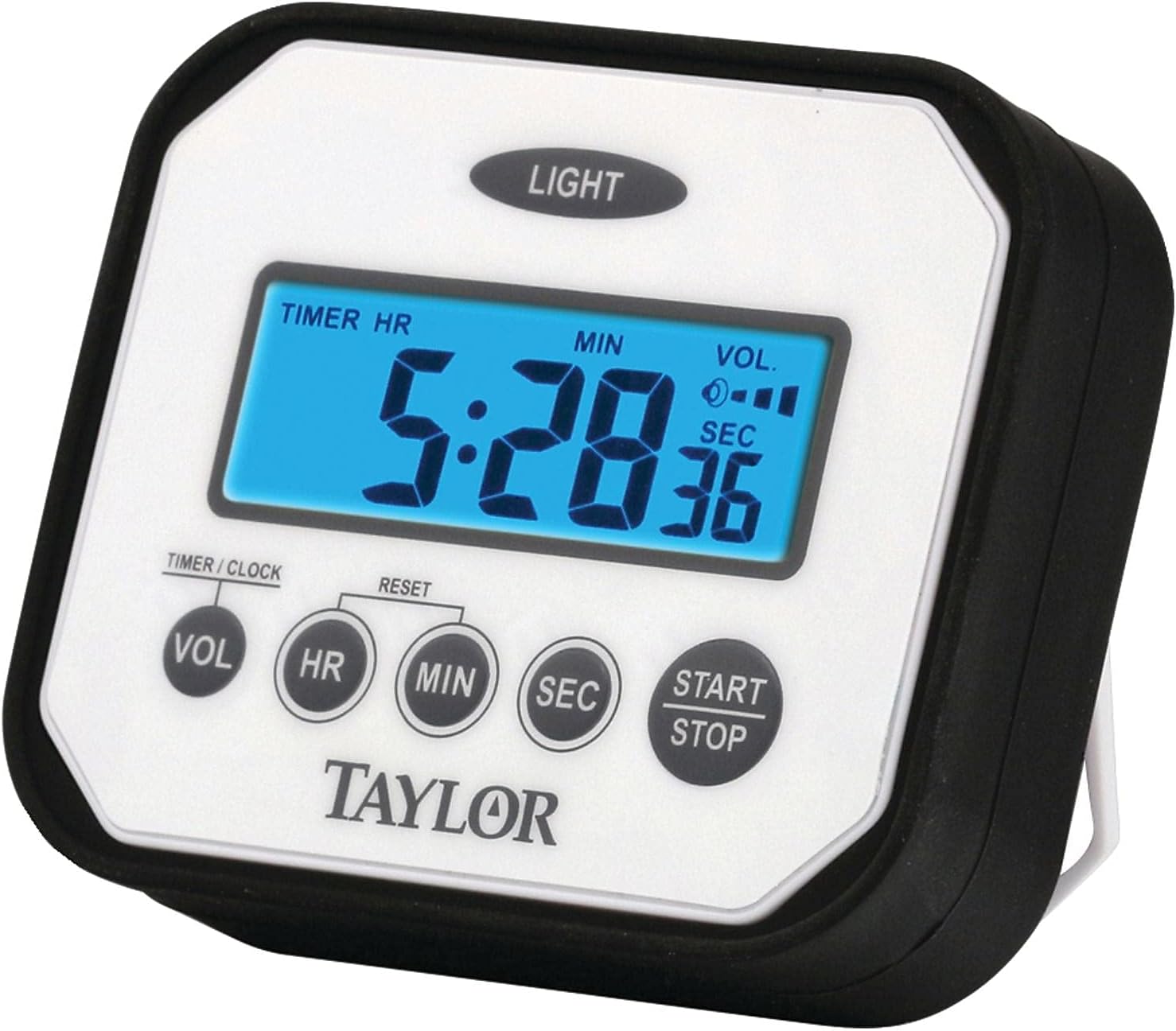
Hareupeun view of the Taylor Splash 'N' Drop Digital Timer, showing the display and control buttons.
Disetél
Pamasangan batré
Your Taylor Splash 'N' Drop Digital Timer requires 2 AAA batteries (included). To install or replace batteries:
- Panggihan kompartemen batré dina tonggong timer.
- Buka panutup kompartemen batré.
- Selapkeun 2 batré AAA, mastikeun polaritasna bener (+/-).
- Tutup panutup kompartemen batré aman.
Pilihan panempatan
Timer nawiskeun pilihan panempatan anu fleksibel:
- Diwangun-di Stand: Utilize the collapsible stand on the back to position the timer upright on a counter or flat surface at a slight angle for easy viewing.
- Gunung Magnét: The timer features two magnets on the back, allowing it to be securely attached to a stove, refrigerator, or any other metal surface.

The timer is designed to resist liquid splashes, making it suitable for kitchen environments.
Parentah Operasi
Setting the Timer (Count-Down)
- To enter Timer Mode, press and hold the VOL button for 3 seconds. The display will show "TIMER HR".
- While in Timer Mode, repeatedly press the VOL button to cycle through the four available ringer volume settings. Select your desired volume.
- Ngagunakeun éta HR, MIN, jeung SEK tombol pikeun nyetel waktu mundur anu dipikahoyong.
- Pencét éta Mimitian / STOP tombol pikeun ngamimitian mundur.
- To pause or stop the timer at any point, press the Mimitian / STOP button. To resume, press it again.
- To reset the timer to zero, press the RESET button (located between HR and MIN buttons) while the timer is stopped.
Using as a Stopwatch (Count-Up)
- Ensure the timer is in Timer Mode (hold VOL for 3 seconds if not).
- To reset the timer to zero, press and hold both the HR jeung MIN buttons simultaneously until the display shows "0:00:00".
- Pencét éta Mimitian / STOP button to begin counting up.
- To pause or stop the stopwatch, press the Mimitian / STOP button. To resume, press it again.
Nyetél Jam
- To enter Clock Mode, press and hold the VOL button for 3 seconds. The display will show "CLOCK".
- Ngagunakeun éta HR, MIN, jeung SEK buttons to adjust the current time. The display will indicate AM/PM.
- To switch back to Timer Mode, press and hold the VOL tombol pikeun 3 detik deui.
Nganggo Lampu Latar
In low light conditions, press the CAHAYA button (located at the top of the timer) to illuminate the display for better visibility.
Official Product Video Guide
This video provides a visual guide on how to set and operate the Taylor Splash 'N' Drop Digital Timer, including setting the volume, timer, clock, and using the stopwatch function.
Pangropéa
- beberesih: Usap timer nganggo iklanamp cloth. Do not immerse in water or use abrasive cleaners. The timer is water-resistant, not waterproof.
- Panyimpenan: Simpen timer di tempat anu garing nalika henteu dianggo.
- Résistansi Dampak: While designed to be impact resistant up to 4 feet, avoid unnecessary drops to prolong the life of the device.
Pamérésan masalah
- Pintonan kosong atanapi taram:
- Pariksa pamasangan batré sareng pastikeun polaritasna leres.
- Ganti batréna upami parantos lami atanapi béak.
- Pencét éta CAHAYA button to activate the backlight in dim conditions.
- Alarm is too quiet or too loud:
- In Timer Mode, press the VOL button repeatedly to cycle through the four volume settings until the desired level is reached.
- Timer not starting/stopping:
- Pastikeun anjeun mencét tombol Mimitian / STOP tombol pageuh.
- If setting a countdown, ensure a time has been set before pressing START.
- Timer not resetting:
- Ensure the timer is stopped before attempting to reset.
- For countdown timer, press the RESET button. For stopwatch, hold HR jeung MIN sakaligus.
spésifikasi
| merek | Taylor |
| Nomer modél | Pro Splash |
| Warna | Bodas |
| Bahan | palastik |
| Dimensi produk | 0.9 "D x 3.5" W x 3" H |
| Item Beurat | 4 ons |
| Durasi Timer Maks. | 24 jam, 59 menit, 59 detik |
| Setélan polumeu | 4 tingkat |
| Résistansi Peunteun | IP65 (Tahan Debu sareng Cai) |
| Résistansi Dampak | Nepi ka 4 suku |
| Batré | 2 batré AAA (kaasup) |
Garansi sareng Rojongan
For detailed warranty information and further support, please refer to the official user manual PDF available for download or contact Taylor customer service.
Buku Panduan Resmi (PDF): Unduh PDF


