Bubuka
Thank you for choosing the Rowenta Adagio Thermal Coffee Maker CT 3818. This appliance is designed to brew delicious filter coffee and keep it warm for extended periods thanks to its insulated stainless steel carafe. Please read this manual carefully before using your coffee maker for the first time and keep it for future reference. Proper use and maintenance will ensure optimal performance and longevity of your appliance.
Parentah Kasalametan penting
- Baca sadaya parentah sateuacan dianggo.
- Entong neuleumkeun alat, kabel listrik, atanapi nyolok kana cai atanapi cairan sanésna.
- Pastikeun voltage dituduhkeun dina alat cocog vol mains lokal Anjeuntage saméméh nyambungkeun.
- Always unplug the coffee maker from the power outlet when not in use and before cleaning. Allow it to cool before adding or removing parts, and before cleaning the appliance.
- Do not operate any appliance with a damaged cord or plug, or after the appliance malfunctions or has been damaged in any manner. Contact Rowenta customer service for examination, repair, or adjustment.
- Entong ngantepkeun kabelna ngagantung dina ujung méja atanapi konter, atanapi nyabak permukaan anu panas.
- Ulah nempatkeun maker kopi dina atawa deukeut gas panas atawa burner listrik, atawa dina oven dipanaskeun.
- Always ensure the thermal carafe is correctly positioned on the warming plate before brewing.
- The thermal carafe is designed for use with this appliance only. It must not be used on a range top.
- Do not clean the thermal carafe with abrasive cleaners, steel wool pads, or other abrasive materials.
- Perkakas ieu kanggo panggunaan rumah tangga wungkul.
- Jauhkeun alat tina jangkauan barudak.
Produk Leuwihview
Familiarize yourself with the components of your Rowenta Adagio Thermal Coffee Maker.
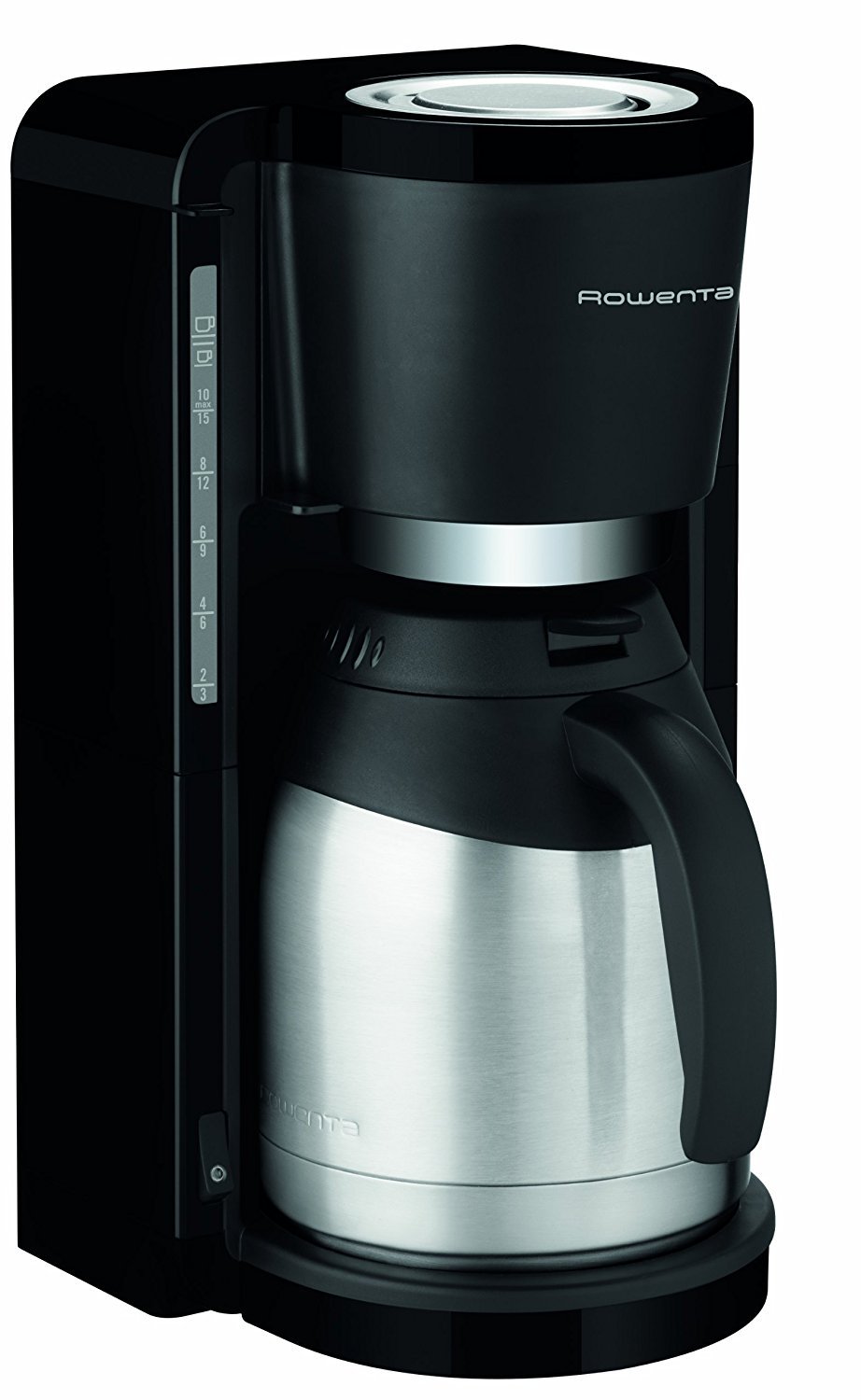

komponén:
- A. Waduk Cai sareng Indikator Tingkat Cai
- B. Filter Holder (removable)
- C. Thermal Carafe with Lid
- D. Kepala Brewing
- E. ON/OFF Switch with Indicator Light
- F. Cord Storage (underneath the unit)
Disetél
1. Ngabongkar bungkusan
- Taliti miceun sadaya bahan bungkusan sareng labél tina mesin kopi.
- Pastikeun sadaya komponén anu didaptarkeun dina Produk Overview section are present and undamaged.
2. Beberesih Panggunaan Mimiti
Before brewing coffee for the first time, it is recommended to clean the appliance:
- Fill the water reservoir with cold water up to the MAX level.
- Place an empty filter paper (size 1x4 or similar) in the filter holder.
- Place the thermal carafe with its lid closed on the warming plate.
- Press the ON/OFF switch to start a brewing cycle without coffee.
- Once the cycle is complete, discard the water from the carafe and rinse the carafe and filter holder thoroughly.
3. Panempatan
Place the coffee maker on a flat, stable, heat-resistant surface, away from water sources and heat. Ensure adequate ventilation around the unit.
Parentah Operasi
1. Ngeusian Waduk Cai
- Buka tutup waduk cai.
- Fill the reservoir with fresh, cold water using the thermal carafe. The water level indicator on the side of the reservoir shows the number of cups. Do not exceed the MAX fill line.
- Tutupkeun tutup wadahna pageuh-pageuh.
2. Adding Ground Coffee
- Remove the filter holder from the coffee maker.
- Insert a paper filter (size 1x4 or similar) into the filter holder.
- Add the desired amount of ground coffee into the paper filter. A general guideline is one tablespoon of coffee per cup, but adjust to your preference.
- Place the filter holder back into its position in the coffee maker. Ensure it is seated correctly.
3. Placing the Thermal Carafe
- Ensure the lid is properly closed on the thermal carafe.
- Place the thermal carafe onto the warming plate. The drip-stop system will engage when the carafe is removed and disengage when it is placed back, preventing drips.
4. Starting the Brewing Process
- Colokkeun kabel listrik kana stop kontak listrik anu cocog.
- Press the ON/OFF switch. The indicator light will illuminate, signifying that the brewing process has started.
- The coffee maker will automatically brew the coffee.
5. After Brewing
- Once the brewing cycle is complete, the coffee maker will automatically shut off. The indicator light will turn off.
- The thermal carafe is designed to keep your coffee warm for up to 4 hours.
- To serve, simply pour from the thermal carafe.
- Unplug the appliance from the power outlet after use.
beberesih sarta Pangropéa
Pembersih rutin ngajamin kinerja optimal sareng manjangkeun umur mesin kopi anjeun.
1. beberesih poean
- Salawasna cabut colokan mesin kopi teras antepkeun tiis sagemblengna sateuacan dibersihkeun.
- Remove the used paper filter and discard the coffee grounds.
- Wash the filter holder and the thermal carafe (including its lid) with warm, soapy water. Rinse thoroughly and dry. These parts are generally not dishwasher safe; refer to specific care instructions for the carafe.
- Ngusap bagian luar mesin kopi nganggo iklanamp lawon. Ulah make cleaners abrasive atawa hampang scouring.
2. Turun
Mineral deposits from water can build up over time, affecting performance. Descale your coffee maker regularly, depending on water hardness and frequency of use (e.g., every 2-4 months).
- Siapkeun larutan pangurang kerak numutkeun parentah produsén (contona, cuka bodas sareng cai, atanapi agén pangurang kerak komérsial).
- Tuang solusi descaling kana embung cai.
- Teundeun teko termal kosong dina pelat pemanasan.
- Start a brewing cycle. Allow half of the solution to brew through, then turn off the coffee maker and let it stand for 15-20 minutes to allow the solution to work.
- Hurungkeun deui mesin kopi pikeun ngalengkepan siklus nyieun kopi.
- After the descaling cycle, run at least two full cycles with fresh, cold water to rinse the appliance thoroughly.
Pamérésan masalah
Upami anjeun mendakan masalah sareng mesin kopi anjeun, tingali masalah sareng solusi umum ieu:
| Masalah | Mungkin Cukang lantaranana | Solusi |
|---|---|---|
| Kopi teu diseduh. | Appliance not plugged in; ON/OFF switch not pressed; no water in reservoir. | Ensure plug is securely in outlet; press ON/OFF switch; fill water reservoir. |
| Kopi teu cukup panas. | Appliance needs descaling; carafe lid not properly closed. | Descale the coffee maker; ensure carafe lid is tightly closed to maintain temperature. |
| Cai bocor tina unit. | Water reservoir overfilled; filter holder not correctly seated; drip-stop mechanism blocked. | Do not exceed MAX fill line; ensure filter holder is firmly in place; clean drip-stop area. |
| Coffee overflows from the filter holder. | Too much coffee grounds; filter paper not correctly placed; coffee grounds too fine; appliance needs descaling. | Reduce coffee quantity; ensure filter paper is properly seated; use medium-ground coffee; descale the appliance. |
spésifikasi
- model: CT 3818
- merek: Rowenta
- Kapasitas: 1.25 Liter (10-15 gelas)
- kakuatan: 870 Watt (W) (Note: Original data indicated 870 KW, which is a likely typo. 870W is assumed based on typical coffee maker power consumption.)
- Voltage: 230 volt
- Bahan: Stainless Steel (carafe), Plastic (housing)
- warna: hideung / pérak
- Ukuran (D x W x H): 26.5 cm x 27 cm x 38.5 cm
- beurat: 2.2 kg
- Fitur husus: Water level indicator, Cord storage, Drip-stop system, Automatic shut-off
Garansi sareng Rojongan
This Rowenta appliance is designed for durability and performance. Rowenta offers a commitment to repairability for 2 taun for spare parts availability from the date of purchase.
For any questions, concerns, or to obtain service under warranty, please contact Rowenta customer service. You can find contact information on the official Rowenta websitus atawa ngaliwatan pangecér Anjeun.
Punten tahan bukti pameseran anjeun pikeun klaim garansi.


