Bubuka
This user manual provides comprehensive instructions for the installation, operation, and maintenance of your RCA RTS736W 30-Inch Streaming Soundbar. Please read this manual thoroughly before using the product to ensure proper functionality and to prevent damage.
The RCA RTS736W is designed to enhance your home audio experience with its 3.0 channel sound and integrated Wi-Fi for streaming online content.
Fitur konci
- Wi-Fi Built-In for streaming video content to a TV.
- 3.0 Channel Left/Center/Right audio configuration.
- HDMI 1080p Output for high-definition connectivity.
- Includes 1 Rear Analog Audio-in Jack and 1 Side Line-in Jack for various audio sources.
- Flexible placement options: includes table or wall mounting brackets.
Eusi pakét
Pastikeun yén sadaya item aya dina bungkusan:
- RCA RTS736W 30-Inch Streaming Soundbar
- Kadali jauh
- Adaptor kakuatan
- Table or Wall Mounting Brackets
- Manual pangguna (dokumén ieu)
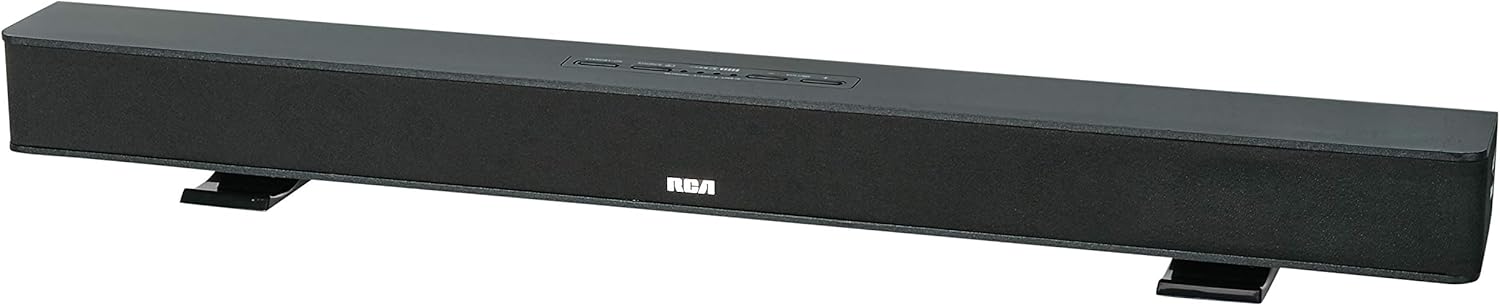
Image: The RCA RTS736W 30-Inch Streaming Soundbar, shown with its sleek black design and integrated controls.
Disetél
1. Pilihan panempatan
The soundbar offers flexible placement:
- Penempatan Tabletop: Place the soundbar on a flat, stable surface in front of your television. Ensure there is adequate ventilation around the unit.
- Pamasangan témbok: Use the included wall mounting brackets to secure the soundbar to a wall. Refer to the separate wall mounting template (if provided) for detailed instructions. Ensure the wall can support the weight of the soundbar.

Image: The RCA RTS736W soundbar positioned on a TV stand, demonstrating a typical home theater setup with various streaming service icons displayed on the television screen.
2. Nyambungkeun ka Daya
- Connect the power adapter to the DC IN 13.5V port on the back of the soundbar.
- Colokkeun tungtung nu sejen adaptor kakuatan kana stop kontak témbok.
3. Sambungan Audio
Choose one of the following methods to connect the soundbar to your audio source:
- Kaluaran HDMI: Connect an HDMI cable from the HDMI OUT port on the soundbar to an HDMI input on your television. This connection supports 1080p video output from the soundbar's streaming functions.
- Analog Audio-in (AUX 1 / AUX 2): Use RCA audio cables to connect your TV or other audio devices to the AUX 1 or AUX 2 input jacks on the back of the soundbar. Match the red and white connectors.
- Side Line-in Jack: For portable devices like smartphones or tablets, connect a 3.5mm audio cable from your device's headphone jack to the Line-in jack located on the side of the soundbar.

Gambar: A close-up view of the rear panel of the RCA RTS736W soundbar, highlighting the AUX 1, AUX 2, DC IN 13.5V, HDMI OUT, and VIDEO OUT ports for various connections.
4. Sambungan Jaringan (Wi-Fi)
To utilize the streaming features, connect the soundbar to your home Wi-Fi network. This process is typically guided by on-screen prompts when the soundbar is first powered on and connected to a TV via HDMI.
- Ensure your TV is connected to the soundbar via HDMI and powered on.
- Follow the on-screen instructions to select your Wi-Fi network and enter the password.
Parentah Operasi
1. Daya Hurung / Pareum
Pencét éta Kakuatan tombol dina soundbar atawa kadali jauh pikeun ngahurungkeun atawa mareuman unit.
2. Pamilihan Input
Pencét éta Input button on the remote control or the soundbar to cycle through available audio sources: HDMI, AUX 1, AUX 2, Line-in, and Wi-Fi streaming.
3. Volume Control
Ngagunakeun éta Jilid + jeung Volume - buttons on the remote control or the soundbar to adjust the audio level.
Pencét éta Ngajempékeun tombol pikeun ngajempékeun samentara audio.
4. Streaming Eusi
Once connected to Wi-Fi and your TV via HDMI, you can access various streaming applications. Navigate using the directional buttons and OK tombol dina kadali jauh.
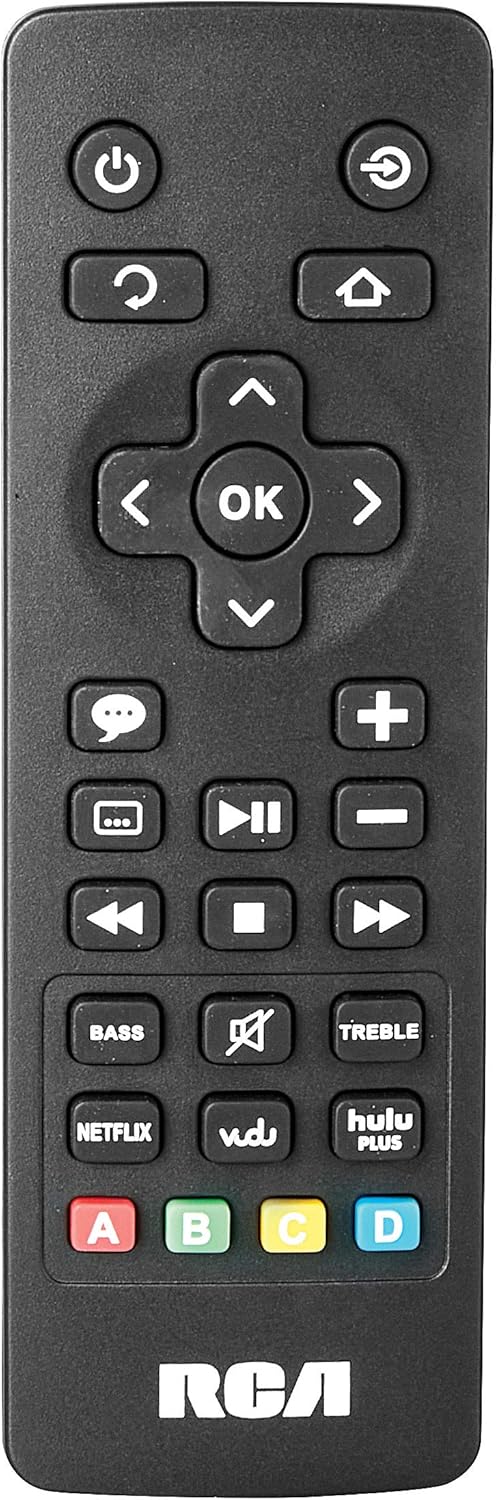
Image: The remote control for the RCA RTS736W soundbar, featuring dedicated buttons for power, volume, input selection, navigation, and direct access to streaming services like Netflix, Vudu, and Hulu Plus.
Dedicated buttons for services like Netflix, Vudu, and Hulu Plus may be available on the remote for direct access.
5. Pangaluyuan Audio
Ngagunakeun éta bass jeung TREBLE buttons on the remote control to fine-tune the audio output to your preference.
Pangropéa
- beberesih: Disconnect the soundbar from the power outlet before cleaning. Use a soft, dry cloth to wipe the exterior surfaces. Do not use liquid cleaners or abrasive materials.
- Ventilasi: Pastikeun liang ventilasi dina soundbar henteu katutup. Aliran hawa anu leres nyegah panas teuing.
- Panyimpenan: Upami nyimpen soundbar kanggo waktos anu lami, pegatkeun sambungan listrik sareng simpen di tempat anu tiis sareng garing jauh tina sinar panonpoé langsung sareng suhu anu ekstrim.
Pamérésan masalah
Taya Daya
- Check if the power adapter is securely connected to the soundbar and a working wall outlet.
- Ensure the power outlet is active by testing it with another device.
Taya Sora
- Verify that the correct input source is selected on the soundbar.
- Check all audio cable connections between the soundbar and your audio source (TV, etc.).
- Ensure the volume on both the soundbar and the connected audio source is turned up and not muted.
- If using HDMI, confirm that your TV's audio output settings are configured to send audio to the soundbar.
Streaming Issues (Buffering, Freezing)
- Check your Wi-Fi network connection. Ensure the signal strength is adequate.
- Restart your home router and modem.
- Restart the soundbar by unplugging it from the power outlet for a few minutes, then plugging it back in.
- Ensure your internet service is active and performing correctly.
Remote Control Teu Gawé
- Ganti batré dina kadali jauh.
- Ensure there are no obstructions between the remote control and the soundbar's sensor.
- Arah remote langsung ka soundbar.
spésifikasi
| Nomer modél | RTS736W |
| Tipe Speaker | Soundbar |
| Saluran | 3.0 (Left/Center/Right) |
| Konektipitas | HDMI, RCA, Wi-Fi |
| Téhnologi nirkabel | Wifi |
| Kaluaran HDMI | 1080 p |
| Input audio | 2x Analog Audio-in (RCA), 1x Side Line-in (3.5mm) |
| Ukuran Speaker | 30 inci |
| Daya Kaluaran Maksimum | 150 Watt |
| Impedansi | 8 ohm |
| Sumber Daya | Kabel Listrik |
| Ukuran produk (L x W x H) | 33.5 x 6.5 x 5.5 inci |
| Item Beurat | 5.55 pon |
| Produsén | Alco Electronics Ltd. |
Émbaran jaminan
Specific warranty details for the RCA RTS736W Soundbar are typically provided with the product packaging or can be found on the official RCA websitus. Punten tahan bukti pameseran anjeun pikeun klaim garansi.
For warranty service, contact RCA customer support with your model number and purchase date.
Rojongan Palanggan
For further assistance, technical support, or service inquiries, please refer to the contact information provided in your product's original documentation or visit the official RCA support websitus.
Sumberdaya Online: Nganjang ka Toko RCA di Amazon
Dokumén Patali - RTS736W
 |
RCA Ultra HD Smart TV Precautions Kasalametan jeung Ngamimitian Guide Pancegahan kaamanan komprehensif, parentah penting, daptar asesoris, jeung pituduh ngamimitian pikeun RCA Ultra HD Smart TV, kaasup kadali jauh jeung informasi batré. |
 |
Buku Panduan TV Pinter RCA RNSMU5836 58 inci 4K UHD Manual instruksi lengkep pikeun TV Smart TV RCA RNSMU5836 58 inci 4K UHD. Ngawengku setelan, sambungan, fitur pinter, pilihan ménu, sareng ngungkulan masalah pikeun pangalaman pangguna anu optimal. |
 |
RCA SBT17015B Soundbar User Manual and Setup Guide Comprehensive user manual for the RCA SBT17015B Soundbar, detailing setup, connections, Bluetooth pairing, audio adjustments, safety precautions, and warranty information. |
 |
RCA RPJ135 Standar HD Projector kalawan Roku Streaming Stick - Manual pamaké Instruksi manual pikeun RCA RPJ135 Standar HD Projector, kaasup setelan, operasi, ngungkulan, sarta informasi garansi pikeun projector jeung terpadu Roku Streaming Stick. |
 |
Buku Panduan Pangguna TV LCD LED HD RCA RS32H2-EU 32 inci Buku pituduh lengkep pikeun TV LCD LED HD 32 inci RCA RS32H2-EU, anu ngawengku parentah kaamanan, setelan, operasi, spésifikasi, sareng ngungkulan masalah. |
 |
Manual pamaké RCA RENO Pituduh pamaké komprehensif pikeun smartphone RCA RENO, ngajéntrékeun setelan, fitur, komunikasi, pakakas, kaamanan, jeung pangropéa pikeun Android 10 (édisi Go). |